https://github.com/tencentedgeone/tech-company-website-template
https://github.com/tencentedgeone/tech-company-website-template
Last synced: 9 months ago
JSON representation
- Host: GitHub
- URL: https://github.com/tencentedgeone/tech-company-website-template
- Owner: TencentEdgeOne
- Created: 2025-04-27T12:03:19.000Z (about 1 year ago)
- Default Branch: main
- Last Pushed: 2025-06-17T06:58:55.000Z (about 1 year ago)
- Last Synced: 2025-07-06T12:45:20.003Z (12 months ago)
- Language: TypeScript
- Size: 2.5 MB
- Stars: 0
- Watchers: 3
- Forks: 3
- Open Issues: 0
-
Metadata Files:
- Readme: README.md
Awesome Lists containing this project
README
# Technology Company Website Template
This template is a general-purpose technology company website template. You can quickly build your own company website by modifying the text, images, and colors.
The UI is based on [Business Tech Company UI Kit](https://www.figma.com/community/file/1286806143648573757/business-tech-company-ui-kit).
Tech stack: Next.js + Tailwind CSS, with internationalization support.
## Features
- Developed with Next.js TypeScript
- Flexible and clean styling with Tailwind CSS
- Purely static pages, excellent Lighthouse scores
- Modular, responsive and scalable components
- i18n-based internationalization
## Code Customization
Main color theme: Modify the theme color in `src/styles/globals.css`
Replace images: Replace in `public/images/`
### Content and Internationalization
This project uses [next-i18next](https://www.i18next.com/) for internationalization.
#### Adding a New Language
The language is determined based on the language parameter in the page path. If you need to add a new language, create a corresponding language folder under `public/locales/`, for example: `public/locales/ja`.
Currently, only Chinese and English are supported, and all translation files are stored in `public/locales/zh` and `public/locales/en`.
#### Modifying Content
The translation items in the code are used to query the corresponding translation text for display. If you need to modify it, you can find the corresponding translation text in `public/locales/`.
Add or modify the translation files for the corresponding pages in the `public/locales/en` and `public/locales/zh` directories, for example:
- `public/locales/en/contact.json` and `public/locales/zh/contact.json` are used for the translation of the contact us page.
- `public/locales/en/about.json` and `public/locales/zh/about.json` are used for the translation of the about us page.
- `public/locales/en/aboutData.json` and `public/locales/zh/aboutData.json` are used for the translation of the staff information in the about us page.
- `public/locales/en/partners.json` and `public/locales/zh/partners.json` are used for the translation of the partner page text.
- `public/locales/en/partnersData.json` and `public/locales/zh/partnersData.json` are used for the translation of the partner list in the partner page.
- `public/locales/en/contact.json` and `src/pages/en/contact.tsx` are used for the translation of the contact us page.
- `public/locales/en/about.json` and `src/pages/en/about.tsx` are used for the translation of the about us page.
- `public/locales/en/partners.json` and `src/pages/en/partners.tsx` are used for the translation of the partner page.
- `public/locales/en/news.json` and `src/pages/en/news.tsx` are used for the translation of the news center page.
- `public/locales/en/projects.json` and `public/locales/zh/projects.json` are used for the translation of the project list in the project page.
Make sure that each page's translation file contains the corresponding translation content to display correctly in different language environments.
## Environment Variables
### Web3Forms Configuration (Contact Form)
This template uses Web3Forms for the contact form functionality. To enable email sending from the contact form:
1. **Get Web3Forms API Key**:
- Visit [Web3Forms](https://web3forms.com/)
- Click "Get Access Key"
- Enter your email address
- Check your email for the API key
2. **Configure Environment Variables**:
Create a `.env.local` file in the project root and add:
```env
NEXT_PUBLIC_WEB3FORMS_KEY=your_api_key_here
```
3. **Test the Contact Form**:
- Start the development server: `npm run dev`
- Visit the contact page
- Fill out and submit the form
- Check if you receive the email
> Note: The Web3Forms platform has anti-spam mechanisms, please use real names and emails for testing. Additionally, please simulate real scenarios for the content you send, and avoid writing obvious test content.
### Plasmic CMS API Configuration
The news page in this template uses the Plasmic CMS API for content management.
> If this feature and its pages are not needed, you can set the corresponding environment variable to `ignore`. The project will then automatically skip all news-related pages and links.
Plasmic CMS API configuration and documentation: https://docs.plasmic.app/learn/plasmic-cms-api-reference/
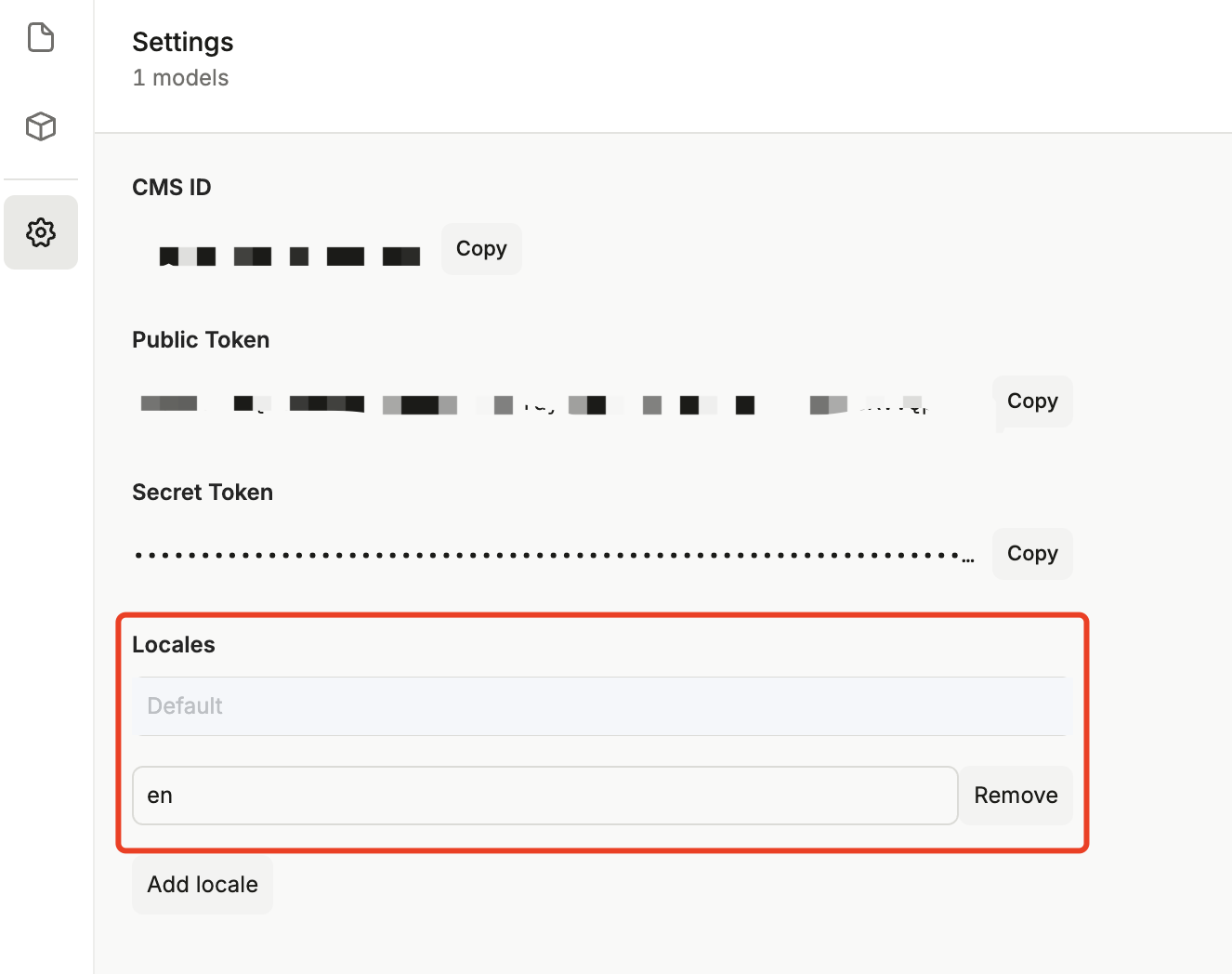
This template uses internationalization, so the article content also requires corresponding multi-language versions. You need to configure `Locales` on the Plasmic settings page:
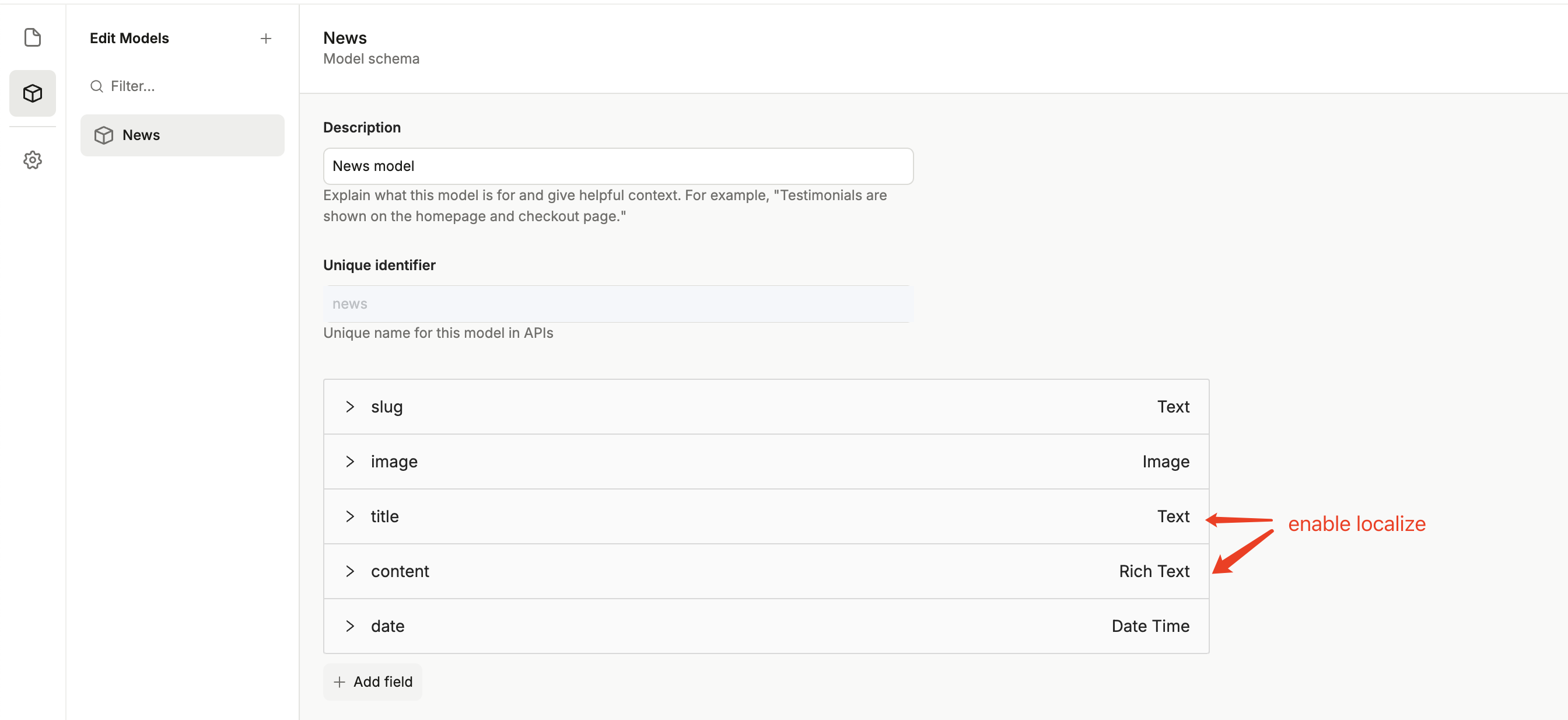
Return to the Model page to create the News data structure, the details are as follows:
## Local Development
Install dependencies: `npm install`
Local debugging: `npm run dev`
## Deploy
[](https://edgeone.ai/pages/new?template=tech-company-website-template)