https://github.com/tensoraws/animepipeline
auto encode new anime episode
https://github.com/tensoraws/animepipeline
Last synced: over 1 year ago
JSON representation
auto encode new anime episode
- Host: GitHub
- URL: https://github.com/tensoraws/animepipeline
- Owner: TensoRaws
- License: gpl-3.0
- Created: 2024-10-14T13:05:31.000Z (over 1 year ago)
- Default Branch: main
- Last Pushed: 2024-10-14T13:05:31.000Z (over 1 year ago)
- Last Synced: 2024-10-20T09:22:24.628Z (over 1 year ago)
- Size: 13.7 KB
- Stars: 1
- Watchers: 1
- Forks: 1
- Open Issues: 0
-
Metadata Files:
- Readme: README.md
- License: LICENSE
Awesome Lists containing this project
README
# AnimePipeline
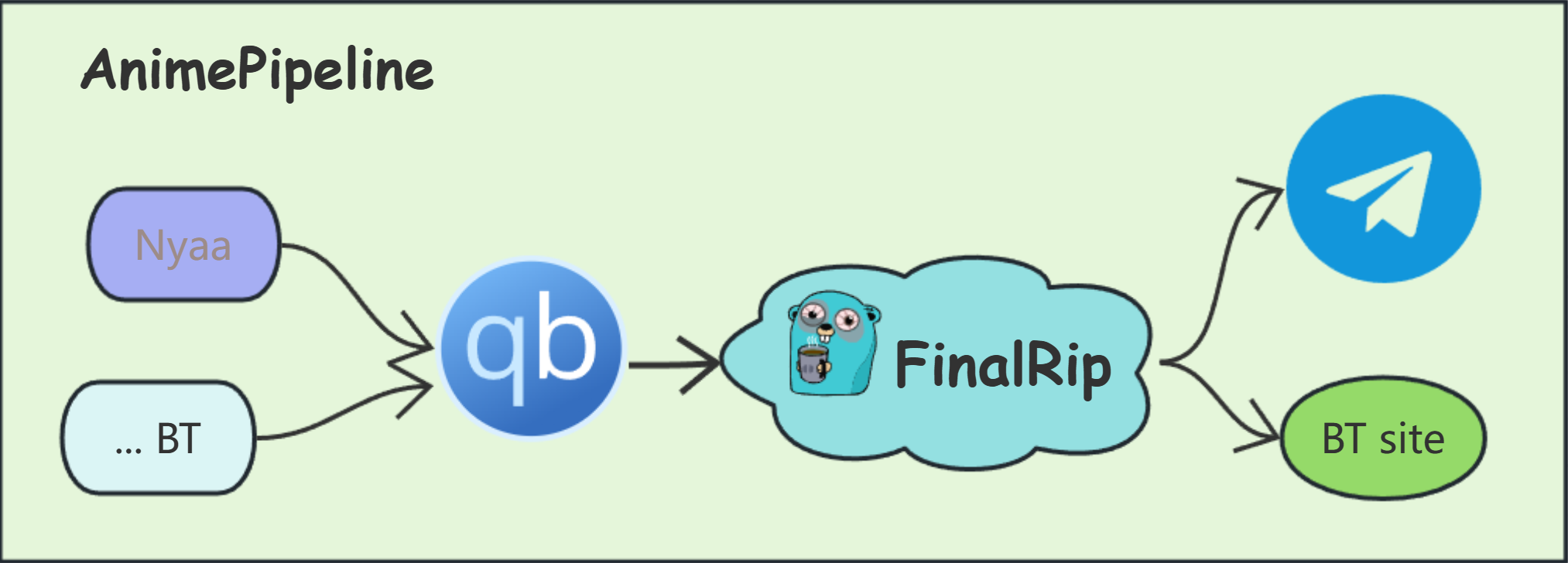
auto encode new anime episode, driven by [**FinalRip**](https://github.com/TensoRaws/FinalRip)
[](https://codecov.io/gh/TensoRaws/AnimePipeline)
[](https://github.com/TensoRaws/AnimePipeline/actions/workflows/CI-test.yml)
[](https://github.com/TensoRaws/AnimePipeline/actions/workflows/CI-test-cli.yml)
[](https://github.com/TensoRaws/AnimePipeline/actions/workflows/CI-docker.yml)
[](https://github.com/TensoRaws/AnimePipeline/actions/workflows/Release.yml)
[](https://badge.fury.io/py/animepipeline)

### Architecture
### Installation
FinalRip is required, if you don't familiar with it, please play with it first.
Python 3.9 or higher is required, we use poetry to manage dependencies.
btw, `make` is required to run the commands in the `Makefile`.
```bash
poetry install
make run
```
or you can use docker to run the project, see [docker-compose.yml](./deploy/docker-compose.yml) for more details.
### CLI
some useful command line tools are provided, you can use them to rename or generate some info
```
pip install animepipeline
ap-rename -h
ap-btf -h
```
### Configuration
#### Server Config:
- loop interval: the interval of the loop, default is 200s
- _download path_: the path to save the downloaded torrent file, if you use docker, you should mount the volume to the container, then use the path in the container. like `/downloads`
- telegram bot token & channel id: your own bot token and channel id
#### RSS Config:
supports hot reloading, which means you can update your config without needing to restart the service.
you should provide the compatible params and scripts in the [params](./conf/params) and [scripts](./conf/scripts) folder.
**the file name will be used as the key**
- base: the default settings, can be overridden in the rss list
- link: the rss link, make sure it's a valid rss link
- pattern: to match the episode(int), use regex
### Reference
- [**FinalRip**](https://github.com/TensoRaws/FinalRip)
- [FFmpeg](https://github.com/FFmpeg/FFmpeg)
- [VapourSynth](https://github.com/vapoursynth/vapoursynth)
- [asyncio](https://docs.python.org/3/library/asyncio.html)
- [httpx](https://github.com/encode/httpx)
- [qbittorrent](https://github.com/qbittorrent/qBittorrent)
- [qbittorrent-api](https://github.com/rmartin16/qbittorrent-api)
- [python-telegram-bot](https://github.com/python-telegram-bot/python-telegram-bot)
### License
This project is licensed under the GPL-3.0 license - see the [LICENSE file](https://github.com/TensoRaws/AnimePipeline/blob/main/LICENSE) for details.