https://github.com/tensorboy/hawkeye
Prompt Free, Soul Driven AI Assistant
https://github.com/tensorboy/hawkeye
ai-assistant ai-for-everyone prompt-free soul-driven
Last synced: 4 months ago
JSON representation
Prompt Free, Soul Driven AI Assistant
- Host: GitHub
- URL: https://github.com/tensorboy/hawkeye
- Owner: tensorboy
- License: mit
- Created: 2026-01-20T21:41:42.000Z (5 months ago)
- Default Branch: main
- Last Pushed: 2026-02-02T01:14:17.000Z (4 months ago)
- Last Synced: 2026-02-02T11:10:44.545Z (4 months ago)
- Topics: ai-assistant, ai-for-everyone, prompt-free, soul-driven
- Language: TypeScript
- Homepage: https://www.hawkiyi.com
- Size: 49.5 MB
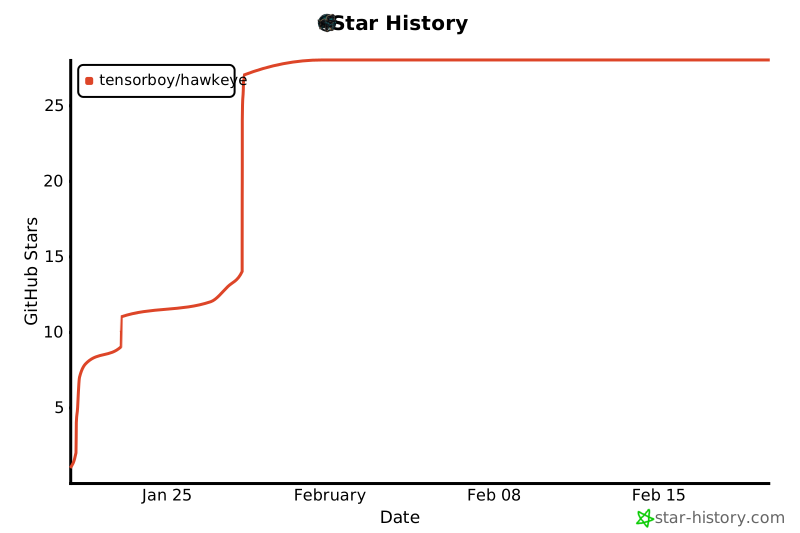
- Stars: 28
- Watchers: 0
- Forks: 0
- Open Issues: 0
-
Metadata Files:
- Readme: README.md
- License: LICENSE
Awesome Lists containing this project
README

# Hawkeye
### 🦅 The First Proactive AI Assistant for Desktop
**AI that enhances your story. Watch keenly. Act thoughtfully. 10x your productivity.**
⌘ + ⇧ + H to observe your screen instantly
[](https://github.com/tensorboy/hawkeye)
[](LICENSE)
[](https://github.com/tensorboy/hawkeye/releases)
[🌐 Website](https://hawkiyi.com) · [📖 Documentation](https://hawkiyi.com/docs) · [🐛 Report Bug](https://github.com/tensorboy/hawkeye/issues) · [💡 Request Feature](https://github.com/tensorboy/hawkeye/issues)


---
## 🎯 What is Hawkeye?
> **Traditional AI waits for your commands. Hawkeye watches and helps proactively.**
Hawkeye is an **AI-powered desktop assistant** that observes your work environment—screen, clipboard, files—and proactively offers intelligent suggestions. No prompts needed.
The AI behind Hawkeye is designed to **enhance your own story** — turning your screen time into meaningful personal growth by automatically mapping your goals, habits, and progress into a living **Life Tree**.
| Feature | Copilot / Cursor / Claude Code | **Hawkeye** |
|---------|-------------------------------|-------------|
| **Mode** | Reactive (you ask) | **Proactive** (it watches) |
| **Scope** | Code only | Everything: coding, browsing, writing |
| **Privacy** | Cloud-based | **Local-first**, your data stays local |
| **Control** | AI executes | **You decide** what to execute |
## ✨ Key Features
### 🔍 Zero-Prompt Intelligence
- Automatically understands your context
- No need to explain what you're doing
- Suggests actions before you ask
### 🏠 Privacy-First Architecture
- All perception runs **100% locally**
- Data never leaves your device
- Works offline with local LLMs
### 🎯 Smart Task Tracking
- Identifies your main task goal
- Generates actionable next steps
- Learns from your workflow
### 🔗 Multi-Platform Sync
- Desktop ↔ Browser seamless sync
- VS Code extension integration
- Cross-app workflow automation
### 🌳 Life Tree — AI Enhances Your Story
- Automatically maps your activities into life stages, goals, and tasks
- Proposes micro-experiments to optimize your habits and workflows
- Graduated experiment phases: task → goal → automation
- Your AI companion that turns screen time into personal growth
## 🚀 Quick Start
### Download
Platform
Download

[Apple Silicon (.dmg)](https://github.com/tensorboy/hawkeye/releases/latest) · [Intel (.dmg)](https://github.com/tensorboy/hawkeye/releases/latest)

[Installer (.exe)](https://github.com/tensorboy/hawkeye/releases/latest)

[Debian/Ubuntu (.deb)](https://github.com/tensorboy/hawkeye/releases/latest) · [AppImage](https://github.com/tensorboy/hawkeye/releases/latest)
⚠️ macOS: "App is damaged" fix
```bash
# Remove quarantine attribute
xattr -cr /Applications/Hawkeye.app
```
### Setup in 60 Seconds
```bash
# 1. Clone
git clone https://github.com/tensorboy/hawkeye.git && cd hawkeye
# 2. Install
pnpm install
# 3. Run
pnpm dev
```
### Configure AI Provider
Option 1: Google Gemini (Recommended — free tier)
1. Get a free API key at [aistudio.google.com/apikey](https://aistudio.google.com/apikey)
2. Enter your key in Settings → Gemini API Key
3. Model defaults to `gemini-2.0-flash` (1M context window)
Option 2: OpenAI-Compatible API
Works with OpenAI, DeepSeek, Groq, Together AI, or any OpenAI-compatible endpoint.
Set your base URL, API key, and model name in Settings.
Option 3: Local LLM with node-llama-cpp (100% Offline)
Download a GGUF model and set the model path in Settings. Supports Metal GPU acceleration on macOS.
Recommended models:
- **Qwen 2.5 7B** — general purpose (4.7 GB)
- **Llama 3.2 3B** — lightweight (2.0 GB)
- **LLaVA 1.6 7B** — vision support (4.5 GB)
Option 4: Ollama (Legacy)
```bash
brew install ollama && ollama pull qwen3:8b
```
Select "Ollama" in Hawkeye settings.
## 🏗️ Architecture
```
┌─────────────────────────────────────────────────────────────────┐
│ HAWKEYE ENGINE │
├─────────────────────────────────────────────────────────────────┤
│ │
│ ┌─────────────┐ ┌─────────────┐ ┌─────────────┐ │
│ │ PERCEPTION │───▶│ REASONING │───▶│ EXECUTION │ │
│ │ Engine │ │ Engine │ │ Engine │ │
│ └─────────────┘ └─────────────┘ └─────────────┘ │
│ │ │ │ │
│ • Screen OCR • Claude/Ollama • Shell Commands │
│ • Clipboard • Task Analysis • File Operations │
│ • File Watch • Intent Detect • App Control │
│ • Window Track • Suggestions • Browser Auto │
│ │
├─────────────────────────────────────────────────────────────────┤
│ INTERFACES │
├───────────────┬───────────────┬───────────────┬─────────────────┤
│ 🖥️ Desktop │ 🧩 VS Code │ 🌐 Chrome │ 📦 Core │
│ (Electron) │ Extension │ Extension │ (npm pkg) │
└───────────────┴───────────────┴───────────────┴─────────────────┘
```
### 🔮 Future: Multi-Modal HCI Pipeline
Hawkeye is evolving into a full multi-modal human-computer interaction system that combines **audio understanding**, **visual perception**, and **gesture control**.
```
┌─────────────────────────────────────────────────────────────────────────────┐
│ HAWKEYE MULTI-MODAL HCI PIPELINE │
├─────────────────────────────────────────────────────────────────────────────┤
│ │
│ ┌─────────────────────────────────────────────────────────────────────┐ │
│ │ INPUT LAYER │ │
│ ├─────────────────────────────────────────────────────────────────────┤ │
│ │ 📷 Camera ────▶ MediaPipe Holistic │ │
│ │ • Face: 468 landmarks │ │
│ │ • Pose: 33 keypoints │ │
│ │ • Hands: 21 × 2 keypoints │ │
│ │ │ │
│ │ 🎙️ Microphone ─▶ Silero VAD ─▶ Audio Buffer │ │
│ └─────────────────────────────────────────────────────────────────────┘ │
│ │ │ │
│ ▼ ▼ │
│ ┌──────────────────────────────┐ ┌──────────────────────────────────┐ │
│ │ VISUAL PROCESSING │ │ AUDIO PROCESSING │ │
│ ├──────────────────────────────┤ ├──────────────────────────────────┤ │
│ │ Face Tracker │ │ DiariZen / Pyannote │ │
│ │ ├─ Multi-face detection │ │ ├─ Speaker diarization │ │
│ │ ├─ Face ID assignment │ │ ├─ "Who is speaking?" │ │
│ │ └─ Lip movement analysis │ │ └─ Speaker embeddings │ │
│ │ │ │ │ │
│ │ Gesture Recognizer │ │ Whisper (smart-whisper) │ │
│ │ ├─ Hand pose classification │ │ ├─ Speech-to-text │ │
│ │ ├─ Dynamic gesture detect │ │ ├─ Language detection │ │
│ │ └─ Custom gesture mapping │ │ └─ Timestamp alignment │ │
│ └──────────────────────────────┘ └──────────────────────────────────┘ │
│ │ │ │
│ ▼ ▼ │
│ ┌─────────────────────────────────────────────────────────────────────┐ │
│ │ FUSION & MATCHING LAYER │ │
│ ├─────────────────────────────────────────────────────────────────────┤ │
│ │ │ │
│ │ Audio-Visual Matching │ │
│ │ ├─ Lip-sync correlation (who's lips match the audio?) │ │
│ │ ├─ Face-voice association (learn speaker identity) │ │
│ │ └─ Active speaker detection (LoCoNet / AS-Net) │ │
│ │ │ │
│ │ Context Aggregation │ │
│ │ ├─ Combine: transcription + speaker ID + face ID + gesture │ │
│ │ └─ Generate unified interaction events │ │
│ │ │ │
│ └─────────────────────────────────────────────────────────────────────┘ │
│ │ │
│ ▼ │
│ ┌─────────────────────────────────────────────────────────────────────┐ │
│ │ ACTION EXECUTION │ │
│ ├─────────────────────────────────────────────────────────────────────┤ │
│ │ │ │
│ │ Gesture → Command Mapping │ │
│ │ ├─ 👍 Thumbs Up → Confirm action │ │
│ │ ├─ ✋ Open Palm → Pause / Stop │ │
│ │ ├─ 👆 Point Up → Scroll up │ │
│ │ ├─ 👇 Point Down → Scroll down │ │
│ │ ├─ ✌️ Victory → Screenshot │ │
│ │ ├─ 🤏 Pinch → Zoom in/out │ │
│ │ └─ 🖐️ Swipe → Switch window / tab │ │
│ │ │ │
│ │ Voice Command + Gesture = Enhanced Control │ │
│ │ └─ "Open browser" + Point → Open browser at pointed location │ │
│ │ │ │
│ └─────────────────────────────────────────────────────────────────────┘ │
│ │ │
│ ▼ │
│ ┌─────────────────────────────────────────────────────────────────────┐ │
│ │ OUTPUT │ │
│ ├─────────────────────────────────────────────────────────────────────┤ │
│ │ │ │
│ │ 📝 Attributed Transcription │ │
│ │ "Alice: Let's review the code changes" │ │
│ │ "Bob: I'll share my screen [👆 pointing at screen]" │ │
│ │ │ │
│ │ 🎮 System Control │ │
│ │ Mouse movement, clicks, keyboard shortcuts, app switching │ │
│ │ │ │
│ │ 🌳 Life Tree Update │ │
│ │ Activity tracking, goal inference, habit analysis │ │
│ │ │ │
│ └─────────────────────────────────────────────────────────────────────┘ │
│ │
└─────────────────────────────────────────────────────────────────────────────┘
```
**Key Technologies:**
| Component | Technology | Status |
|-----------|------------|--------|
| Voice Activity Detection | Silero VAD | ✅ Planned |
| Speech-to-Text | Whisper (smart-whisper) | ✅ Implemented |
| Speaker Diarization | DiariZen / Pyannote | 🔄 Research |
| Active Speaker Detection | LoCoNet (CVPR 2024) | 🔄 Research |
| Body Tracking | MediaPipe Holistic | ✅ Planned |
| Gesture Recognition | MediaPipe Gesture | ✅ Planned |
| Face-Voice Matching | Custom Fusion | 🔄 Research |
## 📦 Project Structure
```
hawkeye/
├── packages/
│ ├── core/ # 🧠 Core engine (local processing)
│ │ ├── perception/ # Screen, clipboard, file monitoring
│ │ ├── ai/ # AI providers (Claude, Ollama, etc.)
│ │ ├── execution/ # Action execution system
│ │ └── storage/ # Local database (SQLite)
│ │
│ ├── desktop/ # 🖥️ Electron desktop app
│ ├── vscode-extension/ # 🧩 VS Code extension
│ └── chrome-extension/ # 🌐 Chrome browser extension
│
├── docs/ # 📖 Documentation
└── website/ # 🌐 Marketing site
```
## 🔒 Privacy & Security
| Aspect | How We Protect You |
|--------|-------------------|
| **Screenshots** | ✅ Analyzed locally, never uploaded |
| **Clipboard** | ✅ Processed on-device only |
| **Files** | ✅ Monitored locally, paths never sent |
| **AI Calls** | ✅ Only minimal context text sent (or use local LLM) |
| **Dangerous Ops** | ✅ Always requires your confirmation |
> 📁 All data stored in `~/.hawkeye/` — you own your data.
## 📖 Usage Examples
### As a Library
```typescript
import { HawkeyeEngine } from '@hawkeye/core';
const engine = new HawkeyeEngine({
provider: 'ollama',
model: 'qwen3:8b'
});
// Get AI-powered suggestions based on current context
const suggestions = await engine.observe();
// Execute a suggestion with user confirmation
await engine.execute(suggestions[0].id);
```
### File Watcher
```typescript
import { FileWatcher } from '@hawkeye/core';
const watcher = new FileWatcher({
paths: ['~/Downloads', '~/Documents'],
events: ['create', 'move']
});
watcher.on('change', (event) => {
console.log(`${event.type}: ${event.path}`);
});
```
## 🛡️ Advanced Features
### Exponential Backoff Retry
AI provider calls use exponential backoff with jitter to handle transient failures gracefully, preventing thundering herd effects.
### SQLite FTS5 Full-Text Search
Context history (window titles, clipboard, OCR text) is indexed with SQLite FTS5 for instant fuzzy search across all recorded observations.
### Adaptive Refresh Rate
The observation interval adjusts dynamically based on user activity — fast polling when active, slow polling when idle — saving CPU and battery.
### Priority Task Queue
A priority-based task queue with deduplication ensures that AI requests and plan executions are processed efficiently without duplicate work.
### MCP Server Tools
Hawkeye exposes 15+ tools via MCP (Model Context Protocol) for screen perception, window management, file organization, and automation.
### Safety Guardrails
An agent monitor enforces cost limits, blocks dangerous operations (e.g. `rm -rf /`), requires confirmation for risky actions, and supports a sandbox mode.
### Menu Bar Panel
A macOS-style popover panel accessible from the system tray provides quick actions, recent activity feed, and real-time module status indicators.
### Provider Unified Protocol
All AI providers declare their capabilities (chat, vision, streaming, function calling), enabling intelligent routing and health monitoring across providers.
## 🗺️ Roadmap
- [x] Core perception engine
- [x] Desktop app (Electron)
- [x] VS Code extension
- [x] Chrome extension
- [x] Local LLM support (Ollama, node-llama-cpp)
- [x] Multi-provider AI (Gemini, OpenAI-compatible, LlamaCpp)
- [x] Provider unified protocol with capability routing
- [x] Streaming and health check support
- [x] SQLite FTS5 full-text search
- [x] Exponential backoff retry strategy
- [x] Adaptive refresh rate
- [x] Priority task queue
- [x] MCP Server with 15+ tools
- [x] Safety guardrails and agent monitoring
- [x] Menu bar panel (macOS-style popover)
- [x] Life Tree — AI maps your life journey and enhances your story
- [ ] Desktop ↔ Extension real-time sync
- [ ] Plugin system
- [ ] Custom workflow builder
- [ ] Mobile companion app
## 🤝 Contributing
Contributions are what make the open source community amazing! Any contributions you make are **greatly appreciated**.
1. Fork the Project
2. Create your Feature Branch (`git checkout -b feature/AmazingFeature`)
3. Commit your Changes (`git commit -m 'Add some AmazingFeature'`)
4. Push to the Branch (`git push origin feature/AmazingFeature`)
5. Open a Pull Request
See [CONTRIBUTING.md](CONTRIBUTING.md) for detailed guidelines.
## ⭐ Star History
## 📄 License
Distributed under the MIT License. See [LICENSE](LICENSE) for more information.
## ☕ Support
If you find Hawkeye useful, consider buying me a coffee!


---
**[🌐 Website](https://hawkiyi.com)** · **[📖 Docs](https://hawkiyi.com/docs)** · **[🐦 Twitter](https://twitter.com/hawkeyeai)** · **[💬 Discord](https://discord.gg/hawkeye)**
Built with ❤️ by the Hawkeye Team
**If Hawkeye helps you, please consider giving it a ⭐**