https://github.com/terma/gigaspace-web-console
Open source alternative for GigaSpace Web UI with enhanced data querying.
https://github.com/terma/gigaspace-web-console
gigaspaces query-engine sql tools webconsole
Last synced: 12 months ago
JSON representation
Open source alternative for GigaSpace Web UI with enhanced data querying.
- Host: GitHub
- URL: https://github.com/terma/gigaspace-web-console
- Owner: terma
- License: apache-2.0
- Created: 2015-01-08T06:34:04.000Z (over 11 years ago)
- Default Branch: master
- Last Pushed: 2017-10-04T21:06:21.000Z (almost 9 years ago)
- Last Synced: 2023-07-26T22:09:32.061Z (almost 3 years ago)
- Topics: gigaspaces, query-engine, sql, tools, webconsole
- Language: JavaScript
- Homepage:
- Size: 2.61 MB
- Stars: 4
- Watchers: 1
- Forks: 4
- Open Issues: 27
-
Metadata Files:
- Readme: README.md
- License: LICENSE
Awesome Lists containing this project
README
# GigaSpaces SQL Console
[](https://travis-ci.org/terma/gigaspace-web-console) [](https://coveralls.io/github/terma/gigaspace-web-console?branch=master) [](https://maven-badges.herokuapp.com/maven-central/com.github.terma.gigaspace-web-console/server/)
Powerful alternative for GigaSpace Management Console when you have a lot of work with spaces data, especially for Quality Assurance Team. Open Source Apache 2.0
* [42](#42)
* [License](#license)
* [Contacts](#contacts)
* [Features](#key-features)
* [How to run](#how-to-run)
* [How to use](#how-to-use)
* [Execute SQL Queries](#execute-sql-queries)
* [SQL on JSON](#sql-on-json)
* [Nice representation custom datatypes](#nice-representation-custom-datatypes)
* [Representation for Oracle XML Type](#representation-for-oracle-xml-type)
* [Registered Types and Counts](#registered-types-and-counts)
* [Counts History](#counts-history)
* [Counts By Partitions](#counts-by-partitions)
* [Execute Groovy](#work-with-groovy)
* [JSON](#work-with-json)
* [Copy data between spaces](#copy-data-between-spaces)
* [Export / Import data](#export--import-data)
# 42
## License
[Apache 2.0](https://github.com/terma/gigaspace-web-console/blob/master/LICENSE)
## Contacts
_Thx a lot for any feedback_
* Convert you point to feature or defect [here](https://github.com/terma/gigaspace-web-console/issues)
* artem.stasuk@gmail.com
* Skype artem.stasuk
## Key Features
_Almost everything what you want but can't find in GigaSpace Management Console for data quering_
* Supports all versions of GigaSpace starts from 9.X (never tested with previous) from one page
* One click switch between different instances, versions and spaces
* Supports detailed view for embedded data, so no more ```my.package.Object@12223``` in results
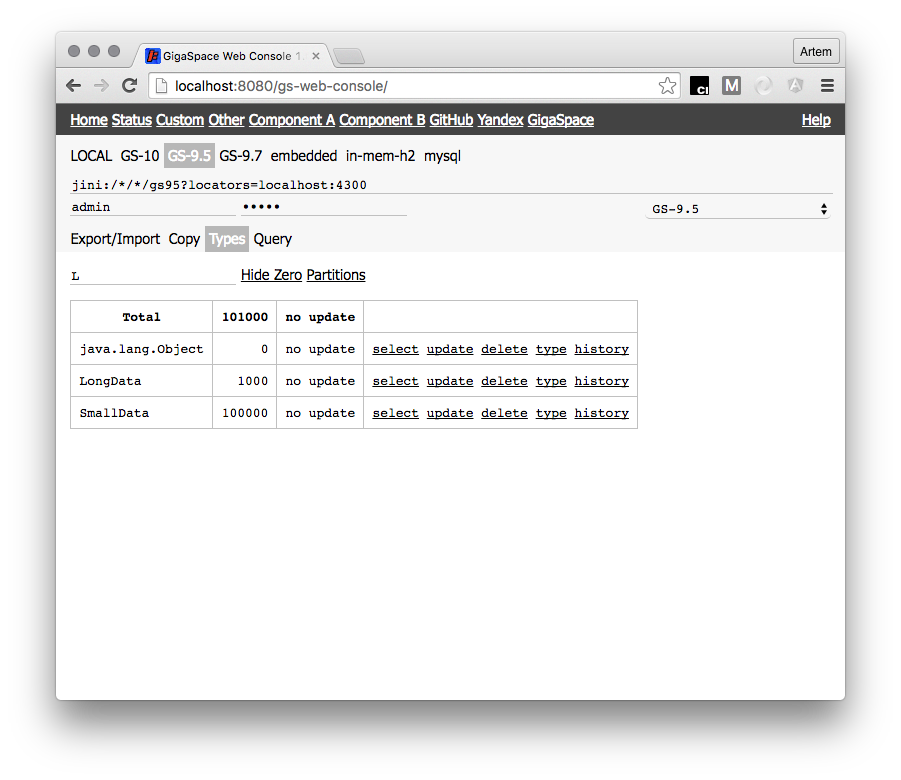
* Super view for types counts with filtering by name, non zero and date and count of last update
* Supports multiqueries and comments when you have complex work with data
* All settings store cross session, so you don't need to retype your queries again
* Copy data between spaces
* Export query result to CSV
* Support Groovy language in console
* Export / Import data between spaces
# How to Run
## Just Run and Use
```console
$ mvn com.github.terma.gigaspace-web-console:plugin:console
```
Useful parameters:
* ```-DgsVersion=``` - to specify version of Gigaspace (will takes it from your maven repository)
* ```-Dport=``` - specify port to run by default ```7777```
* ```-DconfigPath=file:``` - if need to provide custom config
## Integrate in other app
```xml
com.github.terma.gigaspace-web-console
server
```
1. Prepare config file (JSON format)
```json
{
"comment": "list of all versions of GigaSpace which you want to use",
"gs": [
{
"comment": "any name just for user",
"name": "GS-10",
"comment": "list of GigaSpace libraries (you can use that as minimun)",
"libs": [
"/my-path/gs-runtime-10.0.1-11800-RELEASE.jar",
"/my-path/gs-openspaces-10.0.1-11800-RELEASE.jar",
"/my-path/spring-beans-3.2.4.RELEASE.jar",
"/my-path/commons-logging-1.1.1.jar",
]
}
],
"links": [
{
"name": "Name just for user",
"url": "any link"
}
],
"comment": "List of converters which will be used to render your custom embedded types in space, could be empty so we will reference name",
"converters": [
"my.package.CustomTypeConverter"
],
"comment": "predefined list of GigaSpace spaces which you have, so you don't need to enter all details manualy on page. Any way you can customize them from UI too",
"gigaspaces": [
{
"name": "GS-10 - visible name",
"url": "jini:/*/*/gs10?locators=localhost:4700 - GS URL",
"user": "could be blank if you have unsecured space",
"password": "could be blank if you have unsecured space",
"driver": "",
"unmanaged": "set to true if your space is deployed outside of GS cluster like embedded space",
"secure": "set to true if you want UI to check that you enter password before any query so no locked account"
}
]
}
```
1. Pass JVM option ```-DgigaspacewebconsoleConfig= or ``` to your Web Container
1. Start within any Web Container like Jetty, Tomcat etc.
1. Open web app in browser
# How to use
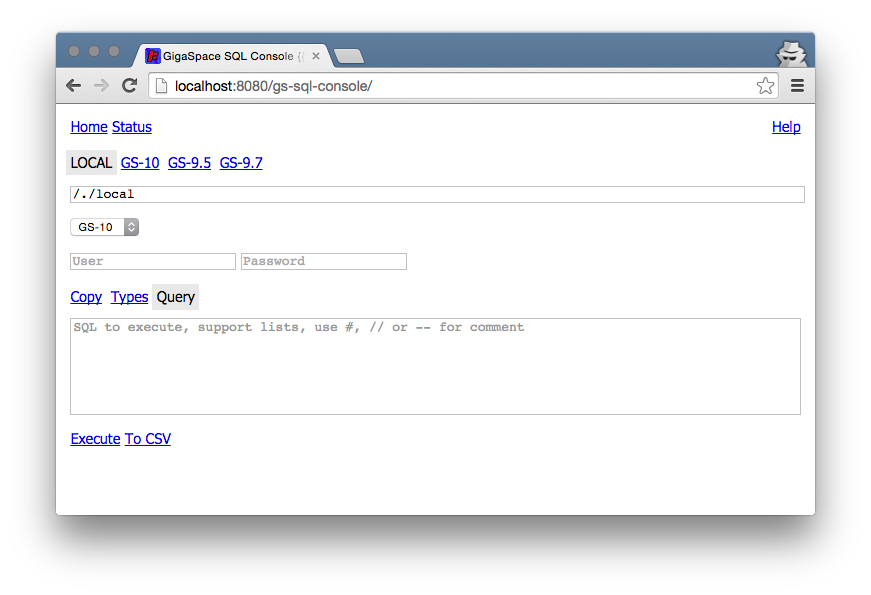
When you start your console first time after configuration you will see:
## Execute SQL queries
Select preconfigured space or type url details and click on -Query- tab
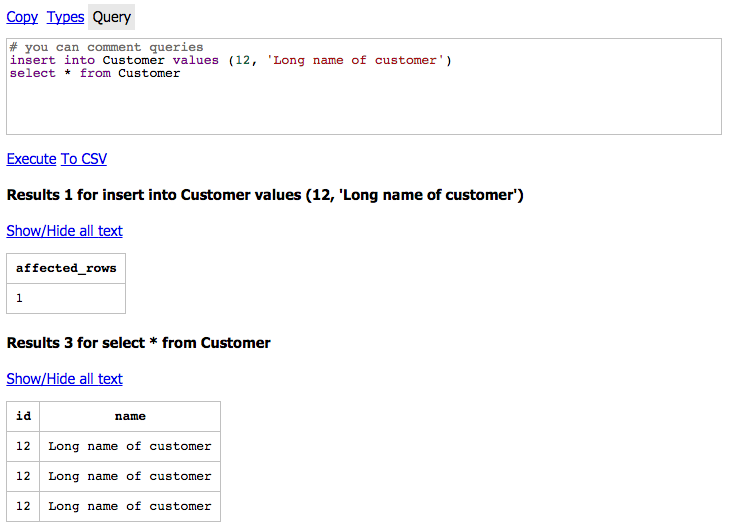
* You can enter more than one query when you run them they will be execute in independenly so you will get all results as on example below
* To disable execution of some query without remove just comment it by ```#``` or ```//``` or ```--```
* Supports ```select```, ```update```, ```delete```
* For ```delete``` and ```update``` result will be count of modified records
* For ```select``` you will get result table and count of records
* When value size for one cell more ```50``` result will be truncated, so ```result``` plus ```...``` to show full result just click on ```Show/Hide all text``` under each result table
* For columns which looks like timestamp you can click on ```T?``` after column name so console shows result in date format for example ```1424054208000``` will be show as ```1424054208000 = Mon, 16 Feb 2015 02:36:48 GMT```
### Work with timestamps
That's general case when you have data stored with timestamp and you need to query by it. Instead of typing exactly count of millis from 1970 like:
```select * from Book where created < 1435028867000```
you can:
```select * from Book where created < TODAY-1d```
or
```select * from Book where created < NOW-1d```
You can use ```-``` or ```+``` with ```d|w|h``` and ```TODAY``` means start of day when ```NOW``` means current millis
### Search documents with properties like
Sometimes you need to find documents with specific property. As example: application stores documents with property specified for each date like P-2016-05-11=true etc. How to find documents for 2016?
_This type of query required full scan so be careful on PROD =)_
```select * from MyDocs where property 'P-2016%'```
### SQL on JSON
Based on https://github.com/terma/sql-on-json
In case if your database does not support native JSON column type or you just need to perform
complex query on data stored in JSON format in database. Use function
```sql_on_json() ```
#### How it works:
1. Execute ```SQL to select JSON``` and get first row
1. Extract first column which expected to be ```string or clob``` with JSON object
1. Convert all fields of JSON object with type array to tables in in-memory database
1. Execute `````` on top of created database
1. Provide result
#### Example:
Given:
```sql
create table ACCOUNT (state varchar(4000))
insert into ACCOUNT values ("{transactions:[{id:10,orderid:23}],orders:[{id:23}]}")
```
When:
```sql
sql_on_json(select state from ACCOUNT limit 1) select * from transactions t where t.orderid in (select id from orders)
```
Then:
id | orderid
------------- | -------
10 | 23
### Nice representation custom datatypes
Gigaspace can store any type of data marked as ```java.io.Serializable```, default configuration of console support converters (nice representation) for all types and next complex nested types:
* ```com.gigaspaces.document.SpaceDocument```
* ```com.gigaspaces.entry.VirtualEntry```
* ```com.gigaspaces.document.DocumentProperties```
* ```java.util.Map```
* ```java.lang.Iterable```
#### Converter for custom type:
* create class with one method (you don't need to implement any interface or abstract class):
```java
public static String convert(Object o) {
if (o instanceof ) return ;
else return null; // should return null when doesn't support incoming type so it could be handled by other converter
}
```
* add converter in console classpath
* add it to console configuration in to section ```converters```, for example:
```json
"converters": [
"MY_CONVERTER_FULL_CLASS_NAME_1",
"MY_CONVERTER_FULL_CLASS_NAME_2"
]
```
#### Representation for Oracle XML Type
Standard Oracle JDBC driver doesn't not support native XML datatype. As result sometimes you will see
```NullPointerException``` or just get ```null``` value for that column, however you can fix that:
* First of all add to class path next dependencies (check proper version):
```xml
com.oracle
xdb
11.2.0
oracle.xml
xmlparserv2
11.2.0.2.0
```
* Then create converter for Oracle XML Type ```oracle.xdb.XMLType```:
```java
public class OracleXmlTypeConverter {
public static String convert(final Object value) {
if (value instanceof XMLType) {
final XMLType xmlTypeValue = (XMLType) value;
try {
return xmlTypeValue.getStringVal();
} catch (SQLException e) {
throw new RuntimeException(e);
}
} else {
return null;
}
}
}
```
* add it to classpath of your console
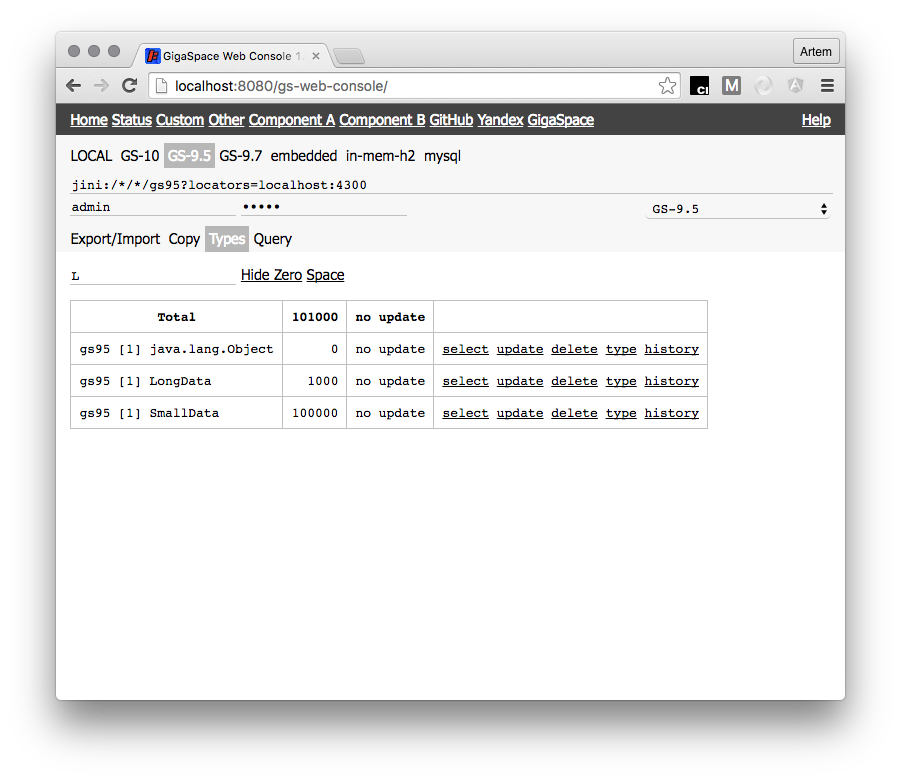
## Registered types and counts
### Counts History
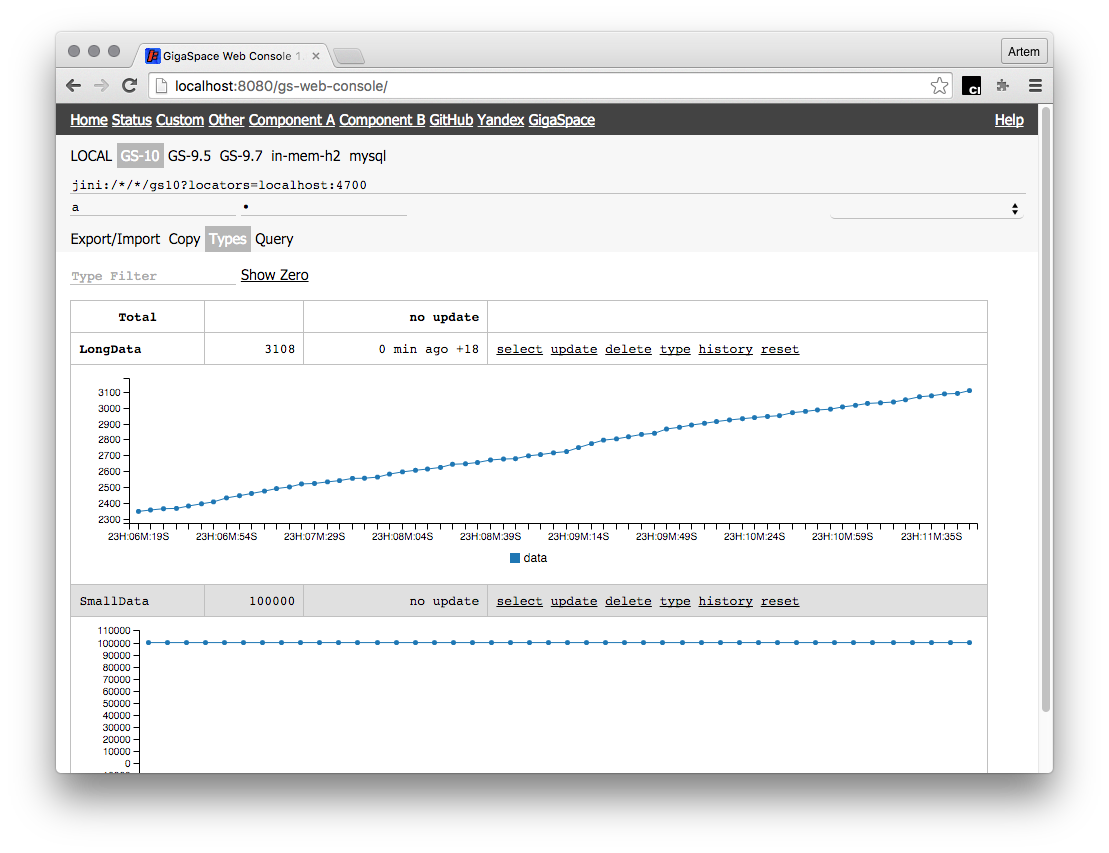
On Types Tab you for any type you can click History to track dynamic of count
### Counts By Partitions
By switching Partitions/Space on Types Tab you can see count for space or partitions. That helps a lot
when you need to how good your routing keys
## Work with Groovy
Sometimes you have complex queries which depends on each other or complex calculation. For example I want to collect all values from select to one string. How I can do that?
First of all enable groovy by adding ```groovy``` word in first line of editor.
Second, create simple [Groovy](http://groovy.codehaus.org/) script and run it in console!
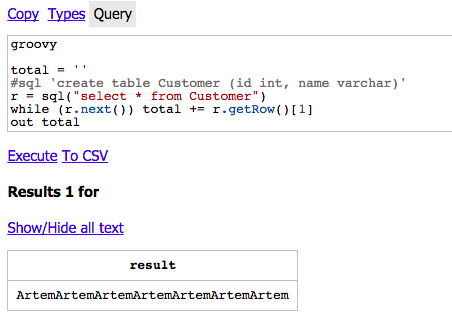
A few additional words about Groovy in console. Withing your script you can use all groovy features (don't forget about proper import) plus a few additional:
* ```java SqlResult sql(sql: java.lang.String)``` - function which can execute any SQL in GigaSpace and return result
```java
public interface SqlResult {
boolean next() throws SQLException;
List getColumns() throws SQLException;
List getRow() throws SQLException;
String getSql();
}
```
* ```java void out(message: java.lang.Object)``` - print any result to console output
* ```java gs``` - ref on GigaSpace instance
### Work with JSON
If you want to work with JSON stored in document fields you can use Groovy JSON API http://docs.groovy-lang.org/latest/html/gapi/groovy/json/JsonSlurper.html
Example:
```groovy
groovy
def slurper = new groovy.json.JsonSlurper()
def result = slurper.parseText('{"person":{"name":"Guillaume","age":33,"pets":["dog","cat"]}}')
result.person.name
```
### Useful fast scripts
Show space type description:
```java
groovy
gs.typeManager.getTypeDescriptor("typeName")
```
*Clean all data from space! Think twice!*
```java
groovy
gs.clear(null)
```
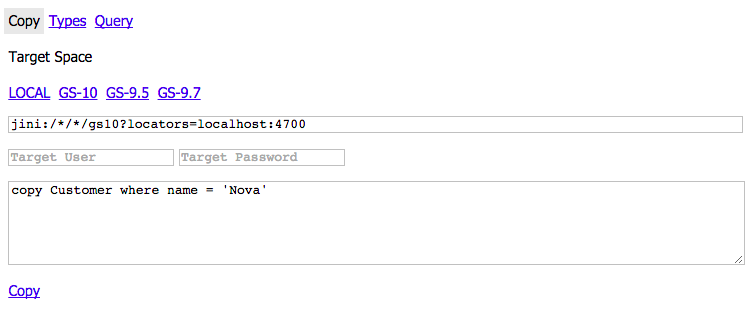
## Copy data between spaces
### Copy part of data
If you don't have criteria to limit you dataset for copy by business field. You can use ```from X only Y``` notation in copy queries for example to copy from 1k set 200 documents start from 160 you need:
```copy MyDocs from 160 only 200```
## Export / Import data
TBD =)