https://github.com/tesserato/dsbg
A dead simple blog generator
https://github.com/tesserato/dsbg
blog free golang static-site-generator static-website
Last synced: 7 months ago
JSON representation
A dead simple blog generator
- Host: GitHub
- URL: https://github.com/tesserato/dsbg
- Owner: tesserato
- License: mit
- Created: 2024-09-01T13:07:14.000Z (almost 2 years ago)
- Default Branch: main
- Last Pushed: 2025-05-31T21:40:04.000Z (about 1 year ago)
- Last Synced: 2025-06-01T07:19:55.690Z (about 1 year ago)
- Topics: blog, free, golang, static-site-generator, static-website
- Language: Go
- Homepage: https://tesserato.github.io/dsbg/
- Size: 44.5 MB
- Stars: 22
- Watchers: 1
- Forks: 0
- Open Issues: 1
-
Metadata Files:
- Readme: README.md
- License: LICENSE
Awesome Lists containing this project
README
---
title: README - Getting Started with DSBG
description: How to install and use Dead Simple Blog Generator.
created: 2025 01 03
coverImagePath: 01_dsbg_logo.webp
---
DSBG (Dead Simple Blog Generator) is a free and open-source command-line tool that transforms a directory of Markdown and/or HTML files into a static website. It's designed for ease of use, allowing you to quickly create and deploy a personal blog, documentation site, or a website with minimal configuration.
The ethos behind it is to automate your virtual presence as much as possible, while retaining control over the created content. To that end, the following features are available:
- Easy installation: Download a [pre-built binary](https://github.com/tesserato/dsbg/releases) or use `go install github.com/tesserato/dsbg@latest`,
- Support for Markdown & HTML source files as inputs,
- Automatic tag generation from paths and built-in tag filtering,
- Client-side fuzzy search over all content,
- Automatic RSS feed generation,
- Watch mode with automatic rebuild for continuous feedback,
- 3 different themes, with the ability to add your own via custom CSS.
- Automatic share buttons for major social networks
- Responsive websites out of the box, with MathJax, footnotes and syntax highlighting,
- Easy to extend with analytics, comments, and more.
**TOC**
- [Installation](#installation)
- [Usage](#usage)
- [Creating a Markdown Template](#creating-a-markdown-template)
- [Building a Blog with a Theme and Watch Mode](#building-a-blog-with-a-theme-and-watch-mode)
- [Building a Blog with Custom CSS](#building-a-blog-with-custom-css)
- [Including Custom HTML Elements](#including-custom-html-elements)
- [Special "PAGE" Tag Usage](#special-page-tag-usage)
- [Features](#features)
- [Command-Line Arguments](#command-line-arguments)
- [Caveats](#caveats)
- [Contributing](#contributing)
- [Blogs using DSBG](#blogs-using-dsbg)
- [Star History](#star-history)
# Installation
To get started with DSBG, you'll first need to install it on your system. If you have Go installed, you can use the following command in your terminal:
```bash
go install github.com/tesserato/dsbg@latest
```
This command will download and install the latest version of DSBG.
Alternatively, you can download a pre-built binary for your operating system from the [releases page](https://github.com/tesserato/dsbg/releases) and add it to your system's `PATH` environment variable or place it in the same directory where your source files are located.
After installation, verify that DSBG is working correctly by running the help command:
```bash
dsbg -h
```
This command will print the help message, displaying all available options and flags.
# Usage
Assuming you are running `dsbg` from a directory containing a `content` folder with your Markdown or HTML files, just running `dsbg` without any flags will generate a website in a folder named `public`. You'll probably want to change the name and description of the blog, in which case you can use the `-title` and `-description` flags:
```bash
dsbg -title "My First Blog" -description "A simple test blog"
```
## Creating a Markdown Template
To create a new Markdown file with a pre-filled frontmatter template, run:
```bash
dsbg -template -title "My Awesome Post" -description "A sample template"
```
This command generates a Markdown file named with the current date in the current directory. You can use this as a starting point to fill with content. If no title is given, the file will be named with the date.
## Building a Blog with a Theme and Watch Mode
To build a blog using a predefined theme (`dark`) and enable watch mode (which automatically rebuilds the site on changes), use:
```bash
dsbg -title "My Awesome Blog" -description "My blog description" -watch -style dark
```
This command generates a blog with the "dark" theme and watches for changes in the `content` folder, rebuilding the website on each change. A local server will also start to serve the blog in your browser.
## Building a Blog with Custom CSS
To use a custom CSS file to style your blog, use:
```bash
dsbg -title "My Awesome Blog" -description "My blog description" -watch -css-path path/to/custom-style.css
```
This command creates a blog that is watched for changes, while using a custom CSS file for styling. Make sure that the path given with `-css-path` is the correct path to your CSS file.
## Including Custom HTML Elements
To include custom HTML elements (like analytics code, headers, or footers) in your blog, use:
```bash
dsbg -title "My Awesome Blog" -description "My blog description" -watch -elements-top elements-top.html -elements-bottom elements-bottom.html
```
This command adds the contents of `elements-top.html` at the top of each generated page, and the content of `elements-bottom.html` at the bottom of each generated page. The files given to these flags must be basic HTML files.
## Special "PAGE" Tag Usage
If your source files are in HTML and have obscure dependencies (beyond the usual links to images, CSS, and JavaScript), you can add the tag `PAGE` to your Markdown or HTML file. This tag tells DSBG to copy the entire directory containing that file and all its contents to the output folder.
* **HTML:** Add `` in the `` section of your HTML file.
* **Markdown:** Add `tags: [PAGE]` in the frontmatter of your Markdown file.
# Features
Here's a breakdown of the core features of DSBG:
* **Markdown & HTML Support:** Write your content using Markdown for ease of use, or use HTML for more complex layouts. You can mix and match these formats freely within the same site.
* **Frontmatter:**
* Use YAML frontmatter in Markdown files to define metadata such as:
* `title`: The title of the article or page.
* `description`: A brief description of the article or page.
* `created`: The creation date of the article or page.
* `updated`: The last update date of the article or page.
* `tags`: Tags for categorizing the article or page.
* `coverImagePath`: The path to an image used as a cover for the article or page.
* **Tag Filtering:**
* DSBG automatically generates tag-based filters on the main index page for easy navigation.
* Tags can be defined in the frontmatter of Markdown files, in the `keywords` meta tag of HTML files, or extracted from directory names.
* **Theming:**
* Choose between pre-defined themes: `default`, `dark`, or `colorful`.
* Use your own custom CSS file with the `-css-path` flag to style your website.
* **RSS Feed Generation:** DSBG automatically generates an RSS feed (`rss.xml`) for your blog, allowing your readers to subscribe to your content updates.
* **Client-Side Search:** A simple client-side search powered by Fuse.js is included, enabling users to easily search for content within your website. The search input is at the top of the main page and supports some basic search commands (like the ones used by UNIX).
* **Resource Handling:** DSBG automatically identifies and copies resources (images, scripts, etc.) linked in your Markdown or HTML content to the output directory.
* **Automatic Date Handling:** DSBG extracts and displays date information from frontmatter fields, filenames, or file metadata, ensuring your content displays with accurate dates. If no date is provided, the file modification date is used.
* **Watch Mode:** When enabled with the `-watch` flag, DSBG monitors your content directory for changes, automatically rebuilds the website, and starts a local server, allowing for a smooth writing experience.
* **"PAGE" Tag:** Use the `PAGE` tag in the frontmatter of a file or the `keywords` meta tag of an HTML file to tell DSBG to copy the entire directory (with all its contents) to the output folder. This is useful when creating custom pages or adding resources.
* **Open Links in New Tabs:** When enabled with the `-open-in-new-tab` flag, external links from your articles will open in a new browser tab, providing a smoother user experience for your readers.
* **Social Media Share Buttons**: Easily add share buttons for Bluesky, Mastodon, Threads, and X (Twitter) to your articles, making it simple for readers to share your content.
* **Social Media Profile Links**: Include links to your profiles on Bluesky, Mastodon, Threads, and X (Twitter) in the header of your blog, enhancing your online presence and making it easier for readers to follow you.
* **Article Sorting**: Control the order in which articles are displayed on the index page. Sort by creation date, update date, title, or file path, in ascending or descending order.
# Command-Line Arguments
The following flags are available when using the `dsbg` command-line tool:
| Flag | Description | Default Value |
| ------------------------- | -------------------------------------------------------------------------------------------------------------------------------------------------------------------------------------------------- | ----------------- |
| `-title` | The title of your blog or website. | `Blog` |
| `-base-url` | The base URL for your website (e.g., `https://example.com`). Required for generating a correct RSS feed. | none |
| `-description` | A brief description of your blog or website. Can be in Markdown format. | `This is my blog` |
| `-input-path` | The path to the directory containing your source content files (Markdown and HTML). | `content` |
| `-output-path` | The path to the directory where the generated website files will be saved. | `public` |
| `-date-format` | The format for displaying dates on the website using Go's time formatting syntax (e.g., `2006-01-02`). | `2006 01 02` |
| `-index-name` | The filename for your main index page. | `index.html` |
| `-css-path` | The path to a custom CSS file to override default styles. | none |
| `-js-path` | The path to a custom JavaScript file to add functionality to your site. | none |
| `-favicon-path` | The path to a custom favicon file (e.g., `.ico`) for your site. | none |
| `-ignore-tags-from-paths` | Disable extracting tags from directory names. | `false` |
| `-keep-date-in-paths` | Do not remove date patterns from the generated file paths. | `false` |
| `-keep-date-in-titles` | Do not remove date patterns from article titles. | `false` |
| `-open-in-new-tab` | Open external links in new browser tabs. | `false` |
| `-style` | Choose a pre-defined theme: `default`, `dark`, or `colorful`. | `default` |
| `-elements-top` | The path to an HTML file with elements to include at the top of each generated page (e.g., analytics scripts). | none |
| `-elements-bottom` | The path to an HTML file with elements to include at the bottom of each generated page. | none |
| `-help` | Display this help message and exit. | `false` |
| `-watch` | Enable watch mode, automatically rebuild the site on changes, and start a local server. | `false` |
| `-template` | Create a basic Markdown template file with frontmatter in the current directory. | `false` |
| `-sort` | Define the sorting order of articles on the index page. Options: `date-created`, `reverse-date-created`, `date-updated`, `reverse-date-updated`, `title`, `reverse-title`, `path`, `reverse-path`. | `date-created` |
| `-x-handle` | X (formerly Twitter) handle for profile link and share buttons. | none |
| `-bluesky-handle` | Bluesky handle for profile link and share buttons. | none |
| `-threads-handle` | Threads handle for profile link and share buttons. | none |
| `-mastodon-handle` | Mastodon handle for profile link and share buttons. | none |
# Caveats
* The output directory (`public` by default) is completely reset (deleted and re-created) every time the program is run. Any files in this folder will be removed, so make sure not to store any important files there. This means that any custom JavaScript, CSS, or other files not in your input directory will be lost when you rebuild the blog. To include custom files, you must place them in the source directory or use the `-css-path`, `-js-path`, or `-favicon-path` flags.
* Links to images or other resources in your source files must not have any whitespace characters.
# Contributing
Contributions are welcome! If you find a bug, have a feature request, or would like to improve the documentation, feel free to submit a pull request or create an issue on [GitHub](https://github.com/tesserato/dsbg).
If you use DSBG in your own project, please consider giving it a star on [GitHub](https://github.com/tesserato/dsbg) and sharing it with your friends. Also, send me the link to your project so I can add it to the list of projects that use DSBG.
If you come up with a nice theme for DSBG, please contact me so I can add it to the list of themes.
# Blogs using DSBG
- [The Fortnightly Tambourine](https://tesserato.web.app/)
My personal blog, and the motivation for DSBG. If you want to know more about why I made this, check out [Why I made yet another blog generator](https://tesserato.web.app/posts/2022-02-16-Why-I-made-yet-another-blog-generator/index.html).
# Star History
[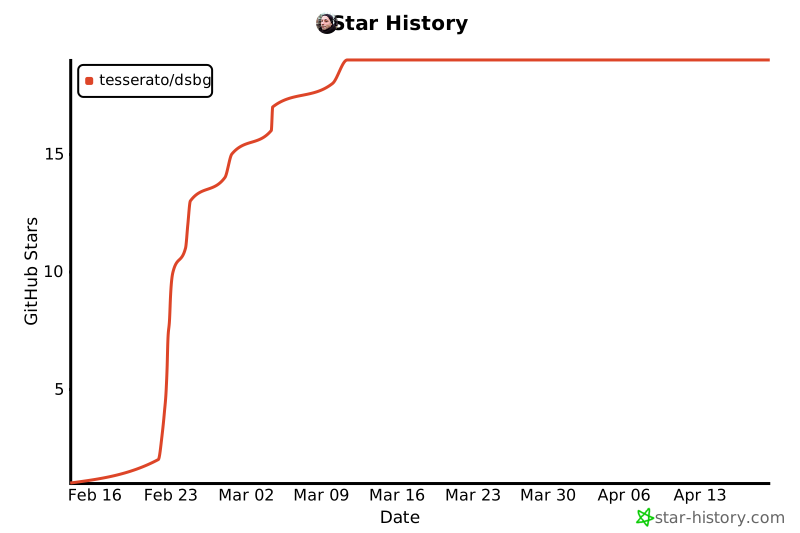](https://star-history.com/#tesserato/dsbg&Date)