https://github.com/tetreum/calendar-indicator
This indicator shows the most immediate event of your Google Calendar in your Ubuntu top bar.
https://github.com/tetreum/calendar-indicator
appindicator calendar-indicator google-calendar ubuntu
Last synced: 9 months ago
JSON representation
This indicator shows the most immediate event of your Google Calendar in your Ubuntu top bar.
- Host: GitHub
- URL: https://github.com/tetreum/calendar-indicator
- Owner: tetreum
- Created: 2020-03-21T09:42:41.000Z (over 6 years ago)
- Default Branch: master
- Last Pushed: 2020-11-26T13:50:58.000Z (over 5 years ago)
- Last Synced: 2025-09-06T10:35:14.058Z (10 months ago)
- Topics: appindicator, calendar-indicator, google-calendar, ubuntu
- Language: Python
- Size: 37.1 KB
- Stars: 2
- Watchers: 0
- Forks: 0
- Open Issues: 1
-
Metadata Files:
- Readme: readme.md
Awesome Lists containing this project
README
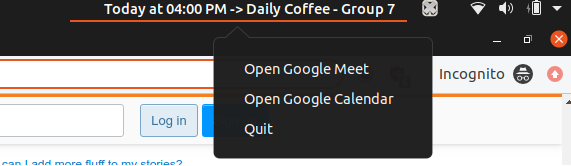
# Calendar Indicator
This indicator shows the most immediate event of your Google Calendar in your Ubuntu top bar, and includes a link to event's google meet (if detected).
*Warning*: I hardly code in Python, so refactors are welcome.
## Setup
1. Download this repository [clicking here](https://github.com/tetreum/calendar-indicator/archive/master.zip).
2. Unzip it somewhere like your documents folder.
3. Run `chmod +x ./setup.sh && ./setup.sh` (without sudo)
4. Get your Google Calendar Secret Address (info: https://support.google.com/calendar/answer/37648?hl=en)
5. Edit `config.json` file with your calendar.
6. Run `./start.sh` and it will work until you restart/shutdown your computer.
7. (Optional) If you like it and want it to start on reboot, run `./runOnBoot.sh`.
## Config file details
```json
{
"minutesBetweenFetches" : 30,
"timezone" : "Europe/Madrid",
"hourFormat" : 24,
"calendar" : "https://calendar.google.com/calendar/ical/callmewendy/private-354t34t34t34t34t6/basic.ics"
}
```
- minutesBetweenFetches: Minutes that will wait before looking for calendar updates/new events each time.
- timezone: Expected timezone to use. Full list at https://gist.github.com/heyalexej/8bf688fd67d7199be4a1682b3eec7568
- hourFormat: 24 or 12 hour clock
- calendar: Your Google Calendar Secret Address. It will be used to fetch your calendar events
## Built on
- Ubuntu 18.04 (lsb_release -a)
- python2.7.16 (python -V)
## Debugging
- It is recommended to manually download the basic.ics file and edit `index.py` to fetch the data locally.
- Rather than using `start.sh`, run `python index.py`