https://github.com/tfproxy/furaffinity-fav-n-save
Adds submission browser, and buttons to automatically download & favorite a submission in one click
https://github.com/tfproxy/furaffinity-fav-n-save
fa furaffinity tampermonkey
Last synced: 3 months ago
JSON representation
Adds submission browser, and buttons to automatically download & favorite a submission in one click
- Host: GitHub
- URL: https://github.com/tfproxy/furaffinity-fav-n-save
- Owner: tfProxy
- License: mit
- Created: 2025-02-09T19:33:21.000Z (over 1 year ago)
- Default Branch: main
- Last Pushed: 2025-04-13T19:12:29.000Z (over 1 year ago)
- Last Synced: 2025-08-12T17:52:40.149Z (12 months ago)
- Topics: fa, furaffinity, tampermonkey
- Language: JavaScript
- Homepage:
- Size: 2.75 MB
- Stars: 0
- Watchers: 1
- Forks: 0
- Open Issues: 0
-
Metadata Files:
- Readme: README.md
- License: LICENSE
Awesome Lists containing this project
README
# Furaffinity-Fav-n-Save
Tampermonkey scripts to add a submission browser to Furaffinity.net, as well as buttons to automatically download & favorite a submission in one click
# Installation
1. Install TamperMonkey extension in your browser (it's available for most browsers)
2. Go to the Tampermonkey extension dawshboard
3. Go to the `Utilities` tab in the Tampermonkey dashboard
4. Scroll to the `Import from URL` and install the following scripts:
* `https://raw.githubusercontent.com/tfProxy/Furaffinity-Fav-n-Save/refs/heads/main/src/favnsave_view.js`
* This adds functionality to the individual submission view page (when looking at a specific image)
* `https://raw.githubusercontent.com/tfProxy/Furaffinity-Fav-n-Save/refs/heads/main/src/favnsave_submissions.js`
* * This adds the submission browser to the main 'Submissions' page
# Usage
On an individual image page, if that image isn't already in your favorites, now there will be an option below the image to 'Fav. & Save' the image which will add it to your favorites and download the image in a single click.
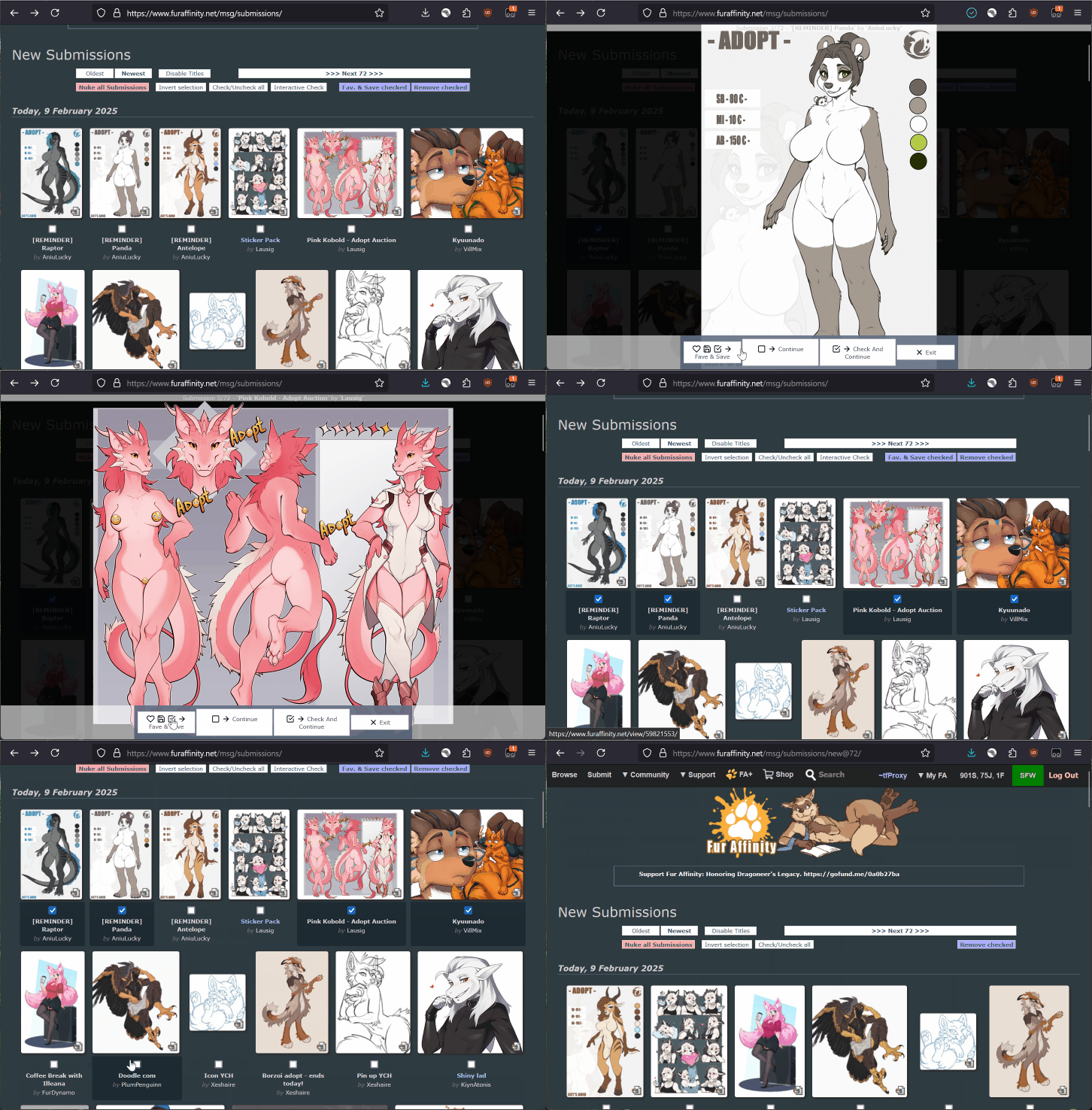
On your `Submissions` page, now there will be an option in the toolbar at the top of the submissions list to perform an `Interactive Check`. This will start going through all the images in your submissions list, displaying each one fullscreen and giving you the option to:
* `Fav. & Save` - Favorites the image, downloads it, checks the image on your submissions list, and then advances to the next image.
* `Continue` - Advances to the next image without performing any other actions.
* `Check & Continue` - Checks the image in your submissions list and then advances to the next image.
* `Exit` - Closes the overlay and returns you to your submissions list without taking any other actions.
An example of using this to browse through your pending submissions:
# Settings
You can change some settings for the scripts from the Tampermonkey window when the script is active on a page.
Available settings at the time of writing are:
* `Reverse Browse Order` - Instead of browsing images on this page from newest -> oldest, will browse from oldest -> newest. Useful if you are viewing sequences of images that were uploaded in order.
* `Hide Button Labels` - Removes the labels from the buttons when the full-screen overlay is present.