https://github.com/tgbv/vlc-shutdown-after-playback
Shut down or put your computer to sleep after VLC playlist ends
https://github.com/tgbv/vlc-shutdown-after-playback
autoit3-script vlc vlc-media-player vlc-player
Last synced: 11 months ago
JSON representation
Shut down or put your computer to sleep after VLC playlist ends
- Host: GitHub
- URL: https://github.com/tgbv/vlc-shutdown-after-playback
- Owner: tgbv
- License: mit
- Created: 2020-10-06T18:53:56.000Z (almost 6 years ago)
- Default Branch: main
- Last Pushed: 2024-02-04T19:44:29.000Z (over 2 years ago)
- Last Synced: 2024-04-18T04:50:02.494Z (over 2 years ago)
- Topics: autoit3-script, vlc, vlc-media-player, vlc-player
- Language: AutoIt
- Homepage:
- Size: 739 KB
- Stars: 3
- Watchers: 2
- Forks: 1
- Open Issues: 0
-
Metadata Files:
- Readme: README.md
- License: LICENSE
Awesome Lists containing this project
README
## VLC: shutdown after playback (VSAP)
VLC Media Player does not have a built-in option to automatically shut down computer after playlist ends.
There are workarounds on internet for this issue but all I could find are tedious methods using VBS/Batch/Bash scripts + drag&drops (eg: https://wiki.videolan.org/VLC_HowTo/Shut_down_the_computer_at_the_end_of_the_playlist/) which I believe is terrible
So I came up with something slightly better: a watcher process which runs independently from VLC process and checks when movie is over/playlist is empty. The script is witten and compiled for Windows OS using Autoit3: https://www.autoitscript.com
## Instructions
**A.** Download the latest version from [Releases](https://github.com/tgbv/vlc-shutdown-after-playback/releases). Pick the right binary depending on the CPU architecture you have. If unsure, pick **vsap_x86.exe**
**B.** Run it. You'll be greeted with the VSAP configuration window:
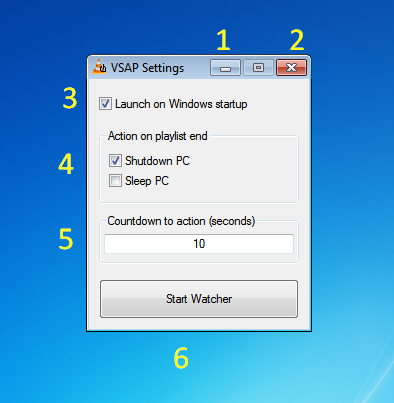
1. Minimize the settings window in taskbar.
2. Exit VSAP.
3. Check this if you want VSAP to automatically start when Windows starts up. If checked, on Windows startup, VSAP watcher is starting minimized.
4. You can pick which action VSAP will take when a playlist ends. Either shut down or put computer to sleep.
5. You can configure the countdown to action, timeframe in which user can abort the action.
6. After you're done with configuring, hit "Start Watcher" button. VSAP watcher will go online and stay camo as taskbar tray icon. You may access the settings window by right clicking on the tray icon:
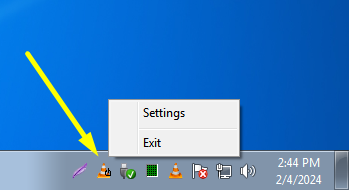
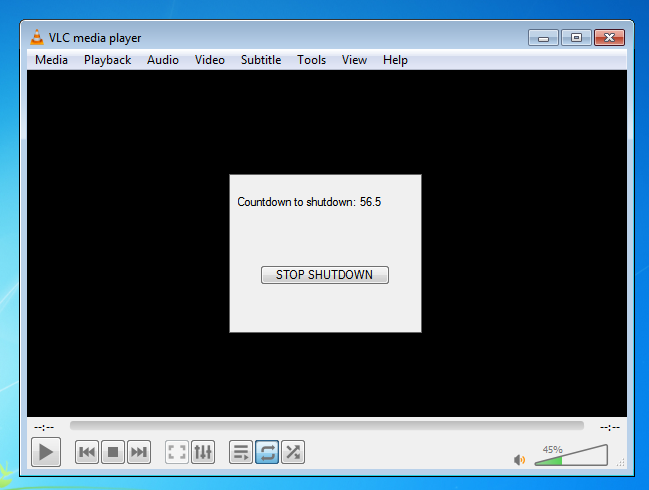
Now each time your movie/playlist ends, a pop-up will bounce on your screen warning your PC will shut down / go to sleep in N seconds; it has a button to abort the action as well.
## Compatibility
- Tested on VLC 3.0.20, it should work with all 3.x.x versions.
- Tested on Windows XP Service Pack 3. It should work with XP, Vista, 7, 8, 10, 11, etc.