https://github.com/tgoelles/specarray
Analyse hyperspectral data from SPECIM devices
https://github.com/tgoelles/specarray
hyperspectral hyperspectral-analysis hyperspectral-data specim specim-fx10
Last synced: 10 months ago
JSON representation
Analyse hyperspectral data from SPECIM devices
- Host: GitHub
- URL: https://github.com/tgoelles/specarray
- Owner: tgoelles
- License: mit
- Created: 2023-09-01T09:42:36.000Z (almost 3 years ago)
- Default Branch: main
- Last Pushed: 2025-03-03T13:25:09.000Z (over 1 year ago)
- Last Synced: 2025-07-18T06:25:27.791Z (11 months ago)
- Topics: hyperspectral, hyperspectral-analysis, hyperspectral-data, specim, specim-fx10
- Language: Python
- Homepage: https://tgoelles.github.io/specarray/
- Size: 8.8 MB
- Stars: 3
- Watchers: 1
- Forks: 0
- Open Issues: 15
-
Metadata Files:
- Readme: README.md
- Changelog: Changelog.md
- License: LICENSE
- Code of conduct: CODE_OF_CONDUCT.md
- Support: SUPPORT.md
Awesome Lists containing this project
README
[](https://github.com/tgoelles/specarray/actions/workflows/test_docker.yml)
[](https://your-project-url)
# SPECARRAY
To read, analyze and plot hyperspectral data from Specim devices. Currently only tested with FX10 data.
## Core features
* read Specim instrument data
* support for large files thanks to dask
* using xarray for data handling and data analysis
* computation of spectral albedo and braodband albedo if white and dark reference is available
## Installation
```bash
pip install specarray
```
## Usage
```python
from specarray import SpecArray
from pathlib import Path
import matplotlib.pyplot as plt
data_dir = Path("data/white_weathering_crust_2_2023-07-15_15-25-24/")
white_weathering_crust = SpecArray.from_folder(data_dir)
white_weathering_crust.capture
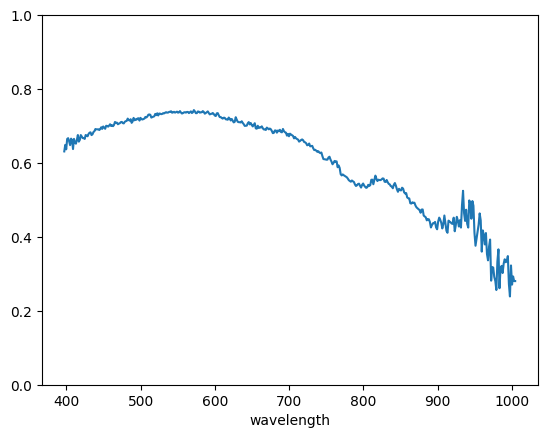
white_weathering_crust.spectral_albedo.sel(sample=0, point=0).plot.line()
plt.ylim(0, 1)
```
The resulting imgage should look like this:
For more examples see the [notebooks](https://github.com/tgoelles/specarray/tree/main/notebooks) folder.