https://github.com/than-dev/kafka-rabbitmq
A micro-services integration using Apache Kafka, RabbitMQ and nodejs, all communications are stable and already to implement your application logic!
https://github.com/than-dev/kafka-rabbitmq
api backend docker docker-compose full-cycle-development kafka microservices nodejs rabbitmq shell-script ubuntu
Last synced: 3 months ago
JSON representation
A micro-services integration using Apache Kafka, RabbitMQ and nodejs, all communications are stable and already to implement your application logic!
- Host: GitHub
- URL: https://github.com/than-dev/kafka-rabbitmq
- Owner: than-dev
- License: mit
- Created: 2021-07-30T12:01:56.000Z (almost 5 years ago)
- Default Branch: main
- Last Pushed: 2022-04-16T21:59:35.000Z (about 4 years ago)
- Last Synced: 2025-02-05T14:48:53.948Z (over 1 year ago)
- Topics: api, backend, docker, docker-compose, full-cycle-development, kafka, microservices, nodejs, rabbitmq, shell-script, ubuntu
- Language: JavaScript
- Homepage:
- Size: 1.82 MB
- Stars: 0
- Watchers: 1
- Forks: 0
- Open Issues: 0
-
Metadata Files:
- Readme: README.md
- License: LICENSE
Awesome Lists containing this project
README
Microservices base
[](/LICENSE)
---
## 📝 Table of Contents
- [About](#about)
- [Getting Started](#getting_started)
- [Usage](#usage)
- [Built Using](#built_using)
- [Authors](#author)
* Purpose of this project was build a micro-services integration to learn use KAFKA and RabbitMQ with nodeJS, user do request to theoretically get a certificate, kafka producer sends a message to kafka consumer, it generate the certified and return it, kafka consumer also send a message to RabbitMQ queue with certified information which is consumed and a email theoretically is sended warning user his certificate is ready!
### Installing
```
git clone https://github.com/NathanCotrim/Kafka-RabbitmQ-NodeJS.git
```
or - (GitHub CLI)
```
gh repo clone NathanCotrim/Kafka-RabbitmQ-NodeJS
```
## Unix OS:
if you have not one of these dependencies: nodeJS, docker and docker-compose, execute install.sh shell script:
```
sh _install.sh
```
### Running
with all dependencies already, execute _run.sh shell script:
```
sh _run.sh
```
All Micro-Services will execute in background, to stop they just press C^!
This command up all containers, to stop they execute:
```
sudo docker-compose down
```
and rebuilt with:
```
sudo docker-compose up -d
```
### To do the request:
```
curl http://localhost:3000/certificate -X POST
```
### You can manage KAFKA and RabbitMQ at:
#### RabbitMQ:
```
http://localhost:15672/
```
#### Username = admin
#### Password = admin
#### KAFKA:
```
http://localhost:19000/
```
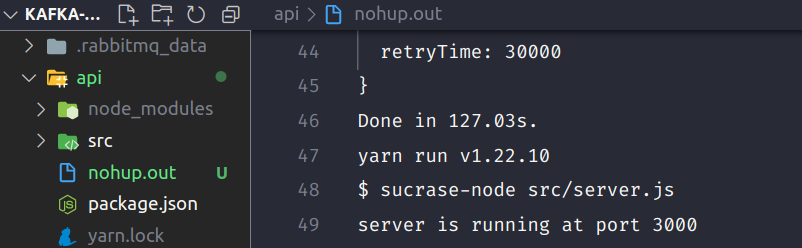
#### OBS: After you run, a file named nohup.out will be created at api folder, in there all api logs will appear!
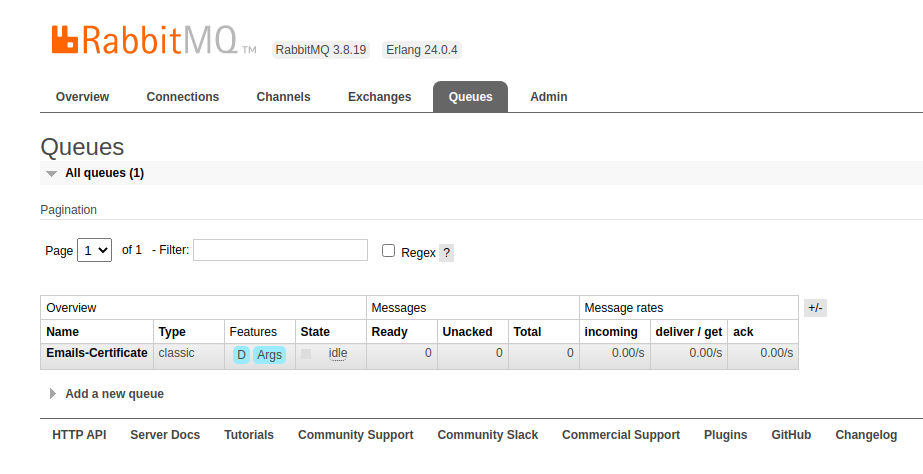
#### If RabbitMQ queue do not auto create, you can do it at 'http://localhost:15672/':
.png)
.png)
- [NodeJs](https://nodejs.org/en/) - Server Environment
- [Docker](https://www.docker.com/) - Containers
- [Docker-Compose](https://docs.docker.com/compose/) - Containers-Group
## ✍️ Author - Nathan Cotrim - MIT License