https://github.com/thanksduck/mail
REST API built for managing email routing rules on Cloudflare with multi user support
https://github.com/thanksduck/mail
aliases cloudlfare jwt mail nodejs routing
Last synced: about 1 month ago
JSON representation
REST API built for managing email routing rules on Cloudflare with multi user support
- Host: GitHub
- URL: https://github.com/thanksduck/mail
- Owner: thanksduck
- Created: 2024-08-30T17:02:33.000Z (almost 2 years ago)
- Default Branch: main
- Last Pushed: 2024-11-03T16:29:50.000Z (over 1 year ago)
- Last Synced: 2025-05-08T21:58:22.553Z (about 1 year ago)
- Topics: aliases, cloudlfare, jwt, mail, nodejs, routing
- Language: JavaScript
- Homepage: https://oas.20032003.xyz
- Size: 168 KB
- Stars: 0
- Watchers: 1
- Forks: 0
- Open Issues: 0
-
Metadata Files:
- Readme: README.md
Awesome Lists containing this project
README
# One Alias Service API
`REST API` built for managing email routing rules on Cloudflare with **multi user support**. Each user can have their own `destinations`, `aliases`, and `rules`. Custom domain* setup within user is also possible but hasn't been implemented yet.
For the API documentation, visit the [OAS official Documentation](https://docs.20032003.xyz/oas/).
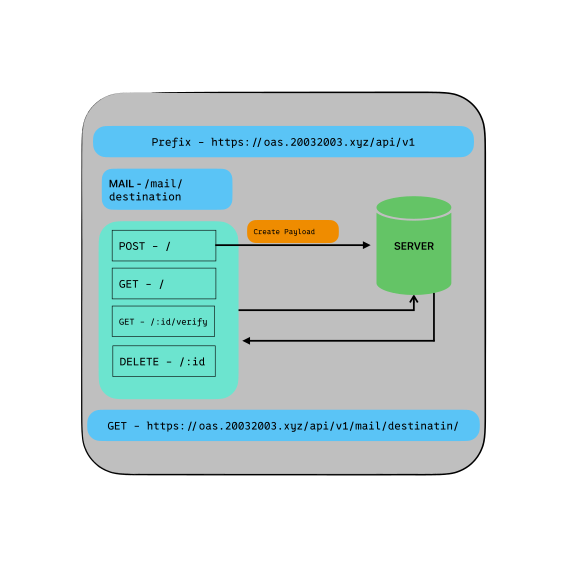
## API Endpoints Visualization
| 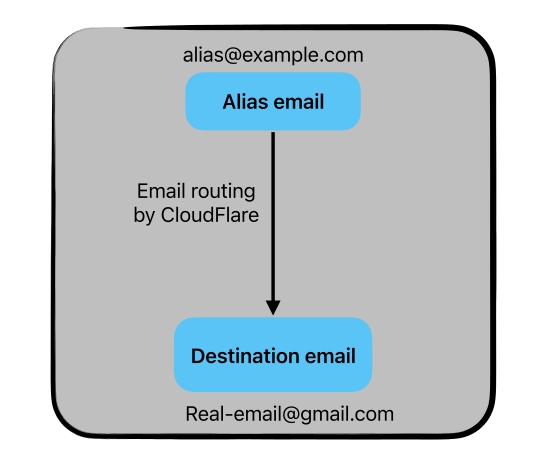 | 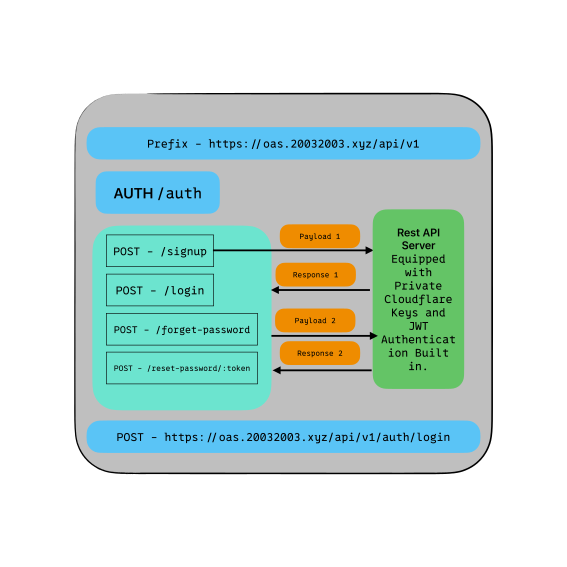 |
|:-------------------------------------------------------------------------------------:|:-----------------------------------------------------------------------------------------------:|
| **Alias Illustration** | **API Endpoints Auth** |
| 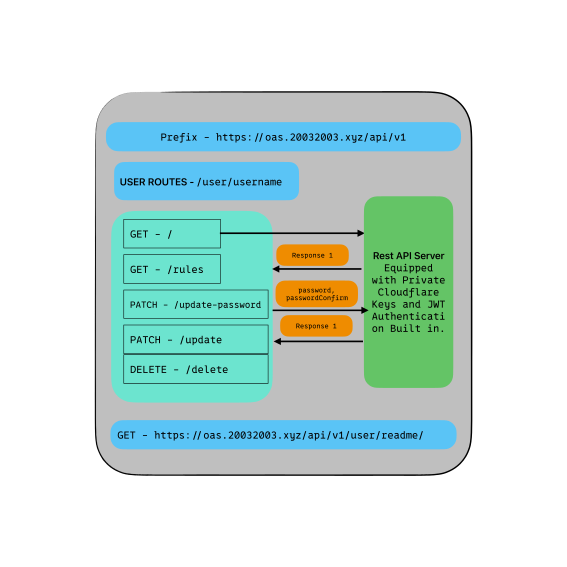 | 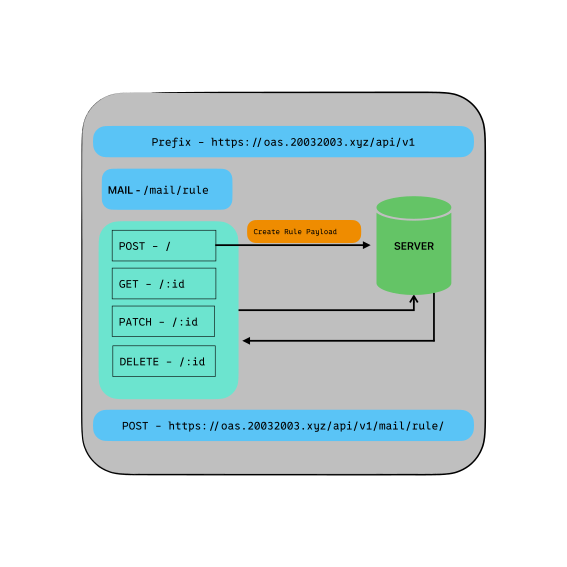 |
|:-----------------------------------------------------------------------------------------------:|:---------------------------------------------------------------------------------------------------:|
| **API Endpoints User** | **API Endpoints Mail** |
|  |
|:-------------------------------------------------------------------------------------------------------------:|
| **API Endpoints Destination** |
## Features
- [x] User authentication with JWT.
- [x] User registration.
- [x] User password reset.
- [x] User email verification with Cloudflare.
- [x] Alias/Rules CRUD operations.
- [x] Destination CRUD operations.
- [x] Rate limiting.
## Installation and Setup
There are three ways to install and set up this project:
### Using Docker (Recommended for production)
Docker provides a lightweight and portable way to run your application. Follow these steps to set up your project using Docker:
1. Clone the repository and navigate to the project directory.
```bash
git clone --depth 1 https://github.com/thanksduck/mail
cd mail
```
1. Copy the `config.env.default` file to `config.env` and fill in the required fields.
```bash
cp config.env.default config.env
```
1. Build the Docker image.
```bash
sudo docker build -t mail .
```
1. Run the Docker container.
```bash
sudo docker run -d -p 3456:3456 --env-file config.env mail
```
### Using Node (Recommended for development)
If you prefer to run your application locally using Node, follow these steps:
1. Clone the repository and navigate to the project directory.
```bash
git clone --depth 1 https://github.com/thanksduck/mail
cd mail
```
1. Copy the `config.env.default` file to `config.env` and fill in the required fields.
```bash
cp config.env.default config.env
```
1. Install the dependencies.
```bash
npm install
```
1. Start the server.
```bash
npm start
```
### Using Docker Compose
If you want to run your application with a database locally using Docker Compose, follow these steps:
1. Clone the repository and navigate to the project directory.
```bash
git clone --depth 1 https://github.com/thanksduck/mail
cd mail
```
1. Copy the `config.env.default` file to `config.env` and fill in the required fields.
```bash
cp config.env.default config.env
```
1. Run the Docker Compose command.
```bash
sudo docker-compose up
```
### config.env Fields
The `config.env` file contains several fields that are used to configure your application. Here's a breakdown of each field:
### Cloudflare API Key
The Cloudflare API key can be generated from the Cloudflare dashboard. [Learn how to generate an API key](https://dash.cloudflare.com/profile/api-tokens). And the zone id can be found in the Cloudflare dashboard. Make sure to provide the account and zone permission of email destination and Routing rules, additionally, you can give it DNS Edit support if you want to add custom domains.
- `CF_EMAIL`: Required Cloudflare email.
- `CF_API_KEY`: Required Cloudflare API key.
- `CF_ACCOUTN_ID`: Required Cloudflare Account ID
- `CF_ZONE_ID`: Required Cloudflare zone ID.
### MongoDB Configuration
- `LOCAL_CONNECTION_STRING`: Optional local connection string for MongoDB.
- `MONGO_URI`: Required MongoDB URI, can also be a local connection string.
### Server Configuration
- `NODE_ENV`: Optional environment variable to set the Node.js environment to production or development.
- `PORT`: Optional port number to run the server on. Defaults to 3456.
### JWT Configuration
- `JWT_SECRET`: Required JWT secret.
- `JWT_EXPIRES_IN`: Required JWT expiration time.
### Email Configuration
- `EMAIL_USER`: Required email user registered with the SMTP service.
- `EMAIL_PASSWORD`: Required email password with the SMTP service.
- `EMAIL_HOST`: Optional SMTP host.
- `EMAIL_PORT`: Optional SMTP port.
- `COMPANY_NAME`: Company Name to be sent in the Email Title
- `SUPPORT_EMAIL`: Email address of the sender
### Rate Limiting
- `RATE_LIMIT_MAX`: Required rate limit max.
### Cookie Expiration
- `COOKIE_EXPIRES`: Required cookie expiration time.
Note: Make sure to replace the placeholder values with your own values for each field.