https://github.com/thatmlopsguy/dokaseca-control-plane
Framework for bootstrapping cloud-native platforms using Kubernetes in Docker (Kind)
https://github.com/thatmlopsguy/dokaseca-control-plane
argocd devops dokaseca gitops gitops-bridge homelab k8s kubernetes platform-engineering terraform
Last synced: about 2 months ago
JSON representation
Framework for bootstrapping cloud-native platforms using Kubernetes in Docker (Kind)
- Host: GitHub
- URL: https://github.com/thatmlopsguy/dokaseca-control-plane
- Owner: thatmlopsguy
- License: apache-2.0
- Created: 2025-02-11T18:39:26.000Z (over 1 year ago)
- Default Branch: main
- Last Pushed: 2026-02-25T15:36:21.000Z (5 months ago)
- Last Synced: 2026-02-25T19:12:03.060Z (5 months ago)
- Topics: argocd, devops, dokaseca, gitops, gitops-bridge, homelab, k8s, kubernetes, platform-engineering, terraform
- Language: HCL
- Homepage: https://thatmlopsguy.github.io/dokaseca-control-plane/
- Size: 8.56 MB
- Stars: 1
- Watchers: 1
- Forks: 1
- Open Issues: 0
-
Metadata Files:
- Readme: README.md
- Contributing: CONTRIBUTING.md
- License: LICENSE
- Codeowners: .github/CODEOWNERS
- Security: SECURITY.md
- Roadmap: ROADMAP.md
Awesome Lists containing this project
README
*Just as ships are built in dry docks, platforms are crafted in DoKa Seca*







>⚠️ Note
>
> DoKa Seca is still in relatively early development. At this time, **do not use** Doka Seca for critical production systems. Current version is intended for learning, experimentation, and as a reference implementation for platform engineering best practices. Use at your own risk.
## Overview
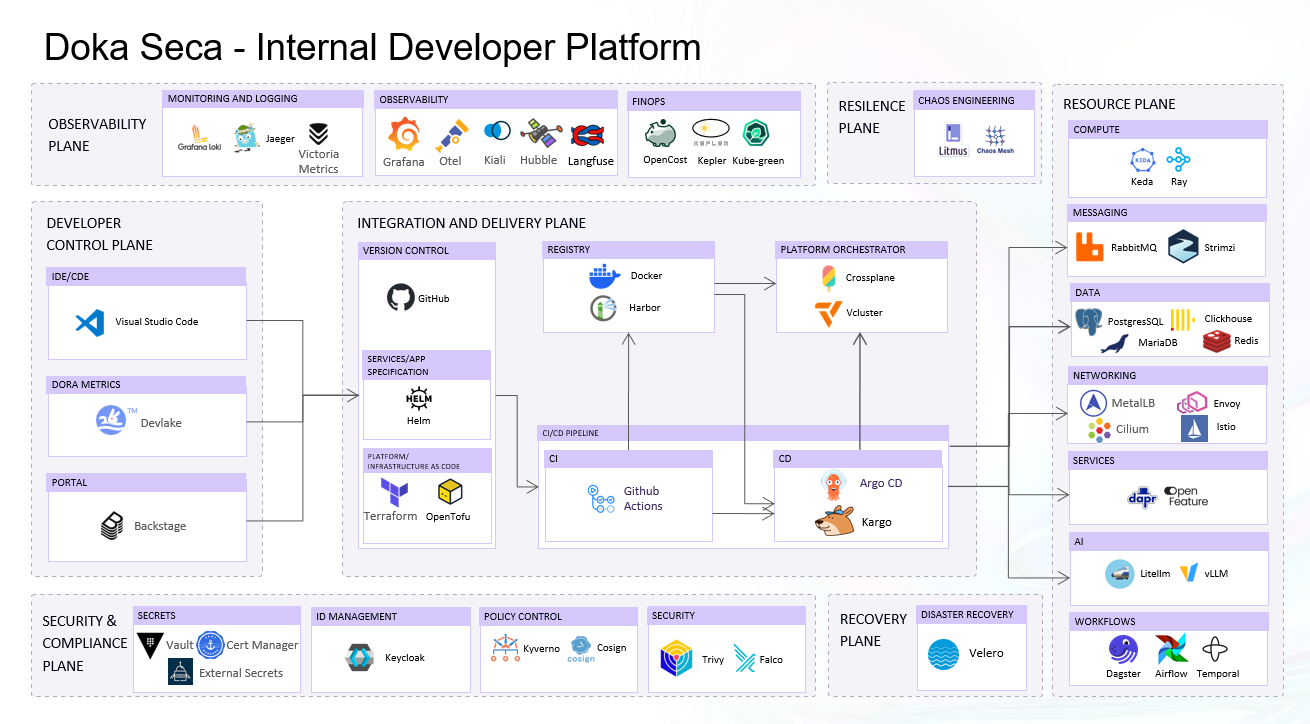
Based on the Humanitec Reference Architectures for Internal Developer Platforms.
Source: platformengineering.org
## Introduction
[](https://kubernetes.io/)
Welcome to **DoKa Seca** (Distributed Orchestration Kubernetes Automation with Scalable Edge Computing Applications) - an opinionated
infrastructure framework that combines the power of Cloud Native Computing Foundation (CNCF) projects for bootstrapping cloud-native
platforms using Kubernetes in Docker (Kind)!
DoKa Seca provides a production-ready framework that automates the entire platform bootstrap process using Kind clusters. Rather than
just being a collection of configurations, it's a complete platform engineering solution that provisions infrastructure, installs
essential tooling, configures GitOps workflows, and sets up observability - all with a single command, in your local "dry dock" environment.
This project serves as both a personal learning journey into modern DevOps practices and a comprehensive resource for platform engineers
and developers interested in rapidly spinning up production-grade Kubernetes environments. Here you'll find real-world implementations of
GitOps workflows, infrastructure as code, observability stacks, and cloud-native security practices - all designed to run efficiently in
local development or homelab environments while following enterprise-grade patterns and best practices.
DoKa Seca consists of 5 GitHub repositories:
| Repository | Description |
|------------------------------------------------------------------------------------|-----------------------------------------------------|
| [dokaseca-control-plane](https://github.com/thatmlopsguy/dokaseca-control-plane) | Control plane infrastructure and cluster management |
| [dokaseca-addons](https://github.com/thatmlopsguy/dokaseca-addons) | Platform addons and Kubernetes extensions |
| [dokaseca-workloads](https://github.com/thatmlopsguy/dokaseca-workloads) | Application workloads and deployments |
| [dokaseca-portal](https://github.com/thatmlopsguy/dokaseca-portal) | Backstage project (TBD) (optional) |
| [dokaseca-portal-catalog](https://github.com/thatmlopsguy/dokaseca-portal-catalog) | Backstage Catalog (TBD) (optional) |
**Prerequisites**
* [`git`](https://git-scm.com/downloads)
* [`make`](https://www.gnu.org/software/make/)
* [`direnv`](https://direnv.net/)
* [`docker`](https://www.docker.com/)
* [`terraform`](https://www.terraform.io/) or [`opentofu`](https://opentofu.org/)
* [`Kind`](https://kind.sigs.k8s.io/docs/user/quick-start/), [`k0s`](https://docs.k0sproject.io/stable/), [`k3d`](https://k3d.io/stable/) and/or [`vind`](https://github.com/loft-sh/vind)
* [`jq`](https://jqlang.github.io/jq/)
* [`helm`](https://helm.sh/docs/intro/install/)
* [`Kubectl`](https://kubernetes.io/docs/tasks/tools/)
* `base64`
* [`kustomize`](https://kustomize.io/)
**Optional tools**
* [`k9s`](https://k9scli.io/) or [`freelens`](https://github.com/freelensapp/freelens) (optional, if you'd like to inspect your cluster visually)
* [`argocd`](https://argo-cd.readthedocs.io/en/stable/cli_installation/)
* [`kargo`](https://docs.kargo.io/user-guide/installing-the-cli/)
* [`vcluster`](https://www.vcluster.com/docs/platform/install/quick-start-guide)
* [`falcoctl`](https://github.com/falcosecurity/falcoctl)
* [`karmor`](https://kubearmor.io/)
* [`clusteradm`](https://github.com/open-cluster-management-io/clusteradm)
* [`cosign`](https://github.com/sigstore/cosign)
* [`velero`](https://github.com/vmware-tanzu/velero)
* [`vault`](https://developer.hashicorp.com/vault/docs/install)
* [`minio client (mc)`](https://github.com/minio/mc)
* [`crossplane-cli`](https://docs.crossplane.io/v2.2/cli/)
> **⚠️ Note: Internet access required**
> You will also need access to the internet to download the necessary Helm charts and CRDs.
> Make sure you are not blocked by a firewall or proxy.
## Quick Start
Doka Seca uses terraform to provision the infrastructure and deploy the clusters, so make sure you have it installed and configured properly.
This ensures your platform setup is consistent, secure, and easily reproducible across environments.
DoKa Seca supports multiple deployment topologies. Choose the one that best fits your needs. For detailed deployment options and advanced
configurations, see [terraform/README.md](terraform/README.md).
### Option 1: Hub-Spoke Topology (Recommended)
This deploys a centralized hub cluster that manages multiple spoke clusters. The hub cluster runs ArgoCD and manages addons/workloads for all clusters.
**Step 1: Deploy the Hub Cluster**
```bash
# Deploy control plane cluster
cd terraform/topologies/hub-spoke/hub
terraform init
terraform apply -auto-approve
```
**Step 2: Deploy Spoke Clusters (Optional)**
```bash
cd terraform/topologies/hub-spoke/spoke
# Deploy spoke clusters for different environments
./deploy.sh spoke dev apply
./deploy.sh spoke stg apply
./deploy.sh spoke prod apply
```
**Step 3: Verify Deployment**
```bash
# Check deployed clusters
kind get clusters
# Verify spoke clusters are registered with hub ArgoCD
kubectl get secrets -n argocd -l argocd.argoproj.io/secret-type=cluster
```
### Option 2: Distributed Topology
Each cluster manages its own addons and workloads independently. Navigate to the distributed configuration.
```bash
cd terraform/topologies/distributed
# Deploy clusters for each environment
./deploy.sh dev
./deploy.sh stg
./deploy.sh prod
```
### Accessing Your Platform
After deployment, you can inspect the deployed clusters:
```bash
# List all kind clusters (Hub-Spoke Topology)
kind get clusters
# Expected output:
# hub-dev
# spoke-dev
# spoke-prod
# spoke-stg
```
**Access ArgoCD UI:**
```bash
# Get ArgoCD admin password
make argo-cd-password
# Forward ArgoCD port
make argo-cd-ui
# Access at: http://localhost:8088
```
If you enable in `terraform.tfvars` the gitops bridge by setting `enable_gitops_bridge = true`, then argocd will be also
installed and all the enabled addons. You can see that terraform will add GitOps Bridge Metadata to the ArgoCD secret.
The annotations contain metadata for the addons' Helm charts and ArgoCD ApplicationSets.
```sh
kubectl get secret -n argocd -l argocd.argoproj.io/secret-type=cluster -o json | jq '.items[0].metadata.annotations'
```
The output looks like the following:
```json
{
"addons_extras_repo_basepath": "stable",
"addons_extras_repo_revision": "main",
"addons_extras_repo_url": "https://github.com/thatmlopsguy/helm-charts",
"addons_repo_basepath": "argocd",
"addons_repo_path": "appsets",
"addons_repo_revision": "main",
"addons_repo_url": "https://github.com/thatmlopsguy/dokaseca-addons",
"cluster_name": "hub-dev",
"cluster_repo_basepath": "argocd",
"cluster_repo_path": "clusters",
"cluster_repo_revision": "dev",
"cluster_repo_url": "https://github.com/thatmlopsguy/dokaseca-clusters",
"environment": "dev",
"workload_repo_basepath": "argocd",
"workload_repo_path": "workloads",
"workload_repo_revision": "dev",
"workload_repo_url": "https://github.com/thatmlopsguy/dokaseca-workloads"
}
```
The labels offer a straightforward way to enable or disable an addon in ArgoCD for the cluster.
```sh
kubectl get secret -n argocd -l argocd.argoproj.io/secret-type=cluster -o json | jq '.items[0].metadata.labels'
```
The output looks like the following:
```json
{
"argocd.argoproj.io/secret-type": "cluster",
"cloud_provider": "local",
"cluster_name": "hub-dev",
"enable_alloy": "false",
"enable_argo_cd": "true",
"enable_argo_cd_image_updater": "false",
"enable_argo_events": "false",
"enable_argo_rollouts": "false",
"enable_argo_workflows": "false",
"enable_trivy": "false",
"enable_vault": "false",
"enable_vcluster": "false",
"enable_vector": "false",
"enable_victoria_metrics_k8s_stack": "true",
"enable_zipkin": "false",
"environment": "dev",
"k8s_cluster_name": "hub-dev",
"k8s_domain_name": "dokaseca.local",
"kubernetes_version": "1.31.2"
}
```
## Destroy Infrastructure
To tear down all the resources and the kind cluster(s), run the following command:
```sh
make clean-infra
```
## Troubleshooting
`ERROR: failed to create cluster: could not find a log line that matches "Reached target .*Multi-User System.*|detected cgroup v1"`
To increase these limits temporarily run the following commands on the host:
```sh
sudo sysctl fs.inotify.max_user_watches=1048576
sudo sysctl fs.inotify.max_user_instances=8192
```
Source: [Pod errors due to “too many open files”](https://kind.sigs.k8s.io/docs/user/known-issues/#pod-errors-due-to-too-many-open-files)
## Support & Resources
User documentation can be found on our [user docs site](https://thatmlopsguy.github.io/dokaseca-control-plane/).
## Contributing & Governance
All contributors are warmly welcome. If you want to become a new contributor, we are so happy! Just, before doing it,
read our [contributing guidelines](CONTRIBUTING.md).
## Roadmap
Want to know about the features to come? Check out the project roadmap for more information.
## License
DoKa Seca is licensed under [Apache License, Version 2.0](LICENSE), a permissive free software license that allows you to use the software for any purpose, to distribute it, to modify it, and to distribute modified versions under specific terms.
Please note that various pieces of software it installs in your cluster may have other licenses.