https://github.com/the-omics-os/lobster
The self-evolving agentic framework for bioinformatics
https://github.com/the-omics-os/lobster
agents bioinformatics langgraph lobster omics proteomics transcriptomics
Last synced: 2 months ago
JSON representation
The self-evolving agentic framework for bioinformatics
- Host: GitHub
- URL: https://github.com/the-omics-os/lobster
- Owner: the-omics-os
- License: other
- Created: 2025-08-13T03:19:01.000Z (11 months ago)
- Default Branch: main
- Last Pushed: 2026-03-27T17:23:20.000Z (3 months ago)
- Last Synced: 2026-04-19T20:11:32.571Z (3 months ago)
- Topics: agents, bioinformatics, langgraph, lobster, omics, proteomics, transcriptomics
- Language: Python
- Homepage: https://www.lobsterbio.com/
- Size: 22.5 MB
- Stars: 25
- Watchers: 0
- Forks: 6
- Open Issues: 0
-
Metadata Files:
- Readme: README.md
- Contributing: CONTRIBUTING.md
- License: LICENSE
Awesome Lists containing this project
- awesome-medical-ai - lobster - omics-os/lobster?style=flat-square) | ⭐⭐ B- | Self-evolving agentic bioinformatics framework with installable package, benchmark harness, autonomous debugging loop, and reproducible genomics-oriented analysis workflows. | (Biomedical Research & Drug Discovery)
README




---
# Quickstart
**1. Install Lobster AI (macOS/Linux):**
```bash
curl -fsSL https://install.lobsterbio.com | bash
```
*(Windows users: `irm https://install.lobsterbio.com/windows | iex`)*
**2. Configure your LLM (Anthropic, Gemini, local Ollama, etc.):**
```bash
lobster init
```
Watch: installation & init walkthrough
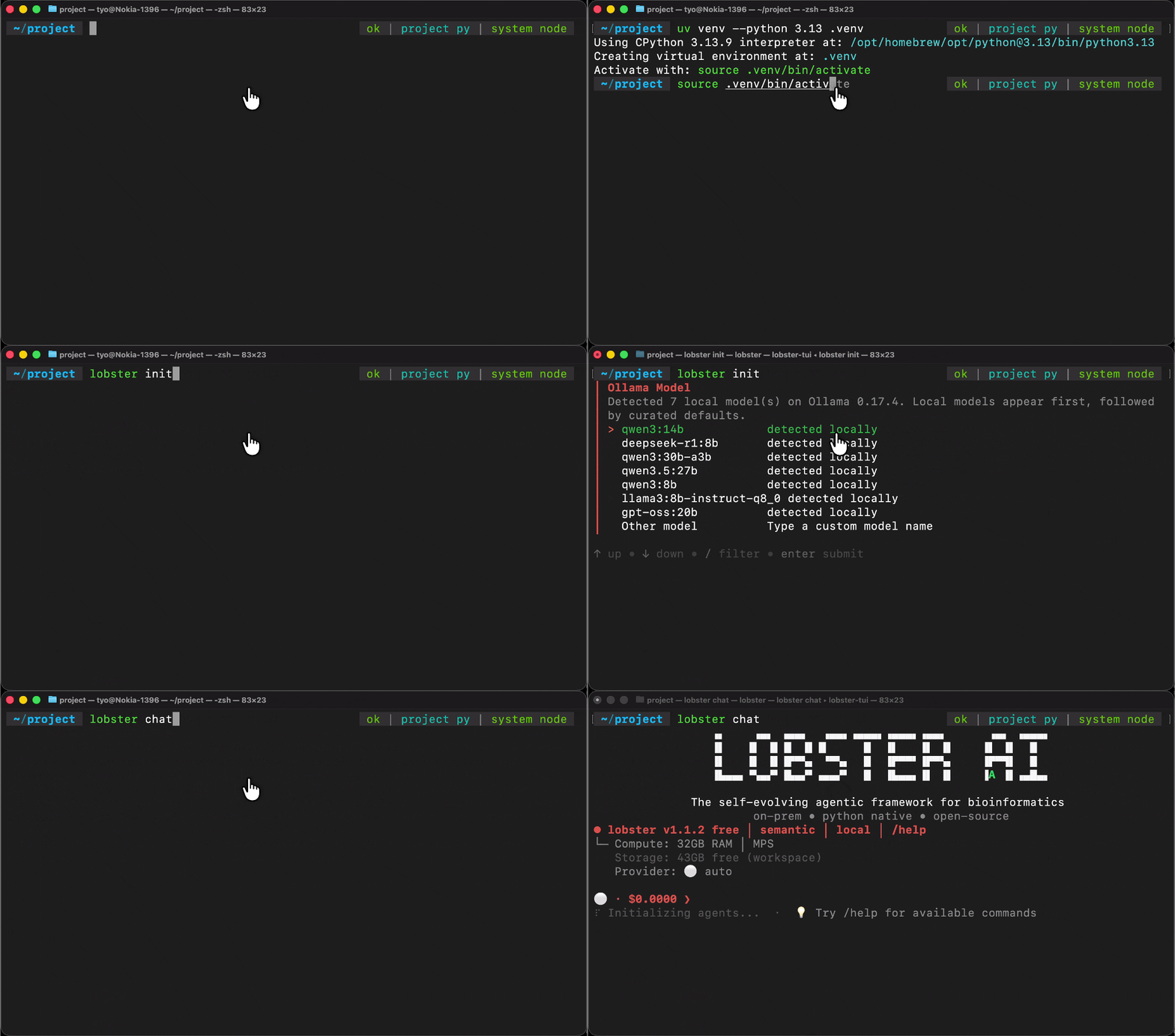
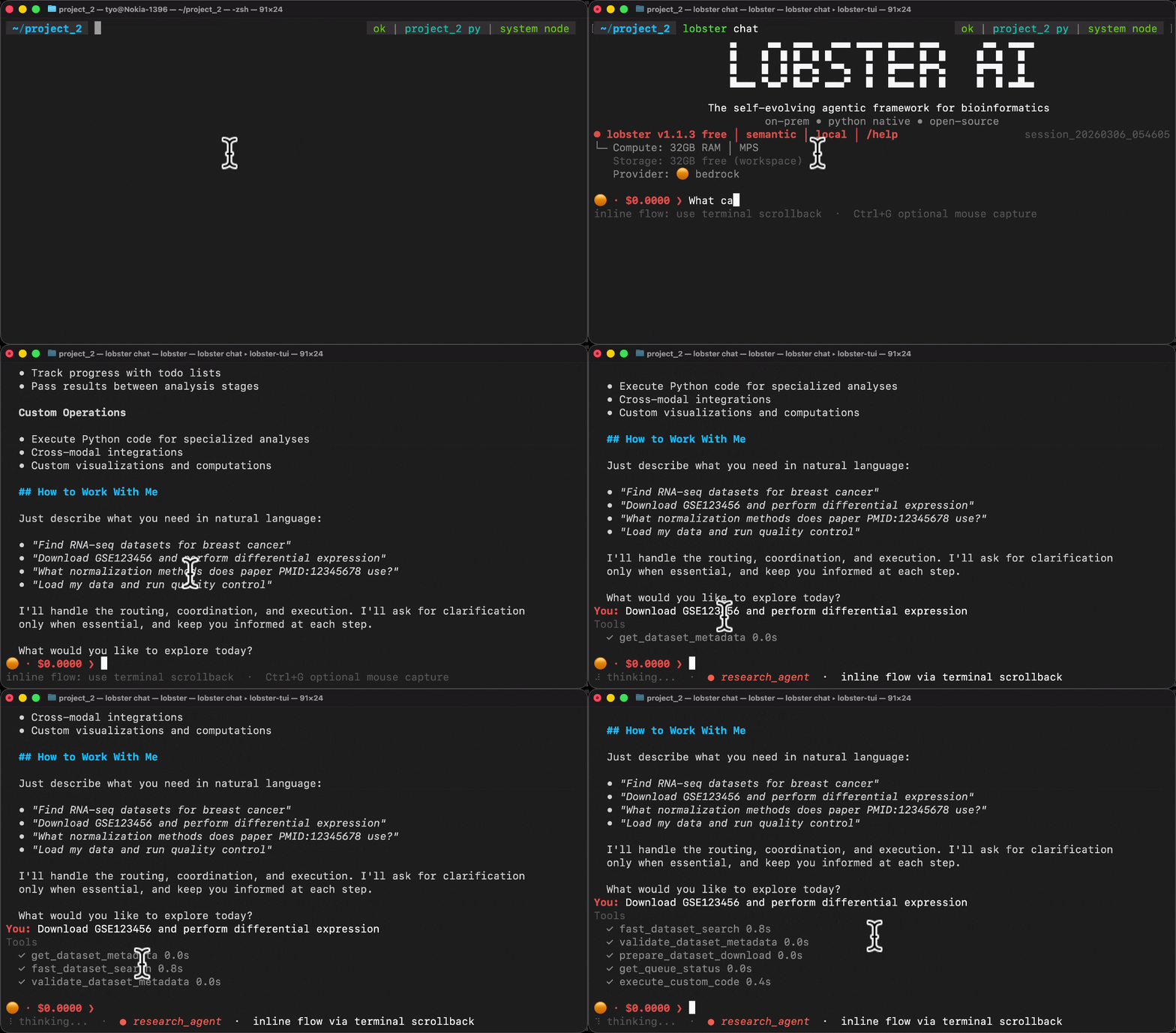
**3. Start an interactive session:**
```bash
lobster chat
```
Then describe your analysis in plain language:
```text
> Search PubMed for single-cell CRISPR screens in T cells from 2023–2024,
download the most cited dataset, run QC, integrate batches with Harmony,
cluster the cells, annotate cell types, and export a reproducible notebook.
```
Watch: analysis session walkthrough
# CLI Reference
**Core commands:**
```bash
lobster chat # Interactive session (default)
lobster query "your request" # Single-turn, non-interactive
lobster init # Configure LLM provider and API keys
lobster --help # Full command reference
```
**Session continuity:**
```bash
lobster query --session-id my_project "Search PubMed for CRISPR"
lobster query --session-id latest "Download the first result" # resume last session
```
**In-session slash commands** (inside `lobster chat`):
```text
> /pipeline export # Export analysis as a reproducible Jupyter notebook
> /pipeline run analysis.ipynb # Re-run an exported notebook
> /data # List loaded datasets and modalities
> /files # Browse workspace files
> /status # Session info, token usage, active agents
> /help # All slash commands
```
**Developer commands:**
```bash
lobster scaffold agent --name my_expert --display-name "My Expert" \
--description "Description" --tier free # Generate a new agent package
lobster validate-plugin ./my-package/ # Validate package structure (7 checks)
```
# 🤖 For AI Coding Agents
Install skills that give Claude Code, Cursor, or Gemini CLI deep knowledge of the Lobster architecture:
```bash
curl -fsSL https://skills.lobsterbio.com | bash
```
This installs `lobster-use` (analysis workflows) and `lobster-dev` (agent development). With these loaded, your coding agent understands the full 10-package structure, tool patterns, entry point registration, and AQUADIF contract — without needing to read source code manually.
**Scaffold a new agent package from the command line:**
```bash
lobster scaffold agent \
--name epigenomics_expert \
--display-name "Epigenomics Expert" \
--description "ATAC-seq, ChIP-seq, and DNA methylation analysis" \
--tier free
```
Generates a complete, contract-compliant package: `pyproject.toml`, entry point wiring, tool stubs with AQUADIF metadata, and contract tests. Then point your coding agent at the generated scaffolding and ask it to implement the domain logic.
# Use Cases
End-to-end walkthroughs across omics domains:
Domain
Case Study
Single-Cell TranscriptomicsCell clustering, annotation & trajectory inference
CML Drug ResistanceResistance mechanism discovery from scRNA-seq
Drug DiscoveryTarget identification & compound prioritization
Clinical GenomicsVariant annotation & GWAS analysis
Mass Spec ProteomicsBiomarker panel selection from DIA-NN data
Literature MiningAutomated dataset discovery from PubMed
Multi-Omics MLFeature selection & survival analysis
# 🧠 Architecture
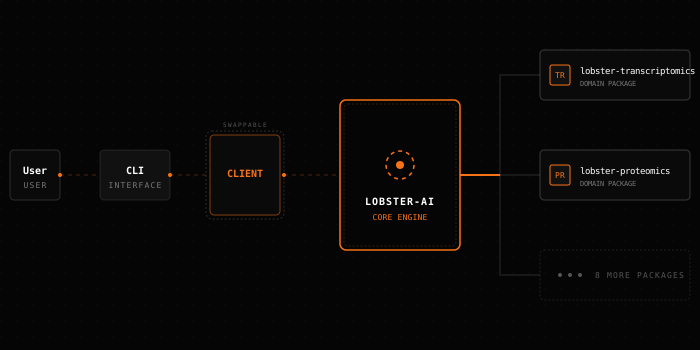
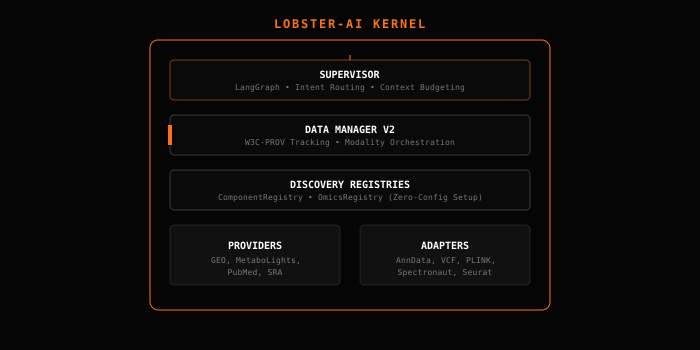
Lobster AI is a multi-agent system: **22 specialist agents across 10 installable packages**, orchestrated by a LangGraph supervisor. Each agent owns a specific omics domain and calls validated scientific libraries directly — no code generation, no hallucinated results.
* **Local execution:** All analysis runs on your machine. Patient data never leaves your hardware.
* **Scientific libraries:** Agents call Scanpy, PyDESeq2, Harmony, and others via tool functions — not by generating scripts.
* **W3C-PROV provenance:** Every analysis step is tracked and exportable as a reproducible Jupyter notebook.
# 🛠️ Build Your Own Agent
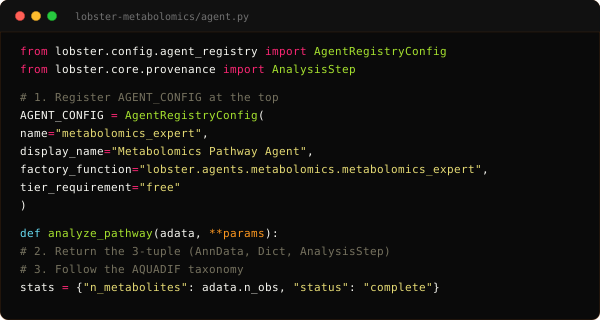
New agents are standalone packages that plug into Lobster via Python entry points. The `lobster-dev` skill loads the full architecture reference into your coding agent (Claude Code, Gemini CLI, Cursor) — package layout, tool patterns, AQUADIF contract, and test fixtures. Use `lobster scaffold` to generate the package skeleton, then let your coding agent implement the domain logic.
1. The Request
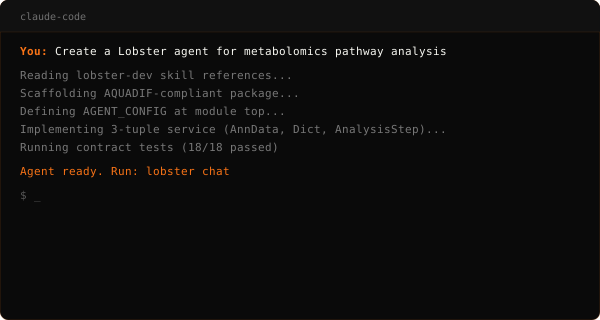
2. The Result
# FAQ
What omics domains are supported?
| Domain | Input Formats | Key Capabilities |
|--------|--------------|-----------------|
| **Single-Cell RNA-seq** | AnnData, 10x, h5ad | QC, doublet detection (Scrublet), batch integration (Harmony/scVI), clustering, cell type annotation, trajectory inference (DPT/PAGA) |
| **Bulk RNA-seq** | Salmon, kallisto, featureCounts | Sample QC, normalization (DESeq2/VST/CPM), differential expression (PyDESeq2), GSEA, publication-ready export |
| **Genomics** | VCF, PLINK | GWAS, LD pruning, kinship estimation, association testing, result clumping |
| **Clinical Genomics** | VCF, ClinVar, gnomAD | Variant annotation (VEP), pathogenicity scoring, clinical variant prioritization |
| **Mass Spec Proteomics** | MaxQuant, DIA-NN, Spectronaut | PTM analysis (phospho/acetyl/ubiquitin), peptide-to-protein rollup, batch correction |
| **Affinity Proteomics** | Olink NPX, SomaScan ADAT, Luminex MFI | LOD quality filtering, bridge normalization, cross-platform concordance |
| **Proteomics Downstream** | Any loaded proteomics modality | GO/Reactome/KEGG enrichment, kinase enrichment (KSEA), STRING PPI, biomarker panel selection (LASSO/Boruta) |
| **Metabolomics** | LC-MS, GC-MS, NMR | QC (RSD/TIC), imputation, normalization (PQN/TIC/IS), PCA, PLS-DA, OPLS-DA, m/z annotation (HMDB/KEGG), lipid class analysis |
| **Machine Learning** | Any modality | Feature selection (stability/LASSO/variance), survival analysis (Cox/KM), cross-validation, SHAP, multi-omics integration (MOFA) |
| **Research & Data Access** | — | PubMed/GEO/PRIDE/MetaboLights search, dataset download orchestration, metadata harmonization |
Which LLMs can I use?
Configure via `lobster init` or environment variables. All providers use the same agent interface.
| Provider | Type | Setup | Notes |
|----------|------|-------|-------|
| **Anthropic** | Cloud | API key | Claude models — recommended default |
| **Ollama** | Local | `ollama pull ` | Fully offline, no data leaves the machine |
| **OpenRouter** | Cloud | API key | Access 200+ models via a single endpoint |
| **Google Gemini** | Cloud | Google API key | Long context window |
| **AWS Bedrock** | Cloud | AWS credentials | Enterprise compliance, IAM-based auth |
| **Azure AI** | Cloud | Endpoint + credential | Azure-hosted deployments |
Pipeline export and slash commands
```text
lobster chat
> /pipeline export # Export reproducible Jupyter notebook
> /pipeline list # List exported pipelines
> /pipeline run analysis.ipynb geo_gse109564
> /data # Show loaded datasets
> /status # Session info
> /help # All commands
```
Advanced installation (Windows, pip)
**Windows** (PowerShell):
```powershell
irm https://install.lobsterbio.com/windows | iex
```
**uv** (recommended manual install):
```bash
uv tool install 'lobster-ai[full]' # All agents, choose provider at init
lobster init
```
**pip**:
```bash
pip install 'lobster-ai[full]'
lobster init
```
**Upgrade**:
```bash
uv tool upgrade lobster-ai # uv
pip install -U lobster-ai # pip
```
How do I build my own agent?
Agents are standalone Python packages that register via PEP 517 entry points. No changes to core required — Lobster discovers them automatically at startup.
**1. Scaffold the package:**
```bash
lobster scaffold agent \
--name my_domain_expert \
--display-name "My Domain Expert" \
--description "Analysis for [your domain]" \
--tier free
```
**2. Implement your tools** in the generated `tools/` directory. Each tool must declare AQUADIF metadata:
```python
@tool
def run_analysis(modality_name: str) -> str:
"""Run domain-specific analysis on a loaded modality."""
...
run_analysis.metadata = {"categories": ["ANALYZE"], "provenance": True}
run_analysis.tags = ["ANALYZE"]
```
**3. Validate the package structure** before wiring:
```bash
lobster validate-plugin ./my-domain-package/
```
**4. Install and test:**
```bash
uv pip install -e ./my-domain-package/
pytest -m contract # runs all AQUADIF contract checks
```
Install the `lobster-dev` skill to give your coding agent the complete reference — package layout, `AGENT_CONFIG` pattern, factory function signature, tool design rules, and the full validation checklist:
```bash
curl -fsSL https://skills.lobsterbio.com | bash
```
# Acknowledgements

Structural inspiration for the drug discovery agent package — CLI design patterns and domain decomposition.

Foundation for the lobster-use and lobster-dev skills — domain knowledge structure and skill distribution patterns.

UI component architecture and streaming patterns used in the Omics-OS Cloud frontend.

BubbleTea, Lipgloss, Glamour, and huh — the entire terminal UI stack powering lobster chat.