https://github.com/thebugcatcher/heimdall
Share secrets in a secure way with paswords, ttl, IP allowlisting and encryption
https://github.com/thebugcatcher/heimdall
encryption passwords security share-secrets
Last synced: 6 months ago
JSON representation
Share secrets in a secure way with paswords, ttl, IP allowlisting and encryption
- Host: GitHub
- URL: https://github.com/thebugcatcher/heimdall
- Owner: thebugcatcher
- Created: 2023-10-24T20:49:26.000Z (over 2 years ago)
- Default Branch: main
- Last Pushed: 2023-10-29T23:50:10.000Z (over 2 years ago)
- Last Synced: 2025-04-01T20:27:38.823Z (over 1 year ago)
- Topics: encryption, passwords, security, share-secrets
- Language: Elixir
- Homepage: https://heimdall.thebugcatcher.com/
- Size: 444 KB
- Stars: 26
- Watchers: 4
- Forks: 0
- Open Issues: 0
-
Metadata Files:
- Readme: README.md
Awesome Lists containing this project
README
# Heimdall
[](https://github.com/spawnfest/heimdall/actions/workflows/ci.yml)
[](https://github.com/spawnfest/heimdall/blob/main/coveralls.json#L15)
A web application that lets you share sensitive data in a secure and easy way.
Whether it's wanting to share a password to a team account or share your health
insurance subscription ID with your doctor, Heimdall has you covered.
With Heimdall instead of sharing your passwords or sensitive data via emails/texts,
you could instead share a short-lived link via emails/texts. These links can be configured
to not work either after a time or after a number of reads so if someone gets a hold
off those links later, they won't work and your information will remain secure.
Furthermore, Heimdall also supports encrypting your data which means you can effectively
password-protect what you're sharing. So, by sharing a link to you sensitive data
via email and password needed to view that data via text, on top of adding an expiration
time to the link, you're adding several layers of security to your information. And best news is
Heimdall makes doing all the above very easy, so it's a win-win for security and ease!
[__VIDEO DEMO LINK__](https://drive.google.com/file/d/19fuT5-A-rtDx-m336HVY3zjN7yxmpjTC/view?usp=sharing)
[__LIVE_SITE_LINK__](https://heimdall.thebugcatcher.com/)
## Example
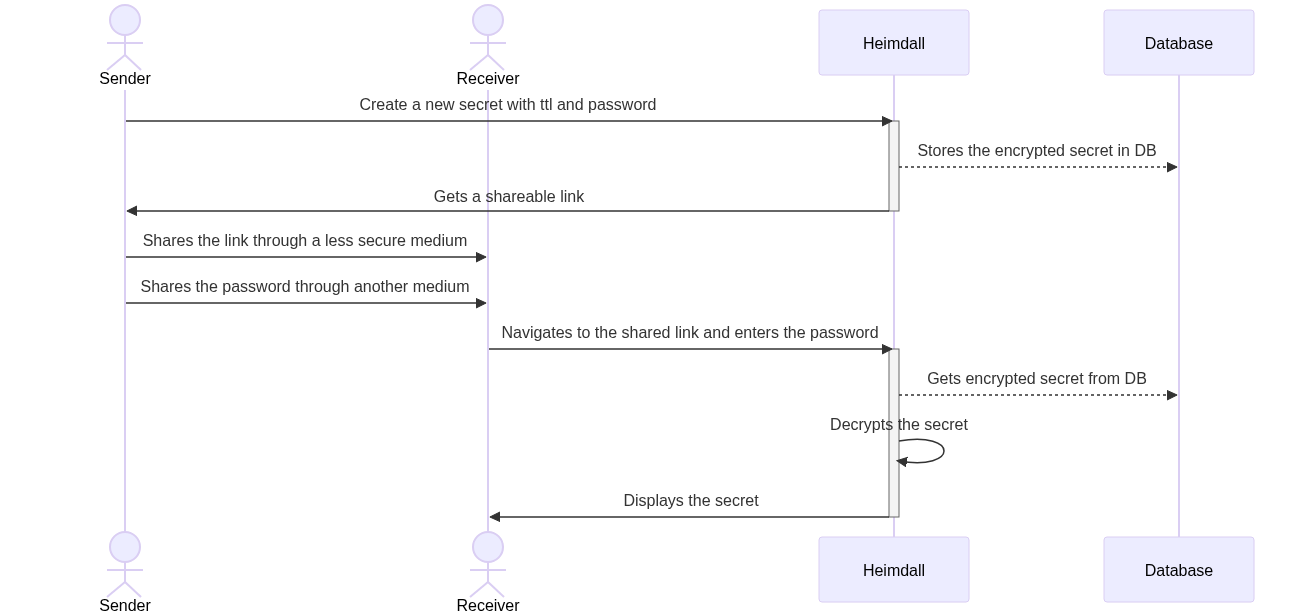
A sender first navigates to Heimdall to create a new secret. The sender can choose
an encryption algorithm (to encrypt the secret at rest), expiration time and
other parameters before hitting the "Create" button. Upon creation, Heimdall will
give the sender an option to copy a shareable link to the secret. The sender can
then share the link with a receiver, who upon navigating to the page will be
prompted for a password (or a key) which is needed for decrypting the secret. If
the receiver uses the correct key within the expiration period, the receiver
can get the secret.
If the receiver enters the wrong password or tries to access the link after it
has expired, the receiver won't be able to view the secret.
[](https://mermaid.live/edit#pako:eNqFUr1uwjAQfpWTZ3iBDAxtqmbqQNYsR3wQq_5J7QsIId6954TQFKQ2k-P7_vzZF9UGTapQib4G8i2VBg8RXeNBPmw5RKgBE9TkNcXl9jZvb6klc8yDadRjZNOaHj1DlQEVGafR2udxmcclMu4w0cyvYb3ZQFXAayRkAgRPJ0jURmI4Ge6A2QJ6LVIpnULU90jmmAnV9F_BOguVBdSSlRJwRyDni-eeSc-CxkP5cicIvi7gnTiJbepQEuwsgTX-c8JoWtosA2_FJxMmn8yQRQzDoRMpSyllxyESONJmcH-R53P9CPgg-_GBup2L-sCjOUgkYYdRYEyupxC5KPJM8bf2f52NHTy1tY_BPfQl_iWNsMlgQi4RcrjSpN7i-Rmx7FOtlKPo0Gh5jJc8b5TgHTWqkKWmPQ6WG9X4q0CHXgvrTRu5XFXs0SZaKRw41GffqoLjQDPo9qBvqOs3hAH3NA)
```mermaid
sequenceDiagram
actor S as Sender
actor R as Receiver
participant H as Heimdall
participant D as Database
S ->> H: Create a new secret with ttl and password
activate H
H -->> D: Stores the encrypted secret in DB
H ->> S: Gets a shareable link
deactivate H
S ->> R: Shares the link through a less secure medium
S ->> R: Shares the password through another medium
R ->> H: Navigates to the shared link and enters the password
activate H
H -->> D: Gets encrypted secret from DB
H ->> H: Decrypts the secret
H ->> R: Displays the secret
deactivate H
```
You might think if I need to share a URL with the receiver why not just share
the secret directly instead of using Heimdall? Heimdall's power comes with two
main features:
* Ability to share URL with TLL, max reads, IP address filtering etc
* Ability to encrypt secret as an added layer of protection
## Installation
### Quick Setup for Demo/Testing (tested on Linux and Mac)
__Recommeded for judges__
Pull the app and run with default config values:
__NOTE: Make sure other already running containers don't interfere with system
ports `5432` and `4000`__
* Run `make demo`
* This will start up docker containers needed to run the app
* Includes `postgres` and `phoenix` containers
* This is the app and this container needs to keep running
* Without stopping the one above, in a separate terminal session, run `make setup`
* This will run the DB migrations needed and setup your app
* This command will probably give you an error at the end about starting
`Ranch` process but that's okay.
* Refer to [Configurations](#configurations) sections for default values.
### Proper setup
Keep the following things in mind:
* Ability to run Elixir or built erlang release
* Postgres DB server.
* __Make sure to set environment variable `DATABASE_URL`__ at runtime
* Check out [Configurations](#configurations) section of this README.
* You might want to at least tweak `ADMIN_` related env vars
* Set up `PHX_HOST` and `PORT` env vars accordingly
* Would be ideal if you could generate a new secret listed in
`SECRET_KEY_BASE` part of that section
### Elixir (ASDF) + Postgres (via Docker)
If you have Elixir on your machine, simply pull the app locally and do the
following:
* `asdf install` to install `elixir`, `erlang` and `nodejs` versions.
* This should install what the app needs
* Run `mix deps.get` to fetch the dependencies
* Make sure `docker` is started and run `make start-infra`.
* This will start a new postgres container. Ignore if you already have
postgres running.
* Update `HEIMDALL_DB_USERNAME`, `HEIMDALL_DB_PASSWORD`, `HEIMDALL_DB_HOST`
and `HEIMDALL_DB_NAME` accordingly to if you're setting up your own
Postgres
* Run using `mix phx.server` and enjoy!
### Deploy container to a Cloud Provider (example: Heroku)
* This app comes up its `Dockerfile` ready for `Heroku`. Make sure to set up
environments as expected and deploy this to Heroku by following container
deployment instructions.
## Features
* Ability to share information as a URL with a TLL.
* Ability to encrypt information using encryption algorithms.
* Supported encryption algoritms:
* `aes_gcm`: Symmetric-key encryption. Can use any (but same) password to encrypt/send and decrypt/receive information
* `plaintext`: No password needed to encrypt/send or decrypt/receive
* `rsa`: Asymmetric-key encryption. Use public key to encrypt/send and private key to decrypt/receive information.
* Encryption of secure information at rest (even when sharing using `plaintext` algo)
* Ability to provide Max failed decryption attempts, after which the secret is effectively stale.
* Ability to provide Max successful reads, after which the secret is effectively stale.
* Ability to whitelist received IP addresses using IP Regex.
* Auto deletion of expired secrets
* Admin interface for ease of management (`/admin`) path
## Configurations
Heimdall is built with both ease-of-setup and _some_ configurability in mind. We know
that people approach security differently and will have their own use cases
that Heimdall could serve, so we have exposed some common configuration
parameters for Heimdall, powered by environment variables that take affect
at container/application start-time.
| env var name | description | default |
|:---------------------------------------:|:--------------------------------------------------------------------------------------------------:|:-----------:|
|`DATABASE_URL` | URL for the Postgres DB to be used for the app | N/A |
|`SECRET_KEY_BASE` | Secret key used by Phoenix (use `mix phx.gen.secret` for a new one) | |
|`PHX_HOST` | Host for phoenix's use (example: `heimdall.thebugcatcher.com`) | empty |
|`PORT` | HTTP Port for phoenix's use | 4000 |
|`ADMIN_USER` | Username for HTTP Basic auth for admin interface | admin |
|`ADMIN_PASSWORD` | Password for HTTP Basic auth for admin interface | admin |
|`ADMIN_SECRETS_SHOW_LIMIT` | Upper limit of number of secrets to display in Admin interface | 200 |
|`PRUNE_OLD_SECRETS` | Deletes expired/stale (past max attempts) secrets | true |
|`SECRETS_PRUNER_INTERVAL_MS` | Time interval in milliseconds between each prune if `PRUNE_OLD_SECRETS` is `true` | 30000 |
|`DELETE_QUERY_TIMEOUT_MS` | Maximum time in milliseconds each prune query should take if `PRUNE_OLD_SECRETS` is `true` | 1500 |
|`SECRET_EXPIRATION_CHECK_PERIOD_MS` | Time interval in milliseconds to check whether a secret is expired when trying to decrypt it | 5000 |
## Quality + Security
* __Extensive automated tests__: Even though Heimdall is a product of a hackathon, we've made sure to test it as
well as we could in the given time. We've made sure to have 100% code coverage, and while we recognize it
doesn't mean 100% real test coverage, we still feel it speaks for the quality of the application.
* __Security post decryption__: We've spent some time coming up with ways people could break into this app.
For example, we've leveraged `LiveView` to make sure once a secret is decrypted, we keep checking at
a periodic interval to make sure it cannot be viewed after it's expired. This happens even though
the receiver doesn't refresh the page, or forgets to close the page after decryption.
* __Security post expiration__: Once a secret has expired, we've made sure to have a Pruner process to
delete expired secrets from the Heimdall database. It helps keep the app even more secure and also ensures
the performance of the app doesn't degrade over time.
And many more security-related things we didn't have time to point out.. 😅
## Naming
> Heimdall, Old Norse Heimdallr, in Norse mythology, the watchman of the gods
Just the way Heimdall protects the Norse gods and Bifrost, the bridge between realms,
this app protects your sensitive data while providing a channel to share it with
others.
> 
>
> Credit: giphy/gifs/marvel-thor-idris-elba-XbPPSwVMWwisg
## About the Team
This app was built as part of Spawnfest 2023 by a wife + husband team: Susan Walker and Adi Iyengar.
Susan has always been interested in Elixir and BEAM-based languages, and Adi being comfortable with
them thought it would be a fun couple's activity to try and build Heimdall at Spawnfest.
* [@thebugcatcher](https://github.com/thebugcatcher)
* [@susanwalker](https://github.com/susanwalker)
## Similar Apps
* [snappass](https://github.com/pinterest/snappass): SnapPass is a great app, but it doesn't have many of
Heimdall's features. It doesn't have the ability to password-protect the secret, auto-refresh after expiration,
IP-address whitelisting etc. Also, it's not powered by BEAM!