https://github.com/thecoderadi/zipouter
A simple npm package to extract and process the contents of a zip file.
https://github.com/thecoderadi/zipouter
javascript typescript zip zipouter
Last synced: 3 months ago
JSON representation
A simple npm package to extract and process the contents of a zip file.
- Host: GitHub
- URL: https://github.com/thecoderadi/zipouter
- Owner: TheCoderAdi
- Created: 2024-03-10T06:56:45.000Z (over 2 years ago)
- Default Branch: main
- Last Pushed: 2024-03-11T10:07:10.000Z (over 2 years ago)
- Last Synced: 2025-08-23T08:52:27.079Z (12 months ago)
- Topics: javascript, typescript, zip, zipouter
- Language: TypeScript
- Homepage: https://www.npmjs.com/package/zipouter
- Size: 36.1 KB
- Stars: 1
- Watchers: 2
- Forks: 0
- Open Issues: 0
-
Metadata Files:
- Readme: README.md
Awesome Lists containing this project
README
# zipouter
[](https://www.npmjs.com/package/zipouter)
[](https://opensource.org/licenses/MIT)
A simple npm package to extract and process the contents of a zip file.
## Installation
```bash
npm install zipouter
```
## Additional Package to Install
```bash
npm install adm-zip
```
## Usage
```javascript
const { extractAndProcessZip } = require("zipouter");
or;
import { extractAndProcessZip } from "zipouter";
const zipFileName = "your-zip-file.zip";
extractAndProcessZip(zipFileName)
.then((results) => {
console.log("Compilation Results:", results);
})
.catch((error) => {
console.error("Error:", error.message);
});
```
## Important
Before proceeding further, ensure that you have Java, Node.js, and Python installed on your local machine. You can download and install them from the official websites:
- [Java](https://www.oracle.com/java/technologies/javase-downloads.html)
- [Node.js](https://nodejs.org/)
- [Python](https://www.python.org/)
## Features
- Extract and process zip files.
- Support for multiple programming languages, including Java, JavaScript, Python, and more.
## API Reference
### `extractAndProcessZip(zipFileName: string): Promise`
Extracts and processes the contents of a zip file.
- `zipFileName`: The name of the zip file to process.
Returns a promise that resolves to an array of `CompilationResult` objects.
#### `CompilationResult`
- `fileName`: Name of the processed file.
- `output`: Compilation output or error message.
## Supported Languages
- **Java**: Files with a `.java` extension.
- **JavaScript**: Files with a `.js` extension.
- **Python**: Files with a `.py` extension.
## Example
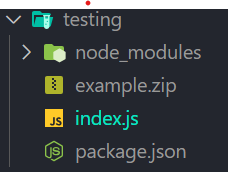
# 0.First upload your zip file in the current directory
# 1.import and use the extractAndProcessZip from zipouter
```javascript
import { extractAndProcessZip } from "zipouter";
const zipFileName = "example.zip";
extractAndProcessZip(zipFileName)
.then((results) => {
console.log("Compilation Results:", results);
})
.catch((error) => {
console.error("Error:", error);
});
```
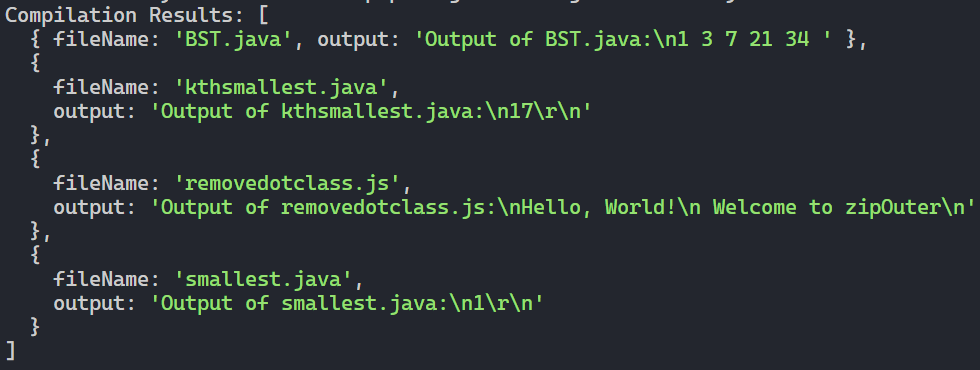
# 2.Output
## License
This project is licensed under the MIT License - see the [LICENSE](LICENSE) file for details.
## Issues
If you encounter any issues or have suggestions, please [open an issue on GitHub](https://github.com/TheCoderAdi/zipouter/issues).