https://github.com/thecodingmachine/mouf-tests
Test your mouf skills !
https://github.com/thecodingmachine/mouf-tests
Last synced: 4 months ago
JSON representation
Test your mouf skills !
- Host: GitHub
- URL: https://github.com/thecodingmachine/mouf-tests
- Owner: thecodingmachine
- Created: 2016-10-18T09:32:10.000Z (over 9 years ago)
- Default Branch: master
- Last Pushed: 2017-06-26T05:02:36.000Z (almost 9 years ago)
- Last Synced: 2025-10-20T06:24:52.045Z (8 months ago)
- Language: PHP
- Size: 262 KB
- Stars: 0
- Watchers: 7
- Forks: 9
- Open Issues: 2
-
Metadata Files:
- Readme: README.md
Awesome Lists containing this project
README
# CRUD Test on Mouf
Hi there! If you are reading these lines, it surely means we are close to count you among TheCodingMachine's developper team.
As we surely said already before, we work alot with our HomeBrewed Framework called [Mouf](http://mouf-php.com/). Therefore here is a simple CRUD (CReate Read Update Delete) test about cars (I know, we could have found a more funny example :))
## Requirements
You will need PHP 7, Apache 2.4, and MySQL installed to proceed.
## Skills
To achieve this test, you will need basic skills in :
* Git
* PHP
* Javascript (Angular of JQuery)
Moreover, which is quite important to us, you will also need to e skilled in discovering and learning Mouf. No worries, there is plenty of documentation to help you install the framework, and to teach you how to use the 2 main packages required to code this example :
* **install mouf:** [http://mouf-php.com/packages/mouf/mouf/doc/installing_mouf.md](http://mouf-php.com/packages/mouf/mouf/doc/installing_mouf.md)
* **Using the MVC package (Splash):** [http://mouf-php.com/packages/mouf/mvc.splash/version/8.0-dev/README.md](http://mouf-php.com/packages/mouf/mvc.splash/version/8.0-dev/README.md)
* **Using our awsome ORM (TDBM):** [http://mouf-php.com/packages/mouf/database.tdbm/version/4.1.5.0/README.md](http://mouf-php.com/packages/mouf/database.tdbm/version/4.1.5.0/README.md)
* **Manage weblibraries in Mouf:** [http://mouf-php.com/packages/mouf/html.utils.weblibrarymanager/README.md](http://mouf-php.com/packages/mouf/html.utils.weblibrarymanager/README.md)
## Install the test project
Please fork this repository : [http://git.thecodingmachine.com/tcm-projects/mouf-test.git](https://github.com/thecodingmachine/mouf-tests.git) in fact, you may have done thas already as you are reading this project's README file :).
Create a database for your project (we'll assume you named it 'test_mouf'). Then run the following SQL statements against the database :
```sql
CREATE TABLE `brands` (
`id` int(11) NOT NULL,
`name` varchar(255) COLLATE utf8_unicode_ci NOT NULL,
`logo` varchar(255) COLLATE utf8_unicode_ci NOT NULL
) ENGINE=InnoDB DEFAULT CHARSET=utf8 COLLATE=utf8_unicode_ci;
CREATE TABLE `cars` (
`id` int(11) NOT NULL,
`brand_id` int(11) NOT NULL,
`name` varchar(255) COLLATE utf8_unicode_ci NOT NULL,
`max_speed` int(11) NOT NULL
) ENGINE=InnoDB DEFAULT CHARSET=utf8 COLLATE=utf8_unicode_ci;
ALTER TABLE `brands`
ADD PRIMARY KEY (`id`);
ALTER TABLE `cars`
ADD PRIMARY KEY (`id`),
ADD KEY `brand_id` (`brand_id`);
ALTER TABLE `brands`
MODIFY `id` int(11) NOT NULL AUTO_INCREMENT;
--
-- AUTO_INCREMENT for table `cars`
--
ALTER TABLE `cars`
MODIFY `id` int(11) NOT NULL AUTO_INCREMENT;
ALTER TABLE `cars`
ADD CONSTRAINT `cars_ibfk_1` FOREIGN KEY (`brand_id`) REFERENCES `brands` (`id`);
INSERT INTO `brands` VALUES('1', 'Tata', 'logo0.png');
INSERT INTO `brands` VALUES('2', 'Porsche', 'logo1.png');
INSERT INTO `brands` VALUES('3', 'Audi', 'logo2.png');
```
In order to complete the installation of Mouf, you will have to enter the configuration settings (DB_*):
* **DB_HOST**: should be localhost
* **DB_PORT**: leave empty for MySQL default port
* **DB_NAME**: the name of the database (test_mouf)
* **DB_USERNAME**: your mysql user name
* **DB_PASSWORD**: your mysql password
Please follow Mouf's installation steps (have a look at the documentation link aove). Once done, the /vendor/mouf/mouf page should show no errors:

Also, if you take a look to the project's files, you will see, among others, the following files:
* src *your php classes are here*
* MoufTest *root namespace for the project*
* Controllers *controllers should be placed here*
* RootController.php
* Model *Your model*
* Bean *Reflect the Table rows*
* Dao *perform requests to the DB*
* views *store the VIEWS called by your Controllers*
* root
* index.twig *the view called to display the Splash welcome screen*
You shoud see the Splash welcome page on your application's ROOT url (ex: http://localhost/mouf-test/) :

If you have gone so far and everything is ok, it means you are ready to code, congratulations !
## What you should achieve
Basically, we want ou to implement 2 screens :
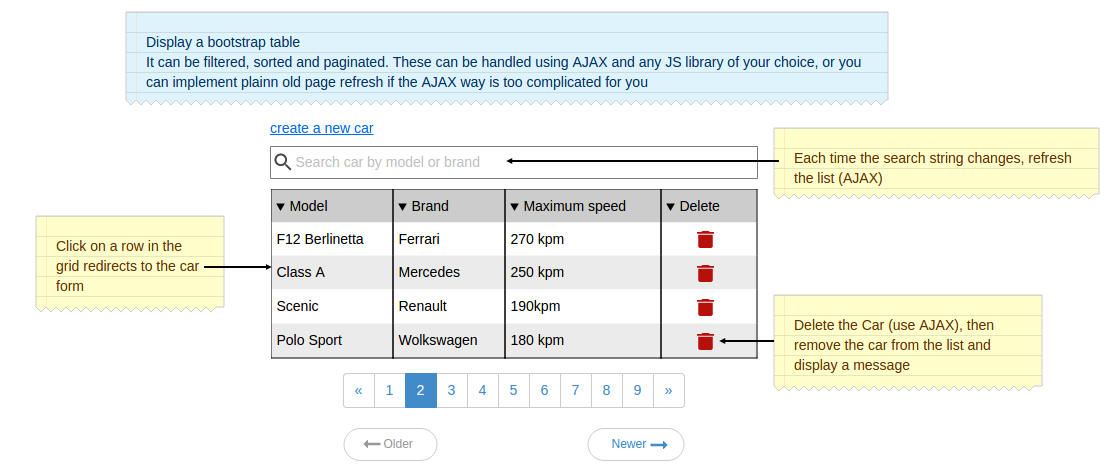
* Cars list : a paginated and filterable list of cars. A car may be removed from that list
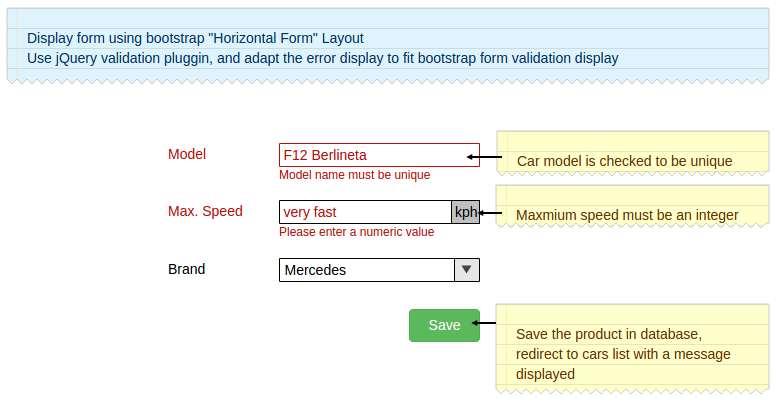
* Car form : add or update a car. Some controls are applied on the form
### Car list
### Car form
These screens should be coded in a NEW controller called CarController please do not use the existing ```RootController```. Most likelly you will need to code JavaScript. Please create a dedicated JS file in ```src/public/js``` and add it to the template using the *WebLibraryManager* (see documentation link above).
If you have any troubles installing the project, or any other question, please feel free to contact us at rh@thecodingmachine.com, for a quick response please contact Kevin - kevin.nguyen.tcm or Xavier - x.huberty on skype !
At the end, please do not open a pull request.
Send us an email with your fork name (most of the time, it's your login) and the branch name.
Then we can test your code by checkouting the branch.
Happy Coding !