https://github.com/thedogecraft/sparkle
A Windows app to debloat and optimize your PC
https://github.com/thedogecraft/sparkle
debloater opimization registry-tweaks windows windows-10-debloat windows-10-optimization windows-cleaner windows-debloat windows-optimization windows-optimization-tool windows-optimizer windows-tweaks
Last synced: 4 months ago
JSON representation
A Windows app to debloat and optimize your PC
- Host: GitHub
- URL: https://github.com/thedogecraft/sparkle
- Owner: thedogecraft
- License: gpl-3.0
- Created: 2023-12-19T04:12:40.000Z (over 2 years ago)
- Default Branch: v2
- Last Pushed: 2026-04-03T04:06:59.000Z (4 months ago)
- Last Synced: 2026-04-03T08:28:31.276Z (4 months ago)
- Topics: debloater, opimization, registry-tweaks, windows, windows-10-debloat, windows-10-optimization, windows-cleaner, windows-debloat, windows-optimization, windows-optimization-tool, windows-optimizer, windows-tweaks
- Language: TypeScript
- Homepage: https://getsparkle.net
- Size: 4.76 MB
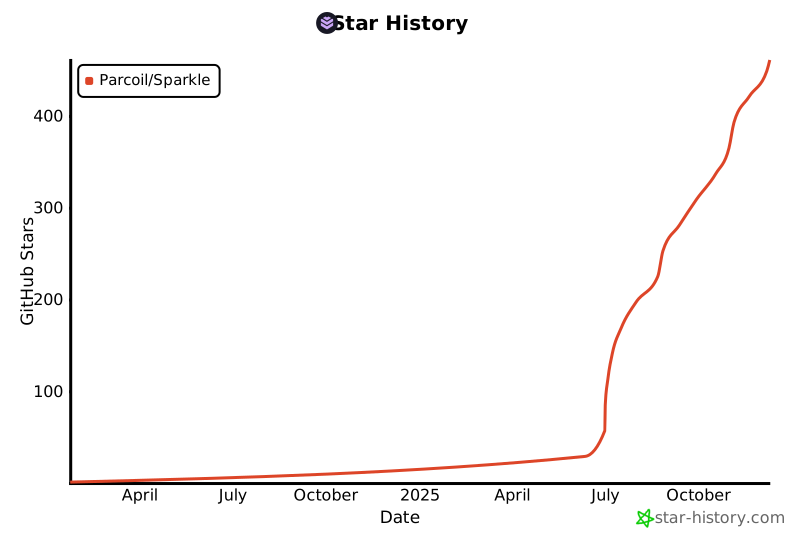
- Stars: 1,203
- Watchers: 10
- Forks: 41
- Open Issues: 7
-
Metadata Files:
- Readme: README.md
- Funding: .github/FUNDING.yml
- License: LICENSE
Awesome Lists containing this project
README

Sparkle
A Windows app to debloat and optimize your PC


Install with Powershell:
```powershell
irm https://raw.githubusercontent.com/Parcoil/Sparkle/v2/get.ps1 | iex
```
Download Installer/Portable
Download From Sourceforge

> [!WARNING]
> Sparkle is currently in beta. While we've tested it extensively, you may encounter some bugs. Please back up your system before applying tweaks and report any issues you find.
🚀 Features
- 📈 Apply Tweaks to Debloat/Optimize your system
- 🗑️ Clean All Temp files in one place
- 📦 Run Utilities Such as "cleanmgr", "sfc /scannow", "chkdisk" and more inside a GUI
- 🌐 Change DNS to Cloudflare, Google, OpenDNS Or a custom one with Sparkle dns mananger
- 🎛️ Install apps with the built-in Winget and Chocolatey integration
- 📁 Backup and Revert changes with GUI Restore Point manager
- ⚙️ View System Stats
📃 Docs
You can find the docs here
the docs cover all the tweaks, how they work what they do and all of Sparkle's Pages and tools.
💖 Credits
-
CTT's WinUtil (Some of the tweaks & Part of the inspo for making this v2 of this project)
-
Raphire Win11Debloat ( Secondary Debloat script offered in Sparkle debloat script)
👥 Contributing
Adding New Tweaks
- Tweaks are located in
/tweaks
Refer to the docs for more info on how to add new tweaks
Other Ways to Contribute
- 🐛 Report bugs and issues
- 💡 Suggest new features or improvements
- 📝 Improve documentation
- 🎨 Enhance the UI/UX
- 🧪 Improve code quality
🛠️ Building Sparkle
To build sparkle you will need the following
-
Node.js v22 or higher
- Windows 10/11
🤧 What if I’m allergic to Electron?
That’s totally fine, this project probably isn’t for you.
You might want to check out [CTT WinUtil](https://github.com/ChrisTitusTech/winutil),
A PowerShell based alternative that keeps things nice and lightweight.
this message is inspired by [this](https://github.com/nukeop/nuclear/blob/legacy/electron/docs/electron.md)
---
> [!IMPORTANT]
> The version of sparkle in the repo is most likely newer than the latest release. expect bugs and unreleased features
-
Clone the repository:
git clone https://github.com/Parcoil/Sparkle
cd Sparkle
-
Install dependencies:
pnpm i
-
Start the app in development mode:
pnpm dev
This will launch Sparkle with hot reload for both the Electron main and renderer processes.
-
Build for production:
pnpm build
This will generate optimized production builds.
Made with ❤️ by Parcoil
## Star History