https://github.com/theduffman85/crowdsec-web-ui
A modern, responsive web interface for managing CrowdSec alerts and decisions.
https://github.com/theduffman85/crowdsec-web-ui
crowdsec crowdsec-lapi crowdsec-manager dashboard docker-container gotify mqtt notifications ntfy self-hosted
Last synced: 2 months ago
JSON representation
A modern, responsive web interface for managing CrowdSec alerts and decisions.
- Host: GitHub
- URL: https://github.com/theduffman85/crowdsec-web-ui
- Owner: TheDuffman85
- License: agpl-3.0
- Created: 2025-12-09T21:07:39.000Z (8 months ago)
- Default Branch: main
- Last Pushed: 2026-05-07T15:41:32.000Z (3 months ago)
- Last Synced: 2026-05-07T17:29:15.160Z (3 months ago)
- Topics: crowdsec, crowdsec-lapi, crowdsec-manager, dashboard, docker-container, gotify, mqtt, notifications, ntfy, self-hosted
- Language: TypeScript
- Homepage:
- Size: 5.08 MB
- Stars: 261
- Watchers: 2
- Forks: 10
- Open Issues: 0
-
Metadata Files:
- Readme: README.md
- License: LICENSE
Awesome Lists containing this project
README

[](https://github.com/TheDuffman85/crowdsec-web-ui/actions/workflows/release.yml)
[](https://github.com/TheDuffman85/crowdsec-web-ui/actions/workflows/trivy-scan.yml)
[](https://github.com/TheDuffman85/crowdsec-web-ui/blob/main/LICENSE)
[](https://github.com/TheDuffman85/crowdsec-web-ui/commits/main)
[](https://github.com/users/TheDuffman85/packages/container/package/crowdsec-web-ui)
# CrowdSec Web UI
A modern, responsive web interface for managing [CrowdSec](https://crowdsec.net/) alerts and decisions. Built with **React**, **Vite**, **Node.js**, and **Tailwind CSS**.
> [!IMPORTANT]
> **Improved Performance & Better Scale**: Recent backend and caching improvements significantly reduce resource pressure and improve responsiveness across the application. CrowdSec Web UI now also supports larger-scale deployments more reliably, including environments with multiple machines and high alert or decision volumes.





## Features
### Dashboard
High-level overview of total alerts and live active decisions. Statistics and top lists with dynamic filtering, including simulation-mode visibility when enabled.

### Alerts Management
View detailed logs of security events, including clear simulation-mode labeling, broad free-text filtering, and optional advanced search syntax.

### Alert Details
Detailed modal view showing attacker IP, AS information, location with map, and triggered events breakdown.

### Decisions Management
View and manage active bans/decisions. Supports filtering by status (active/expired), simulation mode, hiding duplicate decisions, and the same unified search syntax used on Alerts.

### Manual Actions
Ban IPs directly from the UI with custom duration and reason.

### Update Notifications
Automatically detects new container images on GitHub Container Registry (GHCR). A badge appears in the sidebar when an update is available for your current tag.
### Notification Center
Create notification rules for alert spikes, alert thresholds, recent CVE activity, and application updates, then deliver them to one or more outbound destinations such as Email, Gotify, MQTT, ntfy, or Webhooks.
### Unified Search
- **Free-text first**: The Alerts and Decisions search bars still support normal free-text queries.
- **Advanced syntax**: Power users can refine searches with quoted phrases, `field:value`, `AND`, `OR`, `NOT`, unary `-`, and parentheses.
- **Inline field search**: Mix free text and fielded terms in the same query, for example `country:germany ssh`.
- **Built-in help**: Use the `Info` button next to each search bar to open the page-specific syntax reference and examples.
### Modern UI
- **Dark/Light Mode**: Full support for both themes.
- **Responsive**: Optimized for mobile and desktop.
- **Real-time**: Fast interactions using modern React technology.
> [!CAUTION]
> **Security Notice**: This application **does not provide any built-in authentication mechanism**. It is NOT intended to be exposed publicly without protection. We strongly recommend deploying this application behind a reverse proxy with an Identity Provider (IdP) such as [Authentik](https://goauthentik.io/), [Authelia](https://www.authelia.com/), or [Keycloak](https://www.keycloak.org/) to handle authentication and authorization.
## Architecture
- **Client**: React (Vite) + Tailwind CSS. Located in `client/`.
- **Server**: Node.js (Hono). Acts as an intelligent caching layer for CrowdSec Local API (LAPI) with delta updates and optimized chunked historical data sync for improved performance and larger-scale deployments.
- **Build Output**: The root build emits the frontend to `dist/client` and the compiled server to `dist/server`.
- **Database**: SQLite (`better-sqlite3`). Persists alerts and decisions locally in `/app/data/crowdsec.db` to reduce memory usage and support historical data.
- **Security**: The application runs as a non-root user (`node`) inside the container and communicates with CrowdSec via HTTP/LAPI. It uses **Machine Authentication** to obtain a JWT for full access (read/write), either via watcher `User/Password` or agent **mTLS**.
## Prerequisites
- **CrowdSec**: A running CrowdSec instance.
- **Authentication**: Configure exactly one CrowdSec LAPI auth mode for this web UI:
1. **Watcher password auth**
Generate a secure password:
```bash
openssl rand -hex 32
```
Create the machine:
```bash
docker exec crowdsec cscli machines add crowdsec-web-ui --password -f /dev/null
```
2. **Agent mTLS auth**
Configure CrowdSec LAPI TLS auth and generate an agent client certificate/key pair for this Web UI as described in the [CrowdSec TLS authentication docs](https://docs.crowdsec.net/docs/local_api/tls_auth/).
> [!NOTE]
> The `-f /dev/null` flag is crucial. It tells `cscli` **not** to overwrite the existing credentials file of the CrowdSec container. We only want to register the machine in the database, not change the container's local config.
> [!IMPORTANT]
> Choose exactly one auth mode:
> - Password auth: `CROWDSEC_USER` + `CROWDSEC_PASSWORD`
> - mTLS auth: `CROWDSEC_TLS_CERT_PATH` + `CROWDSEC_TLS_KEY_PATH` with optional `CROWDSEC_TLS_CA_CERT_PATH`
>
> Do not set both modes at the same time. The container will fail fast on mixed or partial auth configuration.
## Run with Docker (Recommended)
The examples below intentionally use only the required environment variables. Optional knobs are documented in [Environment Variables](#environment-variables).
1. **Build the image**:
```bash
docker build -t crowdsec-web-ui .
```
You can optionally specify `DOCKER_IMAGE_REF` to override the default image reference used for checking updates (useful for forks or private registries):
```bash
docker build --build-arg DOCKER_IMAGE_REF=my-registry/my-image -t crowdsec-web-ui .
```
> [!NOTE]
> Current Docker images are based on Node.js rather than Bun, so the previous Bun/AVX-specific x64 runtime limitation no longer applies.
2. **Run the container**:
Provide the CrowdSec LAPI URL and one supported auth mode.
```bash
docker run -d \
--name crowdsec_web_ui \
-p 3000:3000 \
-e CROWDSEC_URL=http://:8080 \
-e CROWDSEC_USER=crowdsec-web-ui \
-e CROWDSEC_PASSWORD= \
-v $(pwd)/data:/app/data \
--network your_crowdsec_network \
crowdsec-web-ui
```
> [!NOTE]
> Ensure the container is on the same Docker network as CrowdSec so it can reach the URL.
### Docker Compose Example
```yaml
services:
crowdsec-web-ui:
image: ghcr.io/theduffman85/crowdsec-web-ui:latest
container_name: crowdsec_web_ui
ports:
- "3000:3000"
environment:
- CROWDSEC_URL=http://crowdsec:8080
- CROWDSEC_USER=crowdsec-web-ui
- CROWDSEC_PASSWORD=
volumes:
- ./data:/app/data
restart: unless-stopped
```
The repository also ships a minimal [`docker-compose.yml`](docker-compose.yml) that builds the image locally and reads the same runtime inputs from `.env`.
### Docker Compose Example (mTLS Authentication)
```yaml
services:
crowdsec-web-ui:
image: ghcr.io/theduffman85/crowdsec-web-ui:latest
container_name: crowdsec_web_ui
ports:
- "3000:3000"
environment:
- CROWDSEC_URL=https://crowdsec:8080
- CROWDSEC_TLS_CERT_PATH=/certs/agent.pem
- CROWDSEC_TLS_KEY_PATH=/certs/agent-key.pem
# Optional when CrowdSec LAPI uses a private or self-signed CA
# - CROWDSEC_TLS_CA_CERT_PATH=/certs/ca.pem
volumes:
- ./data:/app/data
- /path/on/host/agent.pem:/certs/agent.pem:ro
- /path/on/host/agent-key.pem:/certs/agent-key.pem:ro
# - /path/on/host/ca.pem:/certs/ca.pem:ro
restart: unless-stopped
```
## Environment Variables
### CrowdSec Connection and Authentication
Choose exactly one auth mode: password auth or mTLS auth.
| Variable | Default | Required | Description |
| --- | --- | --- | --- |
| `CROWDSEC_URL` | `http://crowdsec:8080` | Usually | CrowdSec LAPI base URL. Use `https://...` when TLS is enabled. |
| `CROWDSEC_USER` | none | Password auth only | CrowdSec machine/user name for watcher-password login. Must be set together with `CROWDSEC_PASSWORD`. |
| `CROWDSEC_PASSWORD` | none | Password auth only | CrowdSec watcher password. Must be set together with `CROWDSEC_USER`. |
| `CROWDSEC_TLS_CERT_PATH` | none | mTLS only | Path inside the container or host process to the client certificate used for CrowdSec mTLS auth. |
| `CROWDSEC_TLS_KEY_PATH` | none | mTLS only | Path to the client private key used for CrowdSec mTLS auth. |
| `CROWDSEC_TLS_CA_CERT_PATH` | none | No | Optional CA bundle used to verify the CrowdSec LAPI server certificate during mTLS connections. |
### Runtime Settings
| Variable | Default | Description |
| --- | --- | --- |
| `PORT` | `3000` | HTTP listen port. If you change this in Docker, also update port mappings and the container health check to match. |
| `BASE_PATH` | empty | Serve the UI under a path prefix such as `/crowdsec`. Start with `/` and omit the trailing slash. |
| `DB_DIR` | `/app/data` | Directory that stores the SQLite database and other persisted app data. If you change it, update your volume mounts too. |
| `CROWDSEC_LOOKBACK_PERIOD` | `168h` | Alert/history retention window used for sync and cleanup. Accepts values like `12h`, `7d`, or `30m`. |
| `CROWDSEC_REFRESH_INTERVAL` | `30s` | Normal background refresh interval. Accepts `0`, `manual`, `5s`, `30s`, `1m`, `5m`, or other `s`/`m`/`h`/`d` values. |
| `CROWDSEC_IDLE_REFRESH_INTERVAL` | `5m` | Refresh interval used when the app considers itself idle. |
| `CROWDSEC_IDLE_THRESHOLD` | `2m` | Inactivity period before the app switches to idle refresh behavior. |
| `CROWDSEC_FULL_REFRESH_INTERVAL` | `5m` | Interval for full cache refreshes while active. |
| `CROWDSEC_LAPI_REQUEST_TIMEOUT` | `30s` | Timeout for individual CrowdSec LAPI requests. Increase this for high-latency or very large CrowdSec datasets. |
| `CROWDSEC_ALERT_SYNC_CHUNK` | `6h` | Window size used when syncing historical and active-decision alerts from LAPI. Smaller chunks reduce per-request payload size. |
| `CROWDSEC_ALERT_SYNC_MIN_CHUNK` | `15m` | Smallest window size used when retrying timed-out alert sync windows. |
| `CROWDSEC_BOOTSTRAP_RETRY_DELAY` | `30s` | Delay between background retries when initial CrowdSec bootstrap fails. |
| `CROWDSEC_BOOTSTRAP_RETRY_ENABLED` | `true` | Enables background bootstrap retry after startup or login failures. |
| `CROWDSEC_SIMULATIONS_ENABLED` | `false` | Include simulation-mode alerts and decisions from CrowdSec and expose the related UI indicators. |
| `CROWDSEC_ALERT_INCLUDE_ORIGINS` | empty | Comma-separated list of exact origins to include when syncing alerts. |
| `CROWDSEC_ALERT_EXCLUDE_ORIGINS` | empty | Comma-separated list of exact origins to drop after alert results are merged. |
| `CROWDSEC_ALERT_INCLUDE_CAPI` | `false` | Add the Central API / community-blocklist alert feed. |
| `CROWDSEC_ALERT_INCLUDE_ORIGIN_EMPTY` | `false` | Keep alerts whose effective origin is empty when using explicit include filters. |
| `CROWDSEC_ALERT_EXCLUDE_ORIGIN_EMPTY` | `false` | Drop alerts whose effective origin is empty. |
| `NOTIFICATION_SECRET_KEY` | auto-generated and persisted | Optional fixed encryption key for saved notification secrets. If unset, the app generates one and stores it in app metadata. |
| `NOTIFICATION_ALLOW_PRIVATE_ADDRESSES` | `true` | Allow notification destinations on private, loopback, and link-local addresses. Set to `false` to block them. |
| `NOTIFICATION_DEBUG_PAYLOADS` | `false` | When enabled, failed notification deliveries log a truncated rendered request body for troubleshooting. Use carefully because payloads may contain sensitive data. |
| `NODE_EXTRA_CA_CERTS` | none | Optional Node.js trust bundle for HTTPS connections, useful when using password auth against a private or self-signed CrowdSec CA. |
### Build and Image Metadata
These values are mainly relevant when building your own image or local production bundle.
| Variable | Default | Description |
| --- | --- | --- |
| `DOCKER_IMAGE_REF` | `theduffman85/crowdsec-web-ui` | Image reference used by the built-in update checker. Accepts `owner/repo` or registry-prefixed forms such as `ghcr.io/owner/repo`. |
| `VITE_VERSION` | `0.0.0` | Version label shown in the UI and used for update-check comparisons. |
| `VITE_BRANCH` | `main` | Branch label shown in the UI. `dev` enables dev-build update comparisons. |
| `VITE_COMMIT_HASH` | empty | Commit hash displayed in the sidebar and used for build metadata/update logic. |
| `VITE_BUILD_DATE` | auto-generated at build time | Build timestamp shown in the UI. |
| `VITE_REPO_URL` | `https://github.com/TheDuffman85/crowdsec-web-ui` | Repository URL used for release and commit links in the UI. |
### Development and Test Only
| Variable | Default | Description |
| --- | --- | --- |
| `BACKEND_URL` | `http://localhost:3000` | Vite dev-server proxy target for `/api` during local frontend development. |
| `CROWDSEC_MTLS_IMAGE` | `crowdsecurity/crowdsec:latest` | Override image used by `pnpm run test:mtls:crowdsec`. |
| `CROWDSEC_MTLS_KEEP` | `0` | Set to `1` to keep the disposable CrowdSec test container after the mTLS smoke test. |
| `CROWDSEC_MTLS_CONTAINER` | auto-generated | Override the disposable container name used by the mTLS smoke test. |
> [!NOTE]
> `scripts/ensure-native-deps.mjs` also honors standard Node/npm cache variables such as `COREPACK_HOME`, `XDG_CACHE_HOME`, `PREBUILD_INSTALL_CACHE`, `npm_config_cache`, `npm_config_devdir`, and `npm_config_nodedir`. Those are generic toolchain settings rather than project-specific configuration, so they are not required for normal setup.
## Deployment Notes
### Trusted IPs for Delete Operations (Optional)
By default, CrowdSec may restrict certain write operations such as deleting alerts to trusted IP addresses. If you encounter `403 Forbidden` errors when trying to delete alerts, add the Web UI network or IP range to CrowdSec's trusted IPs list.
**Docker Setup**: Add the Web UI container's network to the CrowdSec configuration in `/etc/crowdsec/config.yaml` or via environment variable:
```yaml
api:
server:
trusted_ips:
- 127.0.0.1
- ::1
- 172.16.0.0/12 # Docker default bridge network
```
Or using `TRUSTED_IPS` environment variable on the CrowdSec container:
```bash
TRUSTED_IPS="127.0.0.1,::1,172.16.0.0/12"
```
See the [CrowdSec documentation](https://docs.crowdsec.net/docs/local_api/intro/) for more details on LAPI configuration.
### Using CrowdSec Web UI with a Local or Custom Certificate
If your CrowdSec Local API (LAPI) uses HTTPS with a self-signed certificate or an internal Certificate Authority (CA), the Web UI container may not trust it by default. This can result in errors like:
```
Login failed: unable to get local issuer certificate
```
#### Solution: Mount the CA Certificate and Use NODE_EXTRA_CA_CERTS
You can mount your CA certificate into the container and instruct Node.js to trust it using the `NODE_EXTRA_CA_CERTS` environment variable.
#### Example Docker Compose
```yaml
services:
crowdsec-web-ui:
image: ghcr.io/theduffman85/crowdsec-web-ui:latest
container_name: crowdsec_web_ui
ports:
- "3000:3000"
environment:
- CROWDSEC_URL=https://crowdsec:8080
- CROWDSEC_USER=crowdsec-web-ui
- CROWDSEC_PASSWORD=
- NODE_EXTRA_CA_CERTS=/certs/root_ca.crt
volumes:
- ./data:/app/data
- /path/on/host/root_ca.crt:/certs/root_ca.crt:ro
restart: unless-stopped
```
#### Notes
- Replace `/path/on/host/root_ca.crt` with the path to your local CA certificate.
- The `:ro` ensures the certificate is mounted read-only.
- This method avoids rebuilding the container image.
- Works for self-signed certificates as well as private CA certificates.
- `NODE_EXTRA_CA_CERTS` is a general runtime trust mechanism. When using the new mTLS auth mode, prefer `CROWDSEC_TLS_CA_CERT_PATH` as the explicit CrowdSec LAPI trust input for the Web UI client connection.
### Reverse Proxy with Base Path
If you need to serve the Web UI at a non-root URL path (e.g., `https://example.com/crowdsec/` instead of `https://example.com/`), use the `BASE_PATH` environment variable.
#### Docker Compose Example
```yaml
services:
crowdsec-web-ui:
image: ghcr.io/theduffman85/crowdsec-web-ui:latest
container_name: crowdsec_web_ui
ports:
- "3000:3000"
environment:
- CROWDSEC_URL=http://crowdsec:8080
- CROWDSEC_USER=crowdsec-web-ui
- CROWDSEC_PASSWORD=
- BASE_PATH=/crowdsec
volumes:
- ./data:/app/data
restart: unless-stopped
```
#### Nginx Reverse Proxy Example
```nginx
location /crowdsec/ {
proxy_pass http://localhost:3000/crowdsec/;
proxy_http_version 1.1;
proxy_set_header Host $host;
proxy_set_header X-Real-IP $remote_addr;
proxy_set_header X-Forwarded-For $proxy_add_x_forwarded_for;
proxy_set_header X-Forwarded-Proto $scheme;
}
```
#### Notes
- The `BASE_PATH` must start with a `/` (e.g., `/crowdsec`, not `crowdsec`)
- Do not include a trailing slash (use `/crowdsec`, not `/crowdsec/`)
- When `BASE_PATH` is set, accessing the root URL (`/`) will redirect to the base path
- All API calls, assets, and navigation will automatically use the configured base path
### Health Check
The Docker image includes a built-in `HEALTHCHECK` that verifies the web server is responding. Docker will automatically mark the container as `healthy` or `unhealthy`.
Startup is non-blocking: if CrowdSec LAPI is temporarily unavailable, the Web UI stays up and continues retrying cache/bootstrap initialization in the background. This means the container can become `healthy` before the initial CrowdSec sync has completed.
**Endpoint:** `GET /api/health` (no authentication required)
```bash
curl http://localhost:3000/api/health
# {"status":"ok"}
```
The health check runs every 30 seconds with a 10-second start period to allow for initialization. You can check the container's health status with:
```bash
docker inspect --format='{{.State.Health.Status}}' crowdsec_web_ui
```
If you use `BASE_PATH`, the health check still targets `localhost:3000/api/health` directly inside the container, so no additional configuration is needed. If you change `PORT`, update the health check command in your deployment to match.
## Runtime Behavior
### Simulation Mode Visibility
CrowdSec can run scenarios in **simulation mode**, where alerts and decisions are generated but no live remediation is applied. The Web UI can display those entries separately from real remediations.
- `CROWDSEC_SIMULATIONS_ENABLED=false` by default.
- When enabled, the UI shows simulation badges, simulation filters, and separate simulation counts on the dashboard.
- When left unset or set to `false`, the UI hides simulated alerts/decisions and the backend stops requesting simulated data from the CrowdSec LAPI.
### Table Column Visibility
The Alerts and Decisions tables include a Columns button that lets you choose which data columns are visible. Desktop and mobile layouts are saved separately in the application database and apply globally to the Web UI.
- `ID`, `Machine`, and `Origin` are hidden by default.
- The app automatically uses the saved desktop or mobile column layout for the current screen size.
- Machine values prefer `machine_alias` and fall back to `machine_id`.
- Alerts with decisions from more than one origin display `Mixed` when the Origin column is visible.
- Hidden columns remain searchable with the advanced search syntax, including `id:`, `machine:`, and `origin:`.
### Search Syntax
The Alerts and Decisions pages use a single search box that supports both normal free-text search and optional advanced syntax.
- Plain words keep working as free-text search, for example `ssh hetzner`
- Quoted phrases match exact text, for example `"nginx bf"`
- Fielded search uses `field:value`, for example `country:germany` or `status:active`
- Date filtering uses the `date` field with ISO dates or timestamps, for example `date>=2026-03-24` or `date<2026-03-25T12:00:00Z`
- Exact field checks use `=` and `<>`, for example `country=DE` or `sim<>simulated`
- Boolean operators `AND`, `OR`, and `NOT` are supported
- Unary `-` can be used as shorthand for negation, for example `-sim:simulated`
- Parentheses can group expressions, for example `country:(germany OR france)`
Examples:
- Alerts: `country:germany ssh`
- Alerts: `date>=2026-03-24 AND date<2026-03-25`
- Alerts: `country:(germany OR france) AND -sim:simulated`
- Decisions: `status:active AND action:ban`
- Decisions: `date>=2026-03-24 AND action:ban`
- Decisions: `alert:123 OR ip:"192.168.5.0/24"`
Notes:
- A field name by itself, such as `country`, is treated as normal free text unless it is followed by `:`
- Ordered comparisons such as `<`, `>`, `<=`, `>=`, and `=>` are supported for the `date` field
- If you want to search for literal operator words like `AND`, `OR`, or `NOT`, wrap them in double quotes
- Use the `Info` button beside the search field to see the supported fields and examples for the current page
### Alert Source Filtering
Some CrowdSec setups ingest very large volumes of alerts and decisions from external automation, imported blocklists, or community feeds. In those cases, you may want the Web UI to focus on specific synced alerts instead of caching everything exposed by the LAPI.
The recommended configuration is:
- `CROWDSEC_ALERT_INCLUDE_ORIGINS`: comma-separated list of exact origins to include when syncing alerts
- `CROWDSEC_ALERT_EXCLUDE_ORIGINS`: comma-separated list of exact origins that cause a synced alert to be dropped
- `CROWDSEC_ALERT_INCLUDE_CAPI`: set to `true` to include Central API / community blocklist alerts
- `CROWDSEC_ALERT_INCLUDE_ORIGIN_EMPTY`: set to `true` to also include alerts whose effective origin is empty when using explicit include filters
- `CROWDSEC_ALERT_EXCLUDE_ORIGIN_EMPTY`: set to `true` to drop alerts whose effective origin is empty
```yaml
environment:
- CROWDSEC_ALERT_INCLUDE_ORIGINS=crowdsec,cscli-import
- CROWDSEC_ALERT_EXCLUDE_ORIGINS=cscli
- CROWDSEC_ALERT_INCLUDE_CAPI=true
- CROWDSEC_ALERT_INCLUDE_ORIGIN_EMPTY=true
- CROWDSEC_ALERT_EXCLUDE_ORIGIN_EMPTY=false
```
Behavior:
- if no alert source vars are set, the Web UI keeps the current default and fetches the normal non-CAPI/non-lists alert feed
- `CROWDSEC_ALERT_INCLUDE_ORIGINS` limits upstream queries to alerts matching the origins you list
- `CROWDSEC_ALERT_INCLUDE_CAPI=true` adds the dedicated CAPI/community-blocklist query on top of the normal non-CAPI/non-lists feed, unless you also enable explicit include filtering with `CROWDSEC_ALERT_INCLUDE_ORIGINS` and/or `CROWDSEC_ALERT_INCLUDE_ORIGIN_EMPTY`
- `CROWDSEC_ALERT_INCLUDE_ORIGIN_EMPTY=true` adds an extra unfiltered non-CAPI query lane so explicit include filters can also keep alerts whose effective origin stays empty after local evaluation
- `CROWDSEC_ALERT_EXCLUDE_ORIGIN_EMPTY=true` drops alerts whose effective origin stays empty after local evaluation
- `CROWDSEC_ALERT_EXCLUDE_ORIGINS` removes matching alerts after the result sets are merged; if an alert contains any excluded origin, the whole alert is dropped
- these origin checks are based on the alert's associated decision origins when present, with CrowdSec blocklist/list source scopes used as a fallback for alerts without decisions
Common origins in CrowdSec include:
- `crowdsec` for alerts carrying decisions created by the security engine
- `cscli` for alerts created by manual `cscli decisions add`
- `cscli-import` for alerts created by `cscli decisions import`
- `lists` for imported list feeds
- `CAPI` for Central API / community blocklist alerts
Examples:
- `CROWDSEC_ALERT_INCLUDE_ORIGINS=crowdsec` keeps only security-engine alerts
- `CROWDSEC_ALERT_INCLUDE_ORIGINS=lists` fetches only list-based alerts
- `CROWDSEC_ALERT_INCLUDE_CAPI=true` keeps the default non-CAPI feed and adds CAPI/community-blocklist alerts
- `CROWDSEC_ALERT_INCLUDE_ORIGINS=CAPI` fetches only CAPI/community-blocklist alerts
- `CROWDSEC_ALERT_INCLUDE_ORIGINS=crowdsec` with `CROWDSEC_ALERT_INCLUDE_ORIGIN_EMPTY=true` keeps both `crowdsec` alerts and alerts without an origin
- `CROWDSEC_ALERT_INCLUDE_ORIGINS=cscli` with `CROWDSEC_ALERT_INCLUDE_ORIGIN_EMPTY=true` keeps both `cscli` alerts and alerts without an origin
- `CROWDSEC_ALERT_EXCLUDE_ORIGIN_EMPTY=true` removes alerts without an effective origin from the synced cache
- `CROWDSEC_ALERT_EXCLUDE_ORIGINS=cscli,lists` removes manual `cscli` alerts and imported list alerts from the local synced cache view
Notes:
- include filters are applied upstream where possible, which is usually the biggest performance win
- `CROWDSEC_ALERT_INCLUDE_ORIGIN_EMPTY` is local-only because CrowdSec LAPI does not expose an upstream "missing origin" filter
- `CROWDSEC_ALERT_INCLUDE_ORIGIN_EMPTY` is mainly intended as an additive option alongside `CROWDSEC_ALERT_INCLUDE_ORIGINS` and/or `CROWDSEC_ALERT_INCLUDE_CAPI`
- `CROWDSEC_ALERT_EXCLUDE_ORIGIN_EMPTY` is also local-only because CrowdSec LAPI does not expose an upstream "missing origin" filter
- generic excludes are applied locally after fetch because CrowdSec LAPI does not expose a general alert-origin exclude filter
- because the local decisions view is built from synced alerts, these settings also affect which imported decisions appear in the UI
## Notifications
The **Notifications** page lets you define rules that watch the locally cached CrowdSec data and create notification events when a condition matches. Every notification is also stored in-app, where you can review delivery status and mark items as read.
### Rules
Each rule has:
- a name
- a severity: `info`, `warning`, or `critical`
- incident-based deduplication so the same condition only fires once until it clears and reappears
- one or more destination channels
Alert-based rules can also use optional filters for scenario text, target text, and whether simulated alerts should be included.
Available rule types:
- `Alert Spike`: compares the current window with the previous window and triggers when the percentage increase and minimum alert count are exceeded
- `Alert Threshold`: triggers when the number of matching alerts in the configured time window reaches the threshold
- `Recent CVE`: extracts CVE IDs from matching alerts and checks publication age before notifying
- `Application Update`: uses the built-in update check and triggers when a newer CrowdSec Web UI version is available
> [!NOTE]
> The `Recent CVE` rule queries the NVD API to determine when a CVE was published. If outbound access to `services.nvd.nist.gov` is blocked, recent-CVE notifications may be skipped.
### Destinations
You can create multiple destinations and attach the same rule to several of them.
Shared behavior:
- destinations can be enabled or disabled independently
- secrets are masked when you reopen a saved destination
- destinations with saved secrets are encrypted at rest using `NOTIFICATION_SECRET_KEY`, or an auto-generated key persisted in app metadata when the env var is unset
- **Send Test** validates a saved destination without waiting for a real rule to fire
- delivery results are stored with each notification as `delivered` or `failed`
- private, loopback, and link-local outbound destinations are allowed by default and can be blocked explicitly
Supported destination types:
#### Email
SMTP delivery with:
- `SMTP Host`
- `SMTP Port`
- `SMTP Security`: `Plain SMTP`, `STARTTLS`, or `SMTPS / Implicit TLS`
- optional `SMTP User` and `SMTP Password`
- `From Address`
- one or more comma-separated `To Address(es)`
- `Importance`: `auto`, `normal`, or `important`
- optional `Allow insecure TLS` for trusted self-signed SMTP endpoints
When email importance is set to `auto`, it follows the rule severity:
- `info` -> `normal`
- `warning` -> `important`
- `critical` -> `important`
#### Gotify
Gotify delivery with:
- `Gotify URL`
- `App Token`
- `Priority`: `auto` or an explicit integer
When Gotify priority is set to `auto`, it follows the rule severity:
- `info` -> `5`
- `warning` -> `7`
- `critical` -> `10`
#### ntfy
ntfy delivery with:
- `Server URL`
- `Topic`
- optional `Access Token`
- `Priority`: `auto`, `min`, `low`, `default`, `high`, or `urgent`
When ntfy priority is set to `auto`, it follows the rule severity:
- `info` -> `default`
- `warning` -> `high`
- `critical` -> `urgent`
#### MQTT
MQTT delivery is generic publish-only notification output. It does **not** include Home Assistant discovery, entity sync, or command handling.
MQTT settings:
- `Broker URL`
- optional `Username` and `Password`
- optional `Client ID`
- `QoS`: `0` or `1`
- `Keepalive`
- `Connect Timeout`
- `Topic`
- `Retain MQTT payloads`
Each notification publishes a JSON payload to the configured topic containing:
- `title`
- `message`
- `severity`
- `metadata`
- `sent_at`
- `channel_id`
- `channel_name`
- `channel_type`
- `rule_id`
- `rule_name`
- `rule_type`
For test sends, rule fields use a synthetic context: `rule_id` is `test`, `rule_name` is `Test notification`, and `rule_type` is `test`.
#### Webhook
Webhook delivery supports custom integrations such as automation tools, internal APIs, chat bridges, and other HTTP endpoints.
Webhook settings:
- HTTP method: `POST`, `PUT`, or `PATCH`
- target `URL`
- optional query parameters
- optional custom headers
- authentication: none, bearer token, or basic auth
- body mode: `JSON`, `Text`, or `Form`
- request timeout
- retry attempts and retry delay
- optional `Allow insecure TLS` for trusted self-signed HTTPS endpoints
Webhook templates support simple dotted variables rooted at `event.*`. The body and templated fields can reference values such as:
- `{{event.title}}`
- `{{event.titleJson}}`
- `{{event.message}}`
- `{{event.messageJson}}`
- `{{event.severity}}`
- `{{event.severityJson}}`
- `{{event.metadata}}`
- `{{event.metadataJson}}`
- `{{event.sent_at}}`
- `{{event.sent_atJson}}`
- `{{event.channel_name}}`
- `{{event.channel_nameJson}}`
- `{{event.rule_id}}`
- `{{event.rule_idJson}}`
- `{{event.rule_idOrUnknown}}`
- `{{event.rule_idOrUnknownJson}}`
- `{{event.rule_name}}`
- `{{event.rule_nameJson}}`
- `{{event.rule_nameOrUnknown}}`
- `{{event.rule_nameOrUnknownJson}}`
- `{{event.rule_type}}`
- `{{event.rule_typeJson}}`
- `{{event.rule_typeOrUnknown}}`
- `{{event.rule_typeOrUnknownJson}}`
Use the `*Json` variables when placing values inside JSON templates without surrounding quotes. Nullable rule fields also provide `OrUnknown` aliases for destinations that reject JSON `null` values.
Failed webhook deliveries include the HTTP status and a truncated response body in the delivery error and server warning logs. Set `NOTIFICATION_DEBUG_PAYLOADS=true` to also include a truncated rendered request body in warning logs; sensitive form fields are redacted, but JSON/text bodies may still contain secrets.
### Notification Security Controls
- `NOTIFICATION_SECRET_KEY`: optional override for the notification encryption key. If unset, the backend auto-generates one on first start and persists it in application metadata so encrypted destinations continue working across restarts.
- `NOTIFICATION_ALLOW_PRIVATE_ADDRESSES=true` by default. Set it to `false` if you want to block private, loopback, and link-local destinations.
- `NOTIFICATION_DEBUG_PAYLOADS=false` by default. Set it to `true` only while troubleshooting failed deliveries, then turn it back off.
### Current Scope
The notification system currently supports:
- in-app notification history
- rule-based outbound delivery
- Email, Gotify, MQTT, ntfy, and Webhook destinations
It currently does **not** include:
- Telegram destinations
- Home Assistant MQTT discovery
- MQTT entity state publishing or inbound commands
### Run with Helm
A Helm chart for deploying `crowdsec-web-ui` on Kubernetes is available (maintained by the zekker6):
[https://github.com/zekker6/helm-charts/tree/main/charts/apps/crowdsec-web-ui](https://github.com/zekker6/helm-charts/tree/main/charts/apps/crowdsec-web-ui)
## Persistence & Alert History
All data is stored in SQLite under `/app/data`. To persist data across container restarts, mount the `/app/data` directory rather than only the `crowdsec.db` file, because SQLite also uses `crowdsec.db-wal` and `crowdsec.db-shm` sidecar files.
**Docker Run:**
Add `-v $(pwd)/data:/app/data` to your command.
**Docker Compose:**
Add the volume mapping:
```yaml
volumes:
- ./data:/app/data
```
### How It Works
The Web UI maintains its own local history of alerts and decisions. Data fetched from the CrowdSec LAPI is stored in the local database and preserved across restarts, while successful full refreshes reconcile the local cache with LAPI so alerts deleted outside the UI are removed locally too.
- Alerts are kept for the duration of `CROWDSEC_LOOKBACK_PERIOD` (default: 7 days), then automatically cleaned up.
- On restart, existing data is reused and new data from LAPI is merged in, then successful full sync windows prune alerts no longer returned by LAPI.
- Large active-decision sets are synced in `CROWDSEC_ALERT_SYNC_CHUNK` windows. If a window times out, it is retried in smaller windows down to `CROWDSEC_ALERT_SYNC_MIN_CHUNK`.
- If LAPI is unavailable during startup, the Web UI keeps retrying bootstrap in the background using `CROWDSEC_BOOTSTRAP_RETRY_DELAY` until it can initialize automatically.
- If some sync windows fail but others succeed, the UI serves the imported cache and marks sync as partial while background retries continue.
- To force a full cache reset, use the `POST /api/cache/clear` endpoint.
## Local Development
1. **Install Dependencies**:
You need Node.js `24.15.0` and pnpm `10.33.0` installed locally.
```bash
pnpm install
```
2. **Configuration**:
Create a `.env` file in the root directory with your CrowdSec credentials:
```bash
CROWDSEC_URL=http://localhost:8080
CROWDSEC_USER=crowdsec-web-ui
CROWDSEC_PASSWORD=
CROWDSEC_SIMULATIONS_ENABLED=true
CROWDSEC_REFRESH_INTERVAL=30s
CROWDSEC_LAPI_REQUEST_TIMEOUT=30s
CROWDSEC_ALERT_SYNC_CHUNK=6h
CROWDSEC_ALERT_SYNC_MIN_CHUNK=15m
CROWDSEC_BOOTSTRAP_RETRY_DELAY=30s
CROWDSEC_BOOTSTRAP_RETRY_ENABLED=true
# Optional: Base path for reverse proxy deployments
# BASE_PATH=/crowdsec
```
Or use mTLS instead of `CROWDSEC_USER`/`CROWDSEC_PASSWORD`:
```bash
CROWDSEC_URL=https://localhost:8080
CROWDSEC_TLS_CERT_PATH=/path/to/agent.pem
CROWDSEC_TLS_KEY_PATH=/path/to/agent-key.pem
# Optional when using a private CA or self-signed CrowdSec LAPI certificate
CROWDSEC_TLS_CA_CERT_PATH=/path/to/ca.pem
CROWDSEC_SIMULATIONS_ENABLED=true
CROWDSEC_REFRESH_INTERVAL=30s
```
3. **Start the Application**:
You can either use the root pnpm scripts directly or the helper script `run.sh`.
**Development Mode with pnpm**:
Starts both server (port 3000) and client (port 5173).
```bash
pnpm run dev
```
**Production Build with pnpm**:
Builds the client and compiled server output.
```bash
pnpm run build
```
**Production Start with pnpm**:
Starts the compiled server from `dist/server`. This is the same startup contract used by the Docker image via `pnpm start`.
```bash
pnpm start
```
**Development Mode with helper script**:
Starts both server (port 3000) and client (port 5173).
```bash
./run.sh dev
```
**Production Mode with helper script**:
Builds the application and starts the server (port 3000).
```bash
./run.sh
```
4. **CrowdSec mTLS smoke test**:
Starts a disposable CrowdSec LAPI container, generates temporary server/client certificates, enables LAPI client certificate verification, logs in through the Web UI LAPI client, and confirms CrowdSec registered the TLS machine.
```bash
pnpm run test:mtls:crowdsec
```
Optional overrides:
```bash
CROWDSEC_MTLS_IMAGE=crowdsecurity/crowdsec:latest pnpm run test:mtls:crowdsec
CROWDSEC_MTLS_KEEP=1 pnpm run test:mtls:crowdsec
CROWDSEC_MTLS_CONTAINER=my-crowdsec-test pnpm run test:mtls:crowdsec
```
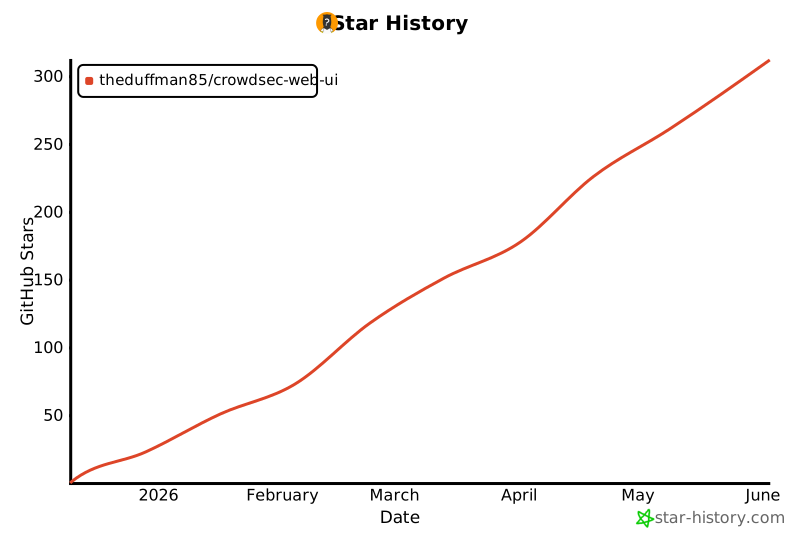
## Star History
[](https://star-history.com/#TheDuffman85/crowdsec-web-ui&Date)