https://github.com/theintern/visual-plugin
Visual Regression Testing for Intern
https://github.com/theintern/visual-plugin
Last synced: about 1 year ago
JSON representation
Visual Regression Testing for Intern
- Host: GitHub
- URL: https://github.com/theintern/visual-plugin
- Owner: theintern
- License: mpl-2.0
- Created: 2016-11-07T17:55:42.000Z (over 9 years ago)
- Default Branch: master
- Last Pushed: 2023-02-27T15:29:48.000Z (over 3 years ago)
- Last Synced: 2025-03-26T21:47:19.247Z (over 1 year ago)
- Language: TypeScript
- Size: 484 KB
- Stars: 29
- Watchers: 11
- Forks: 7
- Open Issues: 13
-
Metadata Files:
- Readme: README.md
- License: LICENSE.txt
Awesome Lists containing this project
README
# visual-plugin

[](https://travis-ci.org/theintern/visual-plugin)
[](https://github.com/theintern/intern/)
This project adds support for visual regression testing to
[Intern](https://theintern.io).
* [Overview](#overview)
* [Installation](#installation)
* [Quick start](#quick-start)
* [API and architecture](#api-and-architecture)
* [visualTest](#visualtest)
* [assertVisuals](#assertvisuals)
* [helpers](#helpers)
* [Reporting results](#reporting-results)
* [Contributing](#contributing)
## Overview
A visual regression test compares a screenshot of a web page with a previously
generated baseline providing the ability to make automated comparisons against a
known-good version to ensure nothing has changed.
These tests can help engineers
* ensure a page is rendered identically on various browsers
* identify when a css change has an undesired effect elsewhere
* put a quick set of visual tests around legacy code to identify regressions
This plugin takes image snapshots of pages when they’re known to be rendering
properly, and then compares those images to how the page looks at later points
to detect visual regressions.
For example, here's a simple login page:
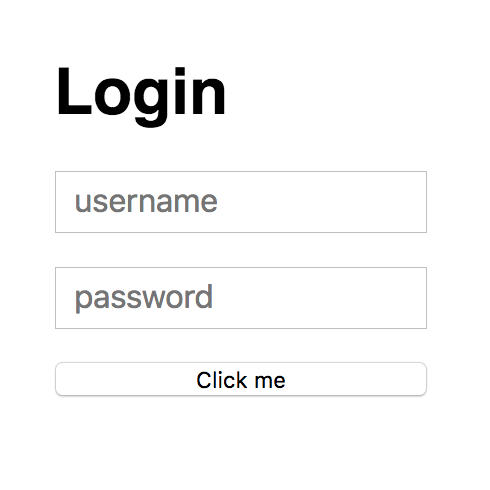
Assume you’ve created a visual test called “login page” for this page. The first
time the test is run it will save a snapshot image (a _baseline_) of the page.
At some point, someone may change a style that has a side effect of making `h1`
tags use a serif font. Now the login page looks like this:
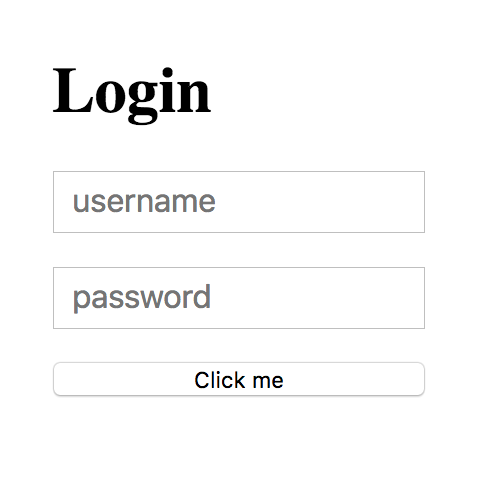
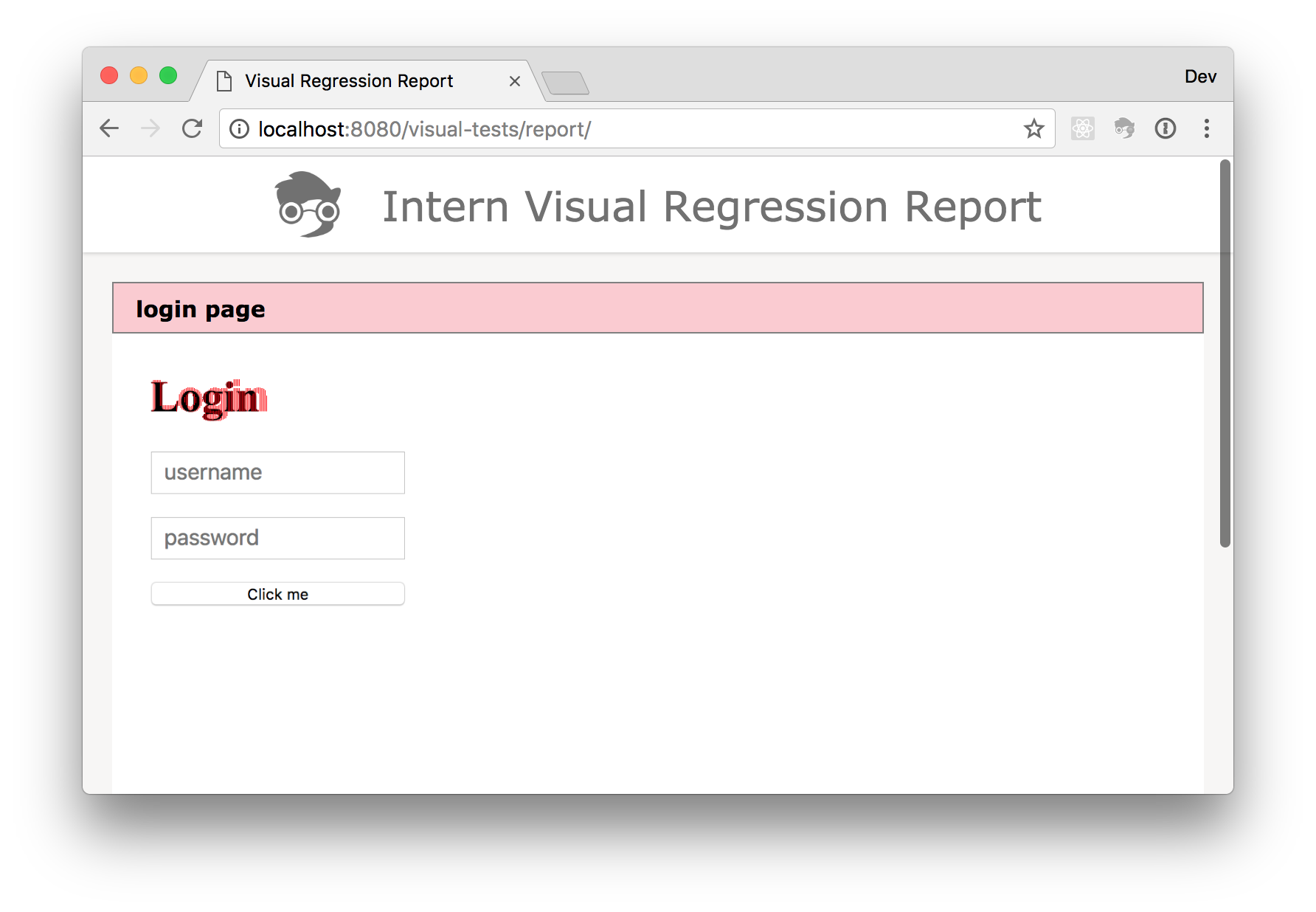
Normal unit tests aren‘t going to see anything wrong here, because the content
is the same. However, the next time the visual test is run for that page it will
fail because the page no longer looks the same. A report will be generated that
highlights the changes:
## Installation
This package should be installed as a peer of Intern
```
$ npm install intern @theintern/visual-plugin --save-dev
```
## Quick start
Ok! You want to see all the great things visual regression testing can do and
how to do it! See some real test code by looking in the
[tests/example](./tests/example) directory.
To run the example tests:
1. Clone this project
1. Install package dependencies
```
npm install
```
1. Run the tests
```
npm test config=@example
```
If you want to see what an error looks like, modify the HTML file used by the
tests, in `_tests/tests/support/pages/basic.html`. For example, change the
paragraph text, or change the background color from pink to green. Then re-run
the test. It will fail, and a report will be generated in `visual-tests/report`.
## API and architecture
This plugin has three main exports:
* `visualTest` is a function that will create a complete visual regression
test based on an options obect
* `assertVisuals` is a function that can be used to make visual assertions in
tests
* `helpers` is an object of functional test helper functions
### visualTest
[visualTest](https://theintern.io/docs.html#visual-plugin/1/api/test/visualtest)
is a function that creates a complete visual regression test from a set of
[options](https://theintern.io/docs.html#visual-plugin/1/api/test/options).
```ts
import { visualTest } from '@theintern/visual-plugin';
registerSuite('mySuite', {
test: visualTest({
url: 'https://sitepen.com',
width: 1024,
height: 768,
missingBaseline: 'snapshot',
});
});
```
### assertVisuals
[assertVisuals](https://theintern.io/docs.html#visual-plugin/1/api/assert/assertvisuals)
is a Leadfoot helper function that can be used to provide visual assertion
functionality within an existing Intern test. It provides the assertion
functionality of `visualTest` but without the surrounding logic.
```ts
import { assertVisuals } from '@theintern/visual-plugin';
registerSuite('mySuite', {
test() {
return this.remote()
.get('https://sitepen.com')
.setWindowSize(1024, 768)
.takeScreenshot()
.then(
assertVisuals(this, {
missingBaseline: 'snapshot'
})
);
}
});
```
See the API docs for the full set of
[options](https://theintern.io/docs.html#visual-plugin/1/api/assert/options-1).
### helpers
The `helpers` export currently contains one function,
[resizeWindow](https://theintern.io/docs.html#visual-plugin/1/api/helpers%2FresizeWindow/resizeWindow).
This is a convenience function that will resize a browser window and wait for
the resize operation to complete.
### Reporting results
By default this plugin will generate an HTML report of visual regression test
results in the plugin’s output directory. The reporter supports a couple of
options:
* `reportLocation`: A directory under the base output directory to write the
report, defaults to "report"
* `errorColor`: The color to use when highlighting image differences, defaults
to "#F00"
```json
"plugins": {
"script": "@theintern/visual-plugin",
"options": {
"missingBaseline": "snapshot",
"directory": "visual",
"reportLocation": "htmlreport",
"errorColor": "#FF7200"
}
}
```
The reporter can be disabled by setting the `report` configuration option to
`false`.
```json
"plugins": {
"script": "@theintern/visual-plugin",
"options": {
"missingBaseline": "snapshot",
"directory": "visual",
"report": false
}
}
```
## Contributing
We would love to hear your feedback and welcome PRs. Please take a look at
[Intern’s Contribution Guidelines](https://github.com/theintern/intern/blob/master/CONTRIBUTING.md)
for some info and tips. Thanks!