https://github.com/themysteriousstranger90/telegrambotforgithub
This is a Telegram bot built with .NET 8 Azure Functions (Isolated Worker model) that integrates with GitHub to provide real-time notifications, OAuth-based login, and repository interaction.
https://github.com/themysteriousstranger90/telegrambotforgithub
azure-functions azurite bot csharp dotnet github github-app ngrok telegram
Last synced: 2 months ago
JSON representation
This is a Telegram bot built with .NET 8 Azure Functions (Isolated Worker model) that integrates with GitHub to provide real-time notifications, OAuth-based login, and repository interaction.
- Host: GitHub
- URL: https://github.com/themysteriousstranger90/telegrambotforgithub
- Owner: TheMysteriousStranger90
- License: mit
- Created: 2025-07-18T07:00:46.000Z (12 months ago)
- Default Branch: master
- Last Pushed: 2025-08-02T09:39:20.000Z (12 months ago)
- Last Synced: 2025-08-02T11:43:46.602Z (12 months ago)
- Topics: azure-functions, azurite, bot, csharp, dotnet, github, github-app, ngrok, telegram
- Language: C#
- Homepage:
- Size: 1.29 MB
- Stars: 1
- Watchers: 0
- Forks: 0
- Open Issues: 0
-
Metadata Files:
- Readme: README.md
- License: LICENSE
Awesome Lists containing this project
README
# Telegram Bot for GitHub
This is a **Telegram bot** built with **.NET 8 Azure Functions (Isolated Worker model)** that integrates with **GitHub** to provide real-time notifications, OAuth-based login, and repository interaction. It is designed for local development with **ngrok** and **Azurite** (via Docker).


## ✨ Features
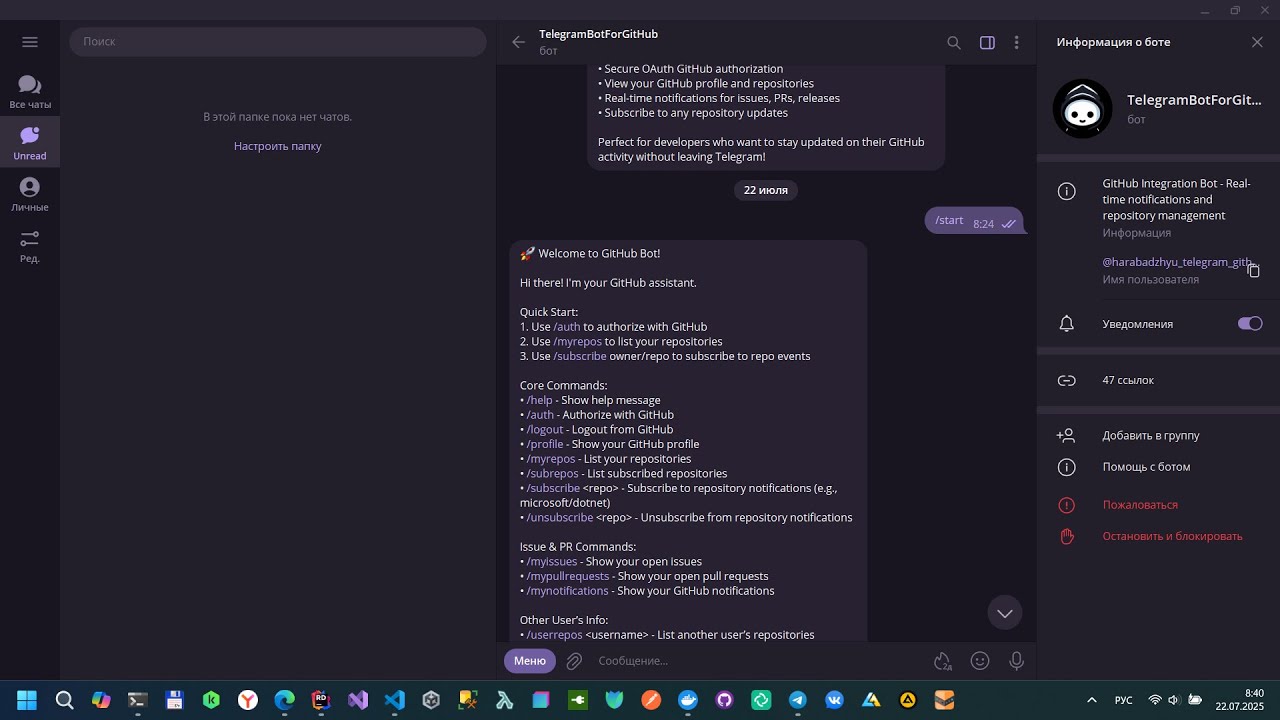
- 🔐 GitHub OAuth authentication via `/auth` and `/logout`
- 👤 Profile commands like `/profile`, `/myrepos`, `/myissues`, `/mypullrequests`
- 📜 Check issues and pull requests for other users.
- 📥 Subscribe/unsubscribe to specific repositories
- 📬 Notification support for specific repositories:
- Push events
- Pull requests
- Issues
- 💬 Supports GitHub webhooks and Telegram webhooks
- 💾 Azure Table Storage used for storing subscriptions
## ⚙️ Technologies
- **Backend**: .NET 8, C#
- **Framework**: Azure Functions v4 (.NET Isolated Worker)
- **Database**: Azure Table Storage
- **API Clients**:
- `Telegram.Bot` for Telegram Bot API
- `Octokit` for GitHub REST API
- **Tooling**:
- **Azurite**: Local Azure Storage emulator.
- **Ngrok**: Exposes local endpoints to the internet for webhook testing.
---
## 🚀 Getting Started (Local Development)
Follow these steps to set up and run the project on your local machine.
### Prerequisites
- [.NET 8 SDK](https://dotnet.microsoft.com/download/dotnet/8.0)
- [Docker Desktop](https://www.docker.com/products/docker-desktop/)
- [Ngrok Account & CLI](https://ngrok.com/download)
- A **Telegram Bot**. Create one by talking to [@BotFather](https://t.me/BotFather) and get your API token.
- A **GitHub OAuth App**. Create one in your GitHub settings:
- Go to `Settings` > `Developer settings` > `OAuth Apps` > `New OAuth App`.
- **Homepage URL**: Use your ngrok URL (e.g., `https://your-subdomain.ngrok-free.app`).
- **Authorization callback URL**: Set it to `https://your-subdomain.ngrok-free.app/api/auth/github/callback`.
### Run Azurite Storage Emulator:
Open a terminal and run the following Docker command to start a local Azurite instance.
```bash
docker pull mcr.microsoft.com/azure-storage/azurite
docker run -p 10000:10000 -p 10001:10001 -p 10002:10002 -v c:/azurite:/data mcr.microsoft.com/azure-storage/azurite
```
### Expose your local host with Ngrok:
The Azure Functions project runs on port 7071 by default. Open a new terminal and run:
```bash
ngrok http 7071
```
Ngrok will give you a public Forwarding URL (e.g., https://.ngrok-free.app). Copy this URL.
### Configure your settings:
Create a file named local.settings.json in the root of the project. Paste the content below and fill in your own credentials.
```json
{
"IsEncrypted": false,
"Values": {
"AzureWebJobsStorage": "UseDevelopmentStorage=true",
"FUNCTIONS_WORKER_RUNTIME": "dotnet-isolated",
"Telegram__Token": "",
"GitHub__Token": "",
"GitHub__WebhookSecret": "",
"GitHub__ClientId": "",
"GitHub__ClientSecret": "",
"GitHub__AppId": "",
"GitHub__PrivateKey": "",
"GitHub__RedirectUri": "https://.ngrok-free.app/api/auth/github/callback",
"TableStorage__ConnectionString": "DefaultEndpointsProtocol=http;AccountName=devstoreaccount1;AccountKey=Eby8vdM02xNOcqFlqUwJPLlmEtlCDXJ1OUzFT50uSRZ6IFsuFq2UVErCz4I6tq/K1SZFPTOtr/KBHBeksoGMGw==;BlobEndpoint=http://127.0.0.1:10000/devstoreaccount1;QueueEndpoint=http://127.0.0.1:10001/devstoreaccount1;TableEndpoint=http://127.0.0.1:10002/devstoreaccount1;",
"TableStorage__TableName": "TelegramBotData",
"BaseUrl": "https://.ngrok-free.app"
},
"Host": {
"LocalHttpPort": 7071,
"CORS": "*"
}
}
```
### Run the Application:
You can run the project from your IDE (Visual Studio, Rider, VS Code) or using PowerShell script: **.bot.ps1**
## Contributing
Pull requests are welcome. For major changes, please open an issue first to discuss what you would like to change.
## Author
Bohdan Harabadzhyu
## License
[MIT](https://choosealicense.com/licenses/mit/)
## YouTube Review
📺 Watch Video Review
[](https://youtu.be/x5k0No31Q4A)