https://github.com/theshubhamgour/sql_in_one
In this repository we are going to learn about SQL in refernce to the youtube channel shubham gour
https://github.com/theshubhamgour/sql_in_one
database dbms mysql
Last synced: 2 months ago
JSON representation
In this repository we are going to learn about SQL in refernce to the youtube channel shubham gour
- Host: GitHub
- URL: https://github.com/theshubhamgour/sql_in_one
- Owner: theshubhamgour
- License: cc0-1.0
- Created: 2022-04-04T12:48:40.000Z (over 4 years ago)
- Default Branch: main
- Last Pushed: 2022-04-05T04:40:23.000Z (over 4 years ago)
- Last Synced: 2025-12-12T00:28:55.853Z (7 months ago)
- Topics: database, dbms, mysql
- Homepage:
- Size: 69.3 KB
- Stars: 0
- Watchers: 1
- Forks: 0
- Open Issues: 0
-
Metadata Files:
- Readme: README.md
- License: LICENSE
Awesome Lists containing this project
README
# SQL_in_one
# What is DataBase?
-> A database is a software that storers data in organized manner.
A database is an organized collection of structured information, or data, typically stored electronically in a computer system.
Computer databases typically store aggregations of data records or files that contain information, such as sales transactions, customer data, financials and product information.

# What is MySQL?
-> MySQL is a DataBase Software used to handle data in relational manner.
Relational manner: follows a pattern (In the form of tables) we can connect tables in relational database.
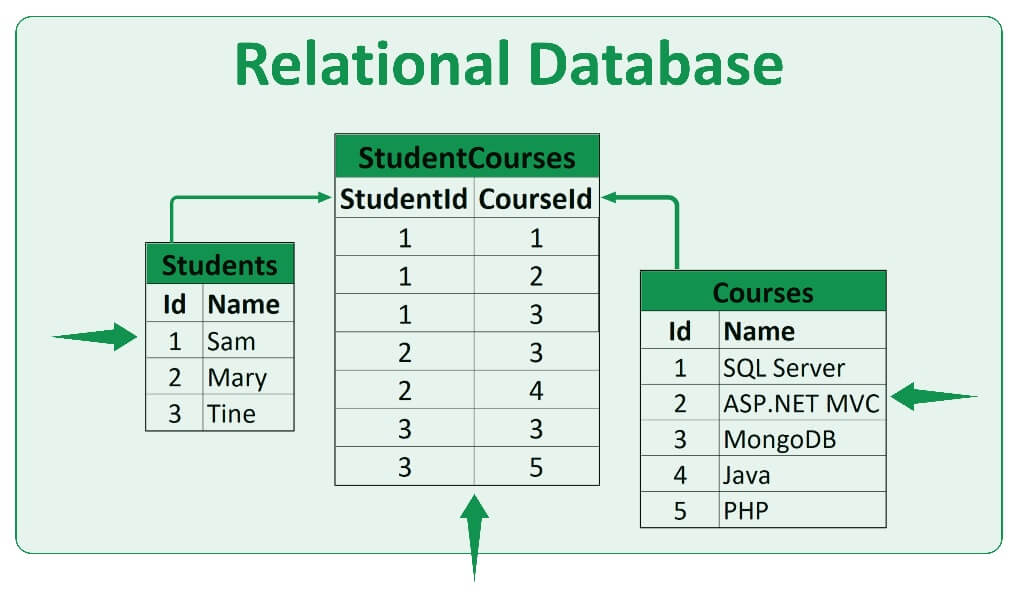
Data can be accesed by queires. it works on theprinciple of request and get

# Download MySQL
Download MySQL Software: https://dev.mysql.com/downloads/mysql/
# Database Operations
1. Show databases : used to view databases which arre present in the database server
```show databases; ```
2. To create a database : create database [database_name]
```create database employee```
3. To use/select a particular database : use [database_name]
```use employee```
4. To delete a database we make use of drop : drop database [database_name]
```drop database employee```
# Table operations
5. To create a table we have to make note of two things first create a ```table``` and ```columns```
create table [table_name] (col 1,col 2,col 3,col 4 ,....)
```create table user(id int(15) primary key, name varchar(150) not null, city varchar(150));```
# Primary key:
A primary key is the column or columns that contain values that uniquely identify each row in a table
I used primary to key to make it unique to identify the user as an unique entry
6. Suoppose you forgot what was the column name and the property of the table thn you can make use of desc for describing the table. desc [table_name];
```desc user;```
```
+-------+--------------+------+-----+---------+-------+
| Field | Type | Null | Key | Default | Extra |
+-------+--------------+------+-----+---------+-------+
| id | int | NO | PRI | NULL | |
| name | varchar(150) | NO | | NULL | |
| city | varchar(150) | YES | | NULL | |
+-------+--------------+------+-----+---------+-------+
```
7. Type ```show tables;``` to view the table that you've created
```
+--------------------+
| Tables_in_employee |
+--------------------+
| user |
+--------------------+
```
8. To drop a table just like the database we have drop earlier we make use of: drop table [table_name] and the table will get deleted.
```drop table user;```
9. To Rename a table name we make use of alter: alter table [old_name] rename to [new_name];
```alter table user rename to student;```
check the table name ```show tables```;
10. To delete all the records of the table we make use of truncate command.
NOTE: ONLY THE DATA IN THE TABLE WILL GET DELETED NOT THE TABLE!
```truncate table student;```
11. To feed data into table we makw use of ```insert into``` command: insert into [table_name](id,name,city) values(id(in int),name(in char),city(in char));
```insert into student(id,name,city) values(15,"Aditya Jain","Nagpur");```
12. In order to check the entry we just made we makw use of : select * from [table_name];
```select * from student;```
```
+----+-------------+--------+
| id | name | city |
+----+-------------+--------+
| 15 | Aditya Jain | Nagpur |
+----+-------------+--------+
```
13. To add a column in table: alter table [table_name] add [col_name];
```alter table student add country varchar(50);```
14. To update entry we make use of : update [table_name] set [col_name] = "Value";
NOTE: IF YOU RUN THIS COMMAND ```update student set country = "India";``` ENTIRE COLUMN OF COUNTRY WILL TURN INTO INDIA.
Type: ``` select * from student; ``` to check the entry
```
+----+-------------+--------+---------+
| id | name | city | country |
+----+-------------+--------+---------+
| 15 | Aditya Jain | Nagpur | India |
+----+-------------+--------+---------+
```
15. Lets add more data in the table:
```
insert into student(id,name,city) values(10, "Shubham","Nagpur");
```
16. In Order to add data to a specifiic id we make use of where:
``` update student set country= "India" where id = 10;
update student set country= "Saudi Arab" where id = 15;
```
Type ```select * from student```
```
+----+-------------+--------+------------+
| id | name | city | country |
+----+-------------+--------+------------+
| 10 | Shubham | Nagpur | India |
| 15 | Aditya Jain | Nagpur | Saudi Arab |
+----+-------------+--------+------------+
```
17. For inserting multiple valuies at once:
```
insert into student values (1,"Pradhynesh","Bhandara","Delhi"),
(2,"Shubham Bedarkar","Amravati","MP"),
(3,"Neha","Berlin","Germany"),
(4,"Sayali","Mathura","India");
```
type: ```select * from student;``` to check the entry we made just now to ensure everything is going properly.
```
+----+------------------+----------+------------+
| id | name | city | country |
+----+------------------+----------+------------+
| 1 | Pradhynesh | Bhandara | Delhi |
| 2 | Shubham Bedarkar | Amravati | MP |
| 3 | Neha | Berlin | Germany |
| 4 | Sayali | Mathura | India |
| 10 | Shubham | Nagpur | India |
| 15 | Aditya Jain | Nagpur | Saudi Arab |
+----+------------------+----------+------------+
```
18. To delete the data from the table for a specific user: delete from [table_name] where [col_name]=[value]
```
delete from student where id=15;
```
# Clauses
For sorting dat we makew use opf clauses
19. where:
```select * from student where city = "Nagpur";```
```
+----+---------+--------+---------+
| id | name | city | country |
+----+---------+--------+---------+
| 10 | Shubham | Nagpur | India |
+----+---------+--------+---------+
```
Method 2: to sort it with just a particular information we make use of below command:
```
select name,city,country from student where country ="india";
```
```
+---------+---------+---------+
| name | city | country |
+---------+---------+---------+
| Sayali | Mathura | India |
| Shubham | Nagpur | India |
+---------+---------+---------+
```
20: Alias : Used to changw the name temporary
```
select name as "USERNAME" , country as "HOMELAND" from student;
```
```
+------------------+----------+
| USERNAME | HOMELAND |
+------------------+----------+
| Pradhynesh | Delhi |
| Shubham Bedarkar | MP |
| Neha | Germany |
| Sayali | India |
| Shubham | India |
+------------------+----------+
```
21: Distinct : Do not repeat same values again and again
```
select distinct (country) from student;
```
Above and below command will give same output
```
select distinct country from student;
```
```
+---------+
| country |
+---------+
| Delhi |
| MP |
| Germany |
| India |
+---------+
```
22. AND: if you want to add two conditons at a time
```
select * from student where country= "india" AND city = "mathura";
```
```
+----+--------+---------+---------+
| id | name | city | country |
+----+--------+---------+---------+
| 4 | Sayali | Mathura | India |
+----+--------+---------+---------+
```
23. OR : IF either one of the condition is true we will get the desired result
```
select * from student where country = "Germany" OR city = "Goa";
```
Here only one conditon i.e: city name is matching the records hence we got the below result
```
+----+------+--------+---------+
| id | name | city | country |
+----+------+--------+---------+
| 3 | Neha | Berlin | Germany |
+----+------+--------+---------+
```
24. Range: Searching and Sorting (Between)
Suppose you want to sort those people/employee whos id ranges between 1 to 5 then we will make use of the conditions given below.
```
select * from student where id>=1 AND id<=5;
```
```
+----+------------------+----------+---------+
| id | name | city | country |
+----+------------------+----------+---------+
| 1 | Pradhynesh | Bhandara | Delhi |
| 2 | Shubham Bedarkar | Amravati | MP |
| 3 | Neha | Berlin | Germany |
| 4 | Sayali | Mathura | India |
+----+------------------+----------+---------+
```
NOTE: SAME RESULT CAN BE OBAINED USING THE FOLLOWING COMMAND ```BETWEEN```
```
select * from student where id between 1 and 4;
```
```
+----+------------------+----------+---------+
| id | name | city | country |
+----+------------------+----------+---------+
| 1 | Pradhynesh | Bhandara | Delhi |
| 2 | Shubham Bedarkar | Amravati | MP |
| 3 | Neha | Berlin | Germany |
| 4 | Sayali | Mathura | India |
+----+------------------+----------+---------+
```
25. Searching multiple records at the same time: (IN OPERATOR)
Consider that you want to see those entires whose ids are 2,10 and 3 then we will make use of the below command.
```
select * from student where id = 2 or id = 10 or id = 3;
```
```
+----+------------------+----------+---------+
| id | name | city | country |
+----+------------------+----------+---------+
| 2 | Shubham Bedarkar | Amravati | MP |
| 3 | Neha | Berlin | Germany |
| 10 | Shubham | Nagpur | India |
+----+------------------+----------+---------+
```
NOTE: IN THE ABOVE COMMAND WE HAVE TO USE MULTRIPLE OR SO TO OVERCOME THAT WE CAN MAKE USE OF ```IN()```
```
select * from student where id in(2,4,10);
```
```
+----+------------------+----------+---------+
| id | name | city | country |
+----+------------------+----------+---------+
| 2 | Shubham Bedarkar | Amravati | MP |
| 4 | Sayali | Mathura | India |
| 10 | Shubham | Nagpur | India |
+----+------------------+----------+---------+
```
26. Limit: Useful to sort Top entries and other operations
Suppose you want to sort top 4 entries then we make use of limit
```
select * from student where id in(2,4,10);
```
```
+----+------------------+----------+---------+
| id | name | city | country |
+----+------------------+----------+---------+
| 2 | Shubham Bedarkar | Amravati | MP |
| 4 | Sayali | Mathura | India |
| 10 | Shubham | Nagpur | India |
+----+------------------+----------+---------+
```
Now You want to leave top 2 entries and want to print the remaining top 3 entries after the top tow then we may use ```offset```
```
select * from student limit 3 offset 2;
```
Here 3 specifiee the values to be printed in the terminal and 2 specifies that we have to exclude the top 2 entires.
```
+----+---------+---------+---------+
| id | name | city | country |
+----+---------+---------+---------+
| 3 | Neha | Berlin | Germany |
| 4 | Sayali | Mathura | India |
| 10 | Shubham | Nagpur | India |
+----+---------+---------+---------+
```
27: Order by: Ascending and Decending
To print in Decending order we make use of below command
```
select * from student order by name desc;
```
```
+----+------------------+----------+---------+
| id | name | city | country |
+----+------------------+----------+---------+
| 2 | Shubham Bedarkar | Amravati | MP |
| 10 | Shubham | Nagpur | India |
| 4 | Sayali | Mathura | India |
| 1 | Pradhynesh | Bhandara | Delhi |
| 3 | Neha | Berlin | Germany |
+----+------------------+----------+---------+
```
Now if you want to display in ascending manner then make use of below command
```
mysql> select * from student order by name asc;
```
```
+----+------------------+----------+---------+
| id | name | city | country |
+----+------------------+----------+---------+
| 3 | Neha | Berlin | Germany |
| 1 | Pradhynesh | Bhandara | Delhi |
| 4 | Sayali | Mathura | India |
| 10 | Shubham | Nagpur | India |
| 2 | Shubham Bedarkar | Amravati | MP |
+----+------------------+----------+---------+
```
Same can be done with ID
```
mysql> select * from student order by id asc;
+----+------------------+----------+---------+
| id | name | city | country |
+----+------------------+----------+---------+
| 1 | Pradhynesh | Bhandara | Delhi |
| 2 | Shubham Bedarkar | Amravati | MP |
| 3 | Neha | Berlin | Germany |
| 4 | Sayali | Mathura | India |
| 10 | Shubham | Nagpur | India |
+----+------------------+----------+---------+
5 rows in set (0.00 sec)
mysql> select * from student order by id desc;
+----+------------------+----------+---------+
| id | name | city | country |
+----+------------------+----------+---------+
| 10 | Shubham | Nagpur | India |
| 4 | Sayali | Mathura | India |
| 3 | Neha | Berlin | Germany |
| 2 | Shubham Bedarkar | Amravati | MP |
| 1 | Pradhynesh | Bhandara | Delhi |
+----+------------------+----------+---------+
5 rows in set (0.00 sec)
```
# Can we use limit and order both at once?
Suppose we want to display bottom two entires and that too in decending order than we make uske of both limit and order by command
```
select * from student order by id desc limit 2;
```
```
+----+---------+---------+---------+
| id | name | city | country |
+----+---------+---------+---------+
| 10 | Shubham | Nagpur | India |
| 4 | Sayali | Mathura | India |
+----+---------+---------+---------+
```
# Can we update the entires??
Suppose we want to update entry with id number 4 and name it as Aditya then we will use the below command:
```
update student set name = "Aditya Jain" where id = 4;
```
```
mysql> select * from student;
+----+------------------+----------+---------+
| id | name | city | country |
+----+------------------+----------+---------+
| 1 | Pradhynesh | Bhandara | Delhi |
| 2 | Shubham Bedarkar | Amravati | MP |
| 3 | Neha | Berlin | Germany |
| 4 | Aditya Jain | Mathura | India |
| 10 | Shubham | Nagpur | India |
+----+------------------+----------+---------+
```
Now you want to update city and country for id numbre 4 ie for Aditya jain then follow below command
```
update student set city ="Nagpur" where id = 4;
update student set country ="India" where id = 4;
```
```
select * from student;
+----+------------------+----------+---------+
| id | name | city | country |
+----+------------------+----------+---------+
| 1 | Pradhynesh | Bhandara | Delhi |
| 2 | Shubham Bedarkar | Amravati | MP |
| 3 | Neha | Berlin | Germany |
| 4 | Aditya Jain | Nagpur | India |
| 10 | Shubham | Nagpur | India |
+----+------------------+----------+---------+
```
# Like clause and search pattern
% = zero, on one or multiple characters (Used when we don't know how many characters it has)
_ = represents single character (Used when we know only one character is present after it)
Suppose you want to sort out all those people whose name starts with s then follow the below command
```
select * from student where name like 's%';
```
We used % here because we dont know how many charaters it have.
```
+----+------------------+----------+---------+
| id | name | city | country |
+----+------------------+----------+---------+
| 2 | Shubham Bedarkar | Amravati | MP |
| 10 | Shubham | Nagpur | India |
+----+------------------+----------+---------+
```
Now Suppose you want to sort those students whose second letter of the city name is "a" then follow the below command
```
select * from student where city like '_a%';
```
```
+----+-------------+--------+---------+
| id | name | city | country |
+----+-------------+--------+---------+
| 4 | Aditya Jain | Nagpur | India |
| 10 | Shubham | Nagpur | India |
+----+-------------+--------+---------+
```
Now to sprt out a student whose last second letter is "r" then follow below command
```
select * from student where city like "%r_";
```
```
+----+------------+----------+---------+
| id | name | city | country |
+----+------------+----------+---------+
| 1 | Pradhynesh | Bhandara | Delhi |
+----+------------+----------+---------+
```
# Sum and Alias together
Suppose you want the sum of all the id's and remane the column id as total then follow the below command
```
select sum(id) as "Total" from student;
```
```
+-------+
| Total |
+-------+
| 20 |
+-------+
```
# Average and Alias together
Suppose you want the average of all the id's and remane the column id as average then follow the below command
```select avg(id) as "Average" from student;
```
```
+---------+
| Average |
+---------+
| 4.0000 |
+---------+
```
# Count number of student present in the database
```
select count(name) from student;
```
```
+-------------+
| count(name) |
+-------------+
| 5 |
+-------------+
+----+------------------+----------+---------+
| id | name | city | country |
+----+------------------+----------+---------+
| 1 | Pradhynesh | Bhandara | Delhi |
| 2 | Shubham Bedarkar | Amravati | MP |
| 3 | Neha | Berlin | Germany |
| 4 | Aditya Jain | Nagpur | India |
| 10 | Shubham | Nagpur | India |
+----+------------------+----------+---------+
```
#MIN and MAX
Suppose you want to sort out the person having the minimum id(in terms of number)
```
select name from student where id = (select min(id) from student);
```
Here we used nested queries where in the first one we sprted the name and in the second we asked specified our need
```
+------------+
| name |
+------------+
| Pradhynesh |
+------------+
```
Same goes for MAX id you want to sort the person with the max id and display on the screen the n olloow the below command
```
select name from student where id = (select max(id) from student);
```
```
+---------+
| name |
+---------+
| Shubham |
+---------+
```
# Foreign key and joins
A FOREIGN KEY enforces data integrity, making sure the data confirms to some rules when it is added to the DB.
A JOIN is used when you extract/query data from the DB by giving rules how to select the data.
We will now create a table name exams and connect it with student table
```
create table exams(roll int(15) primary key, center varchar(56), studentid int(56), foreign key (studentid) references student(id));
```
```
show tables;
```
```
+--------------------+
| Tables_in_employee |
+--------------------+
| exams |
| student |
+--------------------+
```
```
desc exams;
```
```
+-----------+-------------+------+-----+---------+-------+
| Field | Type | Null | Key | Default | Extra |
+-----------+-------------+------+-----+---------+-------+
| roll | int | NO | PRI | NULL | |
| center | varchar(56) | YES | | NULL | |
| studentid | int | YES | MUL | NULL | |
+-----------+-------------+------+-----+---------+-------+
```
Let's insert data into exams ans link with stdents
```
insert into exams values(15, "St. John's School", 10);
insert into exams values(21, "Canter Point", 3);
insert into exams values(20, "SFS", 4);
```
Suppose you want those students whose exams are scheduled then we use the below command
```
select student.name, student.city , exams.center from student , exams where student.id = exams.studentid;
```
Here we selected student name and city from table student and name of centrer from exams and we put a conditon that the id of student from student table should match with the student id of exams.
This is the output we were expecting.
```
+-------------+--------+-------------------+
| name | city | center |
+-------------+--------+-------------------+
| Shubham | Nagpur | St. John's School |
| Aditya Jain | Nagpur | SFS |
| Neha | Berlin | Canter Point |
+-------------+--------+-------------------+
```
Now if you wish to find the entry for only one student namely aditya jain then you may use the below command:
```
select student.name, student.city , exams.center from student, exams where student.id = exams.studentid and student.name= "Aditya Jain";
```
```
+-------------+--------+--------+
| name | city | center |
+-------------+--------+--------+
| Aditya Jain | Nagpur | SFS |
+-------------+--------+--------+
```
# Happy Learning!
We have covered the basics as well as advance concepts of MySQL .
Topics covered:
Introduction to video
Video content
What is database?
What is MySQL?
How to MySQL works?
How to install mysql in our system
MySQL Structure
Create , Drop , User database , Database Operation
Table Operation , Create , Drop , Alter, Rename , Update, AddColumn Insert, Update, Delete, Select , where, and, or , not , in , between , limit , order by , offset, count,
sum,avg,min,max, nested queries and other important operation
Like clause and search pattern
Foreign key and joins