https://github.com/thestaticturtle/mbr-fat32-adventures
Scratchpad repo used to learn the inner workings of MBR & FAT 32
https://github.com/thestaticturtle/mbr-fat32-adventures
Last synced: over 1 year ago
JSON representation
Scratchpad repo used to learn the inner workings of MBR & FAT 32
- Host: GitHub
- URL: https://github.com/thestaticturtle/mbr-fat32-adventures
- Owner: TheStaticTurtle
- License: mit
- Created: 2022-07-12T15:35:45.000Z (about 4 years ago)
- Default Branch: main
- Last Pushed: 2022-07-15T01:13:24.000Z (about 4 years ago)
- Last Synced: 2025-04-01T15:53:37.397Z (over 1 year ago)
- Language: C++
- Size: 334 KB
- Stars: 0
- Watchers: 1
- Forks: 0
- Open Issues: 0
-
Metadata Files:
- Readme: README.md
- License: LICENSE
Awesome Lists containing this project
README
# mbr-fat32-adventures
Scratchpad repo used to learn the inner workings of MBR & FAT32/16
## Links
Ressources I used to read this pile of shit
- https://en.wikipedia.org/wiki/Master_boot_record
- https://en.wikipedia.org/wiki/Design_of_the_FAT_file_system
- https://www.cs.fsu.edu/~cop4610t/lectures/project3/Week11/Slides_week11.pdf
- https://www.cs.fsu.edu/~cop4610t/assignments/project3/spec/fatspec.pdf
- https://www.pjrc.com/tech/8051/ide/fat32.html
- https://cscie92.dce.harvard.edu/spring2021/slides/FAT32%20File%20Structure.pdf
- (Probably forgot some)
## Current state of things:
#### MBR:
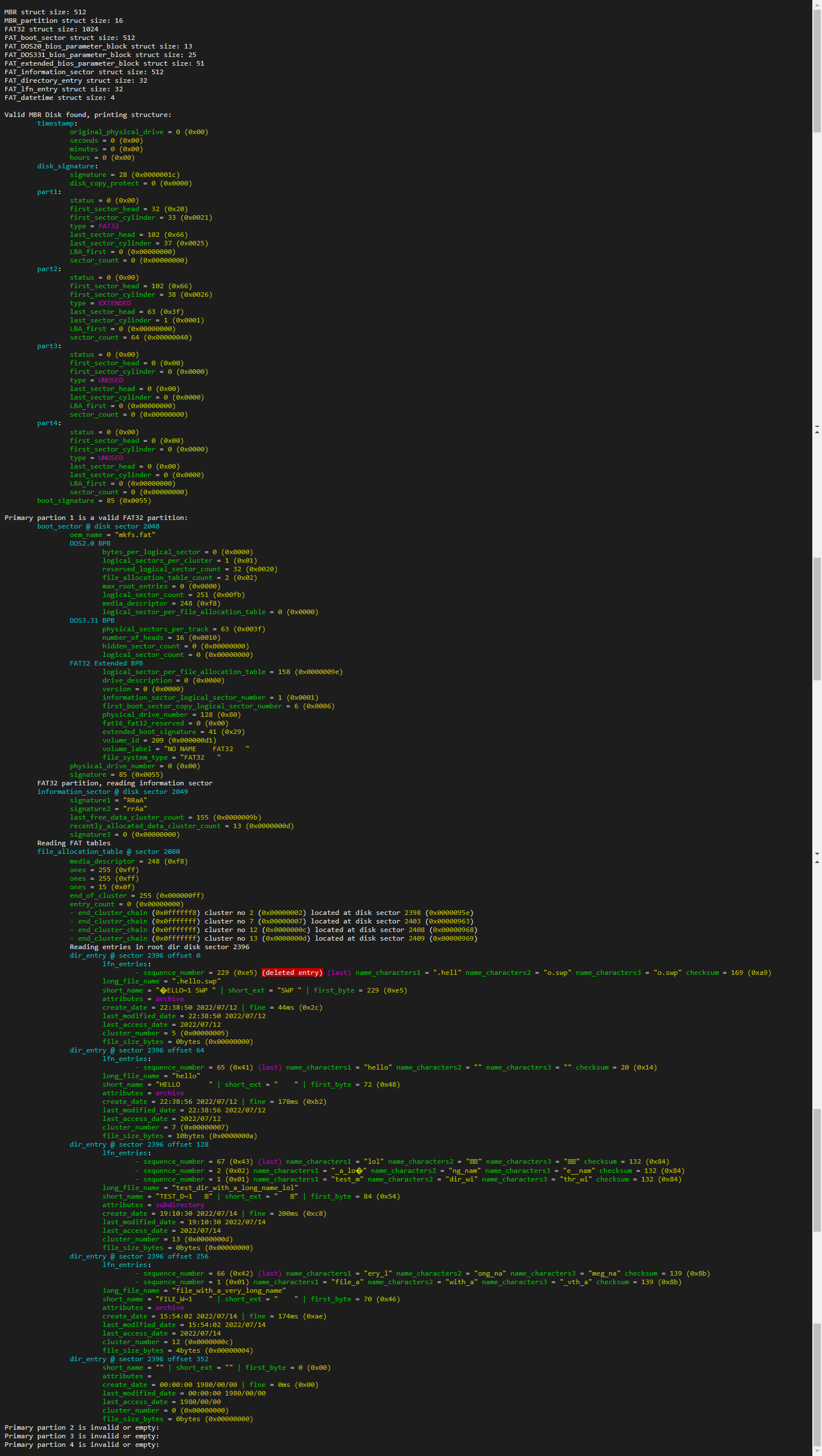
- ✅ Read MBR boot sector
#### Bios parameter block:
- ✅ Read DOS2.0 bios parameter block
- ✅ Read DOS3.31 bios parameter block
- ✅ Read Extended bios parameter block
- ✅ Read FAT32 Extended bios parameter block
#### FAT32 partition:
- ✅ Read FAT32 boot sector
- ✅ Read FAT32 information sector
- ✅ Read FAT32 FAT table(s)
- ✅ Read entries in FAT32 Root directory cluster with LFNs handling
- ❌ Read all directories in FAT32 part (shouldn't be complicated)
- ❌ Read files in FAT32 part (shouldn't be complicated)
#### FAT16 partition:
- ✅ Read FAT16 boot sector
- ❌ Read FAT16 FAT table(s)
- ❌ Read entries in FAT32 Root directory cluster with LFNs handling
- ❌ Read all directories in FAT16 part
- ❌ Read files in FAT16 part
#### Extended partition:
- ❌ Read MBR extended partition
## Usage:
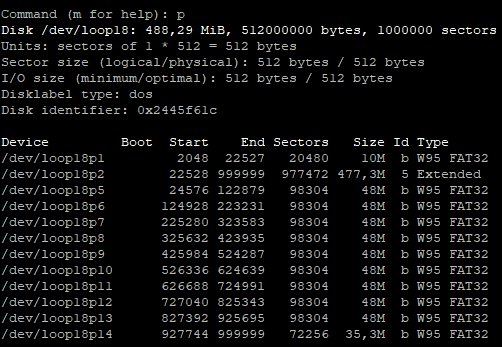
Need a file named "file" representing a disk image with one primary fat32 partition and multiple extended fat32 partitions
## Commands
```bash
# Mount file to partitionned loop:
sudo losetup -P /dev/loop18 file
# Detach loop
sudo losetup -d /dev/loop18
# Create filesystem
sudo mkfs.fat /dev/loop18p1 -n PART1
sudo mkfs.fat /dev/loop18p5 -n PART5
sudo mkfs.fat /dev/loop18p6 -n PART6
sudo mkfs.fat /dev/loop18p7 -n PART7
sudo mkfs.fat /dev/loop18p8 -n PART8
sudo mkfs.fat /dev/loop18p9 -n PART9
sudo mkfs.fat /dev/loop18p10 -n PART10
sudo mkfs.fat /dev/loop18p11 -n PART11
sudo mkfs.fat /dev/loop18p12 -n PART12
sudo mkfs.fat /dev/loop18p13 -n PART13
sudo mkfs.fat /dev/loop18p14 -n PART14
```