https://github.com/theterminalguy/floatcam
Simple, lightweight, and easy-to-use floating camera for any screen recorder
https://github.com/theterminalguy/floatcam
camera creators electron-app loom screenrecorder snapcam webrtc youtube-creators
Last synced: 5 months ago
JSON representation
Simple, lightweight, and easy-to-use floating camera for any screen recorder
- Host: GitHub
- URL: https://github.com/theterminalguy/floatcam
- Owner: theterminalguy
- License: mit
- Created: 2022-11-13T17:20:03.000Z (over 3 years ago)
- Default Branch: main
- Last Pushed: 2025-10-05T09:59:10.000Z (9 months ago)
- Last Synced: 2025-10-05T11:41:26.360Z (9 months ago)
- Topics: camera, creators, electron-app, loom, screenrecorder, snapcam, webrtc, youtube-creators
- Language: TypeScript
- Homepage: https://github.com/theterminalguy/floatcam
- Size: 17 MB
- Stars: 41
- Watchers: 1
- Forks: 10
- Open Issues: 6
-
Metadata Files:
- Readme: README.md
- License: LICENSE
Awesome Lists containing this project
README




**Floatcam** is a simple, lightweight, and easy-to-use camera app that can be used alongside any screen recorder. It floats on top of other apps, so you can easily record your screen and your face at the same time.
It is perfect for recording tutorials, gameplay, or anything else you want to share with the world. The floating camera preview can be moved around while recording. You don't have to worry about the camera getting in the way of your recording or making such adjustment post-production.
## _If you have tried floatcam recently, [please feel free to suggest feedback or features you'd like to see next](https://forms.gle/J4BgqbDo1kYLxiPy7)._
## Features
[Floatcam](https://github.com/theterminalguy/floatcam) features a wide range of settings for
- Customizing the shape of the floating window
- Changing the size of the floating window
- Adding a filter to the camera
- Adding a border to the window
- and lots more!
## Installation
Floatcam is available on macOS, Windows and Linux. You can download it from the [releases](https://github.com/theterminalguy/floatcam/releases) page.
> **Note:** Floatcam is currently in beta. If you find any bugs, [please raise an issue](https://github.com/theterminalguy/floatcam/issues/new). Also, we don't have a code signing certificate yet, so you might have to allow the app to run on your system.
## Usage
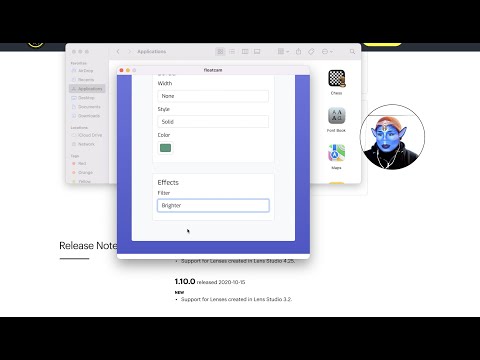
Here is a quick demo on how to use Floatcam:
[](https://youtu.be/r1SKmGSIw7s)
After installing, launch and customize the settings to your liking. When you are done customizing, you can minimize the settings window and start recording or move the settings window to a different monitor.

The floating window can be moved around, resized and have its shape changed during recording. You can also add a border to the window and a filter to the camera.

### Using floatcam with Snap Camera (macOS and Windows only)
Snap Camera is a virtual camera app that lets you add Snapchat filters to your camera. You can download it from the [Snap Camera website](https://snapcamera.snapchat.com/). After installing, Floatcam will automatically detect it and it will show up in the list of available camera sources.

## Why Floatcam?
There are a lot of screen recorders out there, but most of them do not have a built-in camera. For those with a camera, it's either not floating, can't be moved around, is not customizable, or requires paying for a premium version.
### A Brief History of Floatcam
The default screen recorder on macOS (Quicktime) does have a way to record the screen and the camera. However, it is not customizable and sometimes interferes with the recording. On Linux, I used Kazam, but it does not have a built-in camera.
One thing all these screen recorders have in common is that they are not customizable.
[Loom](https://www.loom.com/), a popular screen recorder allows you to do some customization but it's not free. It features a floating camera, a screen recorder and a video editor. It's a great tool, but you have a recording limit of 5 minutes for the free version.
Since there are lots of amazing FREE screen recorders out there and all I wanted was a floating camera, I decided to make my own. I thought it would be nice to have a simple camera app that you can use alongside any screen recorder.
I hope you enjoy using Floatcam as much as I enjoyed making it. If you have any questions, suggestions, or feedback, feel free to reach out to me on [Twitter](https://twitter.com/theterminalguy) or send me an email.
## Roadmap
I have thought about some cool features that I would like to add like screen annotation, a simple whiteboard, area protection and more.
While all of these features sounds cool, it's not the reason why I made Floatcam. I may add those features when I have the time.
## Contributing
If you want to contribute to Floatcam, you can do so by:
- Reporting bugs
- Fixing bugs
- Suggesting and adding new features
## Building from source
If you want to build Floatcam from source, you can do so by cloning the repository and use electron-forge to build it.
## Developing locally
First ensure you have the correct version of Node.js installed. If you are using [nvm](https://github.com/nvm-sh/nvm) you can run `nvm use` to switch to the correct version.
Next, clone the repository and install the dependencies.
```bash
git clone https://github.com/theterminalguy/floatcam.git && cd floatcam && yarn install
```
To start the app, you'd need to run `yarn build && yarn start` and `yarn desktop` in two separate terminals.