https://github.com/thiagokimo/konamicode
Installs the Konami code easter-egg into your Android app ;)
https://github.com/thiagokimo/konamicode
android easter-egg konami konamicode listen swipe
Last synced: 11 months ago
JSON representation
Installs the Konami code easter-egg into your Android app ;)
- Host: GitHub
- URL: https://github.com/thiagokimo/konamicode
- Owner: thiagokimo
- License: apache-2.0
- Created: 2015-07-26T22:19:22.000Z (almost 11 years ago)
- Default Branch: master
- Last Pushed: 2021-01-12T11:53:10.000Z (over 5 years ago)
- Last Synced: 2023-04-01T12:04:33.727Z (over 3 years ago)
- Topics: android, easter-egg, konami, konamicode, listen, swipe
- Language: Java
- Homepage:
- Size: 308 KB
- Stars: 89
- Watchers: 3
- Forks: 9
- Open Issues: 2
-
Metadata Files:
- Readme: README.md
- License: LICENSE
Awesome Lists containing this project
README
# KonamiCode
---
Easy install of our favorite easter-egg!


[](https://android-arsenal.com/details/1/2202)
## Preview
[](https://play.google.com/store/apps/details?id=io.kimo.konami)
[](https://youtu.be/vIRdoI-V-Pk)
## Inculde in your project
### Gradle
Add the JitPack repository to your build file:
``` groovy
repositories {
maven {
url "https://jitpack.io"
}
}
```
Add the dependency in the form:
```groovy
dependencies {
compile 'com.github.thiagokimo:KonamiCode:1.1.6'
}
```
### Maven
If you use Maven, add this into your build file:
``` xml
jitpack.io
https://jitpack.io
```
And them this into your dependencies
``` xml
com.github.thiagokimo
KonamiCode
1.1.6
```
## How to use
Add the following code in your Activity:
``` java
new KonamiCode.Installer(context)
.on(activity-or-fragment-or-view)
.install();
```
The library injects a [KonamiCodeLayout](https://github.com/thiagokimo/KonamiCode/blob/master/library/src/main/java/io/kimo/konamicode/KonamiCodeLayout.java) as the first child of your Activity's view. It listens your swipe events without harming
the touch events of the original view.
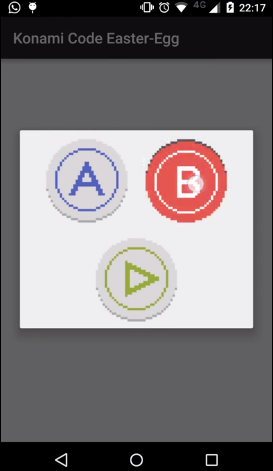
For the first part of the Konami code, swipe into the correct directions. If you do it correctly,
an AlertDialog with the buttons **A**, **B** and **START** will appear. Pressing them correctly will
trigger the final callback.
By default a callback with a Toast message will appear. You can customize the final callback by yourself:
``` java
new KonamiCode.Installer(context)
.on(activity-or-fragment-or-view)
.callback(new KonamiCodeLayout.Callback() {
@Override
public void onFinish() {
//whatever
}
})
.install();
```
### Attention
Make sure you add this **AFTER** your view is set, otherwise it won't listen to your swipes. KonamiCode adds a swipe listener into the root view of your Activity.
## Contribuiting
1. Fork it
2. Create your feature/bug-fix branch(`git checkout -b my-new-feature-or-fix`)
3. Commit your changes (`git commit -am 'Add some feature/fix'`)
4. Do your pull-request
## Developed by
* Thiago Rocha - http://kimo.io -
## License
Copyright 2011, 2012 Thiago Rocha
Licensed under the Apache License, Version 2.0 (the "License");
you may not use this file except in compliance with the License.
You may obtain a copy of the License at
http://www.apache.org/licenses/LICENSE-2.0
Unless required by applicable law or agreed to in writing, software
distributed under the License is distributed on an "AS IS" BASIS,
WITHOUT WARRANTIES OR CONDITIONS OF ANY KIND, either express or implied.
See the License for the specific language governing permissions and
limitations under the License.