https://github.com/thibmaek/ansible-infra
📕Ansible playbooks for Raspberry Pi, Linux and Mac
https://github.com/thibmaek/ansible-infra
ansible linux mac raspberry-pi thibmaek-com
Last synced: about 1 year ago
JSON representation
📕Ansible playbooks for Raspberry Pi, Linux and Mac
- Host: GitHub
- URL: https://github.com/thibmaek/ansible-infra
- Owner: thibmaek
- Created: 2020-03-15T16:26:20.000Z (over 6 years ago)
- Default Branch: master
- Last Pushed: 2024-12-22T16:45:47.000Z (over 1 year ago)
- Last Synced: 2025-04-10T15:53:27.592Z (about 1 year ago)
- Topics: ansible, linux, mac, raspberry-pi, thibmaek-com
- Language: Jinja
- Homepage:
- Size: 12.5 MB
- Stars: 14
- Watchers: 4
- Forks: 1
- Open Issues: 1
-
Metadata Files:
- Readme: README.md
Awesome Lists containing this project
README
# Ansible Playbooks
## Getting started
__Make sure SSH configs are set up according to inventory.yaml!__
```shell
# Setup this repo:
$ make install
# Perform a play:
$ ansible-playbook -v playbooks/init_server.yaml
# Performa a play on a specific host:
$ ansible-playbook -v playbooks/common.yaml -l rpi_node_tresor
# Perform a play directly on current host:
$ make play_local playbook=playbooks/local/macos.yaml
```
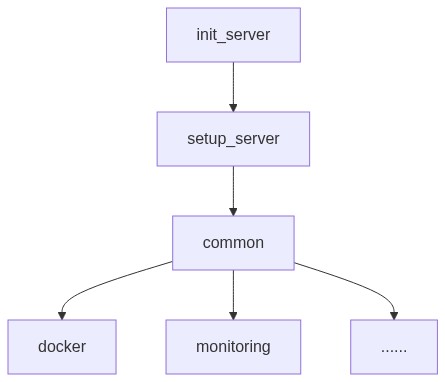
## Order of running plays (Debian)
## Styleguide
This follows:
- [Ansible Best Practices](https://docs.ansible.com/ansible/latest/user_guide/playbooks_best_practices.html)
- [Whitecloud Ansible Styleguide](https://github.com/whitecloud/ansible-styleguide)
## Performing common plays
Common plays (like common.yaml and upgrades.yaml) are available with make:
- `make play_common`
- `make play_upgrade`
## Encrypting secrets (via vault)
```console
ansible-vault encrypt_string 'secret' --name 'var_name'
```