https://github.com/thinhphoenix/github-pages
Automate the deployment of static websites using GitHub Actions and GitHub Pages. This template simplifies the build and deployment process for Vite, React, Vue, and other static frameworks, ensuring secure environment variable management and seamless updates. 🚀
https://github.com/thinhphoenix/github-pages
automation bunjs deploy front-end-development gh-pages github github-actions github-pages github-workflows production template
Last synced: 2 months ago
JSON representation
Automate the deployment of static websites using GitHub Actions and GitHub Pages. This template simplifies the build and deployment process for Vite, React, Vue, and other static frameworks, ensuring secure environment variable management and seamless updates. 🚀
- Host: GitHub
- URL: https://github.com/thinhphoenix/github-pages
- Owner: ThinhPhoenix
- License: apache-2.0
- Created: 2025-01-27T03:57:36.000Z (over 1 year ago)
- Default Branch: main
- Last Pushed: 2025-02-23T10:55:41.000Z (over 1 year ago)
- Last Synced: 2025-02-23T11:20:00.839Z (over 1 year ago)
- Topics: automation, bunjs, deploy, front-end-development, gh-pages, github, github-actions, github-pages, github-workflows, production, template
- Language: HTML
- Homepage:
- Size: 89.8 KB
- Stars: 1
- Watchers: 1
- Forks: 0
- Open Issues: 0
-
Metadata Files:
- Readme: README.md
- License: LICENSE
Awesome Lists containing this project
README
# GitHub Actions Deployment Template
A well-structured template for deploying **Vite, Next.js, Nuxt.js**, and similar applications to **GitHub Pages** using **GitHub Actions**, ensuring secure environment variable management.
> [!Note]
> Special thanks to [JamesIves/github-pages-deploy-action](https://github.com/JamesIves/github-pages-deploy-action) and [rafgraph/spa-github-pages](https://github.com/rafgraph/spa-github-pages) for enabling this streamlined deployment process.

---
## 🚀 Quick Start
### 1. Initialize Deploy Configuration
Run the universal setup script (works on **Windows, macOS, and Linux**):
```bash
curl -L https://cdn.jsdelivr.net/gh/ThinhPhoenix/github-pages@main/init.min.js | node
```
This downloads and executes the init script directly from CDN.
---
### 2. Enable GitHub Actions Permissions
**Option A - Using GitHub CLI (Recommended):**
```bash
gh api -X PUT /repos/$(gh repo view --json nameWithOwner -q .nameWithOwner)/actions/permissions/workflow -f default_workflow_permissions='write'
```
> [!Note]
> Install gh cli https://cli.github.com/
**Option B - Manual Setup:**
Navigate to: `Repository ▸ Settings ▸ Actions ▸ General ▸ Workflow permissions ▸ Read & Write`
### 3. Configure Base URL in vite.config.ts
For **Vite-based projects**, set the correct base URL:
```typescript
import { defineConfig } from "vite";
import react from "@vitejs/plugin-react";
export default defineConfig({
plugins: [react()],
base: "/your-repo-name/", //✎ Replace with your repository name
});
```
> ༼ つ ◕_◕ ༽つ If your project not vite-based then check for config file to change your root base
### 4. Configure Environment Variables
All secrets stored in GitHub Actions Secrets are automatically injected into the build environment. Simply add your secrets via GitHub CLI or the web interface.
> [!Warning]
> **Do not** commit actual secret values to the repository.
### 5. Secure Environment Variables Using GitHub Secrets
To securely store environment variables, use GitHub CLI:
bash
gh secret set -f .env
> [!Note]
> Ensure GitHub CLI is installed before executing this command. You can download GitHub CLI here: [GitHub CLI](https://cli.github.com/).
> Alternatively, you can manually add secrets to **GitHub Actions Secrets** via **Repository > Settings > Secrets and variables > Actions**.
---
## 📦 Features
- ✓ Automated deployment to GitHub Pages
- ✓ Secure environment variable handling
- ✓ Configurable build and deployment settings
- ✓ Jekyll processing disabled (.nojekyll included)
---
## 🔧 Configuration
### GitHub Pages Setup
gh api repos/$(gh repo view --json nameWithOwner -q .nameWithOwner)/pages -X POST -f source[branch]=public -f source[path]=/
1. Navigate to: `Repository ▸ Settings ▸ Pages`
2. Set the source branch to public
3. Click `Save`
### Workflow Configuration
The deployment workflow is defined in `.github/workflows/deploy.yml` and includes:
- Automated deployment on main branch pushes
- Manual workflow execution with optional secret overrides
- Bun runtime setup with caching
- Automatic injection of all GitHub Secrets into the build environment
- Build and deployment execution
```yml
name: Deploy 🕊️
on:
push:
branches:
- main #✎ Adjust to branch you want to deploy
workflow_dispatch:
inputs:
secrets_txt:
description: 'Paste secrets here (format: KEY=VALUE)'
required: false
jobs:
build_and_deploy:
name: Build & Deploy 🚀
runs-on: ubuntu-latest
steps:
- name: Checkout repo
uses: actions/checkout@v4.1.7
- name: Import secrets
env:
SECRETS_CONTEXT: ${{ toJSON(secrets) }}
run: |
echo "$SECRETS_CONTEXT" | jq -r 'to_entries[] | "\(.key)=\(.value)"' >> "$GITHUB_ENV"
- name: Setup Bun
uses: oven-sh/setup-bun@v1
- name: Install dependencies
run: |
bun install
if [ -f bun.lockb ]; then
if git ls-files --error-unmatch bun.lockb > /dev/null 2>&1; then
if ! git diff --quiet bun.lockb; then
git config --global user.name "github-actions[bot]"
git config --global user.email "github-actions[bot]@users.noreply.github.com"
git add bun.lockb
git commit -m "chore: update bun.lockb"
git push
fi
else
echo "bun.lockb is not tracked by Git. Adding it..."
git config --global user.name "github-actions[bot]"
git config --global user.email "github-actions[bot]@users.noreply.github.com"
git add bun.lockb
git commit -m "chore: add bun.lockb"
git push
fi
else
echo "bun.lockb does not exist. Skipping commit."
fi
- name: Build project
run: bun run build && touch ./dist/.nojekyll #✎ Adjust to your build output folder (dist or out)
- name: Deploy to GitHub Pages
uses: JamesIves/github-pages-deploy-action@v4.6.0
with:
token: ${{ secrets.GITHUB_TOKEN }}
branch: public
folder: dist #✎ Adjust to your build output folder (dist or out)
```
---
## 💡 Environment Variables
Environment variables can be managed in two ways:
1. **GitHub Secrets** (recommended for production)
2. **Workflow dispatch input** (useful for testing purposes)
---
## 🏗️ Build Configuration
| Setting | Default Value | Configuration File |
|--------------------|--------------------|---------------------|
| **Output Directory** | dist | deploy.yml |
| **Base URL** | /repository-name/ | vite.config.ts |
These settings can be adjusted based on project requirements.
---
## 📝 Usage
### Automatic Deployment
Deploy automatically by pushing changes to the main branch:
bash
git push origin main
### Manual Deployment
1. Navigate to **Actions** in the repository
2. Select the **Deploy 🕊️** workflow
3. Click **Run workflow**
4. (Optional) Provide secrets in KEY=VALUE format
---
## ⚠️ Important Considerations
> [!Warning]
> - Ensure the repository name matches the base URL in vite.config.ts.
> - **Do not** commit actual secret values to the repository.
> - The public branch is automatically generated upon the first deployment.
> - **Fix SPA GitHub Pages 404 Error:**
> 1. Place `404.html` (from `./public`) at the root of your deployed site. This file redirects all 404s back to `index.html` with the original path preserved in the query string.
> 2. Add the following script to your `index.html` **inside the `` tag** (before any other scripts):
> ```html
>
>
> // Single Page Apps for GitHub Pages
> // MIT License
> // https://github.com/rafgraph/spa-github-pages
> // This script checks to see if a redirect is present in the query string,
> // converts it back into the correct url and adds it to the
> // browser's history using window.history.replaceState(...),
> // which won't cause the browser to attempt to load the new url.
> // When the single page app is loaded further down in this file,
> // the correct url will be waiting in the browser's history for
> // the single page app to route accordingly.
> (function(l) {
> if (l.search[1] === '/' ) {
> var decoded = l.search.slice(1).split('&').map(function(s) {
> return s.replace(/~and~/g, '&')
> }).join('?');
> window.history.replaceState(null, null,
> l.pathname.slice(0, -1) + decoded + l.hash
> );
> }
> }(window.location))
>
>
> ```
> - This allows client-side routing to work correctly when refreshing or accessing deep links directly (e.g., `/about`, `/user/123`).
> - For React Router, Vue Router, or other SPA frameworks, this ensures routes work on refresh.
> - Special thanks to [rafgraph/spa-github-pages](https://github.com/rafgraph/spa-github-pages) for this solution.
---
## 🤝 Contributing
Contributions and improvements are welcome! Feel free to submit issues or feature requests.
---
## 📄 License
This project is distributed under the **MIT License**. Refer to the LICENSE file for more details.
---
## 🙏 Acknowledgments
This deployment template is powered by:
- [JamesIves/github-pages-deploy-action](https://github.com/JamesIves/github-pages-deploy-action)
- [rafgraph/spa-github-pages](https://github.com/rafgraph/spa-github-pages)
Consider supporting their valuable contributions!
---
## Star History
[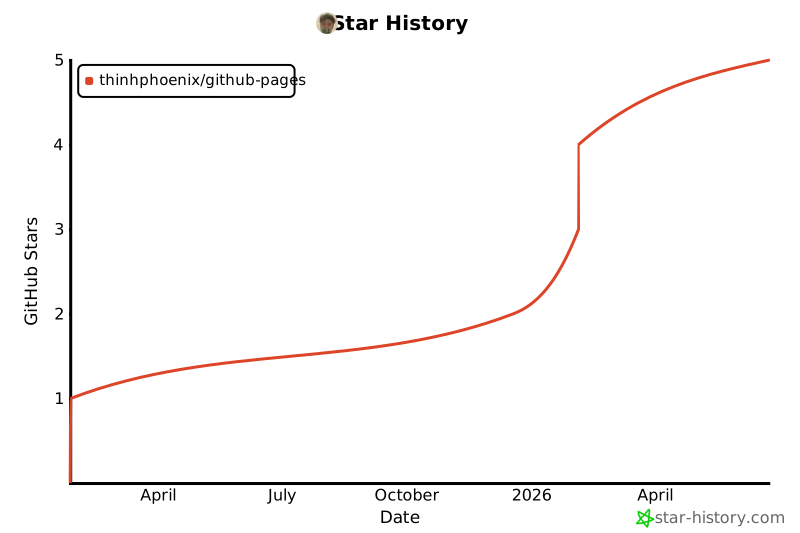](https://star-history.com/#ThinhPhoenix/github-pages&Date)