https://github.com/thirdweb-example/discord-role-granter
Grant users who own NFTs a role in your Discord server!
https://github.com/thirdweb-example/discord-role-granter
Last synced: 11 months ago
JSON representation
Grant users who own NFTs a role in your Discord server!
- Host: GitHub
- URL: https://github.com/thirdweb-example/discord-role-granter
- Owner: thirdweb-example
- License: apache-2.0
- Created: 2022-07-22T03:52:48.000Z (almost 4 years ago)
- Default Branch: main
- Last Pushed: 2024-04-12T00:34:42.000Z (about 2 years ago)
- Last Synced: 2025-06-30T23:06:05.530Z (12 months ago)
- Language: TypeScript
- Homepage: https://discord-role-granter.thirdweb-example.com/
- Size: 327 KB
- Stars: 15
- Watchers: 1
- Forks: 14
- Open Issues: 0
-
Metadata Files:
- Readme: README.md
- License: LICENSE.md
Awesome Lists containing this project
README
> [!Important]
> This repository is referencing the `mumbai` chain.
>
> `Mumbai` [is deprecated since 08/04/2024](https://blog.thirdweb.com/deprecation-of-mumbai-testnet/), meaning the code in this repository will no longer work out of the box.
>
> You can still use this repository, however you will have to switch any references to `mumbai` to another chain.
# Discord Role Granter
This template uses the [authentication SDK](https://thirdweb.com/authentication)
along with Discord OAuth to grant users who own an NFT from a specific collection a special role
in a Discord server.
## Tools:
- [**React SDK**](https://docs.thirdweb.com/react): To connect to the user's MetaMask wallet.
- [**TypeScript SDK**](https://docs.thirdweb.com/typescript): To view the balance of the connected wallet in an NFT collection.
- [**Authentication SDK**](https://thirdweb.com/authentication) to allow the user to sign in with Ethereum and verify they own their wallet.
- [**Next Auth**](https://next-auth.js.org/): To authenticate with Discord and access the user's Discord data such as their user ID.
- [**Discord API**](https://discord.com/developers/docs) to grant users a role in our Discord server.
## Using This Repo
To create a clone of this repository, you can use the [thirdweb CLI](https://portal.thirdweb.com/thirdweb-cli)
```bash
npx thirdweb create --template discord-role-granter
```
# Guide
You can follow along with the guide below to set this up for your Discord server and role.
### Setting Up the Discord Bot
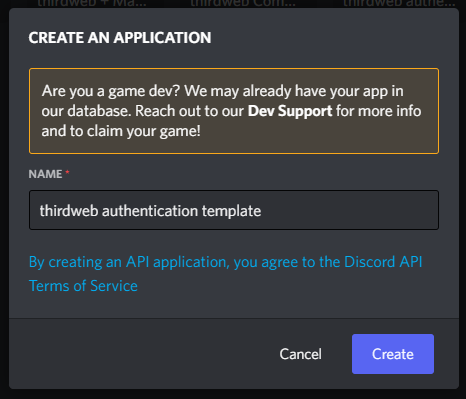
To create a Discord bot, head to the [Discord Developer Portal](https://discord.com/developers/applications) and click on `New Application`, give it a name and click `create`!
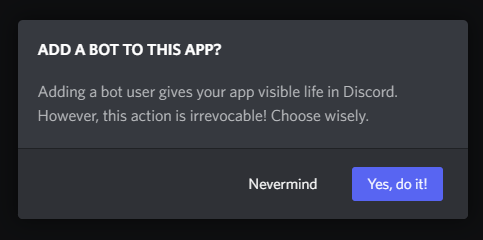
Once it's created, head to the `Bot` tab, and click `Add Bot`.
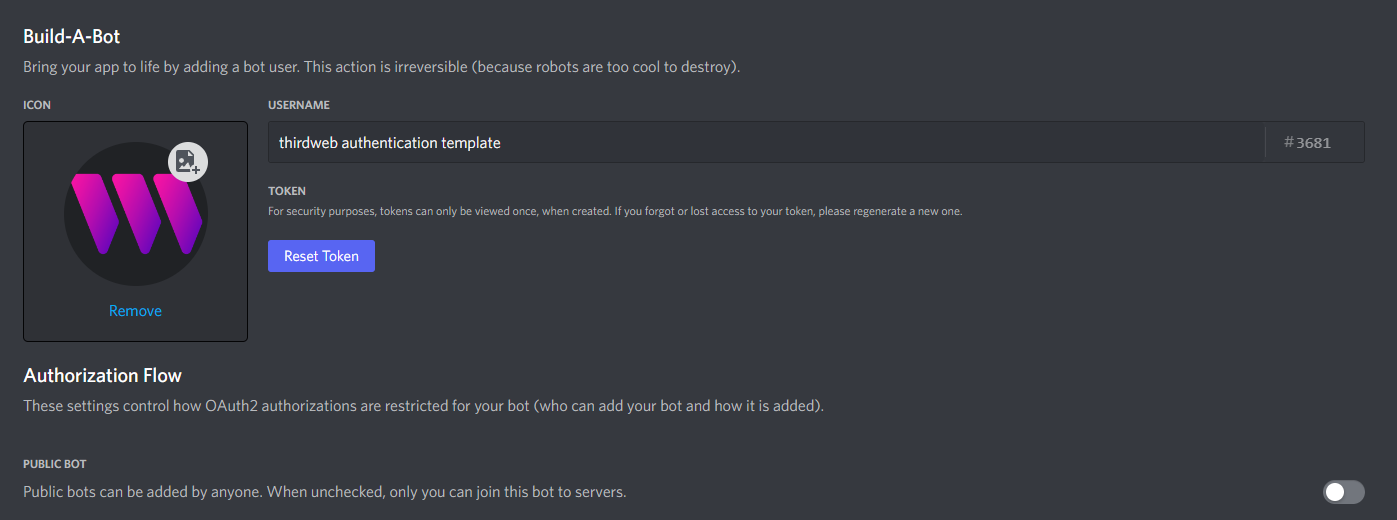
Give your bot a username, and I'm unchecking the `Public Bot` field so that only we can invite our bot.
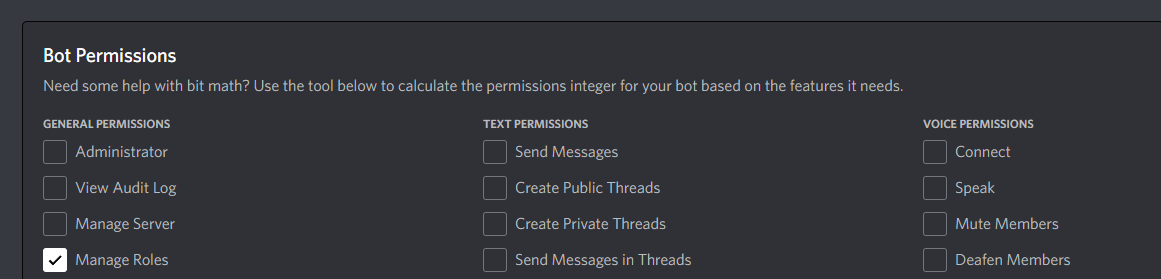
Scroll down to `Bot Permissions` and give our bot the `Manage Roles` permission:
Once you're ready, click `Save Changes`!
Now we're ready to invite our bot to our server!
Click `OAuth2` > `URL Generator` on the sidebar:
Select `bot` and `Manage Roles` scopes.
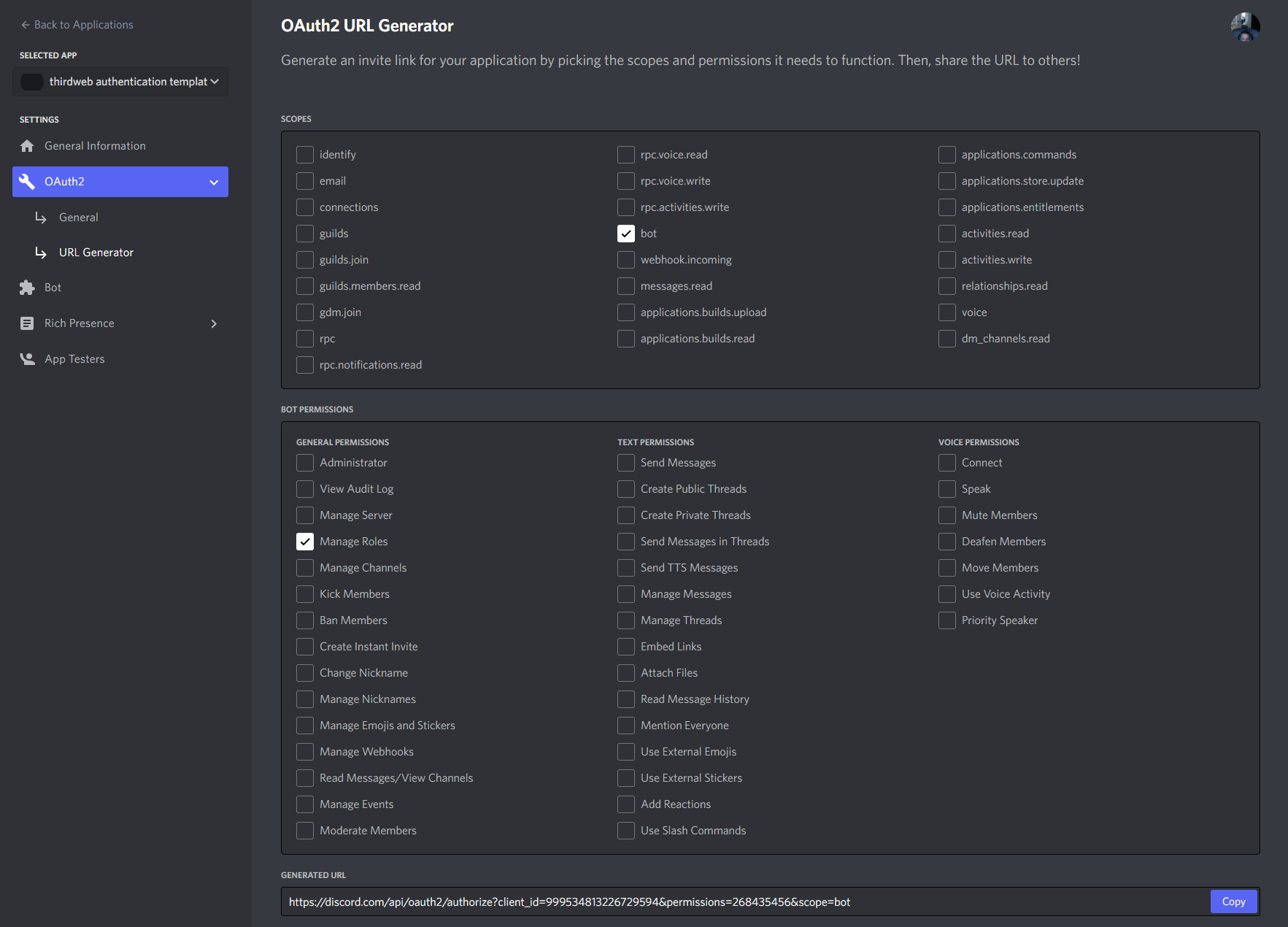
Copy the Generated URL and open it in your browser.
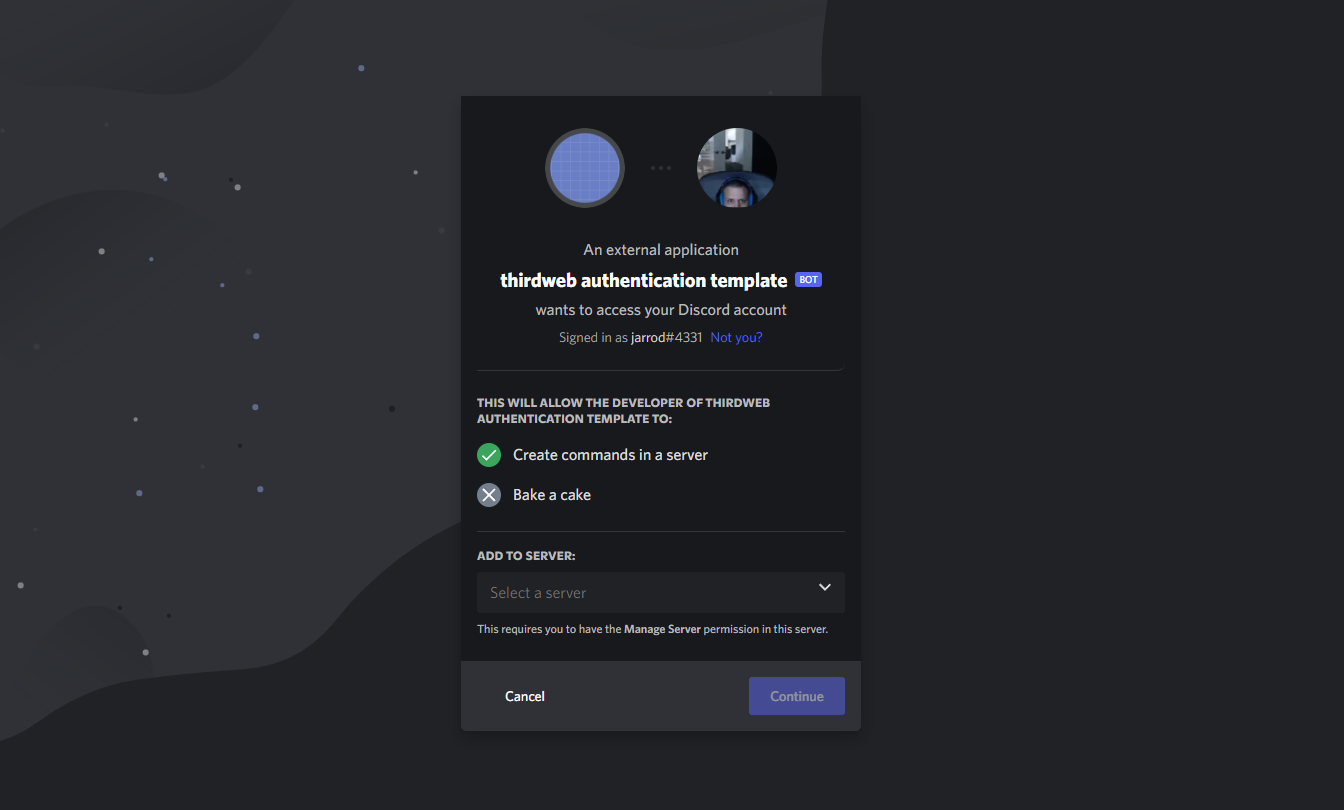
Select the server you want to add your bot to and click `Continue`. It will ask you to approve this bot's permissions, you should see a prompt to authorise the bot for `Manage Roles` permissions:
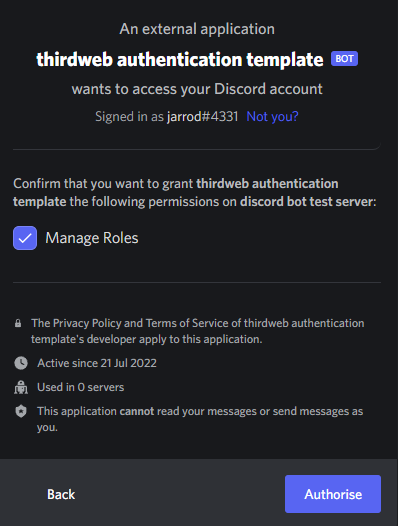
Click `Authorise`, once successful, you'll see an `Authorised` window. Your bot will be added to your server - say hi!

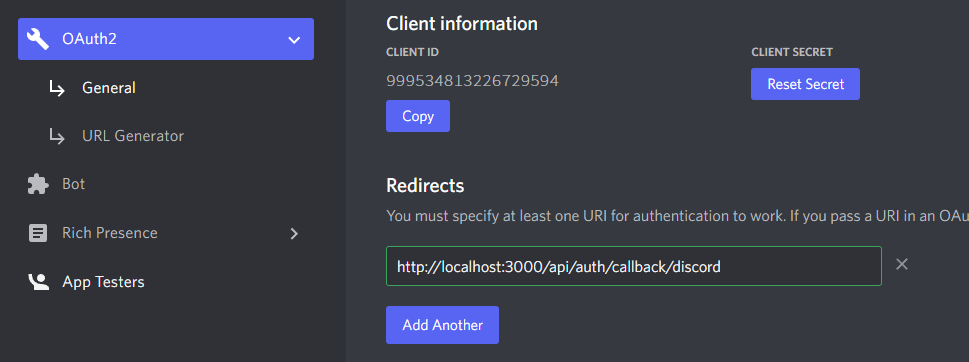
Copy across your `Client ID` and `Client Secret` into environment variables in your project, by creating a `.env.local` file at the root of the directory.
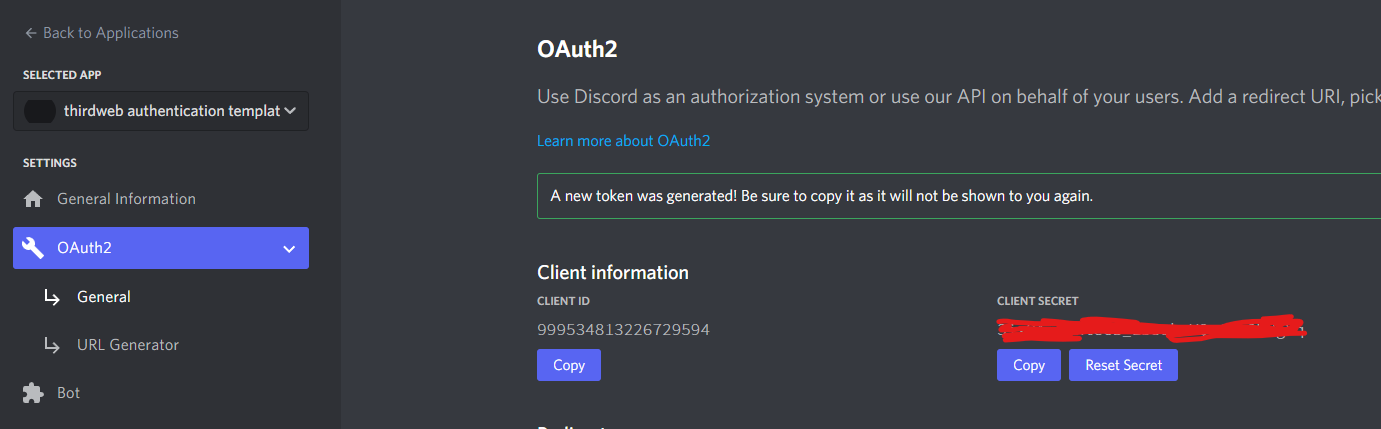
```text
CLIENT_ID=xxxxx
CLIENT_SECRET=xxxxx
```
We also need to add a Redirect URL into our Application while we're here:
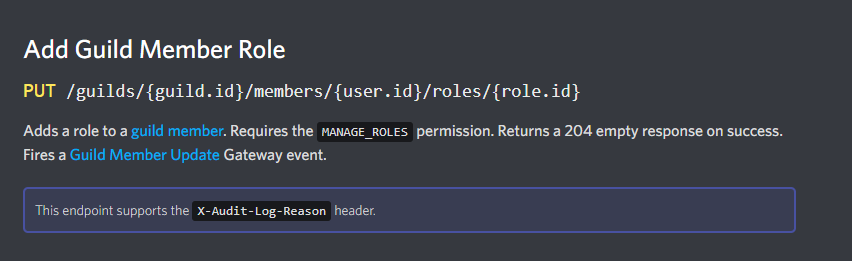
To grant a role to the connected user, we are going to use the Discord API on behalf of the bot that we created. Specifically, we'll be hitting the `Add Guild Member Role` API endpoint:
To make requests from our bot, we'll need a token to act on its behalf. To generate a token, head to the `Bot` tab from your Discord Developer portal, and click `Reset Token` on your bot:
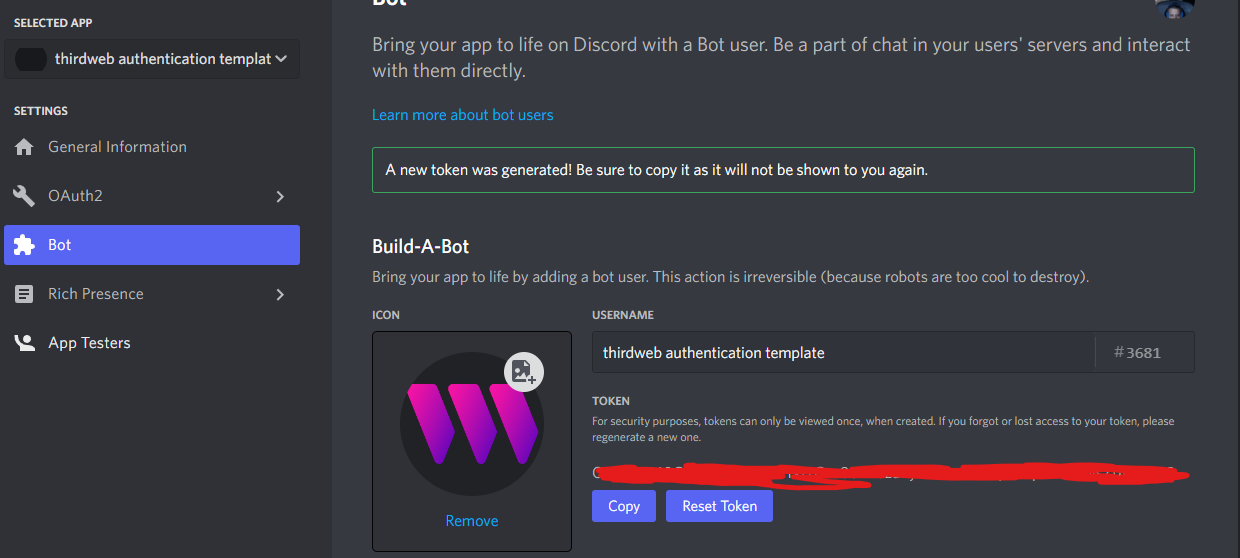
We then need to store this inside our environment variables as well securely:
```text
BOT_TOKEN=xxxx
```
Finally, inside the [constants/index.ts](./constants/index.ts) file, you need to configure your:
- Discord Server ID
- Role ID
- NFT Collection ID
You can learn how to do that from [this guide](https://support.discord.com/hc/en-us/articles/206346498-Where-can-I-find-my-User-Server-Message-ID-).
### thirdweb and NextAuth Wrappers
To authenticate users with both their **wallet** and their Discord account, we wrap our application in two Provider components:
```tsx
// This is the chain your dApp will work on.
const activeChain = "mumbai";
function MyApp({ Component, pageProps }: AppProps) {
return (
);
}
```
This allows us to access the helpful hooks of the React SDK and NextAuth to read information about the current user and their wallet. We also configure authentication with the `authConfig` prop on the `ThirdwebProvider` component.
### Discord Oauth
NextAuth handles the Oauth flow of signing in with Discord for us in
the [[...nextauth.ts]](./pages/api/auth/[...nextauth].ts) file.
We add some additional logic to append the user ID to the
information that is available to us so that we can read that inside our API route.
```tsx
export default NextAuth({
// Configure one or more authentication providers
secret: process.env.AUTH_SECRET,
providers: [
DiscordProvider({
clientId: process.env.CLIENT_ID as string,
clientSecret: process.env.CLIENT_SECRET as string,
}),
],
// When the user signs in, get their token
callbacks: {
async jwt({ token, account }) {
// Persist the user ID to the token right after signin
if (account) {
token.userId = account.providerAccountId;
}
return token;
},
async session({ session, token, user }) {
session.userId = token.userId;
return session;
},
},
});
```
### Connect Wallet & Sign In With Discord
We have a component called [SignIn](./components/SignIn.tsx) that shows the user different buttons
depending on whether they have their wallet connected and Discord account connected.
In this component, three states can occur:
1. The user is connected to both `wallet` and `Discord` => We show them the `Give me the role` button.
2. The user is not connected to `wallet` => We ask them to connect their wallet.
3. The user is not connected to `Discord`=> We ask them to authenticate with Discord.
### Authenticating Wallet
Once users have signed in with their wallet and Discord account, they are shown a button that makes an API
request to grant them a role in the Discord server.
First, we need to prove that the user owns the wallet by using the authentication SDK.
**Sign in with ethereum**:
```tsx
const { isLoggedIn } = useUser();
const login = useLogin();
if (!isLoggedIn) {
return (
Sign using your wallet
This proves that you really own the wallet that you've claimed to be
connected.
{
await login.login();
}}
className={`${styles.mainButton} ${styles.spacerTop}`}
>
Sign message!
);
}
```
**Make the request to the API route**
```tsx
async function requestGrantRole() {
// Then make a request to our API endpoint.
try {
const response = await fetch("/api/grant-role", {
method: "POST",
});
const data = await response.json();
console.log(data);
alert("Check the console for the response!");
} catch (e) {
console.error(e);
}
}
```
### Checking NFT Balance
Using the TypeScript SDK, we can check the balance of the wallet for a specific ERC-1155 token in a specific collection.
```tsx
// Check if this user owns an NFT
const editionDrop = sdk.getContract(
"0x1fCbA150F05Bbe1C9D21d3ab08E35D682a4c41bF",
"edition-drop"
);
// Get addresses' balance of token ID 0
const balance = await editionDrop.balanceOf(verifiedWalletAddress, 0);
```
### Granting Role
Using our Discord bot's token as the authorization header, we can grant the user a role in the Discord server
_if_ they own an NFT in the collection.
```tsx
if (balance.toNumber() > 0) {
// If the user is verified and has an NFT, return the content
// Make a request to the Discord API to get the servers this user is a part of
const discordServerId = "999533680663998485";
const { userId } = session;
const roleId = "999851736028172298";
const response = await fetch(
// Discord Developer Docs for this API Request: https://discord.com/developers/docs/resources/guild#add-guild-member-role
`https://discordapp.com/api/guilds/${discordServerId}/members/${userId}/roles/${roleId}`,
{
headers: {
// Use the bot token to grant the role
Authorization: `Bot ${process.env.BOT_TOKEN}`,
},
method: "PUT",
}
);
// If the role was granted, return the content
if (response.ok) {
res.status(200).json({ message: "Role granted" });
}
// Something went wrong granting the role, but they do have an NFT
else {
const resp = await response.json();
console.error(resp);
res
.status(500)
.json({ error: "Error granting role, are you in the server?" });
}
}
```
## Join our Discord!
For any questions, suggestions, join our discord at [https://discord.gg/thirdweb](https://discord.gg/thirdweb).