https://github.com/thomasbrus/stimulus-reactive-ui
A reactive UI system built on top of Stimulus.js that enables declarative, state-driven interfaces with minimal JavaScript.
https://github.com/thomasbrus/stimulus-reactive-ui
hotwire stimulus turbo
Last synced: 5 months ago
JSON representation
A reactive UI system built on top of Stimulus.js that enables declarative, state-driven interfaces with minimal JavaScript.
- Host: GitHub
- URL: https://github.com/thomasbrus/stimulus-reactive-ui
- Owner: thomasbrus
- License: mit
- Created: 2025-07-20T09:57:52.000Z (11 months ago)
- Default Branch: main
- Last Pushed: 2025-07-27T16:41:05.000Z (11 months ago)
- Last Synced: 2025-07-27T18:47:39.900Z (11 months ago)
- Topics: hotwire, stimulus, turbo
- Language: HTML
- Homepage: https://thomasbrus.github.io/stimulus-reactive-ui
- Size: 205 KB
- Stars: 2
- Watchers: 0
- Forks: 0
- Open Issues: 0
-
Metadata Files:
- Readme: README.md
- License: LICENSE.md
Awesome Lists containing this project
README
# Stimulus Reactive UI
A reactive UI system built on top of Stimulus.js that enables declarative, state-driven interfaces with minimal JavaScript. This project demonstrates how to create dynamic, interactive web applications using reactive patterns within the Stimulus framework.
## Demo
> [!TIP]
> 🚀 **[View Live Demo](https://thomasbrus.github.io/stimulus-reactive-ui/)**
---
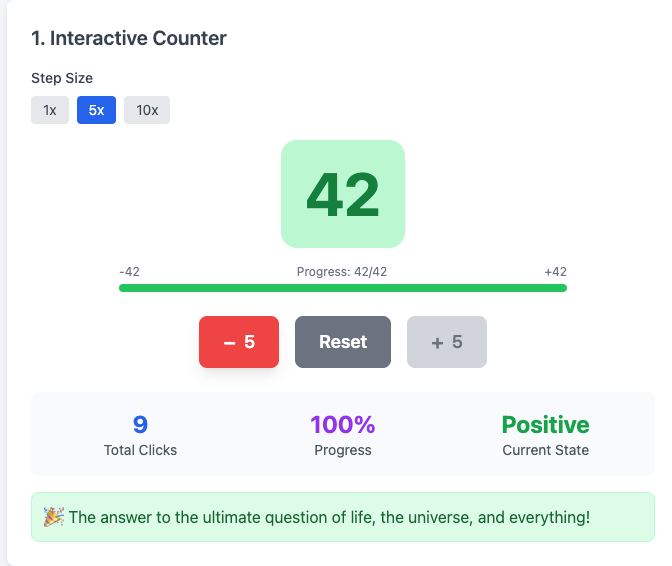
---
```html
state.count > 0
state.count < 0 ? 'negative' : 'positive'
0
Counter is positive
Increment
Decrement
```
The demo is entirely self-contained in a single `index.html` file that showcases 13 different interactive examples. Everything needed to run the demo is included:
- **Tailwind CSS** - Loaded via CDN for styling
- **Stimulus.js** - Imported via ES modules from unpkg
- **LiveController** - Custom Stimulus controller that implements the reactive system
- **Interactive Examples** - 11 demonstrations of reactive UI patterns
## Features
- **Declarative Reactive Bindings** - Use `live:text`, `live:class`, `live:show`, etc. to bind state to DOM elements
- **Computed States** - Define derived state using template scripts
- **Two-way Data Binding** - Automatic synchronization between form inputs and state
- **Conditional Rendering** - Show/hide elements based on state
- **Dynamic Styling** - Apply CSS classes and styles reactively
- **State Management** - Clean, predictable state updates with automatic UI synchronization
## Usage
### Live States
Define reactive state properties that can be bound to form inputs or calculated dynamically.
**Form Input Binding** - Use `data-live-state="propertyName"` on inputs:
```html
Light
Dark
```
**Computed States** - Use `` with JavaScript expressions:
```html
<script type="text/template" data-live-computed="fullName">
state.firstName + ' ' + state.lastName
state.username.length > 3 && state.email.includes('@')
```
**HTML Template Literals** - When a computed property starts with `<`, it's automatically treated as an HTML template literal:
```html
<div class="user-card">
<h3>${state.userName}</h3>
<p>Status: ${computed.userStatus}</p>
</div>
<div class="notification ${computed.notificationType}">
<strong>${computed.title}</strong>
<p>${state.message}</p>
${computed.showTimestamp ? `<small>${computed.timestamp}</small>` : ''}
</div>
```
> **Important:** Within computed property definitions, use `state.` to reference base state properties and `computed.` to reference other computed properties. In your HTML templates, use `computed.` to reference computed properties and `state.` for base state properties.
```html
'Hello, ' + state.firstName + ' ' + state.lastName
computed.greeting + '! Welcome to our application.'
Hello
Welcome
```
### Live Attributes
Bind state to DOM elements using special `live:*` attributes that automatically update when state changes.
| Attribute | Description | Example |
| ----------------- | ----------------------------- | -------------------------------------------------------- |
| `live:text` | Sets element text content | `live:text="state.count"` |
| `live:html` | Sets element innerHTML | `live:html="state.content"` |
| `live:class` | Conditionally applies classes | `live:class="{ 'active': state.isActive }"` |
| `live:style` | Sets CSS styles | `live:style="{ color: state.textColor }"` |
| `live:show` | Shows/hides element | `live:show="state.isVisible"` |
| `live:disabled` | Enables/disables element | `live:disabled="!state.isValid"` |
| `live:attributes` | Sets multiple HTML attributes | `live:attributes="{ src: state.url, alt: state.title }"` |
**Examples:**
```html
Default Title
Submit
Details content
Save
![]()
```
**State Updates** - Trigger state changes using the `live#update` action:
```html
Increment
Toggle
```
## Browser Support
This project uses modern JavaScript features including:
- ES6 Modules
- Proxy objects
- MutationObserver
- Template literals
Supported in all modern browsers (Chrome 61+, Firefox 60+, Safari 12+, Edge 79+).
## Security Considerations
When implementing reactive UI systems that interpolate user input, it's important to consider security implications. This demo evaluates dynamic code using `new Function()`, which is safer and more performant than `eval()` but still carries risks with untrusted input.
For production applications planning to interpolate user input, it is recommended to restrict JavaScript execution to a safe subset using libraries like [jse-eval](https://www.npmjs.com/package/jse-eval), which provides secure expression evaluation without full JavaScript access. Always validate and sanitize user input before incorporating it into reactive expressions to prevent cross-site scripting (XSS) and code injection vulnerabilities.