https://github.com/thomasweise/moptipy
Implementation of metaheuristic optimization methods in Python for scientific, industrial, and educational scenarios. Experiments can be executed in parallel or in a distributed fashion. Experimental results can be evaluated in various ways, including diagrams, tables, and export to Excel.
https://github.com/thomasweise/moptipy
evolutionary-algorithms evolutionary-computation experimentation genetic-algorithm heuristic-optimization hill-climbing memetic-algorithms metaheuristics optimization optimization-algorithms python random-walk randomized-local-search replicability simulated-annealing
Last synced: 4 months ago
JSON representation
Implementation of metaheuristic optimization methods in Python for scientific, industrial, and educational scenarios. Experiments can be executed in parallel or in a distributed fashion. Experimental results can be evaluated in various ways, including diagrams, tables, and export to Excel.
- Host: GitHub
- URL: https://github.com/thomasweise/moptipy
- Owner: thomasWeise
- License: gpl-3.0
- Created: 2021-02-07T23:51:37.000Z (over 5 years ago)
- Default Branch: main
- Last Pushed: 2025-05-21T11:33:31.000Z (about 1 year ago)
- Last Synced: 2025-05-21T12:31:04.785Z (about 1 year ago)
- Topics: evolutionary-algorithms, evolutionary-computation, experimentation, genetic-algorithm, heuristic-optimization, hill-climbing, memetic-algorithms, metaheuristics, optimization, optimization-algorithms, python, random-walk, randomized-local-search, replicability, simulated-annealing
- Language: Python
- Homepage: https://thomasweise.github.io/moptipy/
- Size: 6.88 MB
- Stars: 24
- Watchers: 2
- Forks: 2
- Open Issues: 0
-
Metadata Files:
- Readme: README.md
- Contributing: CONTRIBUTING.md
- License: LICENSE
- Security: SECURITY.md
Awesome Lists containing this project
README
[](https://github.com/thomasWeise/moptipy/actions/workflows/build.yml)
[](https://pypi.org/project/moptipy)
[](https://pypistats.org/packages/moptipy)
[](https://thomasweise.github.io/moptipy/tc/index.html)
[](https://thomasweise.github.io)
# moptipy: Metaheuristic Optimization in Python
- [Introduction](#1-introduction)
- [Installation](#2-installation)
- [How-Tos](#3-how-tos)
- [Applying 1 Algorithm Once to 1 Problem](#31-how-to-apply-1-optimization-algorithm-once-to-1-problem-instance)
- [Run a Series of Experiments](#32-how-to-run-a-series-of-experiments)
- [How to Solve an Optimization Problem](#33-how-to-solve-an-optimization-problem)
- [Defining a New Problem](#331-define-a-new-problem-type)
- [Defining a New Algorithm](#332-define-a-new-algorithm)
- [Applying an Own Algorithm to an Own Problem](#333-applying-an-own-algorithm-to-an-own-problem)
- [Implemented Algorithms, Search Spaces, and Problems](#4-implemented-algorithms-search-spaces-and-problems)
- [Implemented Algorithms](#41-implemented-algorithms)
- [Implemented Search Spaces](#42-implemented-search-spaces-and-operators)
- [Implemented Problems](#43-implemented-problems)
- [Data Formats](#5-data-formats)
- [Log Files](#51-log-files)
- [End Results CSV Files](#52-end-result-csv-files)
- [End Result Statistics CSV Files](#53-end-result-statistics-csv-files)
- [Evaluating Experiments](#6-evaluating-experiments)
- [Exporting Data](#61-exporting-data)
- [Progress Plots](#62-progress-plots)
- [End Results Plots](#63-end-results-plot)
- [ECDF Plots](#64-ecdf-plots)
- [Expected Running Time Plots](#65-expected-running-time-ert-plots)
- [ERT-ECDF Plots](#66-ert-ecdf-plots)
- [Performance over Algorithm Parameter or Instance Feature](#67-performance-over-algorithm-parameter-or-instance-feature)
- [End Results Tables](#68-end-results-table)
- [Tables of Tests Comparing End Results](#69-testing-end-results-for-statistically-significant-differences-table)
- [Examples](#7-examples)
- [More Features](#8-more-features)
- [Unit Tests and Static Analysis](#81-unit-tests-and-static-analysis)
- [Reproducibility](#82-reproducibility)
- [Parallel and Distributed Experiments](#83-parallel-and-distributed-experiments)
- [Uselful Links and References](#9-useful-links-and-references)
- [Publications on moptipy and Works using moptipy](#10-publications-on-moptipy-and-works-using-moptipy)
- [License](#11-license)
- [Contact](#12-contact)
## 1. Introduction
[`moptipy`](https://thomasweise.github.io/moptipy/_static/moptipy_flyer.pdf) is a library with implementations of metaheuristic optimization methods in Python 3.12 that also offers an environment for replicable experiments.
Metaheuristic optimization algorithms are methods for solving hard problems.
`moptipy` provides an [API](https://thomasweise.github.io/moptipy/moptipy.api.html), several [algorithm implementations](https://thomasweise.github.io/moptipy/moptipy.algorithms.html#module-moptipy.algorithms), as well as [experiment execution](https://thomasweise.github.io/moptipy/moptipy.api.html#module-moptipy.api.experiment) and [evaluation](https://thomasweise.github.io/moptipy/moptipy.evaluation.html#module-moptipy.evaluation) facilities for metaheuristics.
[Here](http://thomasweise.github.io/talks/moptipy.pdf) you can find a small presentation outlining some of the concepts of the system.
[`moptipy`](https://thomasweise.github.io/moptipy/_static/moptipy_flyer.pdf) is structured with performance, ease-of-use, and generality in mind, but also based on an educational and research perspective.
It is therefore (hopefully) suitable for practical industrial applications, scientific research, and for students who are just entering the field of metaheuristic optimization.
A metaheuristic algorithm can be a black-box method, which can solve problems without deeper knowledge about their nature.
Such a black-box algorithm only requires methods to [create](https://thomasweise.github.io/moptipy/moptipy.api.html#moptipy.api.operators.Op0) and [modify](https://thomasweise.github.io/moptipy/moptipy.api.html#moptipy.api.operators.Op1) points in the [search space](https://thomasweise.github.io/moptipy/moptipy.api.html#module-moptipy.api.space) and to [evaluate their quality](https://thomasweise.github.io/moptipy/moptipy.api.html#module-moptipy.api.objective).
With these operations, it will try to discover better solutions step-by-step.
Black-box metaheuristics are very general and can be adapted to almost any optimization problem.
They allow us to plug in almost arbitrary [search operators](https://thomasweise.github.io/moptipy/moptipy.api.html#module-moptipy.api.operators), [search spaces](https://thomasweise.github.io/moptipy/moptipy.api.html#module-moptipy.api.space), and [objective functions](https://thomasweise.github.io/moptipy/moptipy.api.html#module-moptipy.api.objective).
But it is also possible to develop algorithms that are tailored to specified problems.
For example, one could either design the search operators and the optimization algorithm as a unit.
Then, the algorithm could change its way to sample new points based on the information it gathers.
Or one could design an algorithm for a specific search space, say, the [`n`-dimensional real numbers](https://thomasweise.github.io/moptipy/moptipy.algorithms.so.vector.html), which could then make use of the special features of this space, such as arithmetic and geometric relationships of the points within it.
Or one could design an algorithm for a specific problem, making use of specific features of the objective function.
Finally, there are [multi-objective optimization problems](https://thomasweise.github.io/moptipy/moptipy.api.html#module-moptipy.api.mo_problem) where multiple, potentially conflicting, criteria need to be optimized at once.
Within our [`moptipy`](https://thomasweise.github.io/moptipy/_static/moptipy_flyer.pdf) framework, you can implement algorithms of all of these types under a unified [API](https://thomasweise.github.io/moptipy/moptipy.api.html).
Our package already provides a growing set of [algorithms](#41-implemented-algorithms) and adaptations to different [search spaces](#42-implemented-search-spaces-and-operators) as well as a set of well-known [optimization problems](#43-implemented-problems).
What `moptipy` *also* offers is an [experiment execution facility](https://thomasweise.github.io/moptipy/moptipy.api.html#module-moptipy.api.experiment) that can collect detailed [log information](#5-data-formats) and [evaluate](#6-evaluating-experiments) the gathered results in a [*reproducible* fashion](#82-reproducibility).
The `moptipy` API supports both single-objective and multi-objective optimization.
A set of "[How-Tos](#3-how-tos)" is given in [Section 3](#3-how-tos) and a longer [list of examples](#7-examples) is given in [Section 7](#7-examples).
You can also take a look at our [`moptipy` flyer](https://thomasweise.github.io/moptipy/_static/moptipy_flyer.pdf).
Examples and practical applications of `moptipy` can be found in the [`moptipyapps`](https://thomasweise.github.io/moptipyapps) package, which is available on [GitHub](https://github.com/thomasWeise/moptipyapps) and in [`PyPi`](https://pypi.org/project/moptipyapps).
## 2. Installation
In order to use this package and to, e.g., run the example codes, you need to first install it using [`pip`](https://pypi.org/project/pip) or some other tool that can install packages from [PyPi](https://pypi.org).
You can install the newest version of this library from [PyPi](https://pypi.org/project/moptipy) using [`pip`](https://pypi.org/project/pip) by doing
```shell
pip install moptipy
```
This will install the latest official release of our package as well as [all dependencies](https://thomasweise.github.io/moptipy/requirements_txt.html).
If you want to install the latest source code version from GitHub (which may not yet be officially released), you can do
```shell
pip install git+https://github.com/thomasWeise/moptipy.git
```
If you want to install the latest source code version from GitHub (which may not yet be officially released) and you have set up a private/public key for GitHub, you can also do:
```shell
git clone ssh://git@github.com/thomasWeise/moptipy
pip install moptipy
```
This may sometimes work better if you are having trouble reaching GitHub via `https` or `http`.
All dependencies for using and running `moptipy` are listed at [here](https://thomasweise.github.io/moptipy/requirements_txt.html).
The additional dependencies for a [full `make` build](https://thomasweise.github.io/moptipy/Makefile.html), including unit tests, static analysis, and the generation of documentation are listed [here](https://thomasweise.github.io/moptipy/requirements-dev_txt.html).
## 3. How-Tos
You can find many examples of how to use the `moptipy` library in the folder "[`examples`](https://github.com/thomasWeise/moptipy/tree/main/examples)".
Here, we talk mainly about directly applying one or multiple [optimization algorithm(s)](#41-implemented-algorithms) to one or multiple [optimization problem](#43-implemented-problems) instance(s).
In [Section 5 on Data Formats](#5-data-formats), we give examples and specifications of the log files that our system produces and how you can export the data to other formats.
Later, in [Section 6 on Evaluating Experiments](#6-evaluating-experiments), we provide several examples on how to evaluate and visualize the results of experiments.
In [Section 7 on examples](#7-examples), we list all the examples that ship with moptipy.
### 3.1. How to Apply 1 Optimization Algorithm Once to 1 Problem Instance
The most basic task that we can do in the domain of optimization is to apply one [algorithm](#41-implemented-algorithms) to one instance of an [optimization problem](#43-implemented-problems).
In our framework, we refer to this as an "execution."
You can prepare an execution using the class [`Execution`](https://thomasweise.github.io/moptipy/moptipy.api.html#moptipy.api.execution.Execution) in the module [moptipy.api.execution](https://thomasweise.github.io/moptipy/moptipy.api.html#module-moptipy.api.execution).
This class follows the [builder design pattern](https://python-patterns.guide/gang-of-four/builder).
A builder is basically an object that allows you to step-by-step set the parameters of another, more complicated object that should be created.
Once you have set all parameters, you can create the object.
In our case, the class [`Execution`](https://thomasweise.github.io/moptipy/moptipy.api.html#moptipy.api.execution.Execution) allows you to compose all the elements necessary for the algorithm run and then it performs it and provides you the end results of that execution.
So first, you create an instance `ex` of [`Execution`](https://thomasweise.github.io/moptipy/moptipy.api.html#moptipy.api.execution.Execution).
Then you set the [algorithm](https://thomasweise.github.io/moptipy/moptipy.api.html#moptipy.api.algorithm.Algorithm) that should be applied via the method [`ex.set_algorithm(...)`](https://thomasweise.github.io/moptipy/moptipy.api.html#moptipy.api.execution.Execution.set_algorithm).
Then you set the [objective function](https://thomasweise.github.io/moptipy/moptipy.api.html#moptipy.api.objective.Objective) via the method [`ex.set_objective(...)`](https://thomasweise.github.io/moptipy/moptipy.api.html#moptipy.api.execution.Execution.set_objective).
Then, via [`ex.set_solution_space(...)`](https://thomasweise.github.io/moptipy/moptipy.api.html#moptipy.api.execution.Execution.set_solution_space) you set the solution [space](https://thomasweise.github.io/moptipy/moptipy.api.html#moptipy.api.space.Space) that contains all possible solutions and is explored by the algorithm.
The solution space is an instance of the class [`Space`](https://thomasweise.github.io/moptipy/moptipy.api.html#moptipy.api.space.Space).
It provides all methods necessary to create a solution data structure, to copy the contents of one solution data structure to another one, to convert solution data structures to and from strings, and to verify whether a solution data structure is valid.
It is used by the optimization algorithm for instantiating the solution data structures and for copying them.
It is used internally by the `moptipy` system to automatically maintain copies of the current best solution, to check if the solutions are indeed valid once the algorithm finishes, and to convert the solution to a string to store it in the [log files](#51-log-files).
If the search and solution spaces are different, then you can also set a search [space](https://thomasweise.github.io/moptipy/moptipy.api.html#moptipy.api.space.Space) via [`ex.set_search_space(...)`](https://thomasweise.github.io/moptipy/moptipy.api.html#moptipy.api.execution.Execution.set_search_space) and an [encoding](https://thomasweise.github.io/moptipy/moptipy.api.html#module-moptipy.api.encoding) via [`ex.set_encoding(...)`](https://thomasweise.github.io/moptipy/moptipy.api.html#moptipy.api.execution.Execution.set_encoding).
This is not necessary if the algorithm works directly on the solutions (as in our example below).
Each application of an [optimization algorithm](https://thomasweise.github.io/moptipy/moptipy.api.html#module-moptipy.api.algorithm) to a problem instance will also be provided with a [random number generator](https://thomasweise.github.io/moptipy/moptipy.api.html#moptipy.api.process.Process.get_random) and it *must* only use this random number generator for randomization and no other sources of randomness.
You can set the seed for this random number generator via [`ex.set_rand_seed(...)`](https://thomasweise.github.io/moptipy/moptipy.api.html#moptipy.api.execution.Execution.set_rand_seed).
If you create two identical executions and set the same seeds for both of them, the algorithms will make the same random decisions and hence should return the same results.
Furthermore, you can also set the maximum number of candidate solutions that the optimization algorithm is allowed to investigate via [`ex.set_max_fes(...)`](https://thomasweise.github.io/moptipy/moptipy.api.html#moptipy.api.execution.Execution.set_max_fes), the maximum runtime budget in milliseconds via [`ex.set_max_time_millis(...)`](https://thomasweise.github.io/moptipy/moptipy.api.html#moptipy.api.execution.Execution.set_max_time_millis), and a goal objective value via [`ex.set_goal_f(...)`](https://thomasweise.github.io/moptipy/moptipy.api.html#moptipy.api.execution.Execution.set_goal_f) (the algorithm should stop after reaching it).
Notice that optimization algorithms may not terminate unless the system tells them to, i.e., unless [`process.should_terminate()`](https://thomasweise.github.io/moptipy/moptipy.api.html#moptipy.api.process.Process.should_terminate) returns `True`, which is triggered by the termination conditions you define as stated above.
Therefore, you should always specify at least either a maximum number of objective function evaluations or a runtime limit.
If you only specify a goal objective value and the algorithm cannot reach it, it may not terminate.
Finally, you can also set the path to a log file via [`ex.set_log_file(...)`](https://thomasweise.github.io/moptipy/moptipy.api.html#moptipy.api.execution.Execution.set_log_file).
If you specify a log file, the system will automatically gather system information and collect the end result.
Via [`ex.set_log_improvements(True)`](https://thomasweise.github.io/moptipy/moptipy.api.html#moptipy.api.execution.Execution.set_log_improvements), you can instruct the system to also collect the progress of the algorithm in terms of improving moves by default.
In the rare case that you want to log every single move that the algorithm makes, you could call [`ex.set_log_all_fes(True)`](https://thomasweise.github.io/moptipy/moptipy.api.html#moptipy.api.execution.Execution.set_log_all_fes).
All the collected data will be stored in a [text file](#51-log-files) *after* the algorithm has completed and you have left the process scope (see below).
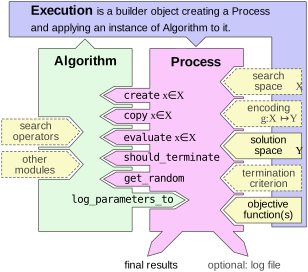
Anyway, after you have completed building the execution, you can run the process you have configured via `ex.execute()`.
This method returns an instance of [`Process`](https://thomasweise.github.io/moptipy/moptipy.api.html#module-moptipy.api.process).
From the algorithm perspective, this instance provides all the information and tools that is needed to create, copy, and evaluate solutions, as well as the termination criterion that tells it when to stop.
For us, the algorithm user, it provides the information about the end result, the consumed FEs, and the end result quality.
In the code below, we illustrate how to extract these information.
Notice that you *must* always use the instances of `Process` in a [`with` block](https://peps.python.org/pep-0343):
Once this block is left, the log file will be written.
If you do not use a `with` block, no log file will be generated.
Let us now look at a concrete example, which is also available as file [examples/single_run_rls_onemax](https://thomasweise.github.io/moptipy/examples/single_run_rls_onemax_py.html).
As example domain, we use [bit strings](https://thomasweise.github.io/moptipy/moptipy.spaces.html#module-moptipy.spaces.bitstrings) of length `n = 10` and try to solve the well-known [`OneMax`](https://thomasweise.github.io/moptipy/moptipy.examples.bitstrings.html#module-moptipy.examples.bitstrings.onemax) problem using the well-known [`RLS`](https://thomasweise.github.io/moptipy/moptipy.algorithms.so.html#module-moptipy.algorithms.so.rls).
```python
from moptipy.algorithms.so.rls import RLS
from moptipy.api.execution import Execution
from moptipy.examples.bitstrings.onemax import OneMax
from moptipy.operators.bitstrings.op0_random import Op0Random
from moptipy.operators.bitstrings.op1_flip1 import Op1Flip1
from moptipy.spaces.bitstrings import BitStrings
from pycommons.io.temp import temp_file
space = BitStrings(10) # search in bit strings of length 10
problem = OneMax(10) # we maximize the number of 1 bits
algorithm = RLS( # create RLS that
Op0Random(), # starts with a random bit string and
Op1Flip1()) # flips exactly one bit in each step
# We work with a temporary log file which is automatically deleted after this
# experiment. For a real experiment, you would not use the `with` block and
# instead put the path to the file that you want to create into `tf` by doing
# `from pycommons.io.path import Path; tf = Path("mydir/my_file.txt")`.
with temp_file() as tf: # create temporary file `tf`
ex = Execution() # begin configuring execution
ex.set_solution_space(space) # set solution space
ex.set_objective(problem) # set objective function
ex.set_algorithm(algorithm) # set algorithm
ex.set_rand_seed(199) # set random seed to 199
ex.set_log_file(tf) # set log file = temp file `tf`
ex.set_max_fes(100) # allow at most 100 function evaluations
with ex.execute() as process: # now run the algorithm*problem combination
end_result = process.create() # create empty record to receive result
process.get_copy_of_best_y(end_result) # obtain end result
print(f"Best solution found: {process.to_str(end_result)}")
print(f"Quality of best solution: {process.get_best_f()}")
print(f"Consumed Runtime: {process.get_consumed_time_millis()}ms")
print(f"Total FEs: {process.get_consumed_fes()}")
print("\nNow reading and printing all the logged data:")
print(tf.read_all_str()) # instead, we load and print the log file
# The temp file is deleted as soon as we leave the `with` block.
```
The output we would get from this program could look something like this:
```text
Best solution found: TTTTTTTTTT
Quality of best solution: 0
Consumed Runtime: 129ms
Total FEs: 17
Now reading and printing all the logged data:
BEGIN_STATE
totalFEs: 17
totalTimeMillis: 129
bestF: 0
lastImprovementFE: 17
lastImprovementTimeMillis: 129
END_STATE
BEGIN_SETUP
p.name: ProcessWithoutSearchSpace
p.class: moptipy.api._process_no_ss._ProcessNoSS
p.maxFEs: 100
p.goalF: 0
p.randSeed: 199
...
END_SETUP
BEGIN_SYS_INFO
...
END_SYS_INFO
BEGIN_RESULT_Y
TTTTTTTTTT
END_RESULT_Y
```
You can also compare this output to the [example for log files](#513-example-for-single-objective-optimization) further down this text.
### 3.2. How to Run a Series of Experiments
When we develop algorithms or do research, then we cannot just apply an algorithm once to a problem instance and call it a day.
Instead, we will apply multiple algorithms (or algorithm setups) to multiple problem instances and execute several runs for each algorithm * instance combination.
Our system of course also provides the facilities for this.
The concept for this is rather simple.
We distinguish "instances" and "setups."
An "instance" can be anything that a represents one specific problem instance.
It could be a string with its identifying name, it could be the [objective function](https://thomasweise.github.io/moptipy/moptipy.api.html#moptipy.api.objective.Objective) itself, or a data structure with the instance data (as is the case for the Job Shop Scheduling Problem used in our book, where we use the class [Instance](https://thomasweise.github.io/moptipy/moptipy.examples.jssp.html#module-moptipy.examples.jssp.instance)).
The important thing is that the `__str__` method of the instance object will return a short string that can be used in file names of [log files](#51-log-files).
The second concept to understand here are "setups."
A "setup" is basically an almost fully configured [`Execution`](https://thomasweise.github.io/moptipy/moptipy.api.html#module-moptipy.api.execution) (see the [previous section](#31-how-to-apply-1-optimization-algorithm-once-to-1-problem-instance) for a detailed discussion of Executions.)
The only things that need to be left blank are the log file path and random seed, which will be filled automatically by our system.
You will basically provide a sequence of [`Callable`](https://docs.python.org/3/library/typing.html#typing.Callable)s, i.e., functions or [lambda](https://docs.python.org/3/reference/expressions.html#lambda)s, each of which will return one "instance."
Additionally, you provide a sequence of callables (functions or lambdas), each of which receiving one "instance" as input and should return an almost fully configured [`Execution`](https://thomasweise.github.io/moptipy/moptipy.api.html#module-moptipy.api.execution).
You also provide the number of runs to be executed per "setup" * "instance" combination and a base directory path identifying the directory where one log file should be written for each run.
`moptipy` also supports [parallel and distributed experiments](#83-parallel-and-distributed-experiments).
All of this is passed to the function [`run_experiment`](https://thomasweise.github.io/moptipy/moptipy.api.html#moptipy.api.experiment.run_experiment) in module [`moptipy.api.experiment`](https://thomasweise.github.io/moptipy/moptipy.api.html#module-moptipy.api.experiment).
This function will do all the work and generate a [folder structure](#511-file-names-and-folder-structure) of log files.
It will spawn the right number of processes, use your functions to generate "instances" and "setups," and execute them.
It will also [automatically determine](https://thomasweise.github.io/moptipy/moptipy.utils.html#moptipy.utils.nputils.rand_seeds_from_str) the random seed for each run.
The seed sequence is determined from the instance name using a [deterministic procedure](https://thomasweise.github.io/moptipy/moptipy.utils.html#moptipy.utils.nputils.rand_seeds_from_str) and therefore [reproducible](#82-reproducibility).
The random seed sequence per instance will be the same for all algorithm setups.
This means that different algorithms would still start with the same solutions if they sample the first solution in the same way.
The system will even do "warmup" runs, i.e., very short dummy runs with the algorithms that are just used to make sure that the interpreter has seen all code before actually doing the experiments.
This avoids situations where the first actual run is slower than the others due to additional interpreter action, i.e., it reduces the bias of time measurements.
Below, we show one example for the automated experiment execution facility, which applies two algorithms to four problem instances with five runs per setup.
We use again the [bit strings domain](https://thomasweise.github.io/moptipy/moptipy.spaces.html#module-moptipy.spaces.bitstrings).
We explore two problems ([`OneMax`](https://thomasweise.github.io/moptipy/moptipy.examples.bitstrings.html#module-moptipy.examples.bitstrings.onemax) and [`LeadingOnes`](https://thomasweise.github.io/moptipy/moptipy.examples.bitstrings.html#module-moptipy.examples.bitstrings.leadingones)) of two different sizes each, leading to four problem instances in total.
We apply the well-known [`RLS`](https://thomasweise.github.io/moptipy/moptipy.algorithms.so.html#module-moptipy.algorithms.so.rls) as well as the trivial [random sampling](https://thomasweise.github.io/moptipy/moptipy.algorithms.html#module-moptipy.algorithms.random_sampling).
The code below is available as file [examples/experiment_2_algorithms_4_problems](https://thomasweise.github.io/moptipy/examples/experiment_2_algorithms_4_problems_py.html).
Besides executing the experiment, it also prints the end results obtained from parsing the log files (see [Section 5.2.](#52-end-result-csv-files) for more information).
```python
from moptipy.algorithms.so.rls import RLS
from moptipy.algorithms.random_sampling import RandomSampling
from moptipy.api.execution import Execution
from moptipy.api.experiment import run_experiment
from moptipy.evaluation.end_results import from_logs
from moptipy.examples.bitstrings.leadingones import LeadingOnes
from moptipy.examples.bitstrings.onemax import OneMax
from moptipy.operators.bitstrings.op0_random import Op0Random
from moptipy.operators.bitstrings.op1_flip1 import Op1Flip1
from moptipy.spaces.bitstrings import BitStrings
from pycommons.io.temp import temp_dir
# The four problems we want to try to solve:
problems = [lambda: OneMax(10), # 10-dimensional OneMax
lambda: OneMax(32), # 32-dimensional OneMax
lambda: LeadingOnes(10), # 10-dimensional LeadingOnes
lambda: LeadingOnes(32)] # 32-dimensional LeadingOnes
def make_rls(problem) -> Execution:
"""
Create an RLS Execution.
:param problem: the problem (OneMax or LeadingOnes)
:returns: the execution
"""
ex = Execution()
ex.set_solution_space(BitStrings(problem.n))
ex.set_objective(problem)
ex.set_algorithm(RLS( # create RLS that
Op0Random(), # starts with a random bit string and
Op1Flip1())) # flips one bit in each step
ex.set_max_fes(100) # permit 100 FEs
return ex
def make_random_sampling(problem) -> Execution:
"""
Create a Random Sampling Execution.
:param problem: the problem (OneMax or LeadingOnes)
:returns: the execution
"""
ex = Execution()
ex.set_solution_space(BitStrings(problem.n))
ex.set_objective(problem)
ex.set_algorithm(RandomSampling(Op0Random()))
ex.set_max_fes(100)
return ex
# We execute the whole experiment in a temp directory.
# For a real experiment, you would put an existing directory path in `td`
# by doing `from pycommons.io.path import Path; td = directory_path("mydir")`
# and not use the `with` block.
with temp_dir() as td: # create temporary directory `td`
run_experiment(base_dir=td, # set the base directory for log files
instances=problems, # define the problem instances
setups=[make_rls, # provide RLS run creator
make_random_sampling], # provide RS run creator
n_runs=5) # we will execute 5 runs per setup
for er in from_logs(td): # parse all log files and print end results
print(f"{er.algorithm} on {er.instance}: {er.best_f}")
# The temp directory is deleted as soon as we leave the `with` block.
```
The output of this program, minus the status information, could look roughly like this:
```text
rs on onemax_10: 0
rs on onemax_10: 2
rs on onemax_10: 1
rs on onemax_10: 2
rs on onemax_10: 1
rs on onemax_32: 8
rs on onemax_32: 8
rs on onemax_32: 8
rs on onemax_32: 9
rs on onemax_32: 9
rs on leadingones_32: 26
rs on leadingones_32: 26
rs on leadingones_32: 25
rs on leadingones_32: 26
rs on leadingones_32: 23
rs on leadingones_10: 4
rs on leadingones_10: 0
rs on leadingones_10: 3
rs on leadingones_10: 3
rs on leadingones_10: 0
rls_flip1 on onemax_10: 0
rls_flip1 on onemax_10: 0
rls_flip1 on onemax_10: 0
rls_flip1 on onemax_10: 0
rls_flip1 on onemax_10: 0
rls_flip1 on onemax_32: 2
rls_flip1 on onemax_32: 1
rls_flip1 on onemax_32: 2
rls_flip1 on onemax_32: 2
rls_flip1 on onemax_32: 1
rls_flip1 on leadingones_32: 18
rls_flip1 on leadingones_32: 23
rls_flip1 on leadingones_32: 28
rls_flip1 on leadingones_32: 16
rls_flip1 on leadingones_32: 29
rls_flip1 on leadingones_10: 0
rls_flip1 on leadingones_10: 0
rls_flip1 on leadingones_10: 0
rls_flip1 on leadingones_10: 0
rls_flip1 on leadingones_10: 0
```
You can simply launch the main process several times in parallel in the same folder to achieve parallelism.
Actually, you can also execute experiments in a *distributed* fashion like this:
All you have to do is to share the folder for the log files among all computer nodes.
Then, in this shared folder, execute the experiment on each node.
The system will then automatically ensure that no work is done twice and the experiment runs in a distributed fashion with almost no overhead.
The trick is that we create the random seeds in a deterministic fashion so that each experiment on each node will have the same seeds and, hence, the [same names for the log files](#511-file-names-and-folder-structure).
The log files are created emptily right before a run starts and filled with data once the run is completed.
Since file creation is atomic in distributed file systems, the system can then automatically ensure that no run is performed by more than one node.
This is an extremely simple yet very robust method for distribution with very low overhead.
### 3.3. How to Solve an Optimization Problem
If you want to solve an optimization problem with [moptipy](https://thomasweise.github.io/moptipy), then you need at least the following three things:
1. a space `Y` of possible solutions,
2. an objective function `f` rating the solutions, i.e., which maps elements `y` of `Y` to either integer or float numbers, where *smaller* values are better, and
3. an optimization algorithm that navigates through `Y` and tries to find solutions `y` in `Y` with low corresponding values `f(y)`.
You may need more components, but if you have these three, then you can [run an experiment](#32-how-to-run-a-series-of-experiments).
#### 3.3.1. Define a New Problem Type
At the core of all optimization problems lies the objective function.
All objective functions in [`moptipy`](https://thomasweise.github.io/moptipy) are instances of the class [Objective](https://thomasweise.github.io/moptipy/moptipy.api.html#moptipy.api.objective.Objective).
If you want to add a new optimization problem, you must derive a new subclass from this class.
There are two functions you must be implemented:
- [`evaluate(x)`](https://thomasweise.github.io/moptipy/moptipy.api.html#moptipy.api.objective.Objective.evaluate) receives a candidate solution `x` as input and must return either an `int` or a `float` rating its quality (smaller values are *better*) and
- `__str__()` returns a string representation of the objective function and may be used in file names and folder structures (depending on how you execute your experiments).
It therefore must not contain spaces and other dodgy characters.
Additionally, you *may* implement the following two functions
- [`lower_bound()`](https://thomasweise.github.io/moptipy/moptipy.api.html#moptipy.api.objective.Objective.lower_bound) returns either an `int` or a `float` with the lower bound of the objective value.
This value does not need to be an objective value that can actually be reached, but if you implement this function, then the value must be small enough so that it is *impossible* to ever reach a smaller objective value.
If we execute an experiment and no goal objective value is specified, then the system will automatically use this lower bound if it is present.
Then, if any solution `x` with `f.evaluate(x)==f.lower_bound()` is encountered, the optimization process is automatically stopped.
Furthermore, after the optimization process is stopped, it is verified that the final solution does not have an objective value smaller than the lower bound.
If it does, then we throw an exception.
- [`upper_bound()`](https://thomasweise.github.io/moptipy/moptipy.api.html#moptipy.api.objective.Objective.upper_bound) returns either an `int` or a `float` with the upper bound of the objective value.
This value does not need to be an objective value that can actually be reached, but if you implement this function, then the value must be large enough so that it is *impossible* to ever reach a larger objective value.
This function, if present, is used to validate the objective value of the final result of the optimization process.
OK, with this information we are basically able to implement our own problem.
Here, we define the task "sort n numbers" as optimization problem.
Basically, we want that our optimization algorithm works on [permutations](https://thomasweise.github.io/moptipy/moptipy.spaces.html#module-moptipy.spaces.permutations) of `n` numbers and is searching for the sorted permutation.
As objective value, we count the number of "sorting errors" in a permutation.
If the number at index `i` is bigger than the number at index `i+1`, then this is a sorting error.
If `n=5`, then the permutation `0;1;2;3;4` has no sorting error, i.e., the best possible objective value `0`.
The permutation `4;3;2;1;0` has `n-1=4` sorting errors, i.e., is the worst possible solution.
The permutation `3;4;2;0;1` as `2` sorting errors.
From these thoughts, we also know that we can implement `lower_bound()` to return `0` and `upper_bound()` to return `n-1`.
`__str__` could be `"sort" + n`, i.e., `sort5` in the above example where `n=5`.
We provide the corresponding code in [Section 3.3.3](#333-applying-an-own-algorithm-to-an-own-problem) below.
#### 3.3.2. Define a New Algorithm
While [`moptipy`](https://thomasweise.github.io/moptipy) comes with several [well-known algorithms](#41-implemented-algorithms) out-of-the-box, you can of course also implement your own [algorithms](https://thomasweise.github.io/moptipy/moptipy.api.html#moptipy.api.algorithm.Algorithm).
These can then make use of the existing [spaces](https://thomasweise.github.io/moptipy/moptipy.api.html#moptipy.api.space.Space) and [search operators](https://thomasweise.github.io/moptipy/moptipy.api.html#module-moptipy.api.operators) – or not.
Let us here create an example algorithm implementation that does *not* use any of the pre-defined [search operators](https://thomasweise.github.io/moptipy/moptipy.api.html#module-moptipy.api.operators).
All optimization algorithms must be subclasses of the class [Algorithm](https://thomasweise.github.io/moptipy/moptipy.api.html#moptipy.api.algorithm.Algorithm).
Each of them must implement two methods, as described in the [documentation](https://thomasweise.github.io/moptipy/moptipy.api.html#module-moptipy.api.algorithm):
- [`solve(process)`](https://thomasweise.github.io/moptipy/moptipy.api.html#moptipy.api.algorithm.Algorithm.solve) receives an instance of [`Process`](https://thomasweise.github.io/moptipy/moptipy.api.html#module-moptipy.api.process), which provides the operations to work with the search space, to evaluate solutions, the termination criterion, and the random number generator.
- `__str__()` must return a short string representation identifying the algorithm and its setup.
This string will be used in file and folder names and therefore must not contain spaces or otherwise dodgy characters.
Additionally, you may need to implement the following methods if the algorithm has other components:
- [`initialize()`](https://thomasweise.github.io/moptipy/moptipy.api.html#moptipy.api.component.Component.initialize) initializes all sub-components of the algorithms and is called *before* each run.
The base class [`Component`](https://thomasweise.github.io/moptipy/moptipy.api.html#moptipy.api.component.Component), from which all elements of the optimization API are derived, already has this method.
If a new algorithm uses, for example, a [selection](https://thomasweise.github.io/moptipy/moptipy.algorithms.modules.html#module-moptipy.algorithms.modules.selection) algorithm, a [temperature schedule](https://thomasweise.github.io/moptipy/moptipy.algorithms.modules.html#module-moptipy.algorithms.modules.selection), or a [search operator](https://thomasweise.github.io/moptipy/moptipy.api.html#module-moptipy.api.operators), it needs to invoke the `initialize()` methods of these components from its own `initialize()` method.
- [`log_parameters_to(...)`](https://thomasweise.github.io/moptipy/moptipy.api.html#moptipy.api.component.Component.log_parameters_to) is used to store all the configuration parameters of an algorithm to a [log section](https://thomasweise.github.io/moptipy/moptipy.utils.html#moptipy.utils.logger.KeyValueLogSection).
If the algorithm has any sub-components, it must here invoke the `log_parameters_to(...)` method of these components.
In this case, it can pass different [prefix scopes](https://thomasweise.github.io/moptipy/moptipy.utils.html#moptipy.utils.logger.KeyValueLogSection.scope) to the `log_parameters_to(...)` methods of its components.
Then, different prefixes can be added to each component's parameter keys, ensuring that all keys are unique.
The instance `process` of [`Process`](https://thomasweise.github.io/moptipy/moptipy.api.html#module-moptipy.api.process) passed to the function [`solve`](https://thomasweise.github.io/moptipy/moptipy.api.html#moptipy.api.algorithm.Algorithm.solve) is a key element of our [`moptipy`](https://thomasweise.github.io/moptipy) API.
If the algorithm needs a data structure to hold a point in the search space, it should invoke [`process.create()`](https://thomasweise.github.io/moptipy/moptipy.api.html#moptipy.api.space.Space.create).
If it needs to copy the point `source` to the point `dest`, it should invoke [`process.copy(dest, source)`](https://thomasweise.github.io/moptipy/moptipy.api.html#moptipy.api.space.Space.copy).
If it wants to know the quality of the point `x`, it should invoke [`process.evaluate(x)`](https://thomasweise.github.io/moptipy/moptipy.api.html#moptipy.api.process.Process.evaluate).
This function will forward the call to the actual objective function (see, e.g., [Section 3.3.1](#331-define-a-new-problem-type) above).
However, it will do more:
It will automatically keep track of the best-so-far solution and, if needed, build logging information in memory.
Before every single call to [`process.evaluate()`](https://thomasweise.github.io/moptipy/moptipy.api.html#moptipy.api.process.Process.evaluate), you should invoke [`process.should_terminate()`](https://thomasweise.github.io/moptipy/moptipy.api.html#moptipy.api.process.Process.should_terminate).
This function returns `True` if the optimization algorithm should stop whatever it is doing and return.
This can happen when a solution of sufficiently good quality is reached, when the maximum number of FEs is exhausted, or when the computational budget in terms of runtime is exhausted.
Since many optimization algorithms make random choices, the function [`process.get_random()`](https://thomasweise.github.io/moptipy/moptipy.api.html#moptipy.api.process.Process.get_random) returns a [random number generator](https://numpy.org/doc/stable/reference/random/generator.html).
This generator *must* be the only source of randomness used by an algorithm.
It will automatically be seeded by our system, allowing for [repeatable and reproducible](https://www.acm.org/publications/policies/artifact-review-and-badging-current) runs.
The `process` also can provide information about the best-so-far [solution](https://thomasweise.github.io/moptipy/moptipy.api.html#moptipy.api.process.Process.get_copy_of_best_y) or [point in the search space](https://thomasweise.github.io/moptipy/moptipy.api.html#moptipy.api.process.Process.get_copy_of_best_x), the consumed [runtime](https://thomasweise.github.io/moptipy/moptipy.api.html#moptipy.api.process.Process.get_consumed_time_millis) and [FEs](https://thomasweise.github.io/moptipy/moptipy.api.html#moptipy.api.process.Process.get_consumed_fes), as well as [when the last improvement was achieved](https://thomasweise.github.io/moptipy/moptipy.api.html#moptipy.api.process.Process.get_last_improvement_fe).
Anyway, all interaction between the algorithm and the actual optimization algorithm will happen through the `process` object.
Equipped with this information, we can develop a simple and rather stupid algorithm to attack the sorting problem.
The search space that we use are the [permutations](https://thomasweise.github.io/moptipy/moptipy.spaces.html#module-moptipy.spaces.permutations) of `n` numbers.
(These will be internally represented as [numpy `ndarray`s](https://numpy.org/doc/stable/reference/arrays.ndarray.html), but we do not need to bother with this, as we this is done automatically for us.)
Our algorithm should start with allocating a point `x_cur` in the search space, filling it with the numbers `0..n-1`, and shuffling it randomly (because we want to start at a random solution).
For the shuffling, it will use than random number generator provided by `process`.
It will evaluate this solution and remember its quality in variable `f_cur`.
It will also allocate a second container `x_new` for permutations.
In each step, our algorithm will copy `x_cur` to `x_new`.
Then, it will use the random number generator to draw two numbers `i` and `j` from `0..n-1`.
It will swap the two numbers at these indices in `x_new`, i.e., exchange `x_new[i], x_new[j] = x_new[j], x_new[i]`.
We then evaluate `x_new` and if the resulting objective value `f_new` is better than `f_cur`, we swap `x_new` and `x_cur` (which is faster than copying `x_new` to `x_cur`) and store `f_new` in `f_cur`.
We repeat this until [`process.should_terminate()`](https://thomasweise.github.io/moptipy/moptipy.api.html#moptipy.api.process.Process.should_terminate) becomes `True`.
All of this is implemented in the source code example below in [Section 3.3.3](#333-applying-an-own-algorithm-to-an-own-problem).
Finally, as a side note:
Our system can automatically store the results of optimization processes in [log file](#51-log-files).
The `process` API also allows your algorithm to store additional information in these files:
First, you can check with [`process.has_log()`](https://thomasweise.github.io/moptipy/moptipy.api.html#moptipy.api.process.Process.has_log) if the process was configured to store information in a log file.
If this function returns `True`, then you can create a [section](#512-log-file-sections) with a given `title` in the log files that should contain one single string `text` by calling [`process.add_log_section(title, text)`](https://thomasweise.github.io/moptipy/moptipy.api.html#moptipy.api.process.Process.add_log_section).
Make sure that all section `title`s are unique.
All such sections will be appended at the end of the log files, wrapped in `BEGIN_title` and `END_title` markers, as prescribed by [our log file format](#512-log-file-sections).
#### 3.3.3. Applying an Own Algorithm to an Own Problem
The following code combines our [own algorithm](#332-define-a-new-algorithm) and our [own problem type](#331-define-a-new-problem-type) that we discussed in the prior two sections and executes an experiment.
It is available as file [examples/experiment_own_algorithm_and_problem](https://thomasweise.github.io/moptipy/examples/experiment_own_algorithm_and_problem_py.html).
Notice how we provide functions for generating both the problem instances (here the objective functions) and the algorithm setups exactly as we described in [Section 3.2.](#32-how-to-run-a-series-of-experiments) above.
```python
from moptipy.api.algorithm import Algorithm
from moptipy.api.execution import Execution
from moptipy.api.experiment import run_experiment
from moptipy.api.objective import Objective
from moptipy.api.process import Process
from moptipy.evaluation.end_results import from_logs
from moptipy.spaces.permutations import Permutations
from pycommons.io.temp import temp_dir
class MySortProblem(Objective):
"""An objective function that rates how well a permutation is sorted."""
def __init__(self, n: int) -> None:
"""
Initialize: Set the number of values to sort.
:param n: the scale of the problem
"""
super().__init__()
#: the number of numbers to sort
self.n = n
def evaluate(self, x) -> int:
"""
Compute how often a bigger number follows a smaller one.
:param x: the permutation
"""
errors = 0 # we start at zero errors
for i in range(self.n - 1): # for i in 0..n-2
if x[i] > x[i + 1]: # that's a sorting error!
errors += 1 # so we increase the number
return errors # return result
def lower_bound(self) -> int:
"""
Get the lower bound: 0 errors is the optimum.
Implementing this function is optional, but it can help in two ways:
First, the optimization processes can be stopped automatically when a
solution of this quality is reached. Second, the lower bound is also
checked when the end results of the optimization process are verified.
:returns: 0
"""
return 0
def upper_bound(self) -> int:
"""
Get the upper bound: n-1 errors is the worst.
Implementing this function is optional, but it can help, e.g., when
the results of the optimization process are automatically checked.
:returns: n-1
"""
return self.n - 1
def __str__(self):
"""
Get the name of this problem.
This name is used in the directory structure and file names of the
log files.
:returns: "sort" + n
"""
return f"sort{self.n}"
class MyAlgorithm(Algorithm):
"""An example for a simple rigidly structured optimization algorithm."""
def solve(self, process: Process) -> None:
"""
Solve the problem encapsulated in the provided process.
:param process: the process instance which provides random numbers,
functions for creating, copying, and evaluating solutions, as well
as the termination criterion
"""
random = process.get_random() # get the random number generator
x_cur = process.create() # create the record for the current solution
x_new = process.create() # create the record for the new solution
n = len(x_cur) # get the scale of problem as length of the solution
x_cur[:] = range(n) # We start by initializing the initial solution
random.shuffle(x_cur) # as [0...n-1] and then randomly shuffle it.
f_cur = process.evaluate(x_cur) # compute solution quality
while not process.should_terminate(): # repeat until we are finished
process.copy(x_new, x_cur) # copy current to new solution
i = random.integers(n) # choose the first random index
j = random.integers(n) # choose the second random index
x_new[i], x_new[j] = x_new[j], x_new[i] # swap values at i and j
f_new = process.evaluate(x_new) # evaluate the new solution
if f_new < f_cur: # if it is better than current solution
x_new, x_cur = x_cur, x_new # swap current and new solution
f_cur = f_new # and remember quality of new solution
def __str__(self):
"""
Get the name of this algorithm.
This name is then used in the directory path and file name of the
log files.
:returns: myAlgo
"""
return "myAlgo"
# The four problems we want to try to solve:
problems = [lambda: MySortProblem(5), # sort 5 numbers
lambda: MySortProblem(10), # sort 10 numbers
lambda: MySortProblem(100)] # sort 100 numbers
def make_execution(problem) -> Execution:
"""
Create an application of our algorithm to our problem.
:param problem: the problem (MySortProblem)
:returns: the execution
"""
ex = Execution()
ex.set_solution_space(
Permutations.standard(problem.n)) # we use permutations of [0..n-1]
ex.set_objective(problem) # set the objective function
ex.set_algorithm(MyAlgorithm()) # apply our algorithm
ex.set_max_fes(100) # permit 100 FEs
return ex
# We execute the whole experiment in a temp directory.
# For a real experiment, you would put an existing directory path in `td`
# by doing `from pycommons.io.path import Path; td = directory_path("mydir")`
# and not use the `with` block.
with temp_dir() as td: # create temporary directory `td`
run_experiment(base_dir=td, # set the base directory for log files
instances=problems, # define the problem instances
setups=[make_execution], # creator for our algorithm
n_runs=5) # we will execute 5 runs per setup
for er in from_logs(td): # parse all log files and print end results
print(f"{er.algorithm} on {er.instance}: {er.best_f}")
# The temp directory is deleted as soon as we leave the `with` block.
```
The output of this program, minus status output, could look like this:
```text
myAlgo on sort10: 2
myAlgo on sort10: 2
myAlgo on sort10: 1
myAlgo on sort10: 1
myAlgo on sort10: 2
myAlgo on sort100: 35
myAlgo on sort100: 41
myAlgo on sort100: 33
myAlgo on sort100: 34
myAlgo on sort100: 35
myAlgo on sort5: 1
myAlgo on sort5: 1
myAlgo on sort5: 1
myAlgo on sort5: 1
myAlgo on sort5: 1
```
## 4. Implemented Algorithms, Search Spaces, and Problems
Here we list the [algorithms](#41-implemented-algorithms), [search spaces](#42-implemented-search-spaces-and-operators), and [optimization problems](#43-implemented-problems) that we implement in our [`moptipy`](https://thomasweise.github.io/moptipy) framework.
### 4.1. Implemented Algorithms
The following algorithms are completely black-box and work for both single- and multi-objective optimization.
(Well, *work* here is relative … they are basically the worst possible algorithms you could choose and are only included for the sake of completeness.)
- [Single Random Sample](https://thomasweise.github.io/moptipy/moptipy.algorithms.html#module-moptipy.algorithms.single_random_sample) creates and evaluates exactly one single random solution.
- [Random Sampling](https://thomasweise.github.io/moptipy/moptipy.algorithms.html#module-moptipy.algorithms.random_sampling) keeps creating random solutions until the computational budget is exhausted.
- [Random Walk](https://thomasweise.github.io/moptipy/moptipy.algorithms.html#module-moptipy.algorithms.random_sampling) creates a random solution and then keeps applying the unary search operator and always accepts the result.
#### 4.1.1. Single-Objective Optimization
Here we list optimization algorithms that optimize a *single* [objective function](https://thomasweise.github.io/moptipy/moptipy.api.html#moptipy.api.objective.Objective).
##### 4.1.1.1. Single-Objective Optimization with Arbitrary Search Spaces
The first set of algorithms is general, i.e., can work with arbitrary [search spaces](#42-implemented-search-spaces-and-operators).
- The simple [Hill Climber](https://thomasweise.github.io/moptipy/moptipy.algorithms.so.html#module-moptipy.algorithms.so.hill_climber) creates a random solution as initial best-so-far solution and then iteratively applies the unary search operator to the best-so-far solution.
When the result of the unary operator is better, it becomes the new best-so-far solution, otherwise it is discarded.
- The [Hill Climber with Restarts](https://thomasweise.github.io/moptipy/moptipy.algorithms.so.html#module-moptipy.algorithms.so.hill_climber_with_restarts) works exactly like the hill climber, but restarts at a new random solution after a fixed number of unsuccessful moves.
- A Random Local Search ([RLS](https://thomasweise.github.io/moptipy/moptipy.algorithms.so.html#module-moptipy.algorithms.so.rls)) also known as (1+1) EA works like the [Hill Climber](https://thomasweise.github.io/moptipy/moptipy.algorithms.so.html#module-moptipy.algorithms.so.hill_climber) as well, but accepts a new solution if it is *not worse* than the best-so-far solution (instead of requiring it to be strictly *better*, as the hill climber does).
- The [(μ+λ) EA](https://thomasweise.github.io/moptipy/moptipy.algorithms.so.html#module-moptipy.algorithms.so.ea), where "EA" stands for "Evolutionary Algorithm," is a simple population-based metaheuristic that starts with a population of `mu` random solutions.
In each iteration, it retains only the `mu` best solutions from the population ("best" in terms of the objective value, ties are broken such that newer solutions are preferred).
It then applies the unary operator and the binary operator to generate `lambda` new solutions and adds them to the population.
The `(1+1) EA` with `br=0` probability to use the binary operator is equivalent to [RLS](https://thomasweise.github.io/moptipy/moptipy.algorithms.so.html#module-moptipy.algorithms.so.rls).
- The [general EA](https://thomasweise.github.io/moptipy/moptipy.algorithms.so.html#module-moptipy.algorithms.so.general_ea) is a generalized version of the (μ+λ) EA that can additionally be configured with a [fitness assignment process](https://thomasweise.github.io/moptipy/moptipy.algorithms.so.fitnesses.html) and both survival and mating [selection algorithms](https://thomasweise.github.io/moptipy/moptipy.algorithms.modules.html#module-moptipy.algorithms.modules.selection).
- Simulated Annealing ([SA](https://thomasweise.github.io/moptipy/moptipy.algorithms.so.html#module-moptipy.algorithms.so.simulated_annealing)) is similar to [RLS](https://thomasweise.github.io/moptipy/moptipy.algorithms.so.html#module-moptipy.algorithms.so.rls) but sometimes accepts worsening moves.
The probability to accept such moves gets smaller the worse the moves are and the longer the search continues.
- The (μ+λ) Memetic Algorithm ([MA](https://thomasweise.github.io/moptipy/moptipy.algorithms.so.html#module-moptipy.algorithms.so.ma)) works like the [(μ+λ) EA](https://thomasweise.github.io/moptipy/moptipy.algorithms.so.html#module-moptipy.algorithms.so.ea) but it applies the binary search operator at a rate of 100%.
(In other words, it never uses the unary search operator).
It refines the results of the nullary and binary search operators by using them as starting points of another algorithm, say an [SA](https://thomasweise.github.io/moptipy/moptipy.algorithms.so.html#module-moptipy.algorithms.so.simulated_annealing) or [RLS](https://thomasweise.github.io/moptipy/moptipy.algorithms.so.html#module-moptipy.algorithms.so.rls), which is executed for a pre-defined number of steps.
- The above [MA](https://thomasweise.github.io/moptipy/moptipy.algorithms.so.html#module-moptipy.algorithms.so.ma) can be configured to use [RLS](https://thomasweise.github.io/moptipy/moptipy.algorithms.so.html#module-moptipy.algorithms.so.rls) as local search.
This special case is also implemented as hard-coded [MA-RLS](https://thomasweise.github.io/moptipy/moptipy.algorithms.so.html#module-moptipy.algorithms.so.marls), which should be a little bit more speed-efficient (due to hard-coding the local search instead of plugging it in), but otherwise it takes the exactly same route through the search space.
- The [general MA](https://thomasweise.github.io/moptipy/moptipy.algorithms.so.html#module-moptipy.algorithms.so.general_ma) is a generalized version of the (μ+λ) MA that can additionally be configured with a [fitness assignment process](https://thomasweise.github.io/moptipy/moptipy.algorithms.so.fitnesses.html) and both survival and mating [selection algorithms](https://thomasweise.github.io/moptipy/moptipy.algorithms.modules.html#module-moptipy.algorithms.modules.selection).
- The Plant Propagation Algorithm ([PPA](https://thomasweise.github.io/moptipy/moptipy.algorithms.so.html#module-moptipy.algorithms.so.ppa)) is a population-based metaheuristic that allocates both the number of new solutions to be derived from an existing solution via the unary search operator as well as the step size to be used by this operator based on the normalized objective value of the solution.
##### 4.1.1.2. Single-Objective Optimization with Continuous Search Space
The algorithms listed here are intended for single-objective optimization of [continuous search spaces](https://thomasweise.github.io/moptipy/moptipy.spaces.html#moptipy.spaces.vectorspace.VectorSpace).
They *only* work with search spaces that are instances of [`VectorSpace`](https://thomasweise.github.io/moptipy/moptipy.spaces.html#moptipy.spaces.vectorspace.VectorSpace).
Such spaces are defined by box-constraints over the *n*-dimensional real numbers.
- The quasi-Newton method by Broyden, Fletcher, Goldfarb, and Shanno ([BFGS](https://thomasweise.github.io/moptipy/moptipy.algorithms.so.vector.html#moptipy.algorithms.so.vector.scipy.BGFS)), wrapped from [SciPy](https://docs.scipy.org/doc/scipy/reference/optimize.minimize-bfgs.html).
- The Conjugate Gradient ([CG](https://thomasweise.github.io/moptipy/moptipy.algorithms.so.vector.html#moptipy.algorithms.so.vector.scipy.CG)) algorithm, wrapped from [SciPy](https://docs.scipy.org/doc/scipy/reference/optimize.minimize-cg.html).
- The Covariance Matrix Adaptation Evolution Strategies [CMA-ES](https://thomasweise.github.io/moptipy/moptipy.algorithms.so.vector.html#moptipy.algorithms.so.vector.cmaes_lib.CMAES), [Separable CMA-ES](https://thomasweise.github.io/moptipy/moptipy.algorithms.so.vector.html#moptipy.algorithms.so.vector.cmaes_lib.SepCMAES), and [BIPOP-CMA-ES](https://thomasweise.github.io/moptipy/moptipy.algorithms.so.vector.html#moptipy.algorithms.so.vector.cmaes_lib.BiPopCMAES) from the library [cmaes](https://pypi.org/project/cmaes).
- Differential Evolution ([DE](https://thomasweise.github.io/moptipy/moptipy.algorithms.so.vector.html#moptipy.algorithms.so.vector.scipy.DE)), wrapped from [SciPy](https://docs.scipy.org/doc/scipy/reference/generated/scipy.optimize.differential_evolution.html).
- The Downhill Simplex method based on the [Nelder-Mead](https://thomasweise.github.io/moptipy/moptipy.algorithms.so.vector.html#moptipy.algorithms.so.vector.scipy.NelderMead), wrapped from [SciPy](https://docs.scipy.org/doc/scipy/reference/optimize.minimize-neldermead.html).
- [Powell's Algorithm](https://thomasweise.github.io/moptipy/moptipy.algorithms.so.vector.html#moptipy.algorithms.so.vector.scipy.Powell), wrapped from [SciPy](https://docs.scipy.org/doc/scipy/reference/optimize.minimize-powell.html).
- The Sequential Least Squares Programming ([SLSQP](https://thomasweise.github.io/moptipy/moptipy.algorithms.so.vector.html#moptipy.algorithms.so.vector.scipy.SLSQP) algorithm, wrapped from [SciPy](https://docs.scipy.org/doc/scipy/reference/optimize.minimize-slsqp.html)).
- The Truncated Newton Method ([TNC](https://thomasweise.github.io/moptipy/moptipy.algorithms.so.vector.html#moptipy.algorithms.so.vector.scipy.TNC)), wrapped from [SciPy](https://docs.scipy.org/doc/scipy/reference/optimize.minimize-tnc.html).
#### 4.1.2. Multi-Objective Optimization
The algorithms listed here are suitable for [multi-objective optimization](https://thomasweise.github.io/moptipy/moptipy.api.html#moptipy.api.mo_problem.MOProblem).
In other words, they try to minimize multiple [objective functions](https://thomasweise.github.io/moptipy/moptipy.api.html#moptipy.api.objective.Objective) at once.
- [Multi-Objective Random Local Search](https://thomasweise.github.io/moptipy/moptipy.algorithms.mo.html#moptipy.algorithms.mo.morls.MORLS) (MORLS) works exactly as [RLS](https://thomasweise.github.io/moptipy/moptipy.algorithms.so.html#moptipy.algorithms.so.rls.RLS), but it accepts a solution if it is not dominated by the current solution.
This is *not* a good algorithm.
- The Fast Elitist Non-Dominated Sorting Genetic Algorithm ([NSGA-II](https://thomasweise.github.io/moptipy/moptipy.algorithms.mo.html#module-moptipy.algorithms.mo.nsga2)) is maybe the most popular multi-objective evolutionary algorithm.
### 4.2. Implemented Search Spaces and Operators
- [Bit Strings](https://thomasweise.github.io/moptipy/moptipy.spaces.html#moptipy.spaces.bitstrings.BitStrings) of a fixed length `n` are represented as `numpy` arrays as well.
Here, each value can either be `True` or `False`.
- Nullary Operators:
- [random initialization](https://thomasweise.github.io/moptipy/moptipy.operators.bitstrings.html#moptipy.operators.bitstrings.op0_random.Op0Random) fills the string with random bits
- Unary Operators:
- [flip 1](https://thomasweise.github.io/moptipy/moptipy.operators.bitstrings.html#moptipy.operators.bitstrings.op1_flip1.Op1Flip1) flips one single bit.
- [flip m/n](https://thomasweise.github.io/moptipy/moptipy.operators.bitstrings.html#moptipy.operators.bitstrings.op1_m_over_n_flip.Op1MoverNflip.op1) flips each bit independently with probability `m/n`.
- [flip m](https://thomasweise.github.io/moptipy/moptipy.operators.bitstrings.html#module-moptipy.operators.bitstrings.op1_flip_m) is an operator with step width where the exact number of bits to flip can be determined.
- Binary Operators:
- [uniform crossover](https://thomasweise.github.io/moptipy/moptipy.operators.bitstrings.html#moptipy.operators.bitstrings.op2_uniform.Op2Uniform) randomly chooses, for each bit, from which of the two source strings it will be copied.
- [Permutations](https://thomasweise.github.io/moptipy/moptipy.spaces.html#module-moptipy.spaces.permutations) with and without Repetitions are represented as numpy arrays of integers.
A permutation of the values "1,2,3", for example, is an arrangement containing these values in any order.
In `moptipy`, the space `Permutation` is defined over any arrangement of a given base string. For example, if a base string is "1,2,2,3", then any arrangement containing one "1", two "2"s, and one "3" is then an element of this space.
This allows us to represent both normal permutations as well as those with repetitions.
- Nullary Operators:
- [Fisher-Yates shuffle](https://thomasweise.github.io/moptipy/moptipy.operators.permutations.html#moptipy.operators.permutations.op0_shuffle.Op0Shuffle) creates uniformly randomly distributed permutations.
- Unary Operators:
- [insert_1](https://thomasweise.github.io/moptipy/moptipy.operators.permutations.html#module-moptipy.operators.permutations.op1_insert1) removes one element from a permutation and inserts it elsewhere.
- [swap 2](https://thomasweise.github.io/moptipy/moptipy.operators.permutations.html#moptipy.operators.permutations.op1_swap2.Op1Swap2) swaps exactly two (different) values.
- [swap n](https://thomasweise.github.io/moptipy/moptipy.operators.permutations.html#moptipy.operators.permutations.op1_swapn.Op1SwapN) performs a random number of swaps.
- [swap_exactly_n](https://thomasweise.github.io/moptipy/moptipy.operators.permutations.html#module-moptipy.operators.permutations.op1_swap_exactly_n) is a unary operator with step size that will change/swap exactly a given number of elements for permutations where each element occurs once and which will try to swap that many in permutations with repetitions (where it might not be possible to swap exactly the required number of elements).
- [swap_try_n](https://thomasweise.github.io/moptipy/moptipy.operators.permutations.html#module-moptipy.operators.permutations.op1_swap_try_n) is a unary operator very similar to the `swap_exactly_n` operator, but it invests much less effort to achieve the number of prescribed swaps and thus is both much faster but also more likely to perform less swaps.
- Binary Operators:
- [generalized alternating position crossover](https://thomasweise.github.io/moptipy/moptipy.operators.permutations.html#moptipy.operators.permutations.op2_gap.Op2GeneralizedAlternatingPosition) chooses, for each index, from which of the two source permutations the (next not-yet-used) value should be copied
- [order-based crossover](https://thomasweise.github.io/moptipy/moptipy.operators.permutations.html#moptipy.operators.permutations.op2_ox2.Op2OrderBased) randomly selects a set of indices and copies the elements from first source permutation to the same indices in the destination string. It then copies the remaining elements from the second source, maintaining the order in which they appear in the second source string.
- [Signed Permutations](https://thomasweise.github.io/moptipy/moptipy.spaces.html#module-moptipy.spaces.signed_permutations) with and without Repetitions are represented as numpy arrays of integers.
They cannot contain the value `0`. All other values may occur either positive or negative, e.g., `5` or `-5`.
- Nullary Operators:
- [shuffle-and-flip](https://thomasweise.github.io/moptipy/moptipy.operators.signed_permutations.html#module-moptipy.operators.signed_permutations.op0_shuffle_and_flip) creates uniformly randomly distributed signed permutations.
- Unary Operators:
- [swap 2 or flip](https://thomasweise.github.io/moptipy/moptipy.operators.signed_permutations.html#module-moptipy.operators.signed_permutations.op1_swap_2_or_flip) either swaps exactly two (different) values or flips the sign of one value.
- [Ordered Choices](https://thomasweise.github.io/moptipy/moptipy.spaces.html#module-moptipy.spaces.ordered_choices) are a hybrid of permutations and combinations.
Given are `n` choices, i.e., sets of different values.
Each choice could contain any number of different values.
Any two choices must either be disjoint or contain the values.
Now an element of the space contains one value from each choice and the order matters.
So permutations and permutations with repetitions can be represented as ordered choices.
- Nullary Operators:
- [choose_and_shuffle](https://thomasweise.github.io/moptipy/moptipy.operators.ordered_choices.html#module-moptipy.operators.ordered_choices) picks one random value from each choice and shuffles them.
- [`n`-dimensional spaces of real numbers](https://thomasweise.github.io/moptipy/moptipy.spaces.html#moptipy.spaces.vectorspace.VectorSpace) are subsets of the `n`-dimensional real numbers.
They are `numpy` arrays representing vectors of length `n`.
On each dimension, a [lower](https://thomasweise.github.io/moptipy/moptipy.spaces.html#moptipy.spaces.vectorspace.VectorSpace.lower_bound) and an [upper bound](https://thomasweise.github.io/moptipy/moptipy.spaces.html#moptipy.spaces.vectorspace.VectorSpace.upper_bound) are imposed.
- Nullary Operators:
- [uniform sampling](https://thomasweise.github.io/moptipy/moptipy.operators.vectors.html#module-moptipy.operators.vectors.op0_uniform) samples a point from the uniform distribution resulting from the lower- and upper bound of the search space.
### 4.3. Implemented Problems
Within this package, we implement a subset of basic problems that are useful for testing different aspects of the algorithms and spaces we provide.
`moptipy` itself is not intended to be a collection of optimization problems, but more a collection of algorithms, spaces, and operators.
We do need a set of examples to [unit test](#81-unit-tests-and-static-analysis) these components, so a set of [example problems](https://thomasweise.github.io/moptipy/moptipy.examples.html#module-moptipy.examples) is indeed provided.
More examples and practical applications of `moptipy` can be found in the [`moptipyapps`](https://thomasweise.github.io/moptipyapps) package, which is available on [GitHub](https://github.com/thomasWeise/moptipyapps) and in [`PyPi`](https://pypi.org/project/moptipyapps).
The `moptipyapps` package is where we will include future examples and benchmark cases, such as for the Quadratic Assignment Problem ([QAP](https://thomasweise.github.io/moptipyapps/#the-quadratic-assignment-problem-qap)), the Traveling Salesperson Problem ([TSP](https://thomasweise.github.io/moptipyapps/#the-traveling-salesperson-problem-tsp)), the Traveling Tournament Problem ([TTP](https://thomasweise.github.io/moptipyapps/#the-traveling-tournament-problem-ttp)), Two-Dimensional [Bin Packing](https://thomasweise.github.io/moptipyapps/#two-dimensional-bin-packing-problem), or [Dynamic Control](https://thomasweise.github.io/moptipyapps/#dynamic-controller-synthesis).
- [Bit Strings](https://thomasweise.github.io/moptipy/moptipy.spaces.html#moptipy.spaces.bitstrings.BitStrings) of a fixed length `n`:
- The minimization version of the [1D Ising Model](https://thomasweise.github.io/moptipy/moptipy.examples.bitstrings.html#moptipy.examples.bitstrings.ising1d.Ising1d), where the goal is to ensure that all bits have the same values as their neighbors.
- The minimization version of the [Jump](https://thomasweise.github.io/moptipy/moptipy.examples.bitstrings.html#module-moptipy.examples.bitstrings.jump) problem, which is equivalent to OneMax, but has a deceptive region right before the optimum.
- The minimization version of the well-known [LeadingOnes](https://thomasweise.github.io/moptipy/moptipy.examples.bitstrings.html#module-moptipy.examples.bitstrings.leadingones) problem, where the goal is to maximize the length of the trailing substring of all `True` bits.
- The minimization version of the well-known [OneMax](https://thomasweise.github.io/moptipy/moptipy.examples.bitstrings.html#module-moptipy.examples.bitstrings.onemax) problem, where the goal is to maximize the number of `True` bits in a string.
- The minimization version of the [Trap](https://thomasweise.github.io/moptipy/moptipy.examples.bitstrings.html#module-moptipy.examples.bitstrings.trap) problem, which is equivalent of OneMax, but with the optimum and worst-possible solution swapped.
This problem is therefore highly deceptive.
- The [W-Model](https://thomasweise.github.io/moptipy/moptipy.examples.bitstrings.html#module-moptipy.examples.bitstrings.w_model), a problem that exhibits tunable neutrality, epistasis, ruggedness, and deceptiveness.
- The minimization version of the well-known [ZeroMax](https://thomasweise.github.io/moptipy/moptipy.examples.bitstrings.html#module-moptipy.examples.bitstrings.zeromax) problem, which is the exact opposite of OneMax and has the goal to find the bit string of all `False` values.
- [Permutations](https://thomasweise.github.io/moptipy/moptipy.spaces.html#moptipy.spaces.permutations.Permutations) (with and without Repetitions):
- The NP-hard Job Shop Scheduling Problem ([JSSP](https://thomasweise.github.io/moptipy/moptipy.examples.jssp.html#module-moptipy.examples.jssp)), where the goal is to find an assignment of jobs to machines with the minimum makespan.
On , we provide several zip archives with results obtained with [`moptipy`](https://thomasweise.github.io/moptipy) on the JSSP.
- [`n`-dimensional spaces of real numbers](https://thomasweise.github.io/moptipy/moptipy.spaces.html#moptipy.spaces.vectorspace.VectorSpace)
- [Ackley's Function](https://thomasweise.github.io/moptipy/moptipy.examples.vectors.html#module-moptipy.examples.vectors.ackley)
- [Sphere Function](https://thomasweise.github.io/moptipy/moptipy.examples.vectors.html#module-moptipy.examples.vectors.sphere)
## 5. Data Formats
We develop several data formats to store and evaluate the results of computational experiments with our [`moptipy`](https://thomasweise.github.io/moptipy) software.
Here you can find their basic definitions.
On , we provide several zip archives with results obtained with our software.
For example, you could download the [results](https://thomasweise.github.io/oa_data/jssp/jssp_hcr_swapn.tar.xz) of the [hill climber with restarts](https://thomasweise.github.io/moptipy/moptipy.algorithms.so.html#module-moptipy.algorithms.so.hill_climber_with_restarts) on the Job Shop Scheduling Problem ([JSSP](https://thomasweise.github.io/moptipy/moptipy.examples.jssp.html#module-moptipy.examples.jssp)) using the [operator `swapn`](https://thomasweise.github.io/moptipy/moptipy.operators.permutations.html#module-moptipy.operators.permutations.op1_swapn) that swaps a randomly chosen number of (different) job IDs, for different restart settings.
The files and folders in this archive will then exactly comply to the structure discussed here.
### 5.1. Log Files
The philosophy of our log files is:
1. One log file per algorithm run.
We always store each run of an algorithm into a single, separate file.
This has several advantages:
If you execute several runs in parallel, there cannot be any problems when writing the log files.
If, instead, we would store multiple runs in a single file, then some synchronization is needed if multiple processes work on the runs for the same setup.
Each log file and run is also self-contained.
If runs are executed in a distributed fashion, then we can store data about the node where the run is executed in the log file.
We can also store the results of the runs right in the log files without requiring any special treatment to identify to which run the results belong (because there only is one run they could belong to).
And so on.
2. Each log file contains all information needed to fully understand the algorithm run, such as
1. The results in numerical form, e.g., the [best achieved objective value](#5122-the-section-state).
2. The result in textual form, e.g., the textual representation of the [best solution discovered](#5125-the-result-sections)
This allows us to later load, use, or validate the result.
3. The [random seed](#5123-the-section-setup) used.
4. The [termination criteria](#5123-the-section-setup) used, i.e., the maximum objective function evaluations or the maximum runtime or the goal objective value.
5. The algorithm name and [configuration](#5123-the-section-setup).
This allows us to later understand what we did here and to reproduce the algorithm setup.
6. The problem instance name and [parameters](#5123-the-section-setup).
This makes sure that we know which problem instance did we solve.
7. The [system configuration](#5124-the-section-sys_info), such as the CPU nd operating system and Python version and [library versions](#5124-the-section-sys_info).
We need to this to understand and reproduce time-dependent measures or to understand situations where changes in the underlying system configuration may have led to different results.
8. [Errors](#5126-the-error-sections), if any occurred.
We can guard against errors using [unit tests](#81-unit-tests-and-static-analysis), but it may still happen that a run of the optimization algorithm crashed.
Our system tries to catch as detailed error information as possible and store it in the log files in order to allow us to figure out what went wrong.
9. The [progress](#5121-the-section-progress) that the algorithm made over time, if capturing this information [was demanded](https://thomasweise.github.io/moptipy/moptipy.api.html#moptipy.api.execution.Execution.set_log_improvements).
10. The [contents of the archive](#5128-the-archive_j_x-and-archive_j_y-sections) of non-dominated solutions, if we perform [multi-objective optimization](#514-example-log-file-for-multi-objective-optimization).
11. The [objective values](#5127-the-archive_qualities-section) of the solutions in the archive of non-dominated solutions, if we perform [multi-objective optimization](#514-example-log-file-for-multi-objective-optimization).
All of this information is stored (almost) automatically.
Experiments with [`moptipy`](https://thomasweise.github.io/moptipy) are intended to be self-documenting, such that you can still see what was going on if you open a log file of someone else or one of your log files five years after the experiment.
Each log file contains all the information, so you will not end up with a situation where you have a "results file" but cannot find the matching setup information because it was stored elsewhere.
By capturing and storing as much information about the setup, configuration, and parameters of each run automatically, we also try to prevent situations where a vital piece of information turns out to be missing some time after the experiment.
For example, the library author himself has encountered situations where he still, e.g., had the result of a run but did not store how long it took to get it.
And did no longer remember when this information was needed.
In such a case we have no choice but to repeat the experiment.
Unless our system is clever enough to automatically store such data.
[`moptipy`](https://thomasweise.github.io/moptipy) is 😁.
#### 5.1.1. File Names and Folder Structure
One independent run of an algorithm on one problem instance produces one log file.
Each run is identified by the algorithm that is applied, the problem instance to which it is applied, and the random seed.
This tuple is reflected in the file name.
`rls_swap2_demo_0x5a9363100a272f12.txt`, for example, represents the algorithm `rls_swap2` applied to the problem instance `demo` and started with random seed `0x5a9363100a272f12` (where `0x` stands for hexademical notation).
The log files are grouped in a `algorithm`/`instance` folder structure.
In the above example, there would be a folder `rls_swap2` containing a folder `demo`, which, in turn, contains all the log files from all runs of that algorithm on this instance.
#### 5.1.2. Log File Sections
A log file is a simple text file divided into several sections.
Each section `X` begins with the line `BEGIN_X` and ends with the line `END_X`.
There are three types of sections:
- *[Semicolon-separated values](https://thomasweise.github.io/moptipy/moptipy.utils.html#moptipy.utils.logger.CsvLogSection)* can hold a series of data values, where each row is divided into multiple values and the values are separated by `;`.
We use ';', as both '.' and ',' might be misinterpreted as decimal or fractional separaters under different locales, whereas ';', to the best of our knowledge, is rarely used for such purposes.
We will still call such sections "CSV" sections (comma-separated-values), though, as most people know what CSV is and the structure basically is exactly that, except that we use ';' instead of ','.
- *[Key-values](https://thomasweise.github.io/moptipy/moptipy.utils.html#moptipy.utils.logger.KeyValueLogSection)* sections represent, well, values for keys in form of a mapping compatible with [YAML](https://yaml.org/spec/1.2.2/#mapping).
In other words, each line contains a key, followed by `: `, followed by the value.
The keys can be hierarchically structured in scopes, for example `a.b` and `a.c` indicate two keys `b` and `c` that belong to scope `a`.
This allows representing complex data such as [configuration parameters](#5123-the-section-setup) in a rather straight-forward, easy-to-parse canonical way.
All keys within a section must be unique, i.e., if a section contains a value under key `a.a`, it cannot contain the same key `a.a` again, even with the same value.
- *[Raw text](https://thomasweise.github.io/moptipy/moptipy.utils.html#moptipy.utils.logger.TextLogSection)* sections contain text without a general or a priori structure, e.g., the string representation of the best solutions found.
Obviously, such raw text cannot contain things such as section delimiters or other reserved keywords.
Apart from that, basically any type of data may be stored there.
This is useful for, for instance, storing the [final solutions](#5125-the-result-sections) of runs or [exceptions caught during the runs](#5126-the-error-sections).
In all the above sections, the character `#` is removed from output.
The character `#` indicates a starting comment and can only be written by the routines dedicated to produce comments.
##### 5.1.2.1 The Section `PROGRESS`
When setting up an algorithm execution, you can specify whether or not you want to [log the progress](https://thomasweise.github.io/moptipy/moptipy.api.html#moptipy.api.execution.Execution.set_log_improvements) of the algorithm.
If and only if you choose to log the progress, the `PROGRESS` section will be contained in the log file.
Notice that this section can be long if the algorithm makes many improvements.
You can also choose if you want to [log all algorithm steps](https://thomasweise.github.io/moptipy/moptipy.api.html#moptipy.api.execution.Execution.set_log_all_fes) or [only the improving moves](https://thomasweise.github.io/moptipy/moptipy.api.html#moptipy.api.execution.Execution.set_log_improvements), the latter being the default behavior.
If you really log all algorithm steps, then your log files will contain one line for every objective function evaluation (FE) you perform.
It can thus become quite large.
In our Job Shop Scheduling example in the [Optimization Algorithms](https://thomasweise.github.io/oa) book, for example, we can do several million FEs within the two minutes of runtime granted to each run.
This then would equate to several millions of lines in the `PROGRESS` section of each log file.
So normally you would rather only log the improving moves, which would often be between a few ten to a few thousand of lines, which is usually acceptable.
Notice that even if you do not choose to log the algorithm's progress at all, the [section `STATE`](#5122-the-section-state) with the objective value of the best solution encountered, the FE when it was found, and the consumed runtime, as well as the [`RESULT_*` sections](#5125-the-result-sections) with the best encountered candidate solution and point in the search space, and also the [`SETUP`](#5123-the-section-setup) and [`SYS_INFO`](#5124-the-section-sys_info) still will be included in the log files.
The `PROGRESS` section contains log points describing the algorithm progress over time in a semicolon-separated values format with one data point per line.
It has an internal header describing the data columns.
There will at least be the following columns:
1. `fes` denoting the integer number of performed objective value evaluations
2. `timeMS` the clock time that has passed since the start of the run, measured in milliseconds and stored as integer value.
Python actually provides the system clock time in terms of nanoseconds, however, we always round up to the next highest millisecond.
We believe that milliseconds are a more reasonable time measure here and a higher resolution is probably not helpful anyway.
Due to the upwards-rounding, the lowest possible time at which a log point can occur is at `1` millisecond.
3. `f` the best-so-far objective value, if only improving moves are logged, or the current objective value, if all moves are logged.
This configuration is denoted by the header `fes;timeMS;f`.
After this header and until `END_PROGRESS`, each line will contain one data point with values for the specified columns.
If you perform multi-objective optimization, then one additional column will be added for each objective function.
The column header will be `fi` with `i` being the zero-based index of the (`i+1`th) objective function.
`f` then stands for the [scalarized](https://thomasweise.github.io/moptipy/moptipy.api.html#moptipy.api.mo_problem.MOProblem.evaluate) version of the objective values.
You can copy the contents of this section together with the header into calculation software such as Microsoft Excel or LibreOffice Calc and choose `;` as separator when applying the text-to-column feature.
This way, you can directly work on the raw data if you want.
Notice that for each FE, there will be at most one data point but there might be multiple data points per millisecond.
This is especially true if we log all FEs.
Usually, we would log one data point for every improvement of the objective value, though.
##### 5.1.2.2 The Section `STATE`
The end state when the run terminates is logged in the section `STATE` in a [YAML](https://yaml.org/spec/1.2.2/#mapping)-compatible key-value format.
It holds at least the following keys:
- `totalFEs` the total number of objective function evaluations performed, as integer
- `totalTimeMillis` the total number of clock time milliseconds elapsed since the begin of the run, as integer
- `bestF` the best objective function value encountered during the run
- `lastImprovementFE` the index of the last objective function evaluation where the objective value improved, as integer
- `lastImprovementTimeMillis` the time in milliseconds at which the last objective function value improvement was registered, as integer
In case that multi-objective optimization is performed, please note the following things:
- `bestF` then corresponds to the best [scalarization](https://thomasweise.github.io/moptipy/moptipy.api.html#moptipy.api.mo_problem.MOProblem.evaluate) result, i.e., the best value achieved by the scalarization of the objective value vector during the search,
- `bestFs`, the vector of objective values corresponding to the solution obtaining `bestF`, is also provided (values are semicolon-separated),
- `archiveSize` is the number of non-dominated solutions collected in the archive, and
- the values of `lastImprovementFE` and `lastImprovementTimeMillis` may not be reliable anymore:
Whenever a solution enters the archive or the best scalarization is improved, this is recorded as improvement.
However, since the archive size is always limited and the archive may be pruned due when it reaches its maximum size, it could be that a solution enters the archive which is actually not non-dominated with respect to the whole search but only with respect to the current archive.
In other words, `lastImprovementFE` and `lastImprovementTimeMillis` may represent a move that is actually not an absolute improvement.
##### 5.1.2.3 The Section `SETUP`
In this [YAML](https://yaml.org/spec/1.2.2/#mapping)-compatible key-value section, we log information about the configuration of the optimization algorithm as well as the parameters of the problem instance solved.
There are at least the following keys:
- [process](https://thomasweise.github.io/moptipy/moptipy.api.html#moptipy.api.process.Process) wrapper parameters (scope `p`):
- `p.name`: the name of the process wrapper, i.e., a short mnemonic describing its purpose
- `p.class`: the python class of the process wrapper
- `p.maxTimeMillis`: the maximum clock time in milliseconds, if specified
- `p.maxFEs`: the maximum number of objective function evaluations (FEs), if specified
- `p.goalF`: the goal objective value, if specified (or computed via the `lower_bound()` of the [objective function](https://thomasweise.github.io/moptipy/moptipy.api.html#moptipy.api.objective.Objective))
- `p.randSeed`: the random seed (a 64bit unsigned integer) in decimal notation
- `p.randSeed(hex)`: the random seed in hexadecimal notation
- `p.randGenType`: the class of the random number generator
- `p.randBitGenType`: the class of the bit generator used by the random number generator
- `p.lowerBound` the lower bound of the (scalarized) objective values that this process can produce (if finite)
- `p.upperBound` the upper bound of the (scalarized) objective values that this process can produce (if finite)
If multi-objective optimization is performed, the following parameters are added:
- `p.archiveMaxSize`: the maximum size of the archive of non-dominated solutions after pruning
- `p.archivePruneLimit`: the archive size limit above which pruning will be triggered.
- [algorithm](https://thomasweise.github.io/moptipy/moptipy.api.html#moptipy.api.algorithm.Algorithm) parameters: scope `a`, includes algorithm `name`, `class`, etc.
- solution [space](https://thomasweise.github.io/moptipy/moptipy.api.html#moptipy.api.space.Space) scope `y`, includes `name` and `class` of solution space
- [objective function](https://thomasweise.github.io/moptipy/moptipy.api.html#moptipy.api.objective.Objective) information: scope `f`.
If multi-objective optimization is performed, this is the scope of the [multi-objective problem](https://thomasweise.github.io/moptipy/moptipy.api.html#moptipy.api.mo_problem.MOProblem).
There will be a sub-scope `f.fi` for the `i`th objective function (`i` starts at `0`).
- search [space](https://thomasweise.github.io/moptipy/moptipy.api.html#moptipy.api.space.Space) information (if search space is different from solution space): scope `x`
- [encoding](https://thomasweise.github.io/moptipy/moptipy.api.html#moptipy.api.encoding.Encoding) information (if encoding is defined): scope `g`
- [archive pruner](https://thomasweise.github.io/moptipy/moptipy.api.html#moptipy.api.mo_archive.MOArchivePruner) information (in case of multi-objective optimization): scope `ap`.
If you implement an own [algorithm](https://thomasweise.github.io/moptipy/moptipy.api.html#moptipy.api.algorithm.Algorithm), [objective function](https://thomasweise.github.io/moptipy/moptipy.api.html#moptipy.api.objective.Objective), [space](https://thomasweise.github.io/moptipy/moptipy.api.html#moptipy.api.space.Space), or your own [search operators](https://thomasweise.github.io/moptipy/moptipy.api.html#module-moptipy.api.operators), then you can overwrite the method [`log_parameters_to(logger)`](https://thomasweise.github.io/moptipy/moptipy.api.html#moptipy.api.component.Component.log_parameters_to).
This method will automatically be invoked when writing the log files of a run.
It should *always* start with calling the super implementation (`super().log_parameters_to(logger)`).
After that, you can store key-value pairs describing the parameterization of your component.
This way, such information can be preserved in log files.
We strongly suggest to always do that if you define your own components.
It is a very easy way to make sure that your results are reproducible, easy-to-understand, and self-documenting.
##### 5.1.2.4 The Section `SYS_INFO`
The system information section is again a key-value section.
It holds key-value pairs describing features of the machine on which the experiment was executed.
This includes information about the CPU, the operating system, the Python installation, as well as the version information of packages used by moptipy.
If your `moptipy` application uses additional Python libraries, then it is strongly suggested to also include their versions in the log files.
This can be done by invoking the function [`add_dependency`](https://thomasweise.github.io/moptipy/moptipy.utils.html#moptipy.utils.sys_info.add_dependency) **before** running any experiment.
This way, you can add the name of a library that your application depends on.
The system will then automatically get the version information of that library and include it into the log files.
##### 5.1.2.5 The `RESULT` Sections
The textual representation of the best encountered solution (whose objective value is noted as `bestF` in section `STATE`) is stored in the section `RESULT_Y`.
Since we can use many different solution spaces, this section just contains raw text.
If the search and solution space are different, the section `RESULT_X` is included.
It then holds the point in the search space corresponding to the solution presented in `RESULT_Y`.
Both sections are plain texts, the results of the [`to_str`](https://thomasweise.github.io/moptipy/moptipy.api.html#moptipy.api.space.Space.to_str) method of the corresponding [`Space`](https://thomasweise.github.io/moptipy/moptipy.api.html#moptipy.api.space.Space) instances for the search and solution spaces.
It is therefore possible to design suitable text representations for arbitrary solution data structures and have them properly stored in the log files.
##### 5.1.2.6 The `ERROR` Sections
Our package has mechanisms to catch and store errors that occurred during the experiments.
Each type of error will be stored in a separate log section and each such sections may store the class of the error in form `exceptionType: error-class`, the error message in the form `exceptionValue: error-message` and the stack trace line by line after a line header `exceptionStackTrace:`.
The following exception sections are currently supported:
- If an exception is encountered during the algorithm run, it will be store in section `ERROR_IN_RUN`.
- If an exception occurred in the context of the optimization process, it will be stored in `ERROR_IN_CONTEXT`.
This may be an error during the execution of the algorithm, or, more likely, an error in the code that accesses the process data afterwards, e.g., that processes the best solution encountered.
- If the validation of the finally returned candidate solution failed, the resulting error will be stored in section `ERROR_INVALID_Y`.
- If the internally remembered best objective value does not match to the objective value of the internally remembered best solution after re-evaluating it at the end, the corresponding information will be stored in section `ERROR_BEST_F_MISMATCH`.
- If the validation of the finally returned point in the search space failed, the resulting error will be stored in section `ERROR_INVALID_X`.
- If an inconsistency in the time measurement is discovered, this will result in the section `ERROR_TIMING`.
Such an error may be caused when the computer clock is adjusted during the run of an optimization algorithm.
It will also occur if an algorithm terminates without performing even a single objective function evaluation.
- In the unlikely case that an exception occurs during the writing of the log but writing can somehow continue, this exception will be stored in section `ERROR_IN_LOG`.
##### 5.1.2.7 The `ARCHIVE_QUALITIES` Section
If multi-objective optimization is performed, the `process` object will automatically collect an archive of non-dominated solutions.
In the CSV-formatted section `ARCHIVE_QUALITIES` of the log files, we will find one row per non-dominated solution in the archive.
The first number in the row is the scalarized overall solution quality `f`, followed by the value `fi` of the `i`th objective function (`i` starts at `0`).
The solutions corresponding to row `j` of this section appear in the `ARCHIVE_j_X` and `ARCHIVE_j_Y` sections (`j` starts at `0`).
##### 5.1.2.8 The `ARCHIVE_j_X` and `ARCHIVE_j_Y` Sections
In multi-objective optimization, the `process` object will automatically collect an archive of non-dominated solutions.
The sections `ARCHIVE_j_X` contains the point in the search space and `ARCHIVE_j_Y` the point in the solution space corresponding to the `j`th element of the archive.
The sections are plain texts, the results of the [`to_str`](https://thomasweise.github.io/moptipy/moptipy.api.html#moptipy.api.space.Space.to_str) method of the corresponding [`Space`](https://thomasweise.github.io/moptipy/moptipy.api.html#moptipy.api.space.Space) instances for the search and solution spaces.
#### 5.1.3. Example for Single-Objective Optimization
You can execute the following Python code to obtain an example log file.
This code is also available in file [examples/log_file_jssp.py](https://thomasweise.github.io/moptipy/examples/log_file_jssp_py.html):
```python
from moptipy.algorithms.so.rls import RLS # the algorithm we use
from moptipy.examples.jssp.experiment import run_experiment # the runner
from moptipy.operators.permutations.op0_shuffle import Op0Shuffle # 0-ary op
from moptipy.operators.permutations.op1_swap2 import Op1Swap2 # 1-ary op
from pycommons.io.temp import temp_dir # temp directory tool
# We work in a temporary directory, i.e., delete all generated files on exit.
# For a real experiment, you would put an existing directory path in `td`
# by doing `from pycommons.io.path import Path; td = directory_path("mydir")`
# and not use the `with` block.
with temp_dir() as td: # create temp directory
# Execute an experiment consisting of exactly one run.
# As example domain, we use the job shop scheduling problem (JSSP).
run_experiment(
base_dir=td, # working directory = temporary directory
algorithms=[ # the set of algorithms to use: we use only 1
# an algorithm is created via a lambda
lambda _, pwr: RLS(Op0Shuffle(pwr), Op1Swap2())],
instances=("demo",), # use the demo JSSP instance
n_runs=1) # perform exactly one run
# The random seed is automatically generated based on the instance name.
print(td.resolve_inside( # so we know algorithm, instance, and seed
"rls_swap2/demo/rls_swap2_demo_0x5a9363100a272f12.txt")
.read_all_str()) # read file into string (which then gets printed)
# When leaving "while", the temp directory will be deleted
```
The example log file printed by the above code will then look something like this:
```text
BEGIN_PROGRESS
fes;timeMS;f
1;1;267
5;1;235
10;1;230
20;1;227
25;1;205
40;1;200
84;2;180
END_PROGRESS
BEGIN_STATE
totalFEs: 84
totalTimeMillis: 2
bestF: 180
lastImprovementFE: 84
lastImprovementTimeMillis: 2
END_STATE
BEGIN_SETUP
p.name: LoggingProcessWithSearchSpace
p.class: moptipy.api._process_ss_log._ProcessSSLog
p.maxTimeMillis: 120000
p.goalF: 180
p.randSeed: 6526669205530947346
p.randSeed(hex): 0x5a9363100a272f12
p.randGenType: numpy.random._generator.Generator
p.randBitGenType: numpy.random._pcg64.PCG64
a.name: rls_swap2
a.class: moptipy.algorithms.rls.RLS
a.op0.name: shuffle
a.op0.class: moptipy.operators.permutations.op0_shuffle.Op0Shuffle
a.op1.name: swap2
a.op1.class: moptipy.operators.permutations.op1_swap2.Op1Swap2
y.name: gantt_demo
y.class: moptipy.examples.jssp.gantt_space.GanttSpace
y.shape: (5, 4, 3)
y.dtype: h
y.inst.name: demo
y.inst.class: moptipy.examples.jssp.instance.Instance
y.inst.machines: 5
y.inst.jobs: 4
y.inst.makespanLowerBound: 180
y.inst.makespanUpperBound: 482
y.inst.dtype: b
f.name: makespan
f.class: moptipy.examples.jssp.makespan.Makespan
x.name: perm4w5r
x.class: moptipy.spaces.permutations.Permutations
x.nvars: 20
x.dtype: b
x.min: 0