https://github.com/thomd/npm-scripter
manage npm-scripts from the command line
https://github.com/thomd/npm-scripter
cli node npm
Last synced: 3 months ago
JSON representation
manage npm-scripts from the command line
- Host: GitHub
- URL: https://github.com/thomd/npm-scripter
- Owner: thomd
- Created: 2017-05-13T20:10:53.000Z (about 9 years ago)
- Default Branch: master
- Last Pushed: 2021-09-16T19:57:55.000Z (almost 5 years ago)
- Last Synced: 2025-10-26T23:38:45.345Z (9 months ago)
- Topics: cli, node, npm
- Language: JavaScript
- Homepage:
- Size: 175 KB
- Stars: 2
- Watchers: 1
- Forks: 0
- Open Issues: 7
-
Metadata Files:
- Readme: README.md
Awesome Lists containing this project
README
# npm-scripter
[](https://travis-ci.org/thomd/npm-scripter)
[](https://snyk.io/test/github/thomd/npm-scripter)
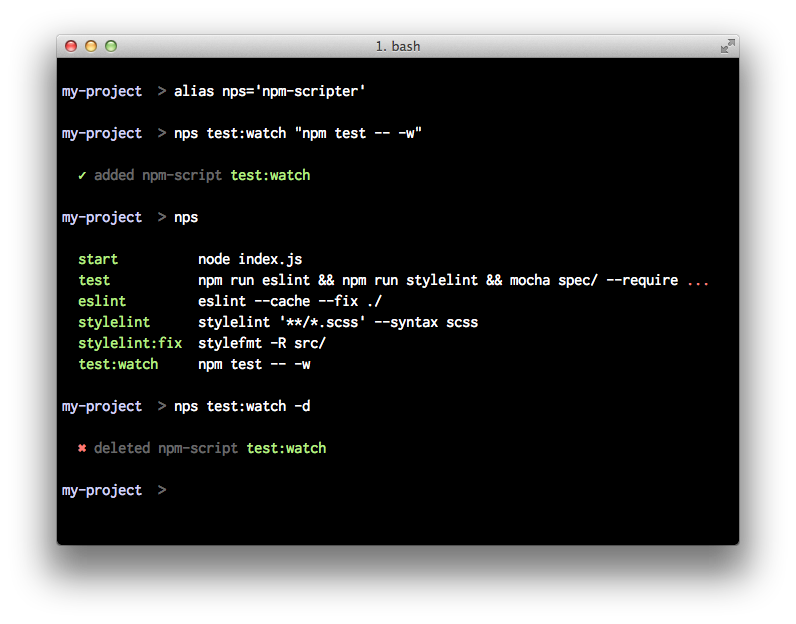
A simple `npm` helper for the command-line to manage npm-scripts.
> It's for the lazy programmer because editing json files is terrible.
## Install
```shell
npm install -g npm-scripter
```
Get help & examples with
```shell
nps -h
```
## Usage
List all npm-scripts with (basically the same as `npm run`)
```shell
nps
```
List npm-script `foo` with
```shell
nps foo
```
Create a new npm-script with
```shell
nps foo 'echo "bar"'
```
This creates an entry in `package.json` like this:
```javascript
"scripts": {
"foo": "echo \"bar\""
}
```
Edit an existing npm-script (only the commands part) in `$EDITOR` with
```shell
nps foo -e
```
Delete npm-script `foo` with
```shell
nps foo -d
```
Delete all npm-scripts with
```shell
nps -d
```