https://github.com/thorwebdev/supabase-slack-clone
https://github.com/thorwebdev/supabase-slack-clone
Last synced: 9 months ago
JSON representation
- Host: GitHub
- URL: https://github.com/thorwebdev/supabase-slack-clone
- Owner: thorwebdev
- Created: 2020-08-07T10:08:31.000Z (almost 6 years ago)
- Default Branch: master
- Last Pushed: 2020-08-09T09:08:49.000Z (almost 6 years ago)
- Last Synced: 2025-09-21T03:48:05.861Z (9 months ago)
- Language: JavaScript
- Homepage: https://supabase-slack-clone-green.vercel.app
- Size: 1.56 MB
- Stars: 0
- Watchers: 1
- Forks: 0
- Open Issues: 0
-
Metadata Files:
- Readme: README.md
Awesome Lists containing this project
README
# Realtime chat example using Supabase
This is a full-stack Slack clone example using:
- Frontend:
- Next.js.
- [Supabase.js](https://supabase.io/docs/library/getting-started) for user management and realtime data syncing.
- Backend:
- [app.supabase.io/](https://app.supabase.io/): hosted Postgres database with restful API for usage with Supabase.js.
## Demo
- Live demo: http://supabase-slack-clone.supabase.vercel.app/
- CodeSandbox: https://codesandbox.io/s/github/supabase/supabase/tree/master/examples/slack-clone
- Video tutorial: https://www.loom.com/share/31eec9b656e44b8d87c88bde8a465676

## Deploy your own
### 1. Create new project
Sign up to Supabase - [https://app.supabase.io](https://app.supabase.io) and create a new project. Wait for your database to start.
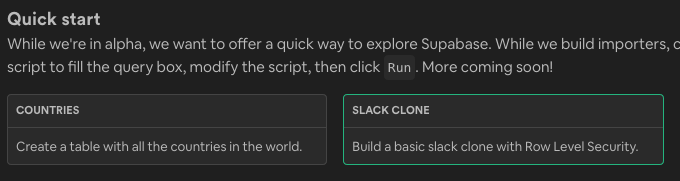
### 2. Run "Slack Clone" Quickstart
Once your database has started, run the "Slack Clone" quickstart.
### 3. Get the URL and Key
Go to the Project Settings (the cog icon), open the API tab, and find your API URL and `anon` key, you'll need these in the next step.
The `anon` key is your client-side API key. It allows "anonymous access" to your database, until the user has logged in. Once they have logged in, the keys will switch to the user's own login token. This enables row level security for your data. Read more about this [below](#postgres-row-level-security).
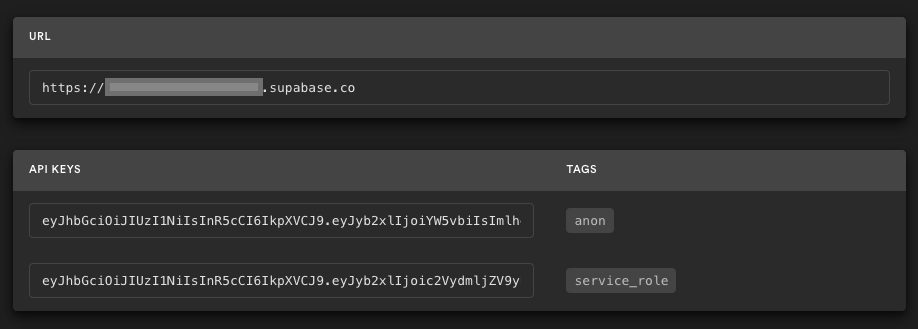
**_NOTE_**: The `service_role` key has full access to your data, bypassing any security policies. These keys have to be kept secret and are meant to be used in server environments and never on a client or browser.
### 4. Deploy the Next.js client
[](https://vercel.com/import/git?s=https%3A%2F%2Fgithub.com%2Fsupabase%2Fsupabase%2Ftree%2Fmaster%2Fexamples%2Fslack-clone&env=NEXT_PUBLIC_SUPABASE_URL,NEXT_PUBLIC_SUPABASE_KEY&envDescription=Find%20the%20Supabase%20URL%20and%20key%20in%20the%20your%20auto-generated%20docs%20at%20app.supabase.io&project-name=supabase-slack-clone&repo-name=supabase-slack-clone)
You will be asked for a `NEXT_PUBLIC_SUPABASE_URL` and `NEXT_PUBLIC_SUPABASE_KEY`. Use the API URL and `anon` key from [step 3](#3.-get-the-url-and-key).
## How to use
### Using `create-next-app`
Execute [`create-next-app`](https://github.com/vercel/next.js/tree/canary/packages/create-next-app) with [npm](https://docs.npmjs.com/cli/init) or [Yarn](https://yarnpkg.com/lang/en/docs/cli/create/) to bootstrap the example locally:
```bash
npx create-next-app --example with-supabase-auth-realtime-db realtime-chat-app
# or
yarn create next-app --example with-supabase-auth-realtime-db realtime-chat-app
```
### Download manually
Download the example:
```bash
curl https://codeload.github.com/vercel/next.js/tar.gz/canary | tar -xz --strip=2 next.js-canary/examples/with-supabase-auth-realtime-db
cd with-supabase-auth-realtime-db
```
### Required configuration
Copy the `.env.local.example` file into a file named `.env.local` in the root directory of the example:
```bash
cp .env.local.example .env.local
```
Set your Supabase details from from [step 3](#3.-get-the-url-and-key) above:
```bash
NEXT_PUBLIC_SUPABASE_URL=
NEXT_PUBLIC_SUPABASE_KEY=
```
### Run the development server
Now install the dependencies and start the development server.
```bash
npm install
npm run dev
# or
yarn
yarn dev
```
Visit http://localhost:3000 and start chatting! Open a channel across two browser tabs to see everything getting updated in realtime 🥳
## Supabase details
### Postgres Row level security
This project uses very high-level Authorization using Postgres' Role Level Security.
When you start a Postgres database on Supabase, we populate it with an `auth` schema, and some helper functions.
When a user logs in, they are issued a JWT with the role `authenticated` and thier UUID.
We can use these details to provide fine-grained control over what each user can and cannot do.
This is a trimmed-down schema, with the policies:
```sql
-- USER PROFILES
CREATE TYPE public.user_status AS ENUM ('ONLINE', 'OFFLINE');
CREATE TABLE public.users (
id uuid NOT NULL PRIMARY KEY, -- UUID from auth.users (Supabase)
username text,
status user_status DEFAULT 'OFFLINE'::public.user_status
);
ALTER TABLE public.users ENABLE ROW LEVEL SECURITY;
CREATE POLICY "Allow logged-in read access" on public.users FOR SELECT USING ( auth.role() = 'authenticated' );
CREATE POLICY "Allow individual insert access" on public.users FOR INSERT WITH CHECK ( auth.uid() = id );
CREATE POLICY "Allow individual update access" on public.users FOR UPDATE USING ( auth.uid() = id );
-- CHANNELS
CREATE TABLE public.channels (
id bigint GENERATED BY DEFAULT AS IDENTITY PRIMARY KEY,
inserted_at timestamp with time zone DEFAULT timezone('utc'::text, now()) NOT NULL,
slug text NOT NULL UNIQUE
);
ALTER TABLE public.channels ENABLE ROW LEVEL SECURITY;
CREATE POLICY "Allow logged-in full access" on public.channels FOR ALL USING ( auth.role() = 'authenticated' );
-- MESSAGES
CREATE TABLE public.messages (
id bigint GENERATED BY DEFAULT AS IDENTITY PRIMARY KEY,
inserted_at timestamp with time zone DEFAULT timezone('utc'::text, now()) NOT NULL,
message text,
user_id uuid REFERENCES public.users NOT NULL,
channel_id bigint REFERENCES public.channels NOT NULL
);
ALTER TABLE public.messages ENABLE ROW LEVEL SECURITY;
CREATE POLICY "Allow logged-in read access" on public.messages USING ( auth.role() = 'authenticated' );
CREATE POLICY "Allow individual insert access" on public.messages FOR INSERT WITH CHECK ( auth.uid() = user_id );
CREATE POLICY "Allow individual update access" on public.messages FOR UPDATE USING ( auth.uid() = user_id );
```
## Authors
- [Supabase](https://supabase.io)
Supabase is open source, we'd love for you to follow along and get involved at https://github.com/supabase/supabase