https://github.com/thrawn01/clip
Git Branch Tools
https://github.com/thrawn01/clip
branches cli clip git tools workflow
Last synced: 12 months ago
JSON representation
Git Branch Tools
- Host: GitHub
- URL: https://github.com/thrawn01/clip
- Owner: thrawn01
- Created: 2016-07-16T05:15:26.000Z (about 10 years ago)
- Default Branch: master
- Last Pushed: 2025-05-30T17:27:55.000Z (about 1 year ago)
- Last Synced: 2025-05-31T01:36:25.848Z (about 1 year ago)
- Topics: branches, cli, clip, git, tools, workflow
- Language: Go
- Size: 1.24 MB
- Stars: 5
- Watchers: 3
- Forks: 1
- Open Issues: 0
-
Metadata Files:
- Readme: README.md
Awesome Lists containing this project
README
## Clip
Clip is a tool that allows you to see the state of all your git branches at a glance.
### Git clip
Due to the collaborative nature of git; over time one begins to accumulate
quite a few local and remote branches. Keeping track of what branch
needs to be merged, has already been merged, and what branches need a pull can
tax the little grey cells.
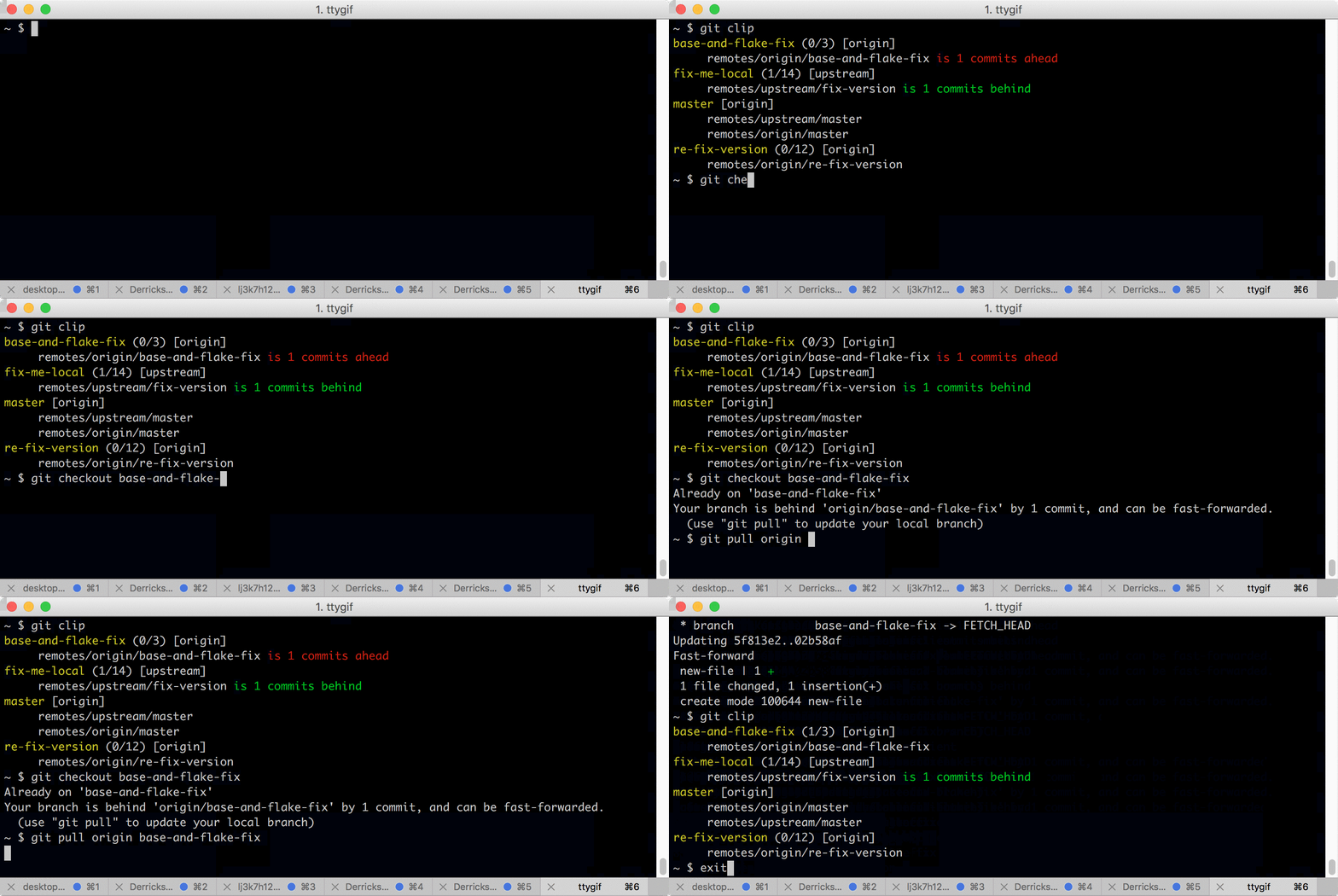
``git clip`` is designed to help elevate this pain by providing a clear view
of all your local and remote branches.
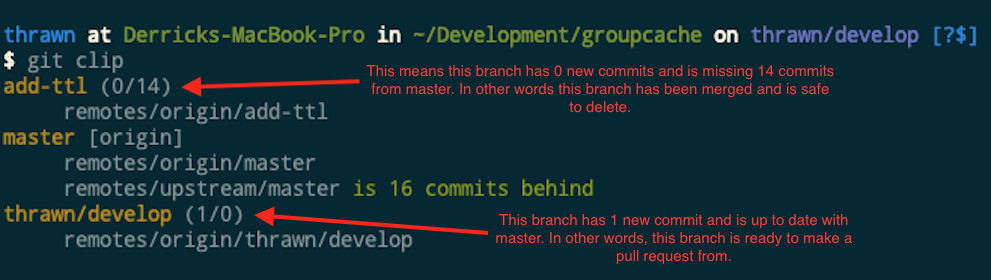
Each branch is annotated like so
```branch-name (commits-added/commits-behind) [name-of-tracking-remote]```
* ``branch-name`` - This is the name of our local branch
* ``commits-added`` - This is the number of commits added to our branch. If this
number is zero, this branch has no new commits, or has already been merged so it's
safe to delete.
* ``commits-behind`` - This is the number of commits behind master. If this number is
anything but zero you should rebase this branch.
* ``name-of-tracking-remote`` - This is the name of the remote branch your local branch
is tracking
Following the branch annotation is a list of remotes. Wherever a remote branch
matches our local branch it is listed with an indicator of how many commits ahead
or behind our local branch is relative to the remote branch.
### git clip-remote
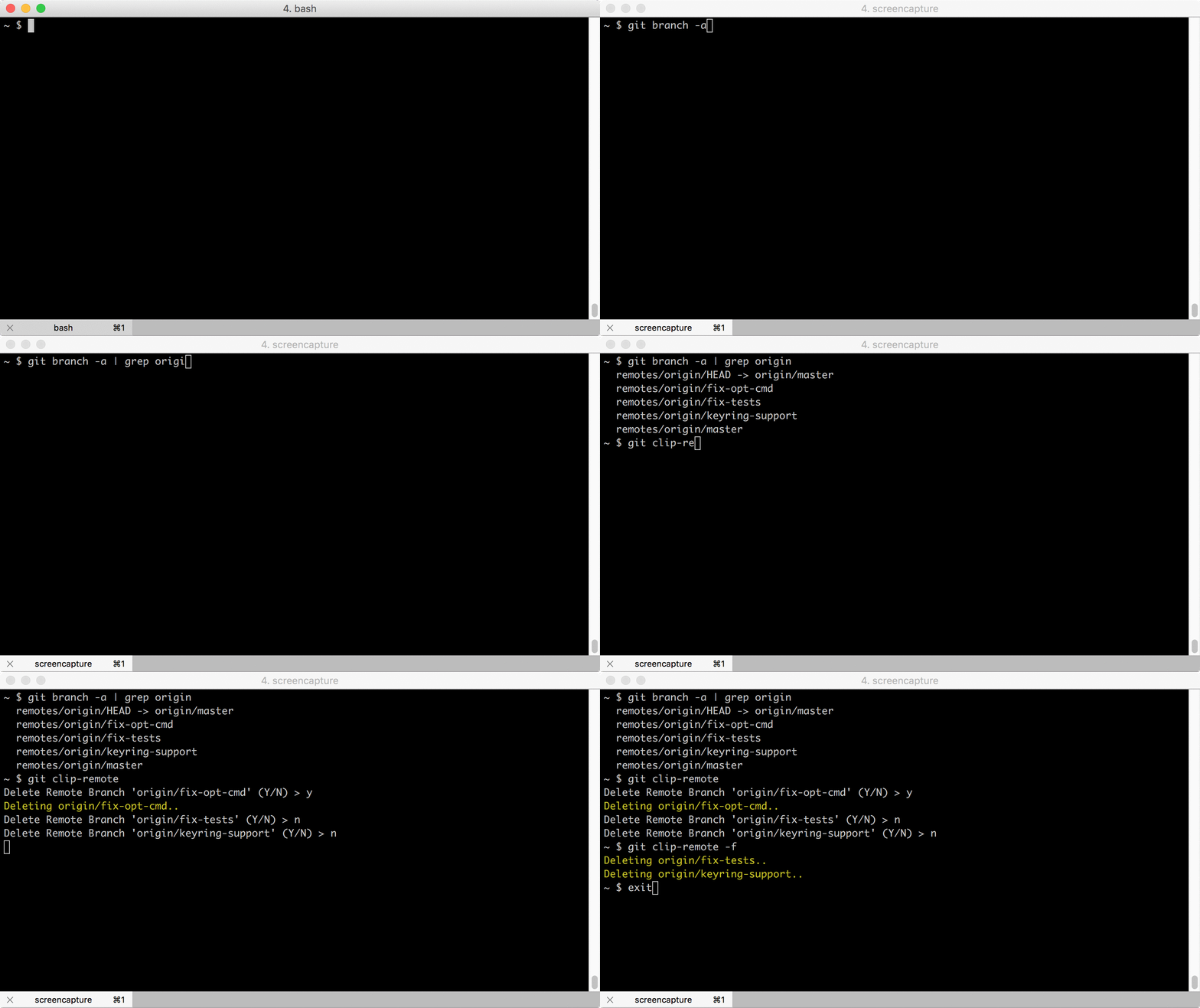
Over time you can collect a large number of branches left on a remote repo.
``clip-remote`` makes cleaning up these branches simple. It will only ever ask
you to delete branches that are on the remote, and will never ask to delete tracked
branches even if the local branch name differs from the remote branch name.
### Installation
#### Binary
Download prebuilt binaries
* [darwin](https://github.com/thrawn01/clip/releases/download/v0.2.0/clip-v0.2.0-darwin-amd64.tar.gz)
* [linux-386](https://github.com/thrawn01/clip/releases/download/v0.2.0/clip-v0.2.0-linux-386.tar.gz)
* [linux-amd64](https://github.com/thrawn01/clip/releases/download/v0.2.0/clip-v0.2.0-linux-amd64.tar.gz)
```bash
# Untar in git's exec path
cd `git --exec-path`
tar -vzxf clip-v0.2.0-darwin-amd64.tar.gz
```
#### Source
```bash
go install github.com/thrawn01/clip/cmd/clip@latest
go install github.com/thrawn01/clip/cmd/clip-remote@latest
```
Link the binaries to git's exec path
```bash
# Fish
set GIT_EXEC (git --exec-path)
ln -s $GOPATH/bin/clip $GIT_EXEC/git-clip
ln -s $GOPATH/bin/clip-remote $GIT_EXEC/git-clip-remote
# sh
GIT_EXEC=`git --exec-path`
ln -s $GOPATH/bin/clip $GIT_EXEC/git-clip
ln -s $GOPATH/bin/clip-remote $GIT_EXEC/git-clip-remote
```