https://github.com/threez/ban
A home control system based on firmata
https://github.com/threez/ban
Last synced: about 1 year ago
JSON representation
A home control system based on firmata
- Host: GitHub
- URL: https://github.com/threez/ban
- Owner: threez
- License: mit
- Created: 2013-09-04T16:33:44.000Z (almost 13 years ago)
- Default Branch: master
- Last Pushed: 2013-10-14T20:23:14.000Z (over 12 years ago)
- Last Synced: 2025-05-08T23:46:57.537Z (about 1 year ago)
- Language: Ruby
- Size: 285 KB
- Stars: 6
- Watchers: 1
- Forks: 0
- Open Issues: 0
-
Metadata Files:
- Readme: README.md
- License: LICENSE.txt
Awesome Lists containing this project
README
# Ban
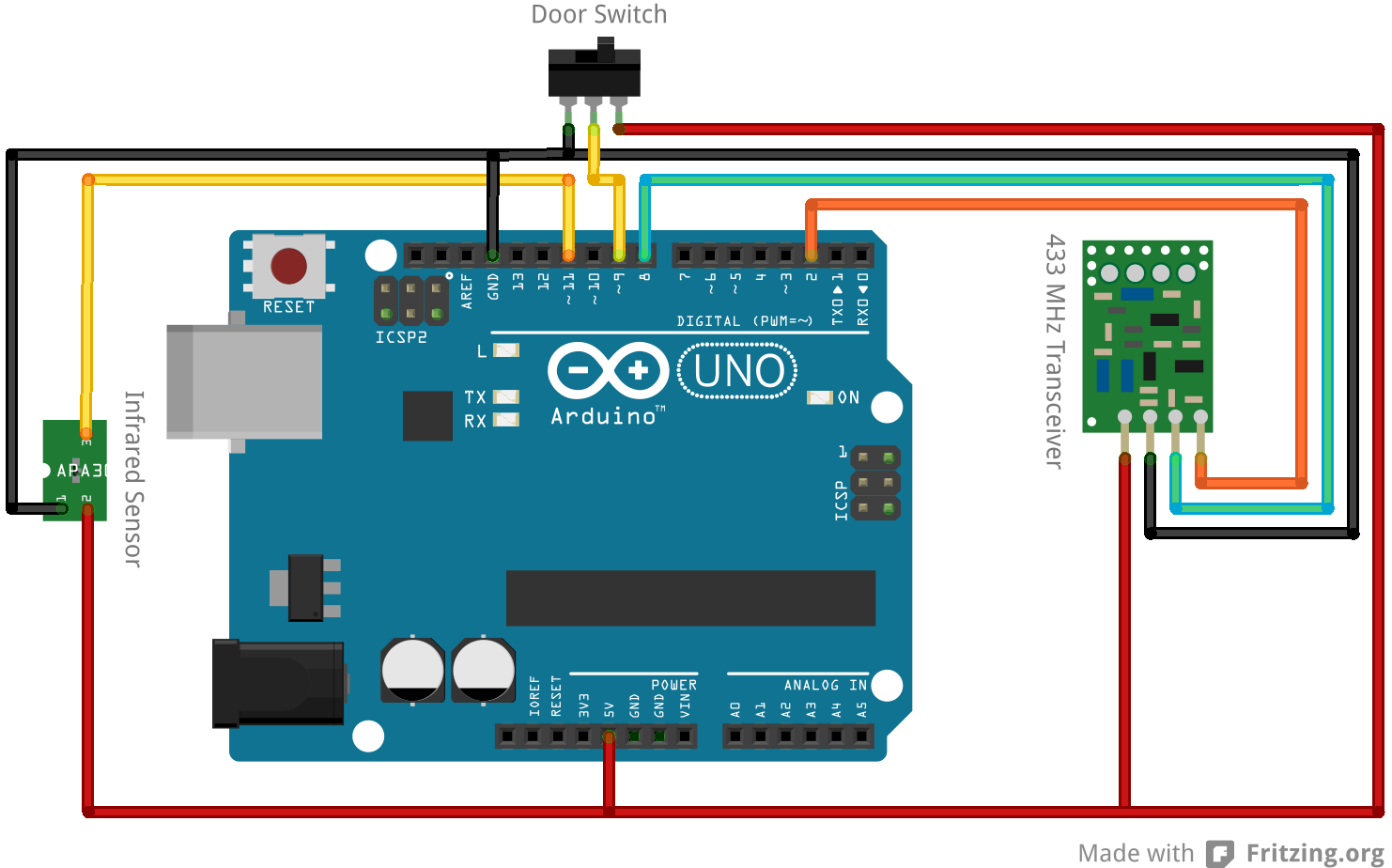
Ban is a arduino firmware (based on firmata) that receives incoming remote control switch commands, infrared commands, door open/close signaling and can send out remote control commands also. Ban distributes all this information over a websocket. The Websocket protocol is described below:
## The Arduino Layout
## Websocket Protocol
Basically the protocol has no authentication and is based on JSON.
### Send messages
The following commands and there json representation are send by the ban server to all clients:
#### rc-turned-on
{ 'rc-turned-on': { 'decimal': 21780,
'bits': 24,
'binary': '000000000101010100010100',
'tristate': '0000FFFF0FF0',
'delay': 322,
'protocol': 1 } }
#### rc-turned-off
{ 'rc-turned-off': { 'decimal': 21780,
'bits': 24,
'binary': '000000000101010100010001',
'tristate': '0000FFFF0F0F',
'delay': 322,
'protocol': 1 } }
#### ir-received
{ 'ir-received': { 'code': 4294967295, 'hex': 'ffffffff' } }
#### door-opened
{ 'door-opened': { 'state': 'open' } }
#### door-closed
{ 'door-closed': { 'state': 'closed' } }
### Received messages
The following commands can be send to the ban server:
#### rc-turn-off
{ 'rc-turn-off': { 'address': '11110D' } }
#### rc-turn-on
{ 'rc-turn-on': { 'address': '11110D' } }
## Installation
Add this line to your application's Gemfile:
gem 'ban'
And then execute:
$ bundle
Or install it yourself as:
$ gem install ban
## Flash the arduino
1. Install the [inotool](http://inotool.org)
2. Install the arduino library [rc-switch](https://code.google.com/p/rc-switch/)
3. Install the arduino library [IRremote](https://github.com/shirriff/Arduino-IRremote)
4. Fetch the git repository
5. Configure the arduino board in the **ino.ini** file.
6. And build and upload the Firmware to your arduino. using
$ ino clean && ino build && ino upload
## Usage
Start the ban server using:
$ ban server
Then by default a websocket server is started on the port 8080 on all interfaces. The websocket server will then send and receive the json messages.
## Contributing
1. Fork it
2. Create your feature branch (`git checkout -b my-new-feature`)
3. Commit your changes (`git commit -am 'Add some feature'`)
4. Push to the branch (`git push origin my-new-feature`)
5. Create new Pull Request