https://github.com/thushan/smash
Smash through to find duplicate files super fast by slicing files intelligently!
https://github.com/thushan/smash
cli cli-tool duplicate-files freebsd go linux macos windows
Last synced: 9 months ago
JSON representation
Smash through to find duplicate files super fast by slicing files intelligently!
- Host: GitHub
- URL: https://github.com/thushan/smash
- Owner: thushan
- License: apache-2.0
- Created: 2023-11-03T23:16:27.000Z (over 2 years ago)
- Default Branch: main
- Last Pushed: 2025-07-12T02:13:11.000Z (about 1 year ago)
- Last Synced: 2025-07-12T03:04:58.348Z (about 1 year ago)
- Topics: cli, cli-tool, duplicate-files, freebsd, go, linux, macos, windows
- Language: Go
- Homepage:
- Size: 7.73 MB
- Stars: 16
- Watchers: 1
- Forks: 0
- Open Issues: 7
-
Metadata Files:
- Readme: readme.md
- License: LICENSE
- Codeowners: .github/CODEOWNERS
Awesome Lists containing this project
- awesome-cli-apps-in-a-csv - smash - Smash through to find duplicate files super fast by slicing files intelligently. (<a name="file-dir-cleanup"></a>Clean up of files and directories)
- awesome-cli-apps - smash - Smash through to find duplicate files super fast by slicing files intelligently. (<a name="file-dir-cleanup"></a>Clean up of files and directories)
README




**Smash** is a high-performance CLI tool for detecting duplicate files — fast. It works by **slicing files or blobs into segments** and hashing them with blazing-fast, non-cryptographic algorithms like [xxhash](https://xxhash.com/) or [murmur3](https://en.wikipedia.org/wiki/MurmurHash).
Built for speed and scale, `smash` is ideal for everything from low-bandwidth deduplication to analysing multi-terabyte datasets.
### Key Features
* **Fast**: Handles large files quickly via [slicing](./docs/slicing.md)
* **Efficient**: Optimised for low I/O and bandwidth-constrained environments
* **Smart hashing**: Supports [multiple algorithms](./docs/algorithms.md) like `xxhash`, `murmur3`, and more
* **Safe**: Performs read-only scans of the filesystem
* **Comprehensive**: Detects duplicate and empty (0-byte) files
* **Machine-friendly**: JSON output compatible with tools like [`jq`](https://github.com/jqlang/jq) — [examples](#examples), [demos](./docs/demos.md)
* **Proven**: Used to dedupe multi-terabyte astrophysics, image, and video datasets
`smash` does **not** delete duplicates. It generates detailed reports for you to safely review and act on.
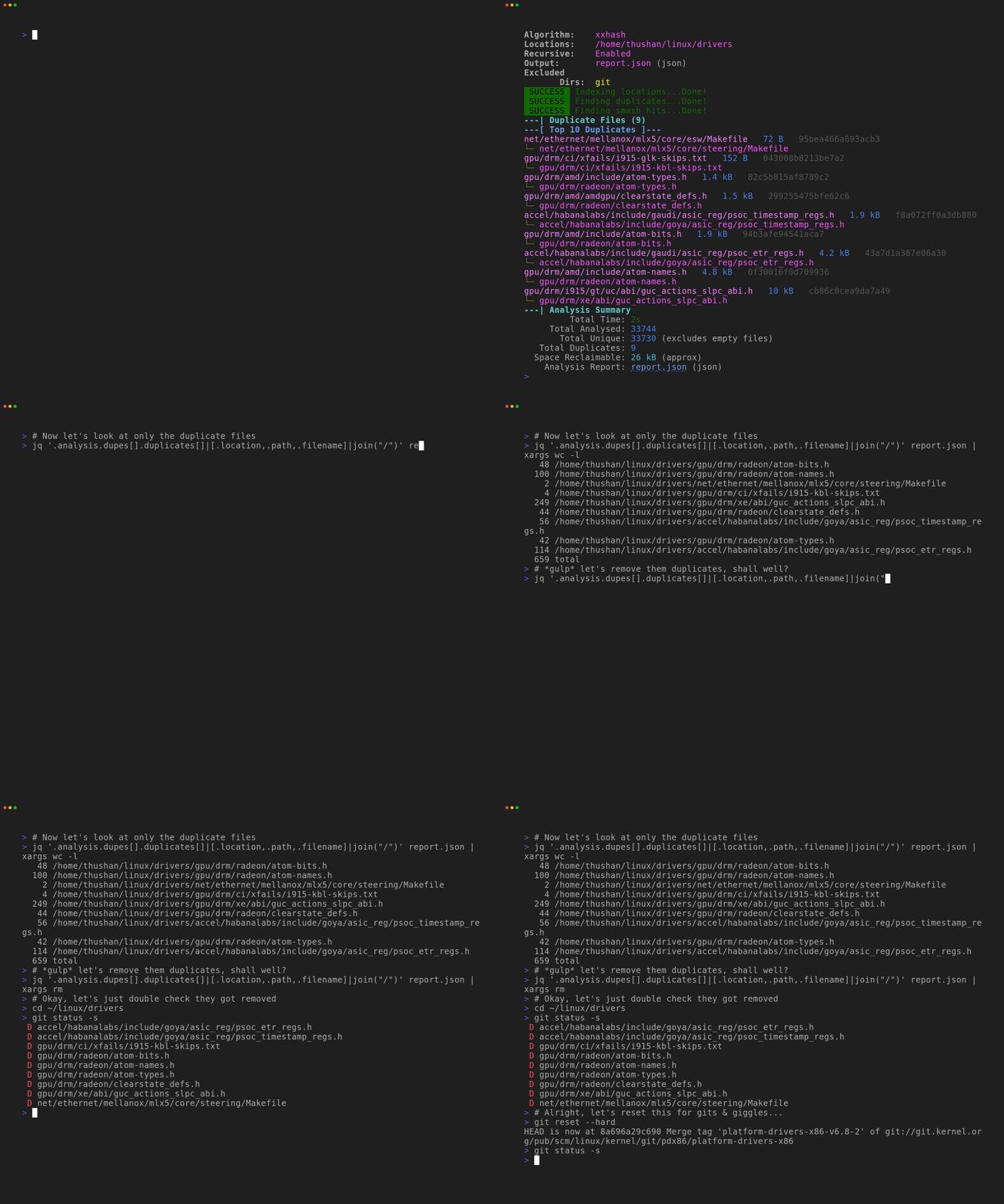
Find duplicates in the linux/drivers source tree with smash (see our 🍿 other demos). Made with vhs!
The name comes from a prototype tool called SmartHash (written many years ago in C/ASM that's now lost in source &
too hard to modernise). It operated on a similar concept of slicing and hashing (with CRC32 then later MD5).
# Installation
[](https://github.com/thushan/smash/releases/latest)
You can download the latest binaries from [Github Releases](https://github.com/thushan/smash/releases) or via our [simple installer script](https://raw.githubusercontent.com/thushan/smash/main/install.sh) - which currently supports Linux, macos, FreeBSD & Windows:
```bash
bash <(curl -s https://raw.githubusercontent.com/thushan/smash/main/install.sh)
```
It will download the latest version & extract it to its own folder for you.
Alternatively, you can install it via go:
```bash
go install github.com/thushan/smash@latest
```
`smash` has been developed on Linux (Pop!_OS & Fedora), tested on macOS, FreeBSD & Windows.
## Docker
You can also run `smash` using Docker. Multi-architecture images (amd64/arm64) are available on GitHub Container Registry:
> [!TIP]
> Use the `-t` flag to allocate a pseudo-TTY for better output formatting with Docker.
>
> We use the `--rm` flag to automatically remove the container after it exits, keeping
> your environment clean in these examples.
```bash
# Pull the latest image
docker pull ghcr.io/thushan/smash:latest
# Scan current directory
docker run -t --rm -v "$PWD:/data" ghcr.io/thushan/smash:latest -r /data
# Scan with output file (saves to current directory)
docker run -t --rm -v "$PWD:/data" ghcr.io/thushan/smash:latest -r --silent -o /data/report.json /data
# Use the built-in /output directory (container includes a writable /output)
docker run -t --rm -v "$PWD:/data" -v "$PWD/output:/output" ghcr.io/thushan/smash:latest \
-r --silent -o /output/report.json /data
# Or create your own output directory
mkdir -p my-reports
docker run -t --rm -v "$PWD:/data" -v "$PWD/my-reports:/output" ghcr.io/thushan/smash:latest \
-r --silent -o /output/report.json /data
# Scan multiple directories with output
docker run -t --rm \
-v "$HOME/Documents:/docs:ro" \
-v "$HOME/Pictures:/pics:ro" \
-v "$PWD/output:/output" \
ghcr.io/thushan/smash:latest -r -o /output/report.json /docs /pics
# Windows PowerShell example
docker run --rm -v "${PWD}:/data" -v "${PWD}/output:/output" ghcr.io/thushan/smash:latest `
-r --silent -o /output/report.json /data
# Use a specific version
docker pull ghcr.io/thushan/smash:v1.0.0
```
**Important notes:**
- Output files must be written to mounted volumes (e.g., `/data` or `/output`)
- Use `:ro` for read-only mounts when you only need to scan directories
- The container runs as non-root user, so ensure output directories are writable
The Docker image is based on Alpine Linux for a minimal footprint (~8MB) and runs as a non-root user for security.
# Usage
```bash
# Basic usage - scan current directory
smash
# Recursive scan
smash -r
# Scan multiple directories
smash -r ~/Documents ~/Downloads
# Silent mode with report
smash -r --silent -o report.json ~/data
```
For detailed usage, see the [User Guide](./docs/user-guide.md).
## Command Line Options
Key flags:
- `-r, --recurse` - Scan subdirectories (required for recursive scanning)
- `-o, --output-file` - Save results to JSON file
- `--silent` - Suppress all output except errors
- `--algorithm` - Choose hash algorithm (default: xxhash)
- `--exclude-dir` - Skip directories (comma-separated)
- `--exclude-file` - Skip files (comma-separated patterns)
Run `smash --help` for complete options.
## Quick Examples
### Find Duplicates
```bash
# In photos directory
smash -r ~/photos -o duplicates.json
# Across multiple drives
smash -r ~/Documents /mnt/backup/Documents
# Large video files only
smash -r --min-size=104857600 ~/Videos
```
### Filter and Exclude
```bash
# Skip git and node_modules
smash -r --exclude-dir=.git,node_modules ~/projects
# Include empty files
smash -r --ignore-empty=false ~/data
```
### Performance Tuning
```bash
# For network drives
smash -r --max-workers=4 /mnt/nas
# For many small files
smash -r --disable-slicing ~/documents
```
### Working with Reports
```bash
# Generate report
smash -r ~/data -o report.json
# List all duplicates
jq -r '.analysis.dupes[].files[].path' report.json
# Show space wasted
jq '.analysis.summary.spaceWasted' report.json
```
See the [User Guide](./docs/user-guide.md) for detailed examples and advanced usage.
# Contributing
We welcome contributions! Please see our [Developer Guide](./docs/developer.md) for information on:
- Building from source
- Running tests
- Development workflow
- Docker development
- Release process
# Acknowledgements
This project was possible thanks to the following projects or folks.
* [@jqlang/jq](https://github.com/jqlang/jq) - without `jq` we'd be a bit lost!
* [@wader/fq](https://github.com/wader/fq) - countless nights of inspecting binary blobs!
* [@cespare/xxhash](https://github.com/cespare/xxhash) - xxhash implementation
* [@spaolacci/murmur3](https://github.com/spaolacci/murmur3) - murmur3 implementation
* [@puzpuzpuz/xsync](https://github.com/puzpuzpuz/xsync) - Amazingly efficient map implementation
* [@pterm/pterm](https://github.com/pterm/pterm) - Amazing TUI framework used
* [@spf13/cobra](https://github.com/spf13/cobra) - CLI Magic with Cobra
* [@golangci/golangci-lint](https://github.com/golangci/golangci-lint) - Go Linter
* [@dkorunic/betteralign](https://github.com/dkorunic/betteralign) - Go alignment checker
Testers - MarkB, JarredT, BenW, DencilW, JayT, ASV, TimW, RyanW, WilliamH, SpencerB, EmadA, ChrisE, AngelaB, LisaA, YousefI, JeffG, MattP
# License
Copyright (c) Thushan Fernando and licensed under Apache License 2.0