https://github.com/tiagosiebler/coinbase-api
Node.js SDK for the Coinbase APIs and WebSockets, with TypeScript & browser support.
https://github.com/tiagosiebler/coinbase-api
coinbase coinbase-api coinbase-pro coinbase-pro-api coinbase-wallet coinbasepro javascript node node-js nodejs typescript
Last synced: 5 months ago
JSON representation
Node.js SDK for the Coinbase APIs and WebSockets, with TypeScript & browser support.
- Host: GitHub
- URL: https://github.com/tiagosiebler/coinbase-api
- Owner: tiagosiebler
- License: mit
- Created: 2024-06-01T16:56:50.000Z (about 2 years ago)
- Default Branch: master
- Last Pushed: 2026-01-30T11:21:22.000Z (5 months ago)
- Last Synced: 2026-01-31T04:04:17.788Z (5 months ago)
- Topics: coinbase, coinbase-api, coinbase-pro, coinbase-pro-api, coinbase-wallet, coinbasepro, javascript, node, node-js, nodejs, typescript
- Language: TypeScript
- Homepage: https://www.npmjs.com/package/coinbase-api
- Size: 1020 KB
- Stars: 23
- Watchers: 2
- Forks: 12
- Open Issues: 3
-
Metadata Files:
- Readme: README.md
- Funding: .github/FUNDING.yml
- License: LICENSE.md
Awesome Lists containing this project
README
# Node.js & JavaScript SDK for Coinbase's Advanced Trade, App, Exchange, International, Prime & Commerce REST APIs and WebSockets

[][1]
[][1]
[][1]
[](https://github.com/tiagosiebler/coinbase-api/actions/workflows/e2etest.yml)
[][1]
[](https://t.me/nodetraders)
[1]: https://www.npmjs.com/package/coinbase-api
> [!TIP]
> Upcoming change: As part of the [Siebly.io](https://siebly.io/?ref=ghcoinbase) brand, this SDK will soon be hosted under the [Siebly.io GitHub organisation](https://github.com/sieblyio). The migration is seamless and requires no user changes.
Updated & performant JavaScript & Node.js SDK for Coinbase's Advanced Trade, App, Exchange, International, Prime & Commerce REST APIs and WebSockets:
- Professional, robust & performant Coinbase SDK with extensive production use in live trading environments.
- Complete integration with all Coinbase APIs - supports both retail and institutional REST clients and WebSockets:
- [Coinbase Advanced Trade](https://docs.cdp.coinbase.com/advanced-trade/docs/welcome) - Modern trading platform
- [Coinbase App](https://docs.cdp.coinbase.com/coinbase-app/docs/welcome) - Consumer mobile/web application
- [Coinbase Exchange](https://docs.cdp.coinbase.com/exchange/docs/welcome) - Professional trading platform
- [Coinbase International Exchange](https://docs.cdp.coinbase.com/intx/docs/welcome) - International institutional trading
- [Coinbase Prime](https://docs.cdp.coinbase.com/prime/docs/welcome) - Institutional custody and trading
- [Coinbase Commerce](https://docs.cdp.coinbase.com/commerce-onchain/docs/welcome) - Payments and commerce solutions
- Complete TypeScript support (with type declarations for most API requests & responses).
- Strongly typed requests and responses.
- Automated end-to-end tests ensuring reliability.
- Actively maintained with a modern, promise-driven interface.
- Supports both ECDSA and ED25519 API keys with automatic key type detection.
- Robust WebSocket integration with configurable connection heartbeats & automatic reconnect then resubscribe workflows.
- Event driven messaging.
- Smart WebSocket persistence with automatic reconnection handling.
- Emit `reconnected` event when dropped connection is restored.
- Support for both public and private WebSocket streams across all platforms.
- Automatically supports both ESM and CJS projects.
- Proxy support via axios integration.
- Heavy automated end-to-end testing with real API calls.
- Active community support & collaboration in telegram: [Node.js Algo Traders](https://t.me/nodetraders).
- Extensive examples for interacting with the Coinbase API offering in Node.js/JavaScript/TypeScript: [/examples/](./examples).
## Table of Contents
- [Installation](#installation)
- [Examples](#examples)
- [Issues & Discussion](#issues--discussion)
- [Related Projects](#related-projects)
- [Documentation](#documentation)
- [Structure](#structure)
- [Usage](#usage)
- [REST API Clients](#rest-api)
- [CBAdvancedTradeClient](#cbadvancedtradeclient)
- [CBAppClient](#cbappclient)
- [CBExchangeClient](#cbexchangeclient)
- [CBInternationalClient](#cbinternationalclient)
- [CBPrimeClient](#cbprimeclient)
- [CBCommerceClient](#cbcommerceclient)
- [WebSocket Client](#websockets)
- [Public WebSocket Streams](#public-websocket)
- [Private WebSocket Streams](#private-websocket)
- [WebSocket Event Handling](#listening-and-subscribing-to-websocket-events)
- [Customise Logging](#customise-logging)
- [Browser/Frontend Usage](#browserfrontend-usage)
- [Webpack](#webpack)
- [LLMs & AI](#use-with-llms--ai)
- [Used By](#used-by)
- [Contributions & Thanks](#contributions--thanks)
## Installation
`npm install --save coinbase-api`
## Examples
Refer to the [examples](./examples) folder for implementation examples.
## Issues & Discussion
- Issues? Check the [issues tab](https://github.com/tiagosiebler/coinbase-api/issues).
- Discuss & collaborate with other node devs? Join our [Node.js Algo Traders](https://t.me/nodetraders) engineering community on telegram.
- Follow our announcement channel for real-time updates on [X/Twitter](https://x.com/sieblyio)
## Related Projects
Check out our JavaScript/TypeScript/Node.js SDKs & Projects:
- Visit our website: [https://Siebly.io](https://siebly.io/?ref=gh)
- Try our REST API & WebSocket SDKs published on npmjs:
- [Bybit Node.js SDK: bybit-api](https://www.npmjs.com/package/bybit-api)
- [Kraken Node.js SDK: @siebly/kraken-api](https://www.npmjs.com/package/@siebly/kraken-api)
- [OKX Node.js SDK: okx-api](https://www.npmjs.com/package/okx-api)
- [Binance Node.js SDK: binance](https://www.npmjs.com/package/binance)
- [Gate (gate.com) Node.js SDK: gateio-api](https://www.npmjs.com/package/gateio-api)
- [Bitget Node.js SDK: bitget-api](https://www.npmjs.com/package/bitget-api)
- [Kucoin Node.js SDK: kucoin-api](https://www.npmjs.com/package/kucoin-api)
- [Coinbase Node.js SDK: coinbase-api](https://www.npmjs.com/package/coinbase-api)
- [Bitmart Node.js SDK: bitmart-api](https://www.npmjs.com/package/bitmart-api)
- Try my misc utilities:
- [OrderBooks Node.js: orderbooks](https://www.npmjs.com/package/orderbooks)
- [Crypto Exchange Account State Cache: accountstate](https://www.npmjs.com/package/accountstate)
- Check out my examples:
- [awesome-crypto-examples Node.js](https://github.com/tiagosiebler/awesome-crypto-examples)
## Documentation
Most methods accept JS objects. These can be populated using parameters specified by Coinbase's API documentation, or check the type definition in each class within this repository.
### API Documentation Links
- [Coinbase Developer Platform - Product APIs](https://docs.cdp.coinbase.com/product-apis/docs/welcome)
- [Advanced Trade API](https://docs.cdp.coinbase.com/advanced-trade/docs/welcome)
- [Coinbase App API](https://docs.cdp.coinbase.com/coinbase-app/docs/welcome)
- [Exchange API](https://docs.cdp.coinbase.com/exchange/docs/welcome)
- [International Exchange API](https://docs.cdp.coinbase.com/intx/docs/welcome)
- [Prime API](https://docs.cdp.coinbase.com/prime/docs/welcome)
- [Commerce API](https://docs.cdp.coinbase.com/commerce-onchain/docs/welcome)
- [REST Endpoint Function List](./docs/endpointFunctionList.md)
## Structure
This project uses typescript. Resources are stored in 2 key structures:
- [src](./src) - the whole connector written in typescript
- [examples](./examples) - some implementation examples & demonstrations. Contributions are welcome!
---
# Usage
Create API credentials on Coinbase's website:
- [Coinbase API Key Management](https://www.coinbase.com/settings/api)
## REST API
The SDK provides dedicated REST clients for each of Coinbase's API groups. Each client is designed for specific use cases and user types:
To use any of Coinbase's REST APIs in JavaScript/TypeScript/Node.js, import (or require) the client you want to use. We currently support the following clients:
- [CBAdvancedTradeClient](./src/CBAdvancedTradeClient.ts)
- [CBAppClient](./src/CBAppClient.ts)
- [CBExchangeClient](./src/CBExchangeClient.ts)
- [CBInternationalClient](./src/CBInternationalClient.ts)
- [CBPrimeClient](./src/CBPrimeClient.ts)
- [CBCommerceClient](./src/CBCommerceClient.ts)
#### CBAdvancedTradeClient
```javascript
const { CBAdvancedTradeClient } = require('coinbase-api');
/**
* Or, with import:
* import { CBAdvancedTradeClient } from 'coinbase-api';
*/
// insert your API key details here from Coinbase API Key Management
const advancedTradeCdpAPIKey = {
// dummy example keys to understand the structure
name: 'organizations/13232211d-d7e2-d7e2-d7e2-d7e2d7e2d7e2/apiKeys/d7e2d7e2-d7e2-d7e2-d7e2-d7e2d7e2d7e2',
privateKey:
'-----BEGIN EC PRIVATE KEY-----\nADFGHmkgnjdfg16k165kuu1kdtyudtyjdtyjytj/ADFGHmkgnjdfg16k165kuu1kdtyudtyjdtyjytj+oAoGCCqGSM49\nAwEHoUQDQgAEhtAep/ADFGHmkgnjdfg16k165kuu1kdtyudtyjdtyjytj+bzduY3iYXEmj/KtCk\nADFGHmkgnjdfg16k165kuu1kdtyudtyjdtyjytj\n-----END EC PRIVATE KEY-----\n',
};
/*
* You can add ECDSA keys like the example above, or ED25519 keys like the example below.
* Client will recognize both types of keys automatically.
* ED25519:
* {
* name: 'your-api-key-id',
* privateKey: 'yourExampleApiSecretEd25519Version==',
* }
*/
const client = new CBAdvancedTradeClient({
// Either pass the full JSON object that can be downloaded when creating your API keys
// cdpApiKey: advancedTradeCdpAPIKey,
// Or use the key name as "apiKey" and private key (WITH the "begin/end EC PRIVATE KEY" comment) as "apiSecret"
apiKey: advancedTradeCdpAPIKey.name,
apiSecret: advancedTradeCdpAPIKey.privateKey,
});
async function doAPICall() {
// Example usage of the CBAdvancedTradeClient
try {
const accounts = await client.getAccounts();
console.log('Get accounts result: ', accounts);
} catch (e) {
console.error('Exception: ', JSON.stringify(e));
}
}
doAPICall();
```
#### CBAppClient
```javascript
const { CBAppClient } = require('coinbase-api');
/**
* Or, with import:
* import { CBAppClient } from 'coinbase-api';
*/
// insert your API key details here from Coinbase API Key Management
const CBAppKeys = {
// dummy example keys to understand the structure
name: 'organizations/13232211d-d7e2-d7e2-d7e2-d7e2d7e2d7e2/apiKeys/d7e2d7e2-d7e2-d7e2-d7e2-d7e2d7e2d7e2',
privateKey:
'-----BEGIN EC PRIVATE KEY-----\nADFGHmkgnjdfg16k165kuu1kdtyudtyjdtyjytj/ADFGHmkgnjdfg16k165kuu1kdtyudtyjdtyjytj+oAoGCCqGSM49\nAwEHoUQDQgAEhtAep/ADFGHmkgnjdfg16k165kuu1kdtyudtyjdtyjytj+bzduY3iYXEmj/KtCk\nADFGHmkgnjdfg16k165kuu1kdtyudtyjdtyjytj\n-----END EC PRIVATE KEY-----\n',
};
/*
* You can add ECDSA keys like the example above, or ED25519 keys like the example below.
* Client will recognize both types of keys automatically.
* ED25519:
* {
* name: 'your-api-key-id',
* privateKey: 'yourExampleApiSecretEd25519Version==',
* }
*/
const client = new CBAppClient({
// Either pass the full JSON object that can be downloaded when creating your API keys
// cdpApiKey: CBAppCdpAPIKey,
// Or use the key name as "apiKey" and private key (WITH the "begin/end EC PRIVATE KEY" comment) as "apiSecret"
apiKey: CBAppKeys.name,
apiSecret: CBAppKeys.privateKey,
});
async function doAPICall() {
try {
// Transfer money between your own accounts
const transferMoneyResult = await client.transferMoney({
account_id: 'your_source_account_id',
type: 'transfer',
to: 'your_destination_account_id',
amount: '0.01',
currency: 'BTC',
});
console.log('Transfer Money Result: ', transferMoneyResult);
} catch (e) {
console.error('Error: ', e);
}
}
doAPICall();
```
#### CBInternationalClient
```javascript
const { CBInternationalClient } = require('coinbase-api');
/**
* Or, with import:
* import { CBInternationalClient } from 'coinbase-api';
*/
// insert your API key details here from Coinbase API Key Management
const client = new CBInternationalClient({
apiKey: 'insert_api_key_here',
apiSecret: 'insert_api_secret_here',
apiPassphrase: 'insert_api_passphrase_here',
// Set "useSandbox" to use the CoinBase International API sandbox environment
// useSandbox: true,
});
async function doAPICall() {
try {
// Get asset details
const assetDetails = await client.getAssetDetails({ asset: 'BTC' });
console.log('Asset Details: ', assetDetails);
} catch (e) {
console.error('Exception: ', JSON.stringify(e, null, 2));
}
}
doAPICall();
```
#### CBExchangeClient
```javascript
const { CBExchangeClient } = require('coinbase-api');
/**
* Or, with import:
* import { CBExchangeClient } from 'coinbase-api';
*/
// insert your API key details here from Coinbase API Key Management
const client = new CBExchangeClient({
apiKey: 'insert_api_key_here',
apiSecret: 'insert_api_secret_here',
apiPassphrase: 'insert_api_passphrase_here',
// Set "useSandbox" to use the CoinBase International API sandbox environment
// useSandbox: true,
});
async function doAPICall() {
try {
// Get a single currency by id
const currency = await client.getCurrency('BTC');
console.log('Currency: ', currency);
} catch (e) {
console.error('Exception: ', JSON.stringify(e, null, 2));
}
}
doAPICall();
```
See all clients [here](./src/) for more information on all the functions or the [examples](./examples/) for lots of usage examples. You can also check the endpoint function list [here](./docs/endpointFunctionList.md) to find all available functions!
## WebSockets
All available WebSockets can be used via a shared `WebsocketClient`. The WebSocket client will automatically open/track/manage connections as needed. Each unique connection (one per server URL) is tracked using a WsKey (each WsKey is a string - see [WS_KEY_MAP](src/lib/websocket/websocket-util.ts) for a list of supported values - `WS_KEY_MAP` can also be used like an enum).
Any subscribe/unsubscribe events will need to include a WsKey, so the WebSocket client understands which connection the event should be routed to. See examples below or in the [examples](./examples/) folder on GitHub.
Data events are emitted from the WebsocketClient via the `update` event, see example below:
#### Public Websocket
```javascript
const { WebsocketClient } = require('coinbase-api');
/**
* Or, with import:
* import { WebsocketClient } from 'coinbase-api';
*/
// public ws client, doesnt need any api keys to run
const client = new WebsocketClient();
// The WS Key (last parameter) dictates which WS feed this request goes to (aka if auth is required).
// As long as the WS feed doesn't require auth, you should be able to subscribe to channels without api credentials.
client.subscribe(
{
topic: 'status',
payload: {
product_ids: ['XRP-USD'],
},
},
'advTradeMarketData',
);
```
#### Private Websocket
```javascript
const { WebsocketClient } = require('coinbase-api');
/**
* Or, with import:
* import { WebsocketClient } from 'coinbase-api';
*/
// key name & private key, as returned by coinbase when creating your API keys.
// Note: the below example is a dummy key and won't actually work
const advancedTradeCdpAPIKey = {
name: 'organizations/13232211d-d7e2-d7e2-d7e2-d7e2d7e2d7e2/apiKeys/d7e2d7e2-d7e2-d7e2-d7e2-d7e2d7e2d7e2',
privateKey:
'-----BEGIN EC PRIVATE KEY-----\nADFGHmkgnjdfg16k165kuu1kdtyudtyjdtyjytj/ADFGHmkgnjdfg16k165kuu1kdtyudtyjdtyjytj+oAoGCCqGSM49\nAwEHoUQDQgAEhtAep/ADFGHmkgnjdfg16k165kuu1kdtyudtyjdtyjytj+bzduY3iYXEmj/KtCk\nADFGHmkgnjdfg16k165kuu1kdtyudtyjdtyjytj\n-----END EC PRIVATE KEY-----\n',
};
/*
* You can add ECDSA keys like the example above, or ED25519 keys like the example below.
* Client will recognize both types of keys automatically.
* ED25519:
* {
* name: 'your-api-key-id',
* privateKey: 'yourExampleApiSecretEd25519Version==',
* }
*/
const client = new WebsocketClient({
// Either pass the full JSON object that can be downloaded when creating your API keys
// cdpApiKey: advancedTradeCdpAPIKey,
// Or use the key name as "apiKey" and private key (WITH the "begin/end EC PRIVATE KEY" comment) as "apiSecret"
apiKey: advancedTradeCdpAPIKey.name,
apiSecret: advancedTradeCdpAPIKey.privateKey,
});
```
#### Listening and subscribing to Websocket events
```javascript
// add event listeners for websocket clients
client.on('open', (data) => {
console.log('open: ', data?.wsKey);
});
// Data received
client.on('update', (data) => {
console.info(new Date(), 'data received: ', JSON.stringify(data));
});
// Something happened, attempting to reconenct
client.on('reconnect', (data) => {
console.log('reconnect: ', data);
});
// Reconnect successful
client.on('reconnected', (data) => {
console.log('reconnected: ', data);
});
// Connection closed. If unexpected, expect reconnect -> reconnected.
client.on('close', (data) => {
console.error('close: ', data);
});
// Reply to a request, e.g. "subscribe"/"unsubscribe"/"authenticate"
client.on('response', (data) => {
console.info('response: ', JSON.stringify(data, null, 2));
// throw new Error('res?');
});
client.on('exception', (data) => {
console.error('exception: ', data);
});
/**
* Use the client subscribe(topic, market) pattern to subscribe to any websocket topic.
*
* You can subscribe to topics one at a time or many in one request.
*
* Topics can be sent as simple strings, if no parameters are required:
*/
// market data
client.subscribe('heartbeats', 'advTradeMarketData');
// This is the same as above, but using WS_KEY_MAP like an enum to reduce any uncertainty on what value to use:
// client.subscribe('heartbeats', WS_KEY_MAP.advTradeMarketData);
// user data
client.subscribe('futures_balance_summary', 'advTradeUserData');
client.subscribe('user', 'advTradeUserData');
/**
* Or send a more structured object with parameters, e.g. if parameters are required
*/
const tickerSubscribeRequest = {
topic: 'ticker',
/**
* Anything in the payload will be merged into the subscribe "request",
* allowing you to send misc parameters supported by the exchange (such as `product_ids: string[]`)
*/
payload: {
product_ids: ['ETH-USD', 'BTC-USD'],
},
};
client.subscribe(tickerSubscribeRequest, 'advTradeMarketData');
/**
* Other adv trade public websocket topics:
*/
client.subscribe(
[
{
topic: 'candles',
payload: {
product_ids: ['ETH-USD'],
},
},
{
topic: 'market_trades',
payload: {
product_ids: ['ETH-USD', 'BTC-USD'],
},
},
{
topic: 'ticker',
payload: {
product_ids: ['ETH-USD', 'BTC-USD'],
},
},
{
topic: 'ticker_batch',
payload: {
product_ids: ['ETH-USD', 'BTC-USD'],
},
},
{
topic: 'level2',
payload: {
product_ids: ['ETH-USD', 'BTC-USD'],
},
},
],
'advTradeMarketData',
);
```
See [WebsocketClient](./src/WebsocketClient.ts) for further information and make sure to check the [examples](./examples/) folder for much more usage examples, especially [publicWs.ts](./examples/AdvancedTrade/WebSockets/publicWs.ts) and [privateWs.ts](./examples/AdvancedTrade/WebSockets/privateWs.ts), which explains a lot of small details.
---
## Customise Logging
Pass a custom logger which supports the log methods `trace`, `info` and `error`, or override methods from the default logger as desired.
```javascript
const { WebsocketClient, DefaultLogger } = require('coinbase-api');
/**
* Or, with import:
* import { WebsocketClient, DefaultLogger } from 'coinbase-api';
*/
// E.g. customise logging for only the trace level:
const logger = {
// Inherit existing logger methods, using an object spread
...DefaultLogger,
// Define a custom trace function to override only that function
trace: (...params) => {
if (
[
'Sending ping',
'Sending upstream ws message: ',
'Received pong, clearing pong timer',
'Received ping, sending pong frame',
].includes(params[0])
) {
return;
}
console.log('trace', params);
},
};
const ws = new WebsocketClient(
{
apiKey: 'apiKeyHere',
apiSecret: 'apiSecretHere',
apiPassphrase: 'apiPassPhraseHere',
},
logger,
);
```
## Browser/Frontend Usage
### Webpack
Build a bundle using webpack:
- `npm install`
- `npm run build`
- `npm run pack`
The bundle can be found in `dist/`. Altough usage should be largely consistent, smaller differences will exist. Documentation is still TODO.
## Use with LLMs & AI
This SDK includes a bundled `llms.txt` file in the root of the repository. If you're developing with LLMs, use the included `llms.txt` with your LLM - it will significantly improve the LLMs understanding of how to correctly use this SDK.
This file contains AI optimised structure of all the functions in this package, and their parameters for easier use with any learning models or artificial intelligence.
---
## Used By
[](https://github.com/tiagosiebler/coinbase-api/network/dependents)
---
### Contributions & Thanks
Have my projects helped you? Share the love, there are many ways you can show your thanks:
- Star & share my projects.
- Are my projects useful? Sponsor me on Github and support my effort to maintain & improve them: https://github.com/sponsors/tiagosiebler
- Have an interesting project? Get in touch & invite me to it.
- Or buy me all the coffee:
- ETH(ERC20): `0xA3Bda8BecaB4DCdA539Dc16F9C54a592553Be06C`
- Sign up with my referral links:
- OKX (receive a 20% fee discount!): https://www.okx.com/join/42013004
- Binance (receive a 20% fee discount!): https://accounts.binance.com/register?ref=OKFFGIJJ
- HyperLiquid (receive a 4% fee discount!): https://app.hyperliquid.xyz/join/SDK
- Gate: https://www.gate.io/signup/NODESDKS?ref_type=103
### Contributions & Pull Requests
Contributions are encouraged, I will review any incoming pull requests. See the issues tab for todo items.
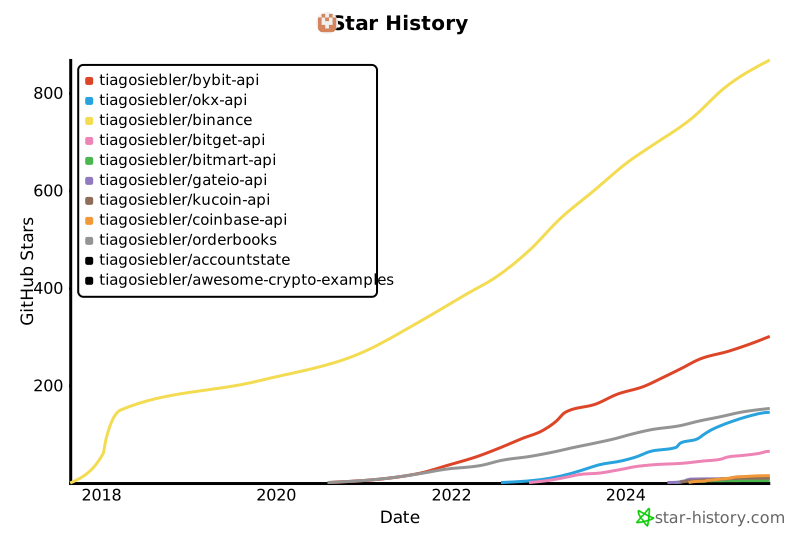
## Star History
[](https://star-history.com/#tiagosiebler/bybit-api&tiagosiebler/okx-api&tiagosiebler/binance&tiagosiebler/bitget-api&tiagosiebler/bitmart-api&tiagosiebler/gateio-api&tiagosiebler/kucoin-api&tiagosiebler/coinbase-api&tiagosiebler/orderbooks&tiagosiebler/accountstate&tiagosiebler/awesome-crypto-examples&Date)