https://github.com/tianzonglin/child-test
A custom interactive questionnaire embedded in Qualtrics with complete statistic and user simulation functions.
https://github.com/tianzonglin/child-test
glitch javascript qualtrics-integration questionnaire
Last synced: 7 months ago
JSON representation
A custom interactive questionnaire embedded in Qualtrics with complete statistic and user simulation functions.
- Host: GitHub
- URL: https://github.com/tianzonglin/child-test
- Owner: TianZonglin
- Created: 2024-03-04T17:59:12.000Z (over 2 years ago)
- Default Branch: main
- Last Pushed: 2024-04-28T12:45:02.000Z (over 2 years ago)
- Last Synced: 2024-12-30T02:24:25.106Z (over 1 year ago)
- Topics: glitch, javascript, qualtrics-integration, questionnaire
- Language: HTML
- Homepage: https://investy.glitch.me/
- Size: 2.69 MB
- Stars: 0
- Watchers: 1
- Forks: 0
- Open Issues: 0
-
Metadata Files:
- Readme: README.md
Awesome Lists containing this project
README
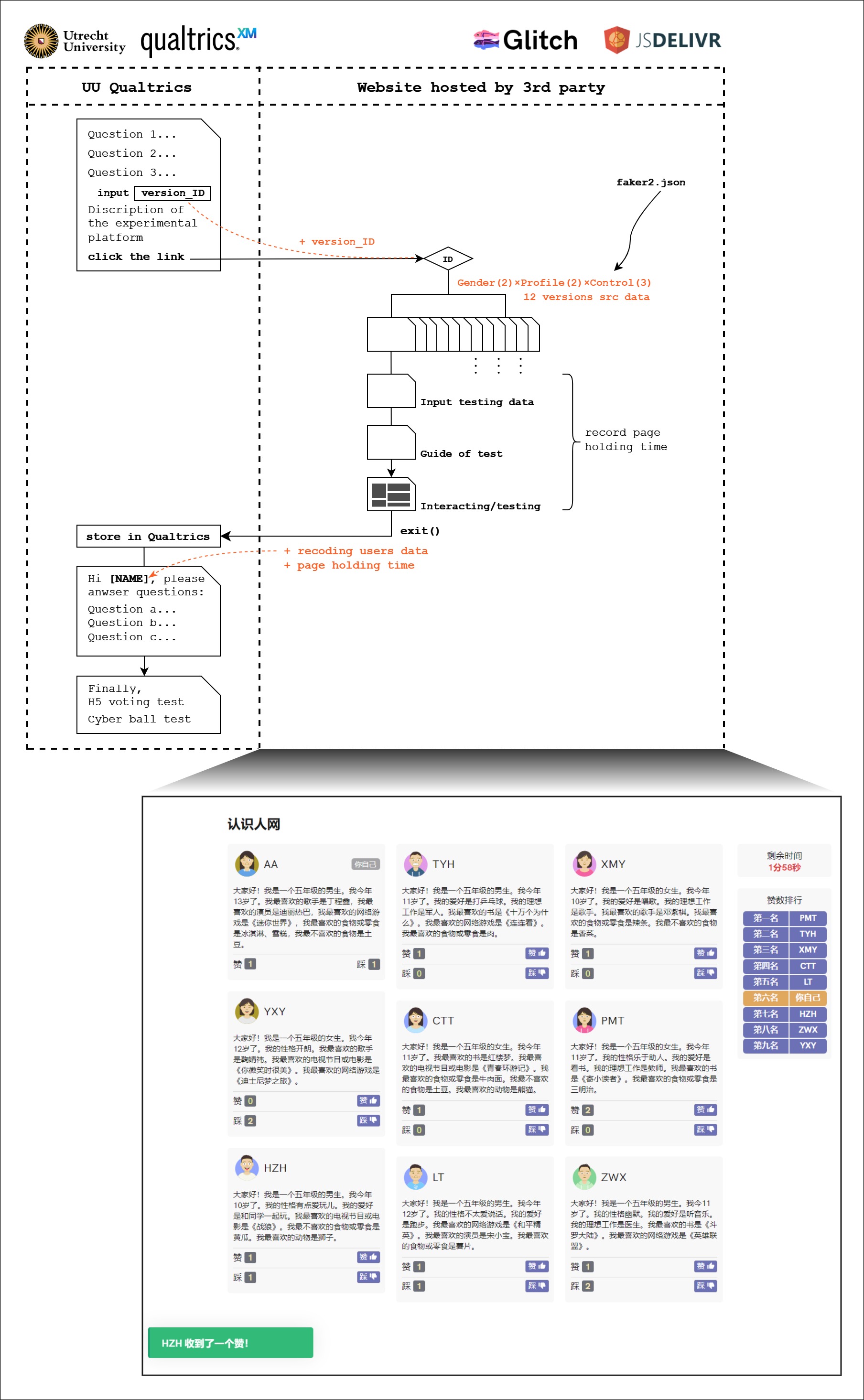
### 项目结构
```
.\Child-Test
│
├─data
│ ├─fakers.json // 导航说明页使用的fake数据
│ └─fakers2.json // 真正的打分页使用的fake数据
│
├─css
│ ├─colored-theme.min.css // 气泡弹窗的主题样式
│ └─driver.min.css // 导航说明的主题样式
│
├─js
│ ├─jquery.min.js // 本项目使用了jQuery对元素进行操作
│ ├─jqmodel.js // 引入轻量的模态框(弹窗)插件
│ ├─avataaars.js // 引入头像生成插件
│ ├─driver.min.js // 引入导航说明插件
│ └─growl-notification.min.js // 引入气泡弹窗插件
│
├─partial
│ ├─intro.html // 主要实现了准备工作+打分页导航说明
│ ├─itact.html // 主要实现了打分页的生成及交互(区分实验组别)
│ └─cball.html // 玩球游戏,后经iframe独立引入Qualtrics
│
├─style.css // 网站基础样式
├─index.html // 认识人网的主页/入口
├─simple-http-server.exe // 轻量的http-server启动器
└─README.md // 项目说明
```
### 快速使用
为了便于非开发人员自行使用,项目文件中已内置server启动器,无需安装任何编程环境和软件。部署步骤如下:
1. 下载当前项目(通过 `git clone` 或直接网页下载zip解压成文件夹均可);
2. 打开命令提示符工具(Powershell也可);
3. 更改当前目录到本项目的根目录,例如本项目文件夹放置在 `D` 盘 `D:\Child-Test`, 则拷贝执行 `cd /D D:\Child-Test` 命令;
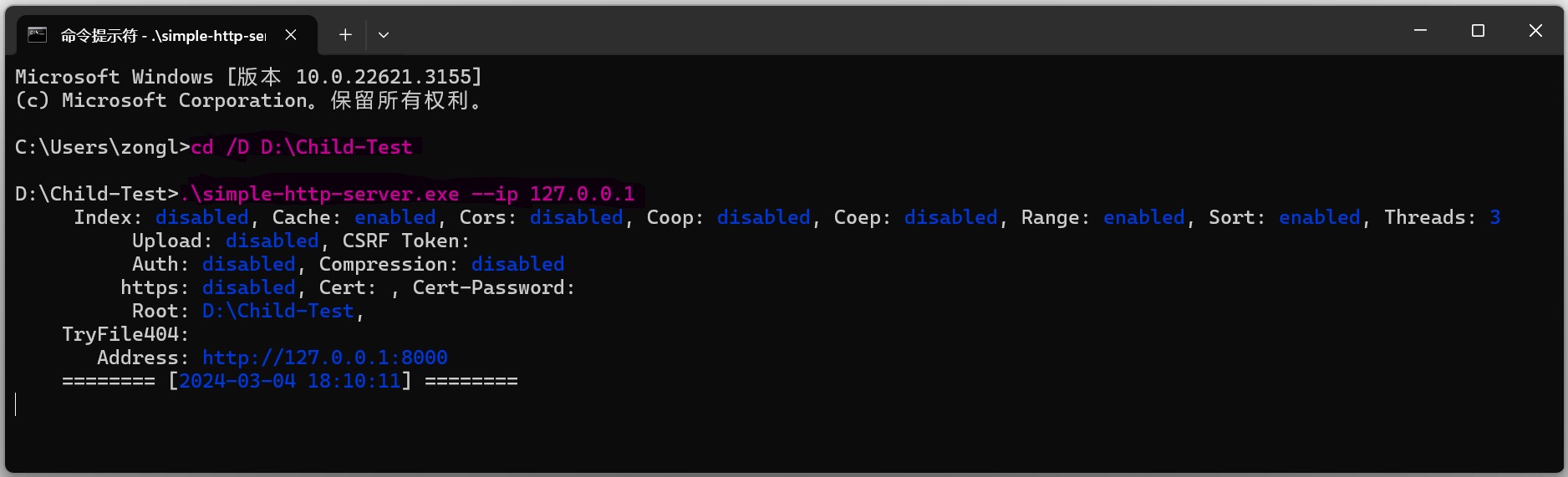
4. 拷贝执行 `.\simple-http-server.exe --ip 127.0.0.1` 命令,启动服务;
5. 如下图所示表示运行正常,可点击访问 `http://127.0.0.1:8000/index.html` 随即进入认识人网页面。
If you want to use this system, just download the code and run it in any possible web container.
- online demo: [https://investy.glitch.me](https://investy.glitch.me/), please wait 10 seconds for initialization.
- Need more help? leave a comment in the repo and we will find out the answer together then.