https://github.com/tiger-ai-lab/quickvideo
Quick Long Video Understanding
https://github.com/tiger-ai-lab/quickvideo
llm multimodal multimodal-learning video
Last synced: about 1 year ago
JSON representation
Quick Long Video Understanding
- Host: GitHub
- URL: https://github.com/tiger-ai-lab/quickvideo
- Owner: TIGER-AI-Lab
- License: mit
- Created: 2025-03-24T00:06:30.000Z (over 1 year ago)
- Default Branch: main
- Last Pushed: 2025-06-08T17:31:13.000Z (about 1 year ago)
- Last Synced: 2025-06-08T18:28:29.400Z (about 1 year ago)
- Topics: llm, multimodal, multimodal-learning, video
- Language: Python
- Homepage: https://arxiv.org/abs/2505.16175
- Size: 51.4 MB
- Stars: 46
- Watchers: 1
- Forks: 3
- Open Issues: 2
-
Metadata Files:
- Readme: README.md
- License: LICENSE
Awesome Lists containing this project
README
# QuickVideo

Efficient video loading and context prefill for hour-long video understanding
Benjamin Schneider* • Dongfu Jiang* • Chao Du • Tianyu Pang • Wenhu Chen
University of Waterloo • SeaAI Lab
*Equal contribution
|
Quick Start |
Paper |
QuickCodec |
QuickPrefill
|
---
## 🎯 Overview
Long video understanding has emerged as a crucial capability for real-world applications such as meeting summarization, video surveillance, educational lecture analysis, and content moderation. However, it remains computationally prohibitive for VideoLLMs due to two critical bottlenecks:
1. **Sequential video decoding** - Converting raw bit streams to RGB frames can take up to a minute for hour-long videos
2. **Costly prefilling** - Processing millions of tokens for LLM inference results in high latency and memory usage

**QuickVideo** is a system-algorithm co-design that achieves **3.5× speedup** (from 70s to 20s for 1-hour videos) while maintaining **97% performance** with **50% less memory**.
## 🚀 Key Innovations
### 🔧 QuickDecoder
- **Parallelized CPU-based decoder** that splits videos into keyframe-aligned intervals
- **2-3× faster** than sequential processing through concurrent execution
### ⚡ QuickPrefill
- **Group-based prefilling** for memory-efficient activation handling
- **KV-cache pruning** using key norm selection (L2) to retain only essential tokens
- **50% memory reduction** while preserving 97% of original performance
### 🔄 Overlapping Pipeline
- **Concurrent CPU decoding and GPU inference** to minimize end-to-end latency
- Intelligent scheduling reduces total processing time significantly

## 📊 Performance Results
We evaluate both QuickCodec on video decoding efficiency (left figure) and QuickPrefill on avg QA accuracy results on 4 long video understanding benchmarks: VideoMME, LongVideoBench, LVBench, MLVU (right figure and hidden table). Results show significant speedup and memory saving while preserving 97% of the original performance.


Performance Table
Group Size
KV Pruning method
ρ
VideoMME
LongVideoBench (val)
LVBench
MLVU (dev)
Avg
Performance
64 Frames
-
-
1
62.41
59.69
40.09
63.86
56.51
100.00%
16
Value Norms
0.5
47.63
35.98
30.92
31.38
36.48
64.55%
16
Attention Scores
0.5
58.63
52.95
37.83
59.87
52.32
92.58%
16
Key Norms (↓)
0.5
60.56
56.17
37.70
62.34
54.19
95.90%
128 Frames
-
-
1
66.41
60.96
42.87
66.86
59.27
100.00%
16
Value Norms
0.5
48.56
37.32
30.73
38.51
38.78
65.42%
16
Attention Scores
0.5
60.96
55.20
39.70
64.36
55.06
92.89%
16
Key Norms (↓)
0.5
63.41
58.19
39.57
64.99
56.54
95.39%
256 Frames
-
-
1
65.78
61.56
43.90
68.65
59.97
100.00%
16
Value Norms
0.5
48.33
38.89
31.38
37.74
39.08
65.17%
16
Attention Scores
0.5
62.52
57.22
41.96
67.27
57.24
95.45%
16
Key Norms (↓)
0.5
64.04
60.21
41.90
66.73
58.22
97.08%
1024 Frames
-
-
1
62.00
60.43
42.29
63.48
57.05
100.00%
16
Value Norms
0.5
47.37
33.66
29.18
32.65
35.71
62.60%
16
Attention Scores
0.5
62.22
58.49
42.03
64.45
56.80
99.56%
16
Key Norms
0.5
59.99
61.59
40.80
64.76
56.78
99.53%
## 🛠️ Installation
```bash
# Clone and setup environment
uv sync
source .venv/bin/activate
uv pip install -e .
uv pip install flash-attn --no-build-isolation
```
**Important**
Please use `transformers==4.50.0` to run and it has been tested. Higher version's transformers library may not work because they have updated the source code of Qwen VL models at some versions after it (e.g. `transformers==4.52.4`). We will try to make it compatible with the latest version in the future.
## 🎮 Quick Start
### 1. Download Example Video
```bash
wget https://github.com/TIGER-AI-Lab/QuickVideo/raw/refs/heads/dev/video/Q8AZ16uBhr8_resized_fps2_mute.mp4
video_path="Q8AZ16uBhr8_resized_fps2_mute.mp4"
```
### 2. Run QuickVideo (Recommended)
**With interleaved processing + KV pruning** - ⚡ **Fastest configuration**
```python
from lvu import LVU, LVUConfig
# Configure QuickVideo with all optimizations
config = LVUConfig(
model_name_or_path="Qwen/Qwen2.5-VL-7B-Instruct",
model_type="qwen25_lvu_interleaved", # Enable interleaved processing
top_k_predict_type="key_norms_small", # Use key norm pruning
video_group_size=16, # Process 16 frames per group
top_k=64, # Keep 64 most important tokens per group
num_frames=1024, # Process up to 1024 frames
use_tqdm=True,
)
lvu = LVU(config)
question = "Describe this video."
video_path = "Q8AZ16uBhr8_resized_fps2_mute.mp4"
# Generate response
output = lvu.generate(question, video_path, max_new_tokens=128, do_sample=False)
print(output)
```
**Expected Output:**
```
⏱️ Performance Metrics:
• Frame fetching: 0.33s
• Processing: 10.44s
• Prefill: 22.95s
• End-to-end: 27.65s (vs 57.86s baseline)
• Time saved: 10.57s ⚡
🎬 Generated Response:
['The video is a compilation of classic animated shorts featuring iconic characters from the 1940s and 1950s, showcasing slapstick humor and vibrant animation styles typical of that era. The clips include:\n\n1. **"A Bug\'s Life"**: A rabbit character is seen in a desert setting, engaging in a comedic chase sequence with a carrot. The rabbit exhibits exaggerated expressions and movements, typical of the cartoon\'s slapstick style.\n\n2. **"The Wabbit Who Could"**: Bugs Bunny appears in a whimsical scene where he is performing a magic trick involving a carrot. The animation is colorful and lively']
"The video is a compilation of classic animated shorts featuring iconic
characters from the 1940s and 1950s, showcasing slapstick humor and
vibrant animation styles typical of that era..."
```
**Important**: We recommend to run the interleaved version on **at least 2 cpu cores**, otherwise the interleaving strategy will do no better than the standard sequential processing. If you find no improvement using interleaved processing, then please check the number of CPU cores available on your machine.
### 3. Baseline Comparison
**Without interleaved processing** - 🐌 **Slower but still optimized**
```python
config = LVUConfig(
model_name_or_path="Qwen/Qwen2.5-VL-7B-Instruct",
model_type="qwen25_lvu", # Standard processing
video_group_size=16,
top_k=64,
num_frames=1024,
use_tqdm=True,
)
# Same usage as above - notice the 2x slower processing time
```
## 🔬 Benchmark Evaluation
Evaluate QuickVideo performance on standard video understanding benchmarks:
```bash
# Setup evaluation environment
git submodule update --init --recursive
cd lmms-eval
uv pip install -e .
# Configure environment
export DEEPCODEC_CORES=8
export FORCE_QWENVL_VIDEO_READER='deepcodec'
```
**Run comprehensive evaluation:**
```bash
# Example evaluation script
num_frame=1024
benchmark_name="videomme,longvideobench_val_v,lvbench,mlvu_dev"
accelerate launch --num_processes 8 --main_process_port 12351 -m lmms_eval \
--model qwen2_5_vl \
--model_args "pretrained=Qwen/Qwen2.5-VL-7B-Instruct,max_num_frames=$num_frame,use_flash_attention_2=True,adaptive_local_attention=True,local_attention_group_size=16,top_k=64,predict_type=key_norms_small" \
--tasks $benchmark_name \
--batch_size 1 \
--log_samples \
--output_path ./logs/quickvideo_evaluation
```
## 🧪 Advanced Configuration
Configuration Parameters
| Parameter | Description | Default | Options |
|-----------|-------------|---------|---------|
| `model_type` | Processing mode | `qwen25_lvu` | `qwen25_lvu`, `qwen25_lvu_interleaved` |
| `video_group_size` | Frames per processing group | `16` | `8`, `16`, `32`, ... |
| `top_k` | Tokens to keep per group | `64` | Any positive integer |
| `top_k_predict_type` | Pruning strategy | `key_norms_small` | `key_norms_small`, `attention_scores`, `value_norms` |
| `num_frames` | Maximum frames to process | `1024` | `64`, `128`, `256`, `1024`, ... |
| `top_p` | Percentage-based pruning | `None` | `0.0` to `1.0` |
## 🤝 Contributing
We welcome contributions! To add new models or KV pruning methods:
1. **Fork the repository**
2. **Create a feature branch**: `git checkout -b feature/new-model`
3. **Implement your changes** following our coding standards
4. **Add tests** and documentation
5. **Submit a pull request**
See our [contribution guidelines](CONTRIBUTING.md) for detailed instructions. (under construction)
## 📜 Citation
If you find QuickVideo useful in your research, please cite our paper:
```bibtex
@inproceedings{Schneider2025QuickVideoRL,
title={QuickVideo: Real-Time Long Video Understanding with System Algorithm Co-Design},
author={Benjamin Schneider and Dongfu Jiang and Chao Du and Tianyu Pang and Wenhu Chen},
year={2025},
url={https://api.semanticscholar.org/CorpusID:278789043}
}
```
## 📄 License
This project is licensed under the MIT License - see the [LICENSE](LICENSE) file for details.
## Star History
[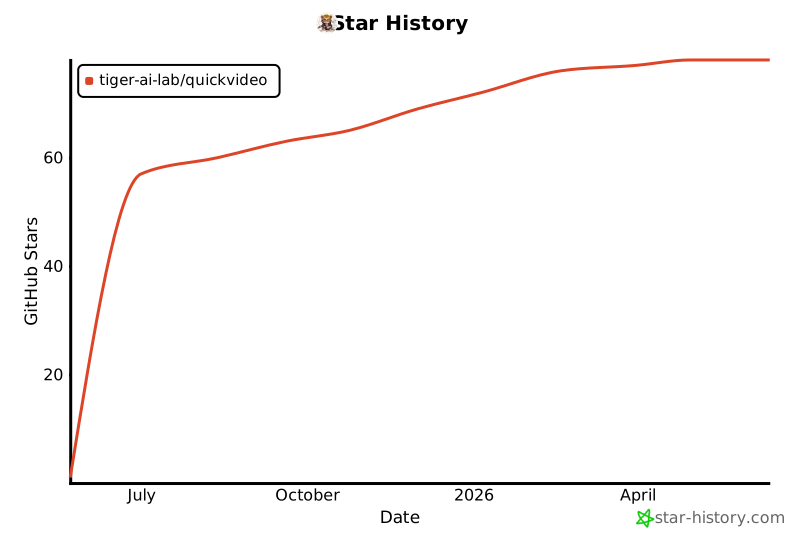](https://www.star-history.com/#TIGER-AI-Lab/QuickVideo&Date)
---
Made with ❤️ by the TIGER AI Lab team