https://github.com/tigera-solutions/cc-aks-security-compliance-workshop
This repository brings a hands-on workshop approach covering the Configuration Security and Compliance for an Azure Kubernetes Service cluster using Calico Cloud.
https://github.com/tigera-solutions/cc-aks-security-compliance-workshop
aks azure cc compliance regismartins workshop
Last synced: 8 months ago
JSON representation
This repository brings a hands-on workshop approach covering the Configuration Security and Compliance for an Azure Kubernetes Service cluster using Calico Cloud.
- Host: GitHub
- URL: https://github.com/tigera-solutions/cc-aks-security-compliance-workshop
- Owner: tigera-solutions
- Created: 2023-04-12T13:50:48.000Z (about 3 years ago)
- Default Branch: main
- Last Pushed: 2023-04-13T13:50:08.000Z (about 3 years ago)
- Last Synced: 2025-02-15T11:19:58.599Z (over 1 year ago)
- Topics: aks, azure, cc, compliance, regismartins, workshop
- Homepage:
- Size: 186 KB
- Stars: 2
- Watchers: 1
- Forks: 1
- Open Issues: 0
-
Metadata Files:
- Readme: README.md
Awesome Lists containing this project
README
# Microsoft Azure: Hands-on AKS workshop Configuration Security and Compliance
In this AKS-focused workshop, you will work with Microsoft Azure and Calico Cloud to learn how to design and deploy best practices to secure your Kubernetes environment and achieve compliance with regulatory frameworks such as PCI, SOC2 and GDPR. This 90-minute hands-on lab will guide you from building an AKS cluster, creating a Calico Cloud trial account and registering your AKS cluster to Calico Cloud for configuring and securing it for compliance. A sample application environment is designed to help implement:
- Configuration security including Kubernetes Security Posture Management (KSPM)
- Security policies for compliance
- Compliance, evidence, and audit reporting
You will come away from this workshop with an understanding of how others in your industry are securing and observing cloud-native applications in Microsoft Azure, along with best practices that you can implement in your organization.
---
## Create a cluster an connect it to Calico Cloud.
If you don't have an AKS cluster created for this workshop, we recommend you create one. You can use the steps described here to create a Calico Cloud compatible AKS cluster to follow along with this workshop.
- [Azure AKS Cluster Creation - Azure CNI for Calico Cloud](./aks-azurecni.md)
> **Connect your cluster to** [Calico Cloud](https://calicocloud.io)
---
## Configure your cluster and install demo applications
Configure Calico parameters for this workshop, and install and configure demo applications.
1. Clone this repository and change directory to it.
```bash
git clone https://github.com/tigera-solutions/cc-aks-security-compliance-workshop.git && \
cd cc-aks-security-compliance-workshop
```
2. Apply the yamls in the `pre` directory. Those yamls will setup the context for this workshop.
```bash
kubectl apply -f pre
```
---
# How Calico supports compliance requirements
Tigera’s solutions, Calico Cloud and Calico Enterprise, enable north-south controls such as egress access, east-west controls such as microsegmentation, and enterprise security controls, policy enforcement, and compliance reporting across all Kubernetes distributions in both hybrid and multi-cloud environments.
- [Download the whitepaper: PCI compliance for Hosts, VMs, containers, and Kubernetes](https://www.tigera.io/lp/kubernetes-pci-compliance/)
- [Download the PCI DSS v4.0 Quick Reference Guide](https://docs-prv.pcisecuritystandards.org/PCI%20DSS/Supporting%20Document/PCI_DSS-QRG-v4_0.pdf)
Calico provides the following features to help achieve PCI compliance.
---
## Access controls
Calico provides methods to enable fine-grained access controls between your microservices and external databases, cloud services, APIs, and other applications that are protected behind a firewall. You can enforce controls from within the cluster using DNS egress policies, from a firewall outside the cluster using the egress gateway. Controls are applied on a fine-grained, per-pod basis.
### Service Graph and Flow Visualizer
| PCI Control # | Requirements| How Calico meets this requirements |
| --- | --- | --- |
| 1.1.2, 1.1.3 | Current network diagram that identifies all connections between the CDE (Cardholder Data Environmet) and other networks and systems | • Stay current with the network diagram for in-scope workloads in Kubernetes environments using Calico’s Dynamic Service Graph and flow visualizer |
Connect to Calico Cloud GUI. From the menu select `Service Graph > Default`. Explore the options.
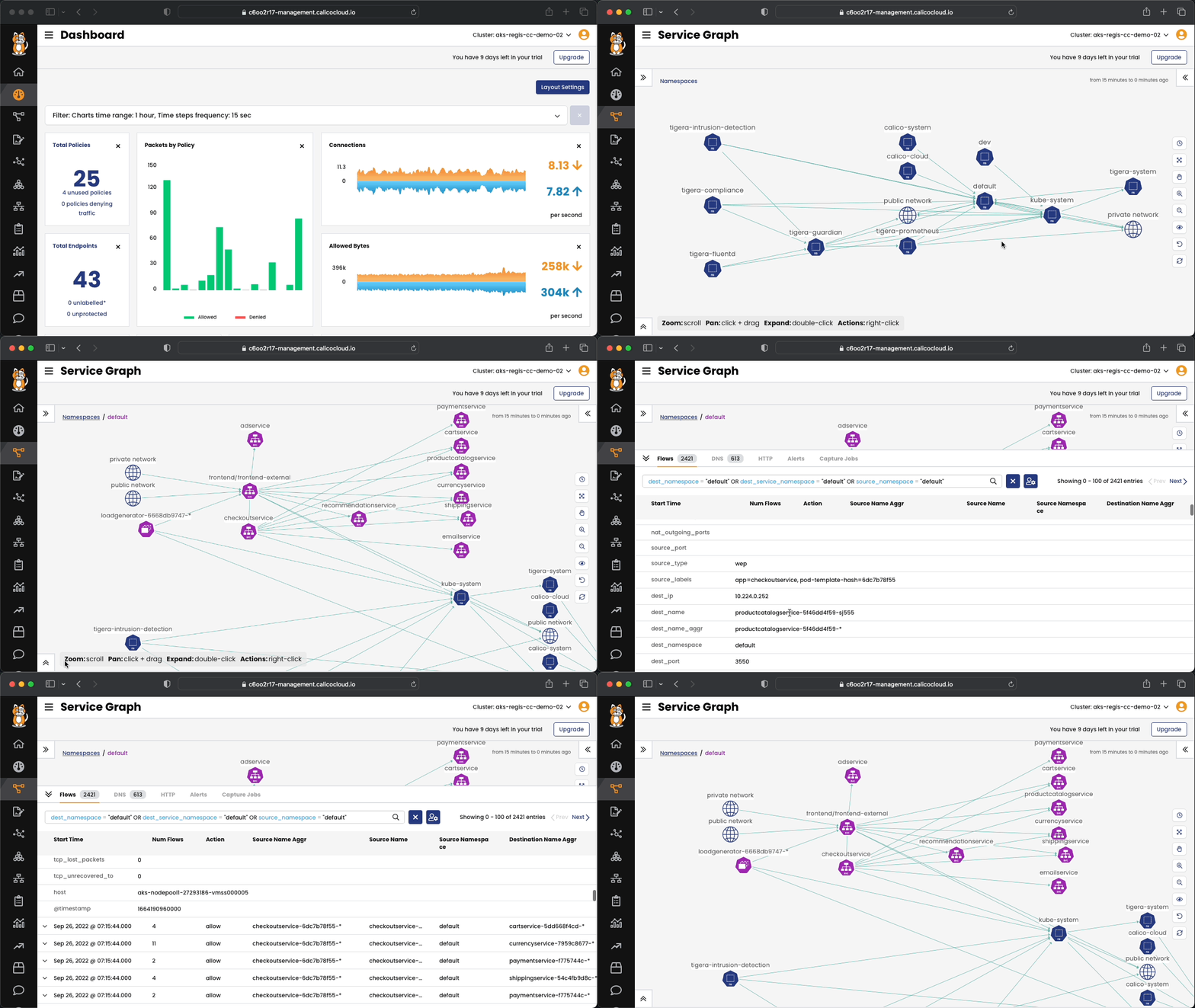
Connect to Calico Cloud GUI. From the menu select `Service Graph > Flow Visualizations`. Explore the options.

---
### Zero trust Security
| PCI Control # | Requirements| How Calico meets this requirements |
| --- | --- | --- |
| 7.1, 7.2 | Restrict access to cardholder data by business need-to-know | • Use zero trust security features to implement a default-deny model (access to all data services should be specifically allowed; everything else should be denied)
• Follow a zero trust security model and implement least-privilege access (all processes should only be able to access information necessary for their legitimate purpose)
A global default deny policy ensures that unwanted traffic (ingress and egress) is denied by default. Pods without policy (or incorrect policy) are not allowed traffic until appropriate network policy is defined. Although the staging policy tool will help you find incorrect and missing policy, a global deny helps mitigate against other lateral malicious attacks.
By default, all traffic is allowed between the pods in a cluster. First, let's test connectivity between application components and across application stacks. All of these tests should succeed as there are no policies in place.
a. Test connectivity between workloads within each namespace, use dev and default namespaces as example
```bash
# test connectivity within dev namespace, the expected result is "HTTP/1.1 200 OK"
kubectl -n dev exec -t centos -- sh -c 'curl -m3 -sI http://nginx-svc 2>/dev/null | grep -i http'
```
```bash
# test connectivity within default namespace in 8080 port
kubectl exec -it $(kubectl -n default get po -l app=frontend -ojsonpath='{.items[0].metadata.name}') \
-c server -- sh -c 'nc -zv recommendationservice 8080'
```
b. Test connectivity across namespaces dev/centos and default/frontend.
```bash
# test connectivity from dev namespace to default namespace, the expected result is "HTTP/1.1 200 OK"
kubectl -n dev exec -t centos -- sh -c 'curl -m3 -sI http://frontend.default 2>/dev/null | grep -i http'
```
c. Test connectivity from each namespace dev and default to the Internet.
```bash
# test connectivity from dev namespace to the Internet, the expected result is "HTTP/1.1 200 OK"
kubectl -n dev exec -t centos -- sh -c 'curl -m3 -sI http://www.google.com 2>/dev/null | grep -i http'
```
```bash
# test connectivity from default namespace to the Internet, the expected result is "HTTP/1.1 200 OK"
kubectl exec -it $(kubectl get po -l app=loadgenerator -ojsonpath='{.items[0].metadata.name}') \
-c main -- sh -c 'curl -m3 -sI http://www.google.com 2>/dev/null | grep -i http'
```
We recommend that you create a global default deny policy after you complete writing policy for the traffic that you want to allow. Use the stage policy feature to get your allowed traffic working as expected, then lock down the cluster to block unwanted traffic.
1. Create a staged global default deny policy. It will shows all the traffic that would be blocked if it were converted into a deny.
```yaml
kubectl apply -f - <<-EOF
apiVersion: projectcalico.org/v3
kind: StagedGlobalNetworkPolicy
metadata:
name: default-deny
spec:
order: 2000
selector: "projectcalico.org/namespace in {'dev','default','storefront'}"
types:
- Ingress
- Egress
EOF
```
The staged policy does not affect the traffic directly but allows you to view the policy impact if it were to be enforced. You can see the deny traffic in staged policy.
2. Create other network policies to individually allow the traffic shown as blocked in step 1, until no connections are denied.
Apply network policies to your application with explicity allow and deny control.
```yaml
kubectl apply -f - <<-EOF
apiVersion: projectcalico.org/v3
kind: NetworkPolicy
metadata:
name: default.centos
namespace: dev
spec:
tier: default
order: 800
selector: app == "centos"
egress:
- action: Allow
protocol: TCP
destination:
selector: app == "nginx"
types:
- Egress
EOF
```
Test connectivity with policies in place.
a. The only connections between the components within namespaces dev are from centos to nginx, which should be allowed as configured by the policies.
```bash
# test connectivity within dev namespace, the expected result is "HTTP/1.1 200 OK"
kubectl -n dev exec -t centos -- sh -c 'curl -m3 -sI http://nginx-svc 2>/dev/null | grep -i http'
```
The connections within namespace default should be allowed as usual.
```bash
# test connectivity within default namespace in 8080 port
kubectl exec -it $(kubectl get po -l app=frontend -ojsonpath='{.items[0].metadata.name}') \
-c server -- sh -c 'nc -zv recommendationservice 8080'
```
b. The connections across dev/centos pod and default/frontend pod should be blocked by the application policy.
```bash
# test connectivity from dev namespace to default namespace, the expected result is "command terminated with exit code 1"
kubectl -n dev exec -t centos -- sh -c 'curl -m3 -sI http://frontend.default 2>/dev/null | grep -i http'
```
c. Test connectivity from each namespace dev and default to the Internet.
```bash
# test connectivity from dev namespace to the Internet, the expected result is "command terminated with exit code 1"
kubectl -n dev exec -t centos -- sh -c 'curl -m3 -sI http://www.google.com 2>/dev/null | grep -i http'
```
```bash
# test connectivity from default namespace to the Internet, the expected result is "HTTP/1.1 200 OK"
kubectl exec -it $(kubectl get po -l app=loadgenerator -ojsonpath='{.items[0].metadata.name}') \
-c main -- sh -c 'curl -m3 -sI http://www.google.com 2>/dev/null | grep -i http'
```
Implement explicitic policy to allow egress access from a workload in one namespace/pod, e.g. dev/centos, to default/frontend.
a. Deploy egress policy between two namespaces dev and default.
```yaml
kubectl apply -f - <<-EOF
apiVersion: projectcalico.org/v3
kind: NetworkPolicy
metadata:
name: platform.centos-to-frontend
namespace: dev
spec:
tier: platform
order: 100
selector: app == "centos"
egress:
- action: Allow
protocol: TCP
source: {}
destination:
selector: app == "frontend"
namespaceSelector: projectcalico.org/name == "default"
- action: Pass
types:
- Egress
EOF
```
b. Test connectivity between dev/centos pod and default/frontend service again, should be allowed now.
```bash
kubectl -n dev exec -t centos -- sh -c 'curl -m3 -sI http://frontend.default 2>/dev/null | grep -i http'
#output is HTTP/1.1 200 OK
```
Apply the policies to allow the microservices to communicate with each other.
```bash
kubectl apply -f manifests/east-west-traffic.yaml
```
3. Use the Calico Cloud GUI to enforce the default-deny staged policy. After enforcing a staged policy, it takes effect immediatelly. The default-deny policy will start to actually deny traffic.
---
### Ingress and Egress access control using NetworkSets
| PCI Control # | Requirements| How Calico meets this requirements |
| --- | --- | --- |
| 1.3, 1.3.1, 1.3.2, 1.3.3, 1.3.4, 1.3.5, 1.3.7 | Prohibit and/or manage access between internet and CDE | • Whitelist ingress access from the public internet only if the endpoint is providing a publicly accessible service
• Whitelist egress access to the public internet from all in-covered components
• Protect against forged source IP addresses with WireGuard (integrated in Calico)|
1. Implement DNS policy to allow the external endpoint access from a specific workload, e.g. `dev/centos`.
a. Apply a policy to allow access to `api.twilio.com` endpoint using DNS rule.
```yaml
kubectl apply -f - <<-EOF
apiVersion: projectcalico.org/v3
kind: GlobalNetworkPolicy
metadata:
name: security.external-domain-access
spec:
tier: security
selector: (app == "centos" && projectcalico.org/namespace == "dev")
order: 100
types:
- Egress
egress:
- action: Allow
source:
selector: app == 'centos'
destination:
domains:
- '*.twilio.com'
EOF
```
Test the access to the endpoints:
```bash
# test egress access to api.twilio.com
kubectl -n dev exec -t centos -- sh -c 'curl -m3 -skI https://api.twilio.com 2>/dev/null | grep -i http'
```
```bash
# test egress access to www.google.com
kubectl -n dev exec -t centos -- sh -c 'curl -m3 -skI https://www.google.com 2>/dev/null | grep -i http'
```
Access to the `api.twilio.com` endpoint should be allowed by the DNS policy and any other external endpoints like `www.google.com` should be denied.
b. Modify the policy to include `*.google.com` in dns policy and test egress access to www.google.com again.
```bash
# test egress access to www.google.com again and it should be allowed.
kubectl -n dev exec -t centos -- sh -c 'curl -m3 -skI https://www.google.com 2>/dev/null | grep -i http'
```
2. Edit the policy to use a `NetworkSet` with DNS domain instead of inline DNS rule.
a. Apply a policy to allow access to `api.twilio.com` endpoint using DNS policy.
Deploy the Network Set
```yaml
kubectl apply -f - <<-EOF
kind: GlobalNetworkSet
apiVersion: projectcalico.org/v3
metadata:
name: allowed-dns
labels:
type: allowed-dns
spec:
allowedEgressDomains:
- '*.twilio.com'
EOF
```
b. Deploy the DNS policy using the network set
```yaml
kubectl apply -f - <<-EOF
apiVersion: projectcalico.org/v3
kind: GlobalNetworkPolicy
metadata:
name: security.external-domain-access
spec:
tier: security
selector: (app == "centos" && projectcalico.org/namespace == "dev")
order: 100
types:
- Egress
egress:
- action: Allow
destination:
selector: type == "allowed-dns"
EOF
```
c. Test the access to the endpoints.
```bash
# test egress access to api.twilio.com
kubectl -n dev exec -t centos -- sh -c 'curl -m3 -skI https://api.twilio.com 2>/dev/null | grep -i http'
```
```bash
# test egress access to www.google.com
kubectl -n dev exec -t centos -- sh -c 'curl -m3 -skI https://www.google.com 2>/dev/null | grep -i http'
```
d. Modify the `NetworkSet` to include `*.google.com` in dns domain and test egress access to www.google.com again.
```bash
# test egress access to www.google.com again and it should be allowed.
kubectl -n dev exec -t centos -- sh -c 'curl -m3 -skI https://www.google.com 2>/dev/null | grep -i http'
```
3. The NetworkSet can also be used to block access from a specific ip address or cidr to an endpoint in your cluster. To demonstrate it, we are going to block the access from your workstation to the Online Boutique frontend-external service.
a. Test the access to the frontend-external service
```bash
curl -sI -m3 $(kubectl get svc frontend-external -ojsonpath='{.status.loadBalancer.ingress[0].ip}') | grep -i http
```
b. Identify your workstation ip address and store it in a environment variable
```bash
export MY_IP=$(curl ifconfig.me)
```
c. Create a NetworkSet with your ip address on it.
```yaml
kubectl apply -f - <<-EOF
kind: GlobalNetworkSet
apiVersion: projectcalico.org/v3
metadata:
name: ip-address-list
labels:
type: blocked-ips
spec:
nets:
- $MY_IP/32
EOF
```
d. Create the policy to deny access to the frontend service.
```yaml
kubectl apply -f - <<-EOF
apiVersion: projectcalico.org/v3
kind: GlobalNetworkPolicy
metadata:
name: security.blockep-ips
spec:
tier: security
selector: app == "frontend"
order: 300
types:
- Ingress
ingress:
- action: Deny
source:
selector: type == "blocked-ips"
destination: {}
EOF
```
e. Create a global alert for the blocked attempt from the ip-address-list to the frontend.
```yaml
kubectl apply -f - <<-EOF
apiVersion: projectcalico.org/v3
kind: GlobalAlert
metadata:
name: blocked-ips
spec:
description: "A connection attempt from a blocked ip address just happened."
summary: "[blocked-ip] ${source_ip} from ${source_name_aggr} networkset attempted to access ${dest_namespace}/${dest_name_aggr}"
severity: 100
dataSet: flows
period: 1m
lookback: 1m
query: '(source_name = "ip-address-list")'
aggregateBy: [dest_namespace, dest_name_aggr, source_name_aggr, source_ip]
field: num_flows
metric: sum
condition: gt
threshold: 0
EOF
```
a. Test the access to the frontend-external service. It is blocked now. Wait a few minutes and check the `Activity > Alerts`.
```bash
curl -sI -m3 $(kubectl get svc frontend-external -ojsonpath='{.status.loadBalancer.ingress[0].ip}') | grep -i http
```
---
### Using Global Threatfeeds to detect and prevent web attacks
| PCI Control # | Requirements| How Calico meets this requirements |
| --- | --- | --- |
| 6.5, 6.6 | Detect and prevent web attacks | • Use policy to implement fine-grained access controls for services |
1. Protect workloads with GlobalThreatfeed from known bad actors.
Calicocloud offers [Global Threatfeed](https://docs.tigera.io/reference/resources/globalthreatfeed) resource to prevent known bad actors from accessing Kubernetes pods.
```bash
kubectl get globalthreatfeeds
```
>Output is
```bash
NAME CREATED AT
alienvault.domainthreatfeeds 2021-09-28T15:01:33Z
alienvault.ipthreatfeeds 2021-09-28T15:01:33Z
```
You can get these domain/ip list from yaml file, the url would be:
```bash
kubectl get globalthreatfeeds alienvault.domainthreatfeeds -ojson | jq -r '.spec.pull.http.url'
kubectl get globalthreatfeeds alienvault.ipthreatfeeds -ojson | jq -r '.spec.pull.http.url'
```
>Output is
```bash
https://installer.calicocloud.io/feeds/v1/domains
https://installer.calicocloud.io/feeds/v1/ips
```
1. Deploy the feodo Threatfeed
```yaml
kubectl apply -f - <<-EOF
apiVersion: projectcalico.org/v3
kind: GlobalThreatFeed
metadata:
name: feodo-tracker
spec:
pull:
http:
url: https://feodotracker.abuse.ch/downloads/ipblocklist.txt
globalNetworkSet:
labels:
threatfeed: feodo
EOF
```
2. Deploy the policy to block traffic from and to feodo Threatfeed
```yaml
kubectl apply -f - <<-EOF
apiVersion: projectcalico.org/v3
kind: GlobalNetworkPolicy
metadata:
name: security.block-threadfeed
spec:
tier: security
order: 210
selector: all()
types:
- Egress
egress:
- action: Deny
destination:
selector: threatfeed == "feodo"
EOF
```
3. Confirm and check the tracker threatfeed
```bash
kubectl get globalthreatfeeds
```
```bash
NAME CREATED AT
alienvault.domainthreatfeeds 2022-02-11T19:21:26Z
alienvault.ipthreatfeeds 2022-02-11T19:21:26Z
feodo-tracker 2022-02-11T22:21:43Z
```
2. Generate alerts by accessing the IP from `feodo-tracker` list.
```bash
# try to ping any of the IPs in from the feodo tracker list.
FIP=$(kubectl get globalnetworkset threatfeed.feodo-tracker -ojson | jq -r '.spec.nets[0]' | sed -e 's/^"//' -e 's/\/32//')
kubectl -n dev exec -t netshoot -- sh -c "ping -c1 $FIP"
```
3. Generate alerts by accessing the IP from `alienvault.ipthreatfeeds` list.
```bash
# try to ping any of the IPs in from the ipthreatfeeds list.
AIP=$(kubectl get globalnetworkset threatfeed.alienvault.ipthreatfeeds -ojson | jq -r '.spec.nets[0]' | sed -e 's/^"//' -e 's/"$//' -e 's/\/32//')
kubectl -n dev exec -t netshoot -- sh -c "ping -c1 $AIP"
```
4. Confirm you are able to see the alerts in alert list.
---
## Microsegmentation
Calico eliminates the risks associated with lateral movement in the cluster to prevent access to sensitive data and other assets. Calico provides a unified, cloud-native segmentation model and single policy framework that works seamlessly across multiple application and workload environments. It enables faster response to security threats
with a cloud-native architecture that can dynamically enforce security policy changes across cloud environments in milliseconds in response to an attack.
| PCI Control # | Requirements| How Calico meets this requirements |
| --- | --- | --- |
|1.1, 1.1.4, 1.1.6, 1.2.1, 1.2.2, 1.2.3 | Install and maintain a firewall configuration to protect cardholder data | • Identify everything covered by PCI requirements with a well-defined label (e.g. PCI=true)
• Block all traffic between PCI and non-PCI workloads
• Whitelist all traffic within PCI workloads |
### Microsegmentation using label PCI = true on a namespace
1. For the microsegmentation deploy a new example application
```bash
kubectl apply -f manifests/storefront-pci.yaml
```
2. Verify that all the workloads has the label `PCI=true`.
```bash
kubectl get pods -n storefront --show-labels
```
3. Create a policy that only allows endpoints with label PCI=true to communicate.
```yaml
kubectl apply -f - <<-EOF
apiVersion: projectcalico.org/v3
kind: GlobalNetworkPolicy
metadata:
name: security.pci-whitelist
spec:
tier: security
order: 120
namespaceSelector: kubernetes.io/metadata.name == "storefront"
ingress:
- action: Allow
source:
selector: PCI == "true"
destination:
selector: PCI == "true"
egress:
- action: Allow
source:
selector: PCI == "true"
destination:
selector: PCI == "true"
types:
- Ingress
- Egress
EOF
```
Now only the pods labeled with PCI=true will be able to exchange information. Note that you can use different labels to create any sort of restrictions for the workloads communications.
---
## IDS/IPS
Calico pinpoints the source of malicious activity, uses machine learning to identify anomalies, creates a security moat
around critical workloads, deploys honeypods to capture zero-day attacks, and automatically quarantines potentially
malicious workloads to thwart an attack. It monitors inbound and outbound traffic (north-south) and east-west traffic
that is traversing the cluster environment. Calico provides threat feed integration and custom alerts, and can be
configured to trigger automatic remediation.
| PCI Control # | Requirements| How Calico meets this requirements |
| --- | --- | --- |
| 5.1, 5.2, 5.3, 5.4, 10.6, 11.4 | Protect all systems against malware with Intrusion Detection Systems (IDS)/Intrusion Prevention Systems (IPS) and network monitoring. Regularly update antivirus software. Review logs for anomalous and suspicious activity | • Detect and address anomalies and threats with Calico instead of antivirus software
• Report and analyze compliance audit findings with Calico
• Automatically quarantine compromised workloads
• Get insights into statistical and behavioral anomalies with Calico flow logs
---
DPI / IDS
### Deep Packet Inspection
1. Create the DPI and the Intrusion Detection for the dev/nginx service.
```yaml
kubectl apply -f - <<-EOF
apiVersion: projectcalico.org/v3
kind: DeepPacketInspection
metadata:
name: dpi-nginx
namespace: dev
spec:
selector: app == "nginx"
---
apiVersion: operator.tigera.io/v1
kind: IntrusionDetection
metadata:
name: tigera-secure
spec:
componentResources:
- componentName: DeepPacketInspection
resourceRequirements:
limits:
cpu: "1"
memory: 1Gi
requests:
cpu: 100m
memory: 100Mi
EOF
```
2. Attack the nginx service
[Sid 1-21562 - MALWARE-CNC Win.Trojan.Bredolab variant outbound connection](https://www.snort.org/rule_docs/1-21562)
```bash
kubectl -n dev exec -t netshoot -- sh -c "curl -m2 http://nginx-svc/ -H 'User-Agent: Mozilla/4.0' -XPOST --data-raw 'smk=1234'"
```
[Sid 1-57461 - MALWARE-BACKDOOR Perl.Backdoor.PULSECHECK variant cnc connection](https://www.snort.org/rule_docs/1-57461)
```bash
kubectl -n dev exec -t netshoot -- sh -c "curl -m2 http://nginx-svc/secid_canceltoken.cgi -H 'X-CMD: Test' -H 'X-KEY: Test' -XPOST"
```
[Sid 1-1002 - SERVER-IIS cmd.exe access](https://www.snort.org/rule_docs/1-1002)
```bash
kubectl -n dev exec -t netshoot -- sh -c "curl -m2 http://nginx-svc/cmd.exe"
```
[Sid 1-2585 - SERVER-WEBAPP nessus 2.x 404 probe](https://www.snort.org/rule_docs/1-2585)
```bash
kubectl -n dev exec -t netshoot -- sh -c "curl -m2 http://nginx-svc/NessusTest"
```
[Check the Snort Id here!](https://www.snort.org/search)
---
## Policy lifecycle management
With Calico, teams can create, preview, and deploy security policies based on the characteristics and metadata
of a workload. These policies can provide an automated and scalable way to manage and isolate workloads for
security and compliance, in adherence with PCI compliance requirements. You can automate a validation step that
ensures your security policy works properly before being committed. Calico can deploy your policies in a “staged”
mode that will display which traffic is being allowed or denied before the policy rule is enforced. The policy can then
be committed if it is operating properly. This step avoids any potential problems caused by incorrect, incomplete, or
conflicting security policy definitions.
| PCI Control # | Requirements| How Calico meets this requirements |
| --- | --- | --- |
| 1.1.1, 1.1.5, 1.1.7 | A formal process for approving and testing all network connections and changes to the rule sets | • Use Calico to record and review all policy changes that affect connectivity between covered components |
| 10.1, 10.2, 10.3 | Implement and record audit trail for all access to system components | • Record all policy changes that impact connectivity to/from in-scope assets with Calico |
1. Open a policy and check the change log

---
## Encryption
Calico’s data-in-transit encryption provides category-leading performance and lower CPU utilization than legacy
approaches based on IPsec and OpenVPN tunneling protocols. No matter where a threat originates, data encrypted
by Calico is unreadable to anyone except the legitimate keyholder, thus protecting sensitive data should a perimeter
breach occur. It enables compliance with corporate and regulatory data protection requirements, such as PCI, that
specify the use of encryption. Calico’s encryption is 6X faster than any other solution on the market.
| PCI Control # | Requirements| How Calico meets this requirements |
| --- | --- | --- |
| 4.1 | Data-in-transit encryption to safeguard sensitive data | • Secure and encrypt data in transit for all covered workloads|
1. On AKS, the WireGuard is already installed in Ubuntu nodes.
2. Enable WireGuard for the cluster
```bash
kubectl patch felixconfiguration default --type='merge' -p '{"spec":{"wireguardEnabled":true}}'
```
3. Verify if enabled
```bash
NODENAME=$(kubectl get nodes -o=jsonpath='{.items[0].metadata.name}')
kubectl get node $NODENAME -o yaml | grep -B2 -A5 annotation
```
4. Enable stats collection
```bash
kubectl patch installation.operator.tigera.io default --type merge -p '{"spec":{"nodeMetricsPort":9091}}'
```
5. Apply Service, ServiceMonitor, NetworkPolicy manifests:
```bash
kubectl apply -f manifests/wireguard-stats.yaml
```
6. Disable WireGuard for the cluster
```bash
kubectl patch felixconfiguration default --type='merge' -p '{"spec":{"wireguardEnabled":false}}'
```
---
## Compliance Reports
Continuous compliance means employing a continual audit that shows what traffic was allowed in your infrastructure,
what traffic was denied and why, and logs of who was trying to change what and whether those changes went into
effect. Continuous compliance gives teams the ability to pinpoint any point in time and say with reasonable certainty
whether the organization was in compliance—and provide documentation to prove it. Calico’s compliance reports
visually describe the security controls in place in an easy-to-understand policy view. Calico also shows all workloads
that are in-scope and out-of-scope with your policy.
| PCI Control # | Requirements| How Calico meets this requirements |
| --- | --- | --- |
| 2.2, 2.4 | Inventory the systems and make sure they meet industry-accepted system-hardening standards | • Keep a running inventory of all ephemeral workloads along with their networking and security controls
• Leverage inventory report and CIS|
1. On the Calico Cloud GUI, navigate to `Compliance`.

2. Explore the Compliance Reports.

---
# Thank you!
---
**Useful links**
- [Project Calico](https://www.tigera.io/project-calico/)
- [Calico Academy - Get Calico Certified!](https://academy.tigera.io/)
- [O’REILLY EBOOK: Kubernetes security and observability](https://www.tigera.io/lp/kubernetes-security-and-observability-ebook)
- [Calico Users - Slack](https://slack.projectcalico.org/)
**Follow us on social media**
- [LinkedIn](https://www.linkedin.com/company/tigera/)
- [Twitter](https://twitter.com/tigeraio)
- [YouTube](https://www.youtube.com/channel/UC8uN3yhpeBeerGNwDiQbcgw/)
- [Slack](https://calicousers.slack.com/)
- [Github](https://github.com/tigera-solutions/)
- [Discuss](https://discuss.projectcalico.tigera.io/)
---
[:arrow_up: Back to the top](/README.md#microsoft-azure-hands-on-aks-workshop--configuration-security-and-compliance)