https://github.com/tilakapash/skills-code-with-codespaces
My clone repository
https://github.com/tilakapash/skills-code-with-codespaces
Last synced: 9 months ago
JSON representation
My clone repository
- Host: GitHub
- URL: https://github.com/tilakapash/skills-code-with-codespaces
- Owner: tilakapash
- License: mit
- Created: 2025-04-07T14:46:53.000Z (9 months ago)
- Default Branch: main
- Last Pushed: 2025-04-07T14:57:30.000Z (9 months ago)
- Last Synced: 2025-04-07T15:26:32.251Z (9 months ago)
- Language: HTML
- Size: 0 Bytes
- Stars: 0
- Watchers: 1
- Forks: 0
- Open Issues: 0
-
Metadata Files:
- Readme: README.md
- License: LICENSE
Awesome Lists containing this project
README
# Code with GitHub Codespaces and Visual Studio Code
_Develop code using GitHub Codespaces and Visual Studio Code!_
## Step 4: Personalize your codespace!
_Nicely done customizing your codespace!_ :partying_face:
When using any development environment, customizing the settings and tools to your preferences and workflows is an important step. GitHub Codespaces offers two main ways of personalizing your codespace: `Settings Sync` with VS Code and `dotfiles`.
`Dotfiles` will be the focus of this activity.
**What are `dotfiles`?** Dotfiles are files and folders on Unix-like systems starting with . that control the configuration of applications and shells on your system. You can store and manage your dotfiles in a repository on GitHub.
Let's see how this works!
### :keyboard: Activity: Enable a `dotfile` for your codespace
1. Start from the landing page of your repository.
1. In the upper-right corner of any page, click your profile photo, and then click **Settings**.
1. In the **Code, planning, and automation** section of the sidebar, click **Codespaces**.
1. Under **Dotfiles**, select **Automatically install dotfiles** so that GitHub Codespaces automatically installs your dotfiles into every new codespace you create.
1. Click **Select repository** and then choose your current skills working repository as the repository from which to install dotfiles.
### :keyboard: Activity: Add a `dotfile` to your repository and run your codespace
1. Start from the landing page of your repository.
1. Click the **Code** button located in the middle of the page.
1. Click the **Codespaces** tab on the box that pops up.
1. Click the **Create codespace on main** button.
> Wait about **2 minutes** for the codespace to spin itself up.
1. Verify your codespace is running. The browser should contain a VS Code web-based editor and a terminal should be present such as the below:
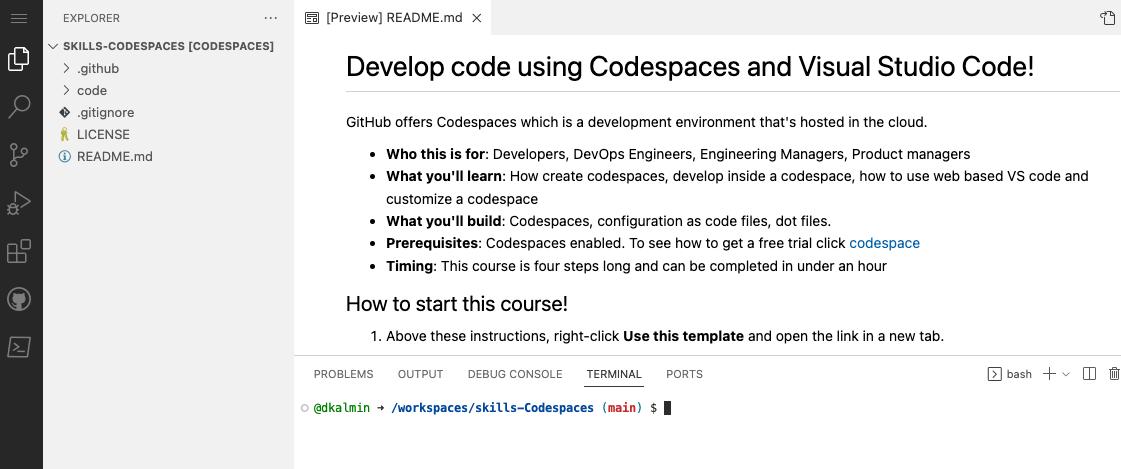
1. From inside the codespace in the VS Code explorer window, create a new file `setup.sh`.
1. Enter the following code into the file:
```bash
#!/bin/bash
sudo apt-get update
sudo apt-get install sl
echo "export PATH=\$PATH:/usr/games" >> ~/.bashrc
```
1. Save the file.
> **Note**: The file should autosave.
1. Commit the file changes. From the VS Code terminal enter:
```shell
git add setup.sh --chmod=+x
git commit -m "Adding setup.sh from the codespace!"
```
1. Push the changes back to your repository. From the VS Code terminal, enter:
```shell
git push
```
1. Switch back to the homepage of your repository and view the `setup.sh` to verify the new code was pushed to your repository.
1. Close the codespace web browser tab.
1. Click the **Create codespace on main** button.
> Wait about **2 minutes** for the codespace to spin itself up.
1. Verify your codespace is running, as you did previously.
1. Verify the `setup.sh` file is present in your VS Code editor.
1. From the VS Code terminal, type or paste:
```shell
sl
```
1. Enjoy the show!
1. Wait about 20 seconds then refresh this page (the one you're following instructions from). [GitHub Actions](https://docs.github.com/en/actions) will automatically update to the next step.
---
Get help: [Post in our discussion board](https://github.com/orgs/skills/discussions/categories/code-with-codespaces) • [Review the GitHub status page](https://www.githubstatus.com/)
© 2023 GitHub • [Code of Conduct](https://www.contributor-covenant.org/version/2/1/code_of_conduct/code_of_conduct.md) • [MIT License](https://gh.io/mit)