https://github.com/tilfin/paced-work-stream
Node.js stream working at constant pace and concurrent
https://github.com/tilfin/paced-work-stream
concurrent-processes node-streams nodejs npm-module promise-processing stream
Last synced: about 1 month ago
JSON representation
Node.js stream working at constant pace and concurrent
- Host: GitHub
- URL: https://github.com/tilfin/paced-work-stream
- Owner: tilfin
- License: mit
- Created: 2016-09-11T01:18:36.000Z (almost 10 years ago)
- Default Branch: master
- Last Pushed: 2019-02-24T14:20:56.000Z (over 7 years ago)
- Last Synced: 2024-10-23T09:06:09.262Z (over 1 year ago)
- Topics: concurrent-processes, node-streams, nodejs, npm-module, promise-processing, stream
- Language: JavaScript
- Size: 21.5 KB
- Stars: 1
- Watchers: 3
- Forks: 0
- Open Issues: 0
-
Metadata Files:
- Readme: README.md
- License: LICENSE
Awesome Lists containing this project
README
PacedWorkStream
===============
[![NPM Version][npm-image]][npm-url]
[]()
[](https://travis-ci.org/tilfin/paced-work-stream)
[](https://coveralls.io/github/tilfin/paced-work-stream?branch=master)
[](https://david-dm.org/tilfin/paced-work-stream)
Node.js transform stream working at constant pace and concurrent for object mode
## Features
* Work time at once can be specified. (workMS option)
* Concurrent workers can be specified. (concurrency option)
* Fires `done` event after when all workers have finished asynchrous -processes
* Counting tag system to call `this.countTag()` in `_workPromise`, you can get summarized results `tagCounts` grouped by tag.
* Node.js 6.10 or later
## Targets
* API client that needs to handle the rate-limit
* DB client that needs to handle the read/write capacity units like AWS DynamoDB
## Install
```
$ npm install -save paced-work-stream
```
## How to Use
### Create a PacedWorkStream
**new PacedWorkStream(options, workPromise)**
* `options` ``
* `concurrency` is the number of concurrent processes.
* `workMS` is milliseconds of work time at once that contains process-time and wait-time.
* `delay` is enable to start concurrent process in order delay for a time that divided workMS by concurrency, default is false. workPromise must return functions wrap each promise. Refer to the following figure for detailed operation pattern.
* `highWaterMark` is maximum object buffer size. If you use flow mode, you should set it at least concurrency.
* `workPromise` is `function(item):` must return a _Promise_ processing the _item_ or a _Function_ that returns a _Promise_.
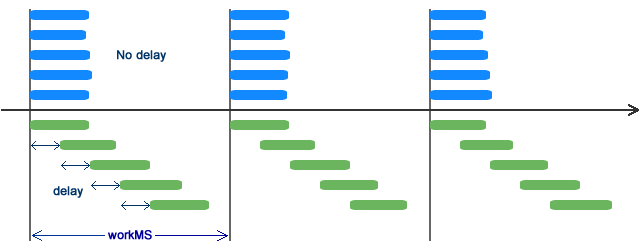
### Create subclass that extends PacedWorkStream
* `super(options)` must be called in the constructor.
* `_workPromise` method must be overrided and return a _Promise_ processing the _item_ or a _Function_ that returns a _Promise_.
```javascript
class MyWorkStream extends PacedWorkStream {
constructor(options) {
super(options);
}
_workPromise(item) {
return () => {
this.countTag(item.tag);
return Promise.resolve(item.value);
};
}
}
```
## Examples
```javascript
const es = require('event-stream');
const devnull = require('dev-null');
const PacedWorkStream = require('paced-work-stream');
const pwStream = new PacedWorkStream({
concurrency: 2,
workMS: 1000,
highWaterMark: 5
}, function(item) {
console.log(new Date().toISOString(), 'Begin', item);
return new Promise((resolve, reject) => {
setTimeout(() => {
this.countTag('workDone');
console.log(new Date().toISOString(), 'End', item);
resolve();
}, 600); // workMS contains the time.
})
})
.on('done', function() {
console.log(this.tagCounts);
}).on('error', (err) => {
console.error(err);
});
const reader = es.readArray([11, 12, 21, 22, 31])
reader.pipe(pwStream).pipe(devnull({ objectMode: true }));
```
* Pay attention to handling `done` event to get last `tagCounts` because workers haven't processed items on `finish` event.
* If stream need not output, the stream must pipe dev-null.
### Console output
```
$ node example.js
2016-09-11T03:17:50.000Z Begin 11
2016-09-11T03:17:50.003Z Begin 12
2016-09-11T03:17:50.605Z End 11
2016-09-11T03:17:50.605Z End 12
2016-09-11T03:17:51.009Z Begin 21
2016-09-11T03:17:51.009Z Begin 22
2016-09-11T03:17:51.606Z End 21
2016-09-11T03:17:51.606Z End 22
2016-09-11T03:17:52.004Z Begin 31
2016-09-11T03:17:52.607Z End 31
{ workDone: 5 }
```
### Using with Promised Lifestream
[Promised Lifestream](https://github.com/tilfin/promised-lifestream) is useful for stream pipeline. The following example gets the same result as above.
```javascript
'use strict';
const es = require('event-stream');
const PromisedLife = require('promised-lifestream');
const PacedWorkStream = require('paced-work-stream');
const pacedWorker = new PacedWorkStream({
concurrency: 2,
workMS: 1000,
highWaterMark: 5
}, function(item) {
console.log(new Date().toISOString(), 'Begin', item);
return new Promise((resolve, reject) => {
setTimeout(() => {
this.countTag('workDone');
console.log(new Date().toISOString(), 'End', item);
resolve();
}, 600); // workMS contains the time.
})
})
PromisedLife([
es.readArray([11, 12, 21, 22, 31]),
pacedWorker
])
.then(() => {
console.log(pacedWorker.tagCounts);
})
.catch(err => {
console.error(err);
});
```
## License
[MIT](LICENSE)
[npm-image]: https://img.shields.io/npm/v/paced-work-stream.svg
[npm-url]: https://npmjs.org/package/paced-work-stream