https://github.com/timer-machine/timer-machine-android
⏲ A highly customizable interval timer app for Android
https://github.com/timer-machine/timer-machine-android
android interval-timer kotlin mobile mobile-app mvvm open-source opensource timer
Last synced: about 2 months ago
JSON representation
⏲ A highly customizable interval timer app for Android
- Host: GitHub
- URL: https://github.com/timer-machine/timer-machine-android
- Owner: timer-machine
- License: gpl-3.0
- Created: 2021-10-03T10:46:02.000Z (almost 5 years ago)
- Default Branch: develop
- Last Pushed: 2026-05-25T01:49:47.000Z (about 2 months ago)
- Last Synced: 2026-05-25T03:25:03.517Z (about 2 months ago)
- Topics: android, interval-timer, kotlin, mobile, mobile-app, mvvm, open-source, opensource, timer
- Language: Kotlin
- Homepage:
- Size: 4.49 MB
- Stars: 335
- Watchers: 5
- Forks: 34
- Open Issues: 42
-
Metadata Files:
- Readme: README.md
- Changelog: CHANGELOG.md
- License: LICENSE
Awesome Lists containing this project
README
# TimeR Machine
[](https://github.com/timer-machine/timer-machine-android/actions/workflows/android.yml)
A highly customizable interval timer app for Android

## Download
| Link | Package Name |
|:------------------------------------------------------------------------------------------------------------------------------------------------------------------------------------------------------------------------------------------:|:--------------------------------:|
|  | io.github.deweyreed.timer.google |
| [Get it on Google Drive](https://drive.google.com/open?id=1YHIdW77fuxmyQ7sFza1LEIqmhzBygEZx)
(AAB universial APK) | io.github.deweyreed.timer.google |
|  | io.github.deweyreed.timer.other |
|  | io.github.deweyreed.timer.other |
| [Get it on GitHub](https://github.com/timer-machine/timer-machine-android/releases) | io.github.deweyreed.timer.other |
## Structure
The app uses the [Navigation component](https://developer.android.com/guide/navigation).
- Modules whose names start with `app-` are different destinations of the navigation graph.
- Each destination uses `ViewModel` in the `presentation` module.
- Each `ViewModel` is injected with `UseCase` in the `domain` module.
- Each `UseCase` is injected with different repositories that are implemented in the `data` module.
- Modules whose names start with `component-` are shared views and utility codes.
- The `flavor-google` module includes some advanced features and IAP.
## Build
Use the `dog` product flavor to develop and test.
The `google` product flavor is the version in Google Play. It has some in-app purchases. It also
uses Firebase to store backup files and AppCenter to track crashes.
- Firebase: Create a Firebase project and add `google-services.json` to the project.
- [This optional Firebase Cloud Function](functions/index.js) removes old backup files when
there are too many.
- AppCenter: Create an AppCenter project and put the app secret to your `local.properties`(
Format: `APP_CENTER_APP_SECRET=your-app-secret`).
Compared with the `google` product flavor, the `other` product flavor removes in-app purchases and
corresponding functions to release the app to other app stores.
## Contribute
If you have any questions or suggestions, feel free
to [open an issue](https://github.com/timer-machine/timer-machine-android/issues/new).
There are some legacy codes that I wrote while learning Android development. I plan to fix them
when they are broken or required by a new feature.
## Translations
If you'd like to add translations, please join the project
on [Weblate](https://hosted.weblate.org/engage/timer-machine/).
[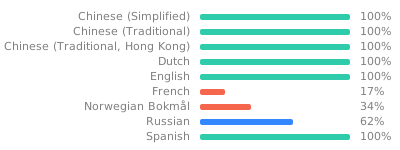](https://hosted.weblate.org/engage/timer-machine/)
## License
TimeR Machine is under the [GNU General Public License v3.0](LICENSE).
Some code and functions
from [AOSP's desklock](https://android.googlesource.com/platform/packages/apps/DeskClock/+/refs/heads/master/src/com/android/deskclock)
are under the Apache License 2.0.