https://github.com/timerring/CloudCheckin
基于 Cloudflare Workers 的 Nodeseek V2EX 一亩三分地 自动签到 (Daily check in the nodeseek and V2EX 1point3acres)
https://github.com/timerring/CloudCheckin
Last synced: 10 months ago
JSON representation
基于 Cloudflare Workers 的 Nodeseek V2EX 一亩三分地 自动签到 (Daily check in the nodeseek and V2EX 1point3acres)
- Host: GitHub
- URL: https://github.com/timerring/CloudCheckin
- Owner: timerring
- Created: 2025-05-10T10:36:28.000Z (11 months ago)
- Default Branch: main
- Last Pushed: 2025-05-28T10:45:50.000Z (10 months ago)
- Last Synced: 2025-05-28T11:38:16.138Z (10 months ago)
- Language: Python
- Homepage:
- Size: 49.8 KB
- Stars: 14
- Watchers: 2
- Forks: 12
- Open Issues: 0
-
Metadata Files:
- Readme: README-en.md
Awesome Lists containing this project
README
# CloudCheckin

Multi-platform automatic check-in and quiz automation based on CI/CD and Cloudflare Workers.
English Version |
[中文版本](./README.md)
## Features
> Welcome to :star: this project. Feel free to submit issues or PRs to add more platforms.
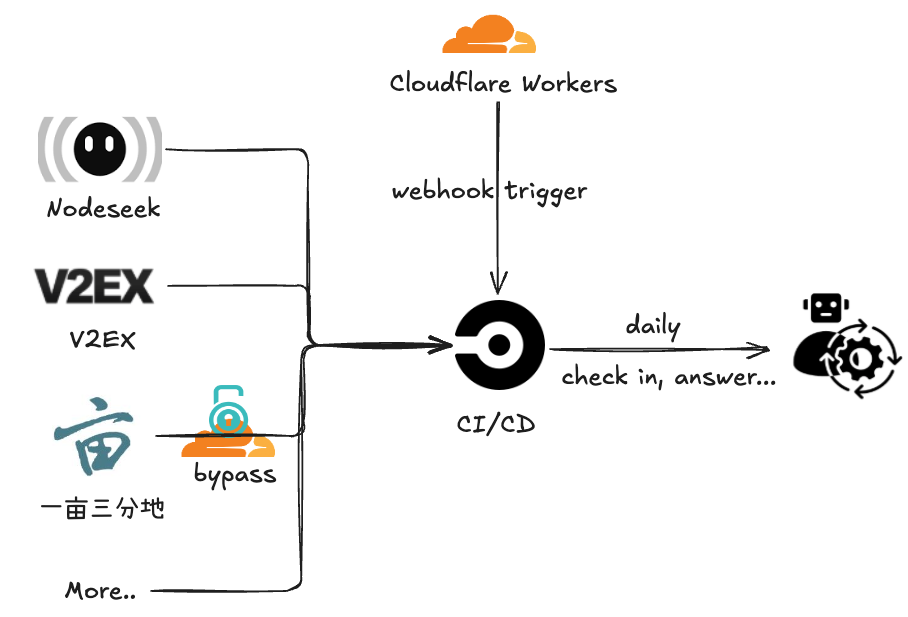
Automatically complete platform tasks daily. After completion, notifications will be sent via Telegram bot. If tasks fail, email notifications will be sent directly through CircleCI.
- **Nodeseek**
- Automatic check-in
- **V2EX**
- Automatic check-in
- **1Point3Acres**
- Automatic check-in
- Automatic quiz completion
## Architecture
## Quick Start
Fork this repository to your own account, then add the corresponding configuration items to your repository secrets (in `settings -> secrets and variables -> actions -> new repository secret`).
### Register for [CircleCI](https://circleci.com/)
[CircleCI](https://circleci.com/) is an excellent CI/CD platform. The Free plan offers `30,000 credits/mo, that's up to 6,000 build mins`, which is more than sufficient for all the requirements of this project.
For detailed registration instructions, please see [CloudCheckin Wiki](https://github.com/timerring/CloudCheckin/wiki/CircleCI-Registeration).
> [!IMPORTANT]
> **Note: After completing the trigger `CIRCLECI_WEBHOOK_URL` concatenation, fill it in the GitHub Actions secrets**.
### Apply for CircleCI Token
Apply for a Token on the [CircleCI](https://app.circleci.com/settings/user/tokens) page and add it to your repository secrets with the name `CIRCLECI_TOKEN`.
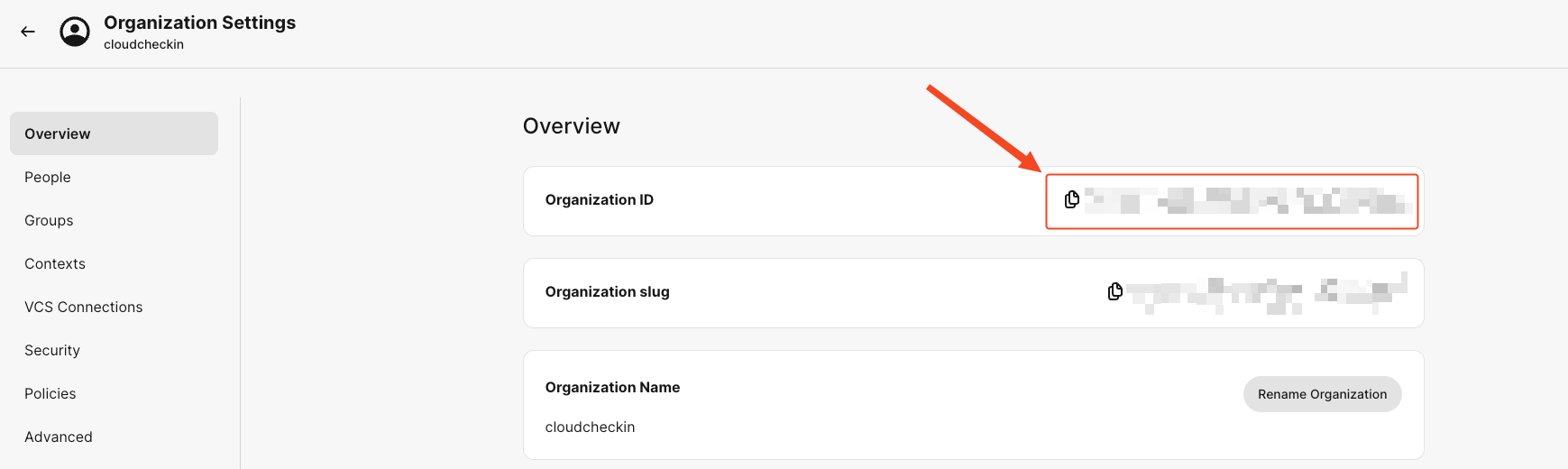
### Copy Organization ID
Find the Organization ID in your created Organization Settings and add it to your repository secrets with the name `CIRCLECI_ORG_ID`.
### Configure Cloudflare Worker
1. Log in to your [Cloudflare](https://dash.cloudflare.com/login) account, [create a token on the `Profile` page](https://dash.cloudflare.com/profile/api-tokens) using `Create Token` (recommend using the `Edit Cloudflare Workers` template with default settings).
2. Add this Token to your repository secrets with the name `CLOUDFLARE_API_TOKEN`.
### Set Task Schedule
You can modify the cron field in `wrangler.toml` to set task schedules. Note that execution time is fixed to UTC timezone. Beijing time is UTC+8, so please convert the time difference accordingly.
https://github.com/timerring/CloudCheckin/blob/0b719258ab4f5f746b067798eb2a4185a71631f7/wrangler.toml#L6
### Configure Platforms
> If you don't need a certain platform, you can directly edit and delete the corresponding items in `.circleci/config.yml`. For example, if you don't need 1Point3Acres, consider deleting lines 57-58.
#### Configure Telegram Notifications
1. Follow the [telegram bot](https://core.telegram.org/bots/features#botfather) instructions to create a telegram bot and get the `token`
2. Add the bot as your contact and send a message. Then visit https://api.telegram.org/bot{TELEGRAM_TOKEN}/getUpdates to get the `chat id` (replace `{TELEGRAM_TOKEN}` with the token from step 1)
3. Add the `token` and `chat id` to repository secrets, named `TELEGRAM_TOKEN` and `TELEGRAM_CHAT_ID` respectively
#### Configure Check-in Platforms
Configure Nodeseek Check-in
1. Get the `cookie` from the Nodeseek website (for cookie acquisition methods, please refer to [COOKIE Acquisition Tutorial](https://blog.timerring.com/posts/the-way-to-get-cookie/))
2. Add the `cookie` to repository secrets with the name `NODESEEK_COOKIE`
Configure V2EX Check-in
1. Get the `cookie` from the V2EX website (for cookie acquisition methods, please refer to [COOKIE Acquisition Tutorial](https://blog.timerring.com/posts/the-way-to-get-cookie/))
2. Note that V2EX cookies contain special characters like `"` and `$`, which may cause shell transmission failures when passing secrets. Therefore, you need to escape these two special characters. A simple replacement script is: `echo 'your V2EX cookie' | sed 's/["$]/\\&/g'`
3. Add the escaped `cookie` to repository secrets with the name `V2EX_COOKIE`
Configure 1Point3Acres Check-in and Quiz
1. Get the `cookie` from the 1Point3Acres website (for cookie acquisition methods, please refer to [COOKIE Acquisition Tutorial](https://blog.timerring.com/posts/the-way-to-get-cookie/))
2. Add the `cookie` to repository secrets with the name `ONEPOINT3ACRES_COOKIE`
3. Top up and get an `api key` from [2captcha](https://2captcha.com/) (since 1Point3Acres check-in and quiz require Cloudflare Turnstile verification, we use 2captcha's API to solve the verification problem)
- Note: 2captcha API requires payment, starting from $3, supports Alipay. Each successful verification costs about $0.00145, so $3 can be used 2068 times, approximately 2.83 years.
4. Add the `api key` to repository secrets with the name `TWOCAPTCHA_APIKEY`
#### Sync Configuration
After configuring all content, please manually execute the `Setup CircleCI Context and Secrets` and `Deploy Cloudflare Worker` workflows once to ensure that configuration secrets are correctly synchronized to CircleCI contexts secrets through CircleCI CLI, and that the Cloudflare Worker is properly deployed. (Actions -> `Setup CircleCI Context and Secrets` -> `Run workflow` and Actions -> `Deploy Cloudflare Worker` -> `Run workflow`)
## FAQ
1. **Why use CircleCI instead of GitHub Actions directly?**
Using GitHub Actions directly may lead to potential repository banning risks. Although this project only triggers requests once a day and doesn't have high concurrent request volumes like upptime and other open-source projects, we still follow the principle of not adding excessive burden to GitHub. CircleCI is also an excellent CI/CD platform. The Free plan's 30,000 credits/mo (up to 6,000 build mins) can fully support all the requirements of this project. Additionally, CircleCI's contexts design between different Projects is quite innovative compared to general CI/CD platforms. More users using and becoming familiar with CircleCI benefits both users and the platform.
2. **Why not use Cloudflare Worker or other Serverless computing functions?**
We have tried Cloudflare Worker. Local `wrangler dev` works, but after deploying to Cloudflare Worker, since Cloudflare edge requests carry obvious cf flags, many platforms have restricted Cloudflare Worker requests. We are still trying more function computing platforms, and any progress will be synchronized in the repository. Of course, if you are interested in the Cloudflare Worker approach, you are welcome to continue the work. The demo I debugged locally has been placed in the `cloudflareworkers` directory.
3. **Why switch to Cloudflare Worker as a Webhook trigger instead of using CircleCI's Scheduled?**
According to [CircleCI's latest terms](https://circleci.com/docs/version-control-system-integration-overview/#pipeline-triggers-and-integrations), Scheduled pipelines will not be available for personal repositories under `GitHub App`, so we need to switch to [Custom Webhook](https://circleci.com/docs/custom-webhooks/) format, using Cloudflare Worker as a scheduled trigger. Of course, you can also use [other ways to call Webhook](https://circleci.com/docs/triggers-overview/#trigger-a-pipeline-from-a-custom-webhook), just need to call the Webhook interface regularly. Here I use Cloudflare Worker as the scheduled trigger.
## Contributing
Welcome to submit platforms you need, no language restrictions.
> If you are a Python user, it is recommended to use the `curl_cffi` library instead of `requests` and other libraries. `curl_cffi` can more accurately simulate browser requests, greatly preventing website risk control.
## References
- [curl_cffi](https://github.com/lexiforest/curl_cffi)
- [2captcha](https://github.com/2captcha/2captcha-python)
- [1point3acres](https://github.com/harryhare/1point3acres)
- [V2EX](https://github.com/CruiseTian/action-hub)
- [nodeseek](https://github.com/xinycai/nodeseek_signin)