https://github.com/timerring/auto-slice-video
基于弹幕密度的高能片段自动切片工具 (Auto slice the highlight shorts based on the density of danmaku.)
https://github.com/timerring/auto-slice-video
Last synced: 10 months ago
JSON representation
基于弹幕密度的高能片段自动切片工具 (Auto slice the highlight shorts based on the density of danmaku.)
- Host: GitHub
- URL: https://github.com/timerring/auto-slice-video
- Owner: timerring
- License: mit
- Created: 2025-01-24T16:12:39.000Z (over 1 year ago)
- Default Branch: main
- Last Pushed: 2025-04-11T05:51:28.000Z (about 1 year ago)
- Last Synced: 2025-07-22T23:14:42.262Z (10 months ago)
- Language: Python
- Homepage:
- Size: 55.4 MB
- Stars: 91
- Watchers: 2
- Forks: 13
- Open Issues: 2
-
Metadata Files:
- Readme: README.md
- License: LICENSE
Awesome Lists containing this project
README

**Auto slice the highlight shorts** based on the density of danmaku.
English | [简体中文](./README-zh.md)
## Features
- Detect the dense period of danmaku based on the sliding window algorithm.
- Slice the video based on the density of danmaku.
- Support GPU accelerated calculation.([Automatically choose whether to use GPU acceleration](#why-i-cannot-use-the-gpu-acceleration))
- Support custom quantity slicing videos.
- Support custom slice duration.
- Add detailed log information.
- Support cli usage and api usage.
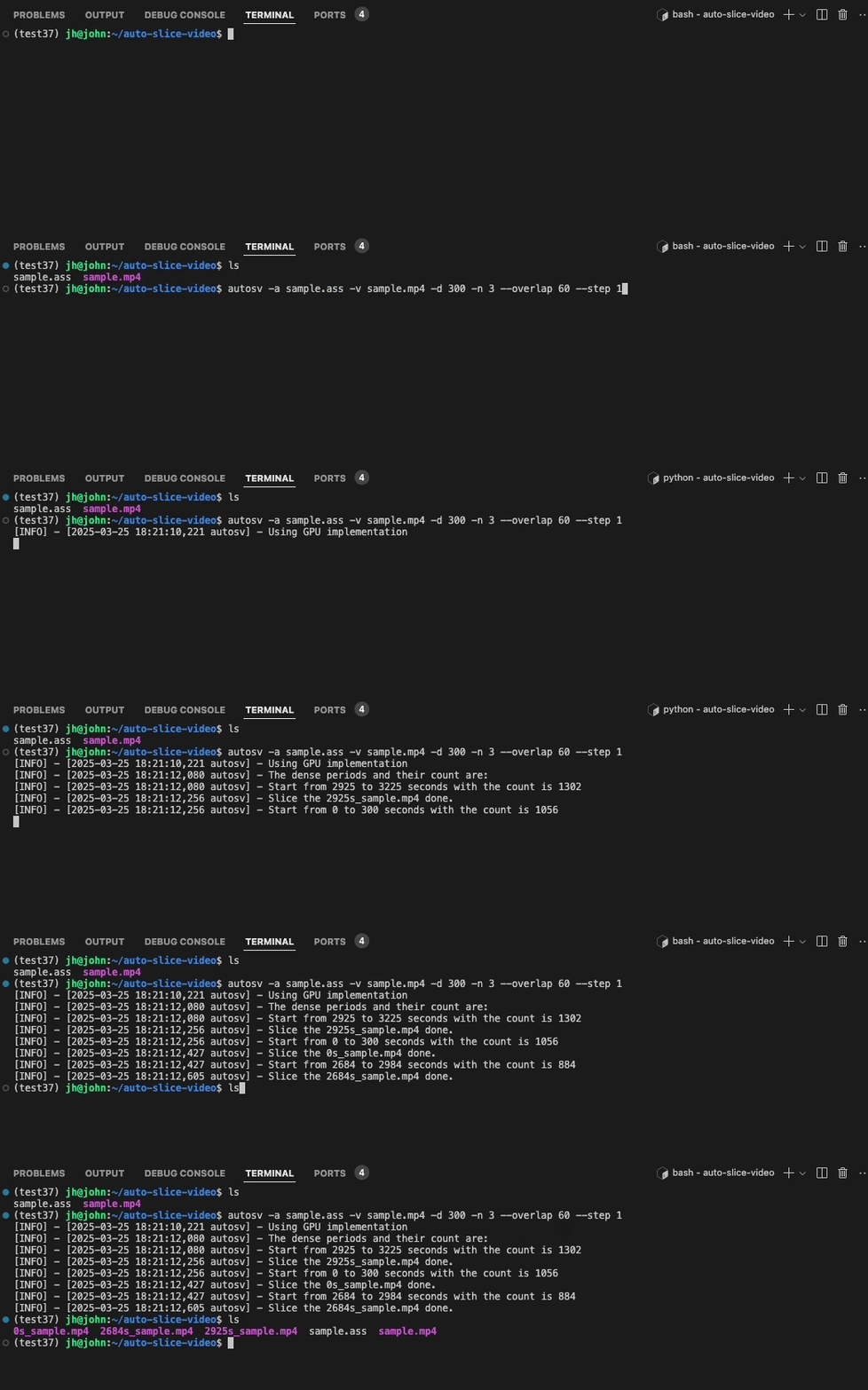
## Demo
## Installation
To use this tool, you need to install ffmpeg first.
- Windows: `choco install ffmpeg` (via [Chocolatey](https://chocolatey.org/)) or other methods.
- macOS: `brew install ffmpeg` (via [Homebrew](https://brew.sh/)).
- Linux: `sudo apt install ffmpeg` (Debian/Ubuntu).
More OS please refer to the [official website](https://ffmpeg.org/download.html).
Then install the `autosv` package.
```bash
pip install autosv
```
## Usage
### cli usage
```bash
# eg. The default parameters are shown in autosv -h
autosv -a sample.ass -v sample.mp4
autosv -a sample.ass -v sample.mp4 -d 300 -n 3 --overlap 60 --step 1
autosv -h
# optional arguments:
# -h, --help show this help message and exit
# -V, --version Print version information
# -a ASS, --ass ASS The input ass file of the danmaku
# -v VIDEO, --video VIDEO
# The input video file
# -d DURATION, --duration DURATION
# The duration(seconds) of the sliced highlight video, default is 60
# -n TOP_N, --top_n TOP_N
# The number of the top dense periods to return, default is 1
# --overlap OVERLAP The overlapped(seconds) between the sliced highlight videos, default is 30
# --step STEP The step(seconds) of the sliding window, default is 1
```
### api usage
```python
from autosv import slice_video_by_danmaku
# The default parameters are the same as the cli usage
slice_video_by_danmaku(ass_path, video_path, duration=300, top_n=3, max_overlap=60, step=1)
```
## common issues
### What is the difference between cpu and gpu implementation?
Generally speaking, the gpu implementation is faster and more efficient than the cpu implementation due to the parallel computing. In my practice, when the input data is around 30k(Try `test/sample2.ass`), the gpu implementation only takes 2 seconds, while the cpu implementation takes 33 seconds, which is 16.5 times faster with only 55 MB VRAM occupied.
### Why I cannot use the gpu acceleration?
The autosv will detect whether the cuda is available on the machine via `nvcc -V`, if your machine has nvidia gpu, please make sure your driver is installed and the cuda is available. Meanwhile, make sure you have installed the `numba` and `numpy` with the right version.