https://github.com/timescale/aws-lambda-example
A sample serverless AWS Lambda time-series application.
https://github.com/timescale/aws-lambda-example
Last synced: about 1 year ago
JSON representation
A sample serverless AWS Lambda time-series application.
- Host: GitHub
- URL: https://github.com/timescale/aws-lambda-example
- Owner: timescale
- Created: 2023-02-17T02:11:14.000Z (over 3 years ago)
- Default Branch: main
- Last Pushed: 2023-04-05T17:20:17.000Z (over 3 years ago)
- Last Synced: 2025-06-16T07:57:31.859Z (about 1 year ago)
- Language: Python
- Size: 686 KB
- Stars: 5
- Watchers: 5
- Forks: 0
- Open Issues: 0
-
Metadata Files:
- Readme: README.md
Awesome Lists containing this project
README
# timescale/aws-lambda-example
This repository serves as an example of an AWS Lambda time-series application that uses TimescaleDB on Timescale Cloud as a database!
### Watch our video about this repository on YouTube!
[](https://tsdb.co/aws-lambda-yt)
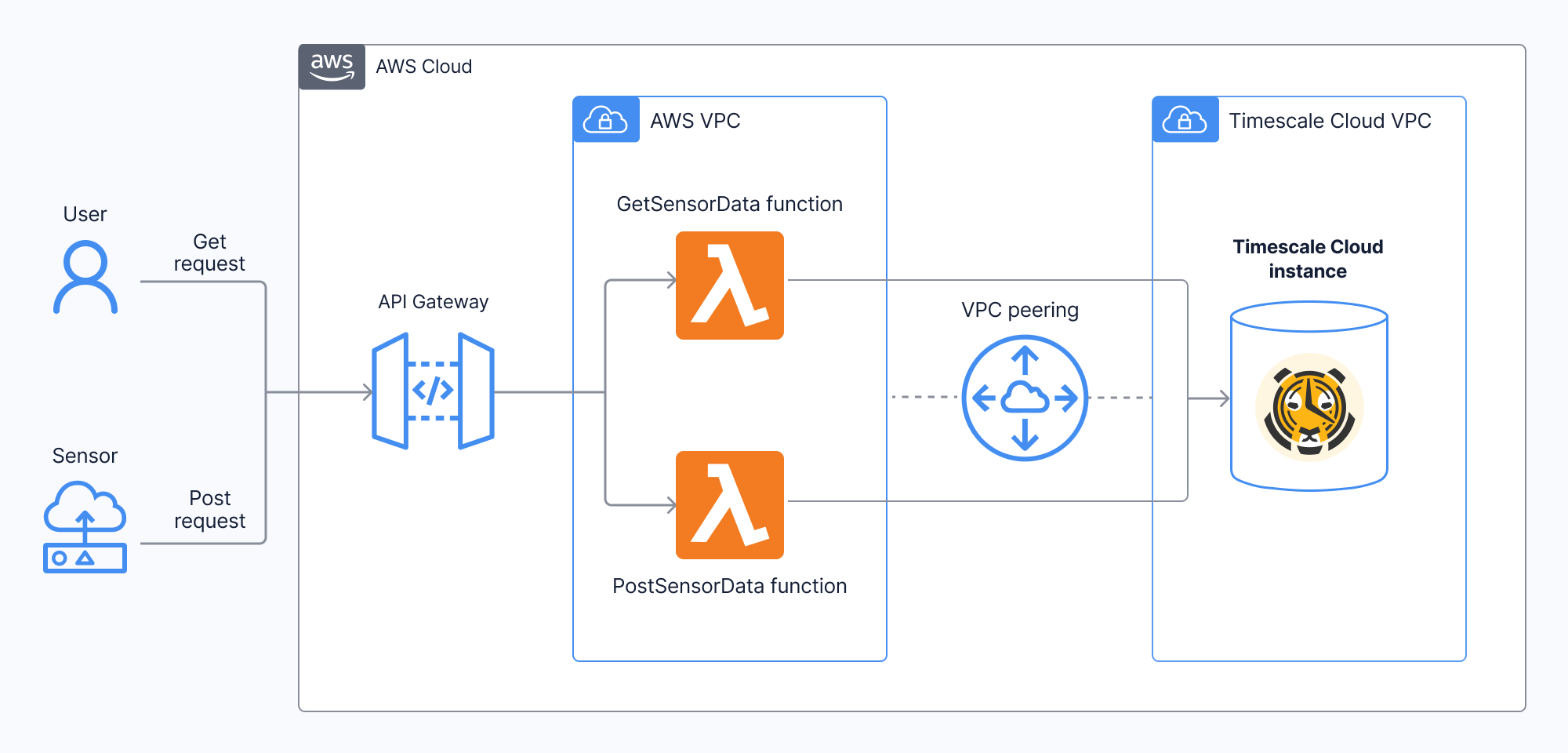
The application consists of two Lambda functions behind an API Gateway and a TimescaleDB instance on Timescale Cloud.
### PostSensorData
This function takes in an API Gateway event with a body containing the location and temperature of the sensor reading. The function parses those parameters from the body and inserts them into a TimescaleDB database.
Event body:
```json
{
"location": "bedroom",
"temperature": 74
}
```
Response:
```json
[
{
"time": 1675997918,
"location": "bedroom",
"temperature": 65.0
},
...
{
"time": 1675997910,
"location": "bedroom",
"temperature": 67.0
}
]
```
### GetSensorData
This function takes no inputs but returns the latest 5 sensor readings ordered by time in an array.
## Template
In order to use this AWS SAM project, you need to modify the following records in the `template.yaml` file:
- `Globals.Function.Environment.Variables.CONN_STRING`
- `Globals.Function.Environment.VpcConfig.SecurityGroupIds`
- `Globals.Function.Environment.VpcConfig.SubnetIds`
## Test and Deploy
To test the functions locally we need to build the Docker container for each function. You can do this by executing the following command in the root of this project:
```bash
sam build
```
Afterwards we can test each function individually using the provided events in `./events`.
```bash
# test the PostSensorData function
sam local invoke "PostSensorDataFunction" -e events/post.json
# test the GetSensorData function
sam local invoke "GetSensorDataFunction" -e events/get.json
```
To deploy the function and it's required resources for the first time, execute:
```
sam deploy --guided
```
If you've made changes to the code and want to deploy them to the cloud, execute:
```
sam build
sam deploy
```