https://github.com/timeu/google-map-markerclusterer
Polymer port of markerclusterer-plus
https://github.com/timeu/google-map-markerclusterer
Last synced: 6 months ago
JSON representation
Polymer port of markerclusterer-plus
- Host: GitHub
- URL: https://github.com/timeu/google-map-markerclusterer
- Owner: timeu
- License: mit
- Created: 2014-05-12T14:12:38.000Z (about 12 years ago)
- Default Branch: master
- Last Pushed: 2018-08-12T11:36:36.000Z (almost 8 years ago)
- Last Synced: 2026-01-18T12:08:39.364Z (6 months ago)
- Language: HTML
- Size: 4.23 MB
- Stars: 37
- Watchers: 4
- Forks: 12
- Open Issues: 1
-
Metadata Files:
- Readme: README.md
- License: LICENSE
Awesome Lists containing this project
README
# <google-map-markerclusterer>
> Port of [Markerclusterer-Plus](http://google-maps-utility-library-v3.googlecode.com/svn/trunk/markerclustererplus/docs/reference.html) as a Web Component using Polymer.
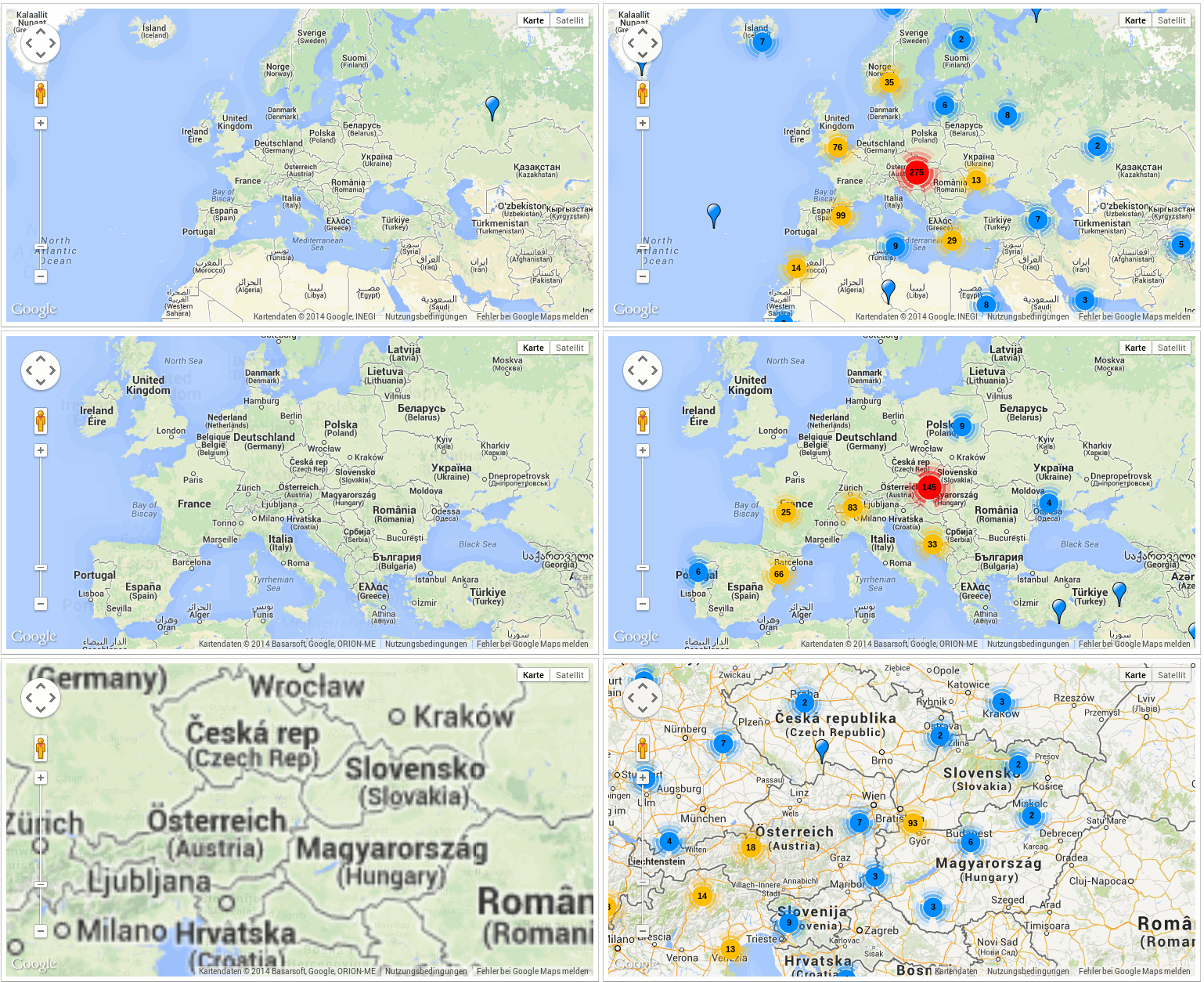
## Demo
> [Check it live](http://timeu.github.io/google-map-markerclusterer/components/google-map-markerclusterer/demo/index.html).
## Install
Install the component using [Bower](http://bower.io/):
```sh
$ bower install google-map-markerclusterer --save
```
Or [download as ZIP](https://github.com/timeu/google-map-markerclusterer/archive/master.zip).
## Usage
1. Import Web Components' polyfill:
```html
```
2. Import Custom Element:
```html
```
3. Start using it!
```html
```
or using javascript:
```javascript
var gmap = document.querySelector('google-map');
gmap.addEventListener('google-map-ready', function(e) {
document.querySelector('google-map-markerclusterer').map = this.map;
});
```
## Options
See the [component page](http://timeu.github.io/google-map-markerclusterer) for more information.
## Custom markers
Instead of the default markers `` also custom markers can be used by implementing the behavior: `Markerclusterer.GoogleMapOverlayViewMarkerBehavior`
## Custom cluster markers
There are 2 ways to have custom cluster markers:
### Using the styles attribute
Pass an array of objects to the styles property of the ``:
```Javascript
var styles = [{
url: 'http://google-maps-utility-library-v3.googlecode.com/svn/trunk/markerclustererplus/images/conv30.png',
width: "30px",
height: "27px",
anchorText: ["-3px", "0px"],
anchorIcon: ["27px", "28px"],
textColor: '#ff00ff',
textSize: "10px"
}, {
url: 'http://google-maps-utility-library-v3.googlecode.com/svn/trunk/markerclustererplus/images/conv40.png',
width: "40px",
height: "36px",
anchorText: ["-4px", "0px"],
anchorIcon: ["36px", "37px"],
textColor: '#ff0000',
textSize: "11px"
}, {
url: 'http://google-maps-utility-library-v3.googlecode.com/svn/trunk/markerclustererplus/images/conv50.png',
width: "50px",
height: "45px",
anchorText: ["-5px", "0px"],
anchorIcon: ["45px", "46px"],
textColor: '#0000ff',
textSize: "12px"
}]
```
```Html
```
or using javascript:
```Javascript
var markerclusterer = document.querySelector("google-map-markerclusterer");
markerclusterer.styles = styles;
```
## Wrapping a custom element
If the use-case is more advanced than just what the styles attribute provides, it's possible to specify a custom element as a replacement for the default cluster marker. Create a custom element (i.e ``) that implements the `Markerclusterer.ClusterIconBehavior` behavior and add it to the `google-map-markerclusterer`.
**Important:** Make sure to add a *cluster-icon* classname to your custom cluster icon element.
```Html
```
The various customizations can be viewed on the [demo page](http://timeu.github.io/google-map-markerclusterer/components/google-map-markerclusterer/demo/) page.
## Versions & Branches
| Polymer version | Branch | Release |
| :---- | :---- | :--- |
| 1.x | [1.x](https://github.com/timeu/google-map-markerclusterer/tree/1.x) | 1.x |
| 2.x | [2.x](https://github.com/timeu/google-map-markerclusterer/tree/2.x) | 2.x |
| 3.x | [3.x](https://github.com/timeu/google-map-markerclusterer/tree/3.x) | 3.x |
| lit-element | [master](https://github.com/timeu/google-map-markerclusterer/tree/master) | 4.x|
## Contributing
1. Fork it!
2. Create your feature branch: `git checkout -b my-new-feature`
3. Commit your changes: `git commit -m 'Add some feature'`
4. Push to the branch: `git push origin my-new-feature`
5. Submit a pull request :D
## History
Check [Release](https://github.com/timeu/google-map-markerclusterer/releases) list.
## License
[MIT License](http://timeu.mit-license.org/) © Ümit Seren