https://github.com/timeu/ldviewer
GWT visualization widget for display ld plots
https://github.com/timeu/ldviewer
Last synced: 12 months ago
JSON representation
GWT visualization widget for display ld plots
- Host: GitHub
- URL: https://github.com/timeu/ldviewer
- Owner: timeu
- License: mit
- Created: 2012-06-11T13:36:42.000Z (about 14 years ago)
- Default Branch: master
- Last Pushed: 2020-10-13T05:26:11.000Z (almost 6 years ago)
- Last Synced: 2025-07-20T11:24:49.159Z (about 1 year ago)
- Language: Java
- Size: 15.1 MB
- Stars: 1
- Watchers: 1
- Forks: 0
- Open Issues: 1
-
Metadata Files:
- Readme: README.md
- Changelog: CHANGELOG
- License: LICENSE
Awesome Lists containing this project
README
## What is LDViewer?
LDViewer is a Google Web Toolkit (GWT) widget containing a [processingjs][0] sketch for visualizing [LD triangle plots][1].
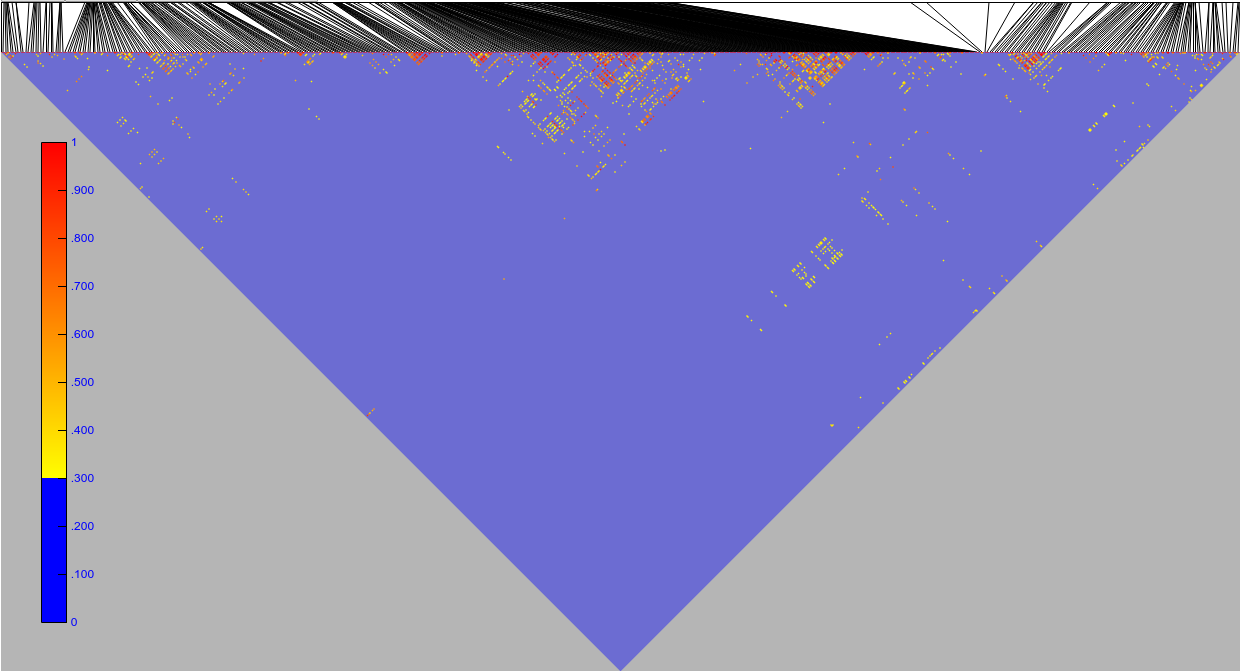
## How do I use it?
Following steps are required:
```JAVA
LDViewer ldviewer = new LDViewer();
ldviewer.load(new Runnable() {
@Override
public void run() {
GWT.log("LDViewer loaded");
// Interact with sketch
ldviewer.showLDValues();
}
});
```
To display data users have to call the `showLDValues(int[] positions,float[][] r2Values, int start, int end)` function with following parameters:
- `positions`: Array of integer
- `r2Values`: multi-dimensional array of floats in a [triangular matrix][2] form.
- `start`: start position (should be the first position of the position array)
- `end`: end position (should be the last position of the position array)
An [example of this data][3] can be found in the sample application and one could load it this way:
```JAVA
final String jsonData = GET_FROM_CLIENTBUNDLE OR AJAX CALL
LDData data = JsonUtils.safeEval(jsonData);
```
## How do I install it?
If you're using Maven, you can add the following to your ``
section:
```xml
com.github.timeu.gwtlibs.ldviewer
ldviewer
1.0.0
```
LDViewer uses [GWT 2.8's][4] new [JSInterop feature][5] and thus it has to be enabled in the GWT compiler args.
For maven:
```xml
-generateJsInteropExports
```
or passing it to the compiler via `-generateJsInteropExports`
You can also download the [jar][1] directly or check out the source using git
from and build it yourself. Once
you've installed LDViewer, be sure to inherit the module in your .gwt.xml
file like this:
```xml
```
## Where can I learn more?
* Check out the [sample app][6] ([Source Code][7]) for a full example of using LDViewer.
[0]: http://processingjs.org
[1]: http://www.nature.com/nrg/journal/v4/n8/fig_tab/nrg1123_F1.html
[4]: http://www.gwtproject.org/release-notes.html#Release_Notes_2_8_0_BETA1
[5]: https://docs.google.com/document/d/10fmlEYIHcyead_4R1S5wKGs1t2I7Fnp_PaNaa7XTEk0/edit#heading=h.o7amqk9edhb9
[2]: https://en.wikipedia.org/wiki/Triangular_matrix
[3]: https://github.com/timeu/LDViewer/blob/master/ldviewer-sample/src/main/resources/sample/client/data/ld_sample_data.json
[6]: http://timeu.github.io/LDViewer
[7]: https://github.com/timeu/LDViewer/tree/master/ldviewer-sample