https://github.com/timoa/workflow-editor
Visualize, edit, and diagram GitHub Actions workflows in VS Code, Cursor, Windsurf, etc. – no more YAML headaches.
https://github.com/timoa/workflow-editor
diagram github-actions github-workflows visual-editor vscode-extension
Last synced: 3 months ago
JSON representation
Visualize, edit, and diagram GitHub Actions workflows in VS Code, Cursor, Windsurf, etc. – no more YAML headaches.
- Host: GitHub
- URL: https://github.com/timoa/workflow-editor
- Owner: timoa
- License: mit
- Created: 2026-02-03T08:59:16.000Z (4 months ago)
- Default Branch: main
- Last Pushed: 2026-02-18T17:14:59.000Z (4 months ago)
- Last Synced: 2026-02-18T19:15:04.390Z (4 months ago)
- Topics: diagram, github-actions, github-workflows, visual-editor, vscode-extension
- Language: TypeScript
- Homepage: https://workflow-editor.com
- Size: 12.2 MB
- Stars: 6
- Watchers: 0
- Forks: 1
- Open Issues: 13
-
Metadata Files:
- Readme: README.md
- Changelog: CHANGELOG.md
- License: LICENSE
Awesome Lists containing this project
README
# Workflow Visual Editor
[](https://securityscorecards.dev/viewer/?uri=github.com/timoa/workflow-editor)
[](https://www.bestpractices.dev/projects/11998)
[](https://codecov.io/gh/timoa/workflow-editor)
[](https://github.com/timoa/workflow-editor/actions/workflows/pull-request.yml)
[](https://github.com/timoa/workflow-editor/actions/workflows/dependency-review.yml)
[](https://github.com/timoa/workflow-editor/actions/workflows/codeql-analysis.yml)
[](https://github.com/timoa/workflow-editor/actions/workflows/scorecard.yml)
[](https://github.com/timoa/workflow-editor/actions/workflows/release.yml)
[](https://github.com/timoa/workflow-editor/actions/workflows/publish.yml)
[](LICENSE)
> **_WARNING:_** This extension is currently in early development and can have a few bugs. Please save your changes on Git before updating your Workflows
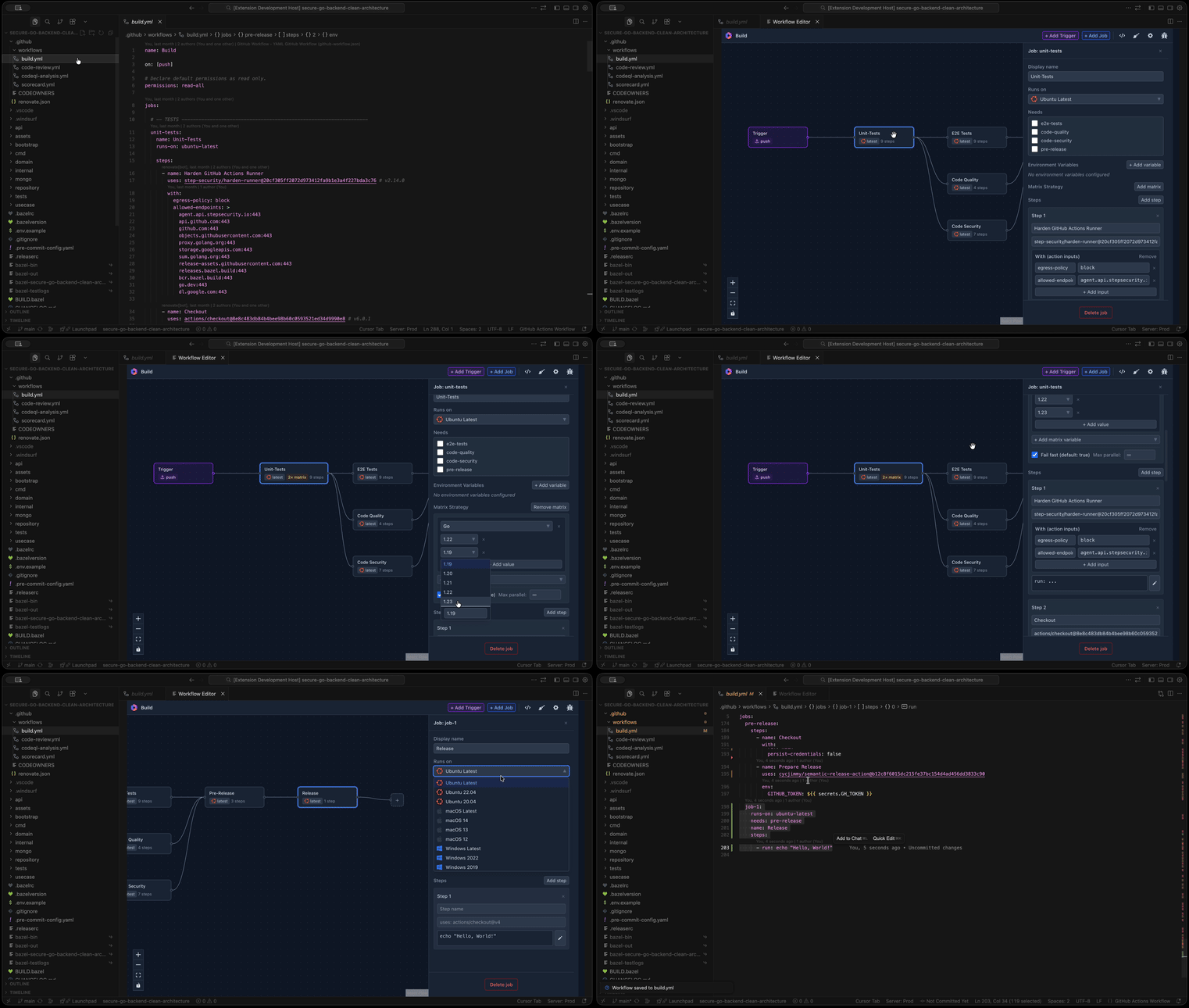
A VSCode extension providing a visual editor for GitHub Actions workflow files. Open a workflow (YAML), view jobs and steps as a diagram, edit job properties in a side panel, and save back to YAML.
## Features
- **Diagram**: Jobs as nodes, edges from `needs` dependencies. Built with [React Flow](https://reactflow.dev/).
- **Trigger visualization**: Visual trigger nodes showing workflow triggers (push, pull_request, schedule, etc.) with connections to jobs.
- **Trigger editing**: Edit workflow triggers with a dedicated panel supporting all trigger types and configurations (branches, tags, paths, cron schedules, etc.).
- **Workflow dispatch inputs**: Define `workflow_dispatch` and `workflow_call` inputs directly in the trigger panel — set name, description, type (string, boolean, number, choice, environment), required flag, and default value.
- **Property panel**: Click a job node to edit name, runs-on, needs, matrix strategy, and steps (N8N-style). Reusable workflow caller jobs (`uses`) display a dedicated panel showing the referenced workflow, inputs (`with`), and secrets instead of runs-on/steps.
- **Reusable workflow support**: Workflows that call a reusable workflow via `job.uses` are parsed, displayed, and serialized correctly — `runs-on` and `steps` are never added to caller jobs, preventing linter errors.
- **Matrix strategy**: Configure matrix builds with multiple variable combinations. Visual indicator shows total matrix combinations (e.g., "6× matrix").
- **Source code preview**: View and edit workflow YAML in a large dialog. Changes apply only when saved.
- **Run script editor**: Edit step run scripts in a full-size popup dialog with a comfortable code-style editor (same font and theme as the app). Click "Edit script" next to a step's run field to open the dialog; save with **Save changes** or **Ctrl/Cmd+S**, cancel with **Escape**.
- **Workflow validation**: Automatic validation using the official [@actions/workflow-parser](https://github.com/actions/languageservices) (same as the GitHub Actions VS Code extension). Reports schema and syntax errors with detailed messages.
- **VSCode Integration**: Open workflow files via context menu or command palette; save directly to workspace. Theme automatically follows your IDE theme (no in-editor theme toggle).
- **Multiple workflow tabs**: Opening another workflow (e.g. from the Explorer or "Open Workflow File") opens in a new editor tab instead of replacing the current one, so unsaved changes are not lost. Re-opening the same file reveals its existing tab.
- **Simplified navbar**: Toolbar keeps View source, Clear/Load sample, Add Trigger/Job, and workflow config. Save, Open file, Paste YAML, and theme buttons were removed for a cleaner UX; use the command palette or context menu to open workflows, and Ctrl/Cmd+S to save.
- **Validation**: Parse errors and lint errors shown in a banner when opening or editing workflows.
## Installation
### From Marketplace
1. Open VSCode (or Cursor, Windsurf, or other VSCode-based IDE)
2. Go to Extensions (Ctrl+Shift+X / Cmd+Shift+X)
3. Search for "Workflow Visual Editor"
4. Click Install
### From VSIX
1. Download the `.vsix` file from the [latest release](https://github.com/timoa/workflow-editor/releases/latest)
2. Open VSCode
3. Go to Extensions → ... → Install from VSIX...
4. Select the downloaded `.vsix` file
**Note**: The `.vsix` file is attached to each GitHub release as an asset.
## Usage
### Open Workflow Editor
- **Command Palette**: Press `Ctrl+Shift+P` (or `Cmd+Shift+P` on Mac), type "Workflow Editor: Open", and press Enter
- **Context Menu**: Right-click a `.yml` or `.yaml` file in the Explorer, select "Open with Workflow Editor"
- **Command**: `workflow-visual-editor.open` - Opens an empty editor
- **Command**: `workflow-visual-editor.openFile` - Opens file picker to load a workflow
### Keyboard Shortcuts
- **Ctrl/Cmd+Z**: Undo last change (when the Workflow Editor tab is focused)
- **Ctrl/Cmd+S**: Save workflow (when the Workflow Editor tab is focused; uses VSCode command so it works reliably)
- **Escape**: Close property panel, source dialog, or run script dialog
### File Operations
- **Open**: Use the Command Palette ("Workflow Editor: Open Workflow File") or right-click a `.yml`/`.yaml` file in the Explorer and choose "Open with Workflow Editor". Each workflow opens in its own tab; opening the same file again focuses that tab.
- **Save**: Press Ctrl/Cmd+S when the workflow editor tab is focused (Save and Undo apply to the active tab).
- **View Source**: Click the code icon to view/edit raw YAML
## Security & quality
This project is built and maintained with security and quality in mind:
- **OpenSSF Scorecard & Best Practices**: The repository is scored by [OpenSSF Scorecard](https://securityscorecards.dev/) and follows [OpenSSF Best Practices](https://www.bestpractices.dev/) (see badges above).
- **Hardened CI**: All GitHub Actions use [step-security/harden-runner](https://github.com/step-security/harden-runner) with **egress blocking** — only explicitly allowed endpoints can be reached. This limits supply chain attacks (e.g. compromised dependencies phoning home or pulling malicious payloads) during build and test.
- **Dependency checks**: [Dependency Review](https://github.com/timoa/workflow-editor/actions/workflows/dependency-review.yml) runs on every PR; CI runs `pnpm audit --audit-level=high`. Known exceptions are documented in [osv-scanner.toml](osv-scanner.toml).
- **CodeQL**: [CodeQL analysis](https://github.com/timoa/workflow-editor/actions/workflows/codeql-analysis.yml) runs on push/PR and on a schedule for JavaScript/TypeScript.
- **Code coverage**: Tests run with coverage and results are uploaded to [Codecov](https://codecov.io/gh/timoa/workflow-editor) (see badge above).
- **Fuzzing**: Property-based tests with [fast-check](https://fast-check.dev/) for parse/serialize logic (satisfies the OpenSSF Scorecard fuzzing criterion).
- **React Doctor**: [React Doctor](https://www.react.doctor) scans the React webview code for correctness, performance, and accessibility. It runs on every pull request (diff-only on changed files) and posts a comment with the report; you can also run it locally (see [CONTRIBUTING.md](CONTRIBUTING.md#react-doctor-local)).
- **AI code review**: Pull requests receive AI-assisted review via [CodeRabbit](https://coderabbit.ai) for consistency and best practices.
## Compatibility
- **VSCode**: Full support (minimum version 1.80.0)
- **Cursor**: Compatible (VSCode-compatible extension)
- **Windsurf**: Compatible (VSCode-compatible extension)
- **Other VSCode-based IDEs**: Should work with any IDE that supports VSCode extensions
## Related Projects
**[Workflow Metrics](https://github.com/timoa/workflow-metrics)** — An open-source dashboard that surfaces GitHub Actions metrics (run history, DORA metrics, build minutes, efficiency insights) and lets you optimize workflows with AI-powered suggestions. If you use Workflow Editor to build your workflows, Workflow Metrics is the natural next step to measure and improve them.
## Contributing
Contributions are welcome! See [CONTRIBUTING.md](CONTRIBUTING.md) for setup, coding standards, and how to submit a pull request.