https://github.com/timoliver/toalertviewcontroller
A modern looking modal popup UI component for iOS and iPadOS.
https://github.com/timoliver/toalertviewcontroller
Last synced: about 1 year ago
JSON representation
A modern looking modal popup UI component for iOS and iPadOS.
- Host: GitHub
- URL: https://github.com/timoliver/toalertviewcontroller
- Owner: TimOliver
- License: mit
- Created: 2019-05-23T17:01:33.000Z (about 7 years ago)
- Default Branch: master
- Last Pushed: 2020-01-29T10:32:06.000Z (over 6 years ago)
- Last Synced: 2025-04-11T20:12:38.685Z (about 1 year ago)
- Language: Objective-C
- Homepage:
- Size: 2.81 MB
- Stars: 24
- Watchers: 5
- Forks: 4
- Open Issues: 1
-
Metadata Files:
- Readme: README.md
- Changelog: CHANGELOG.md
- Funding: .github/FUNDING.yml
- License: LICENSE
Awesome Lists containing this project
README
# TOAlertViewController
[](https://github.com/TimOliver/TOAlertViewController/actions)
[](http://cocoadocs.org/docsets/TOAlertViewController)
[](https://raw.githubusercontent.com/TimOliver/TOAlertViewController/master/LICENSE)
[](http://cocoadocs.org/docsets/TOAlertViewController)
[](https://www.paypal.com/cgi-bin/webscr?cmd=_s-xclick&hosted_button_id=M4RKULAVKV7K8)
[](http://twitch.tv/timXD)
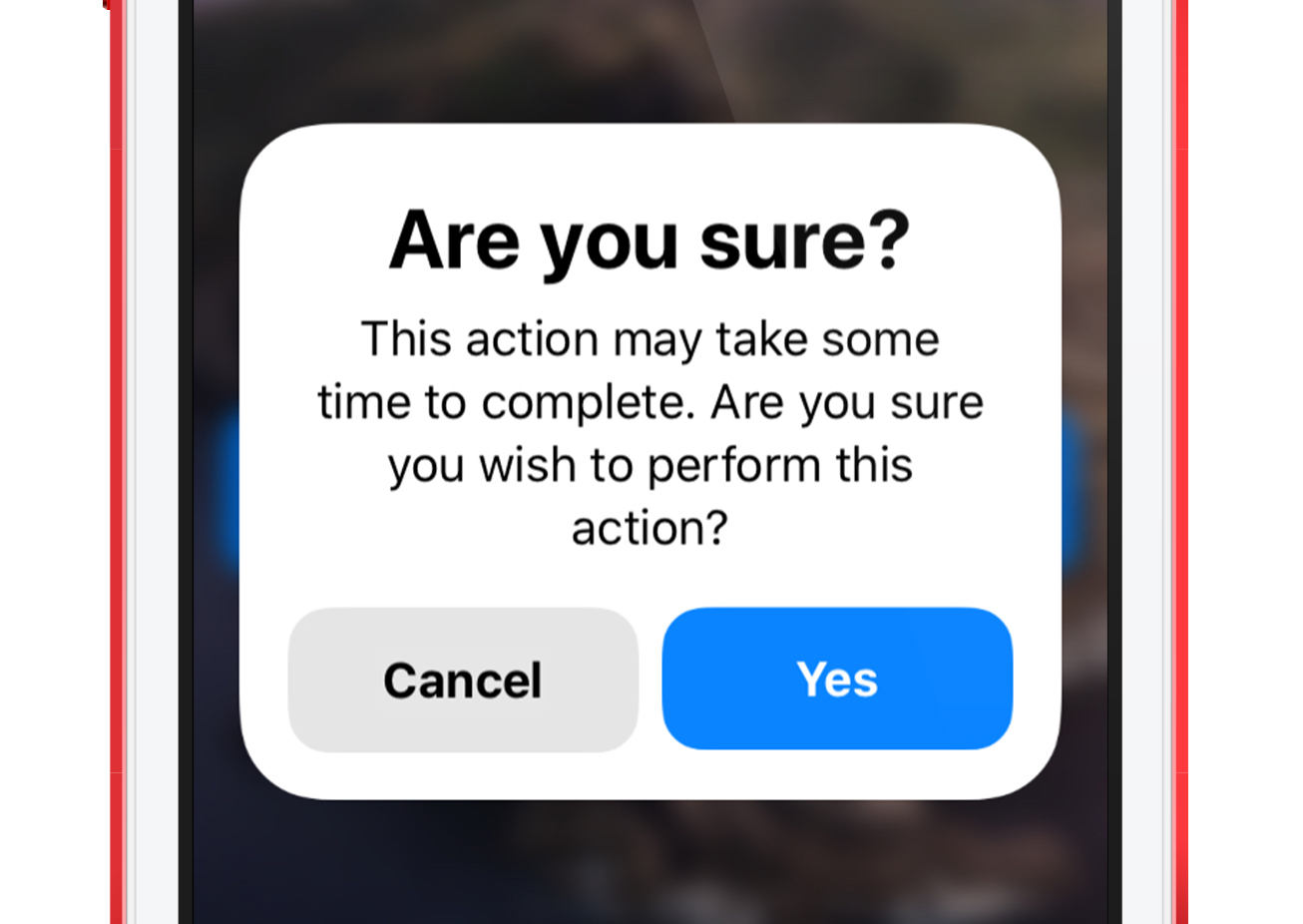
`TOAlertViewController` is a custom re-implementation of `UIAlertController` with a much more modern visual design. It features a large bold title
and rounded action buttons in line with the more modern design language of iOS that started appearing since 2017.
# Features
* A much more modern look and field than the native `UIAlertController` class (As of iOS 13).
* Includes theming for default, and destructive action buttons.
* Provides an optional dark mode appearance.
* Smooth presentation and dismissal animations.
* Uses `UIVisualEffectView` to produce a subtle 'depth-of-field' effect when presented.
# Examples
`TOAlertViewController` features a complete default configuration useful for most app instances, but can be easily modified beyond that.
```objc
TOAlertViewController *alertController = [[TOAlertViewController alloc]
initWithTitle:@"Are you sure?" message:@"This action may take some time to complete. Are you sure you wish to perform this action?"];
alertController.defaultAction = [TOAlertAction alertActionWithTitle:@"Yes" action:^{ NSLog(@"Default Button Tapped!"); }];
alertController.cancelAction = [TOAlertAction alertActionWithTitle:@"Cancel" action:^{ NSLog(@"Cancel Button Tapped!"); }];
[self presentViewController:alertController animated:YES completion:nil];
```
# Requirements
`TOAlertViewController` will work with iOS 11 and above. While written in Objective-C, it will easily import into Swift.
It also requires the [`TORoundedButton`](https://github.com/TimOliver/TORoundedButton) library to be installed in your app.
## Manual Installation
Copy the contents of the `TOAlertViewController` folder to your app project.
Download a copy of [`TORoundedButton`](https://github.com/TimOliver/TORoundedButton) and also be sure to install that into your project as well.
## CocoaPods
CocoaPods automatically manages importing `TORoundedButton` itself.
```
pod 'TOAlertViewController'
```
## Carthage
```
github "TimOliver/TORoundedButton"
github "TimOliver/TOAlertViewController"
```
# Credits
`TOAlertViewController` was created by [Tim Oliver](http://twitter.com/TimOliverAU) as a component of [iComics](http://icomics.co).
The iOS device mockup art was also created by Tim Oliver and is [available on Dribbble](https://dribbble.com/shots/1129682-iPod-touch-5G-PSD-Template).
# License
`TOAlertViewController` is available under the MIT license. Please see the [LICENSE](LICENSE) file for more information. 