https://github.com/timoncool/ace-step-studio
Portable AI music generator — full songs with vocals, covers, music videos. One-click install, 100% offline, NVIDIA GPU.
https://github.com/timoncool/ace-step-studio
ace-step ai-music gradio local-ai lyrics music-generation music-video offline one-click-install portable pytorch text-to-music vocals windows
Last synced: about 1 month ago
JSON representation
Portable AI music generator — full songs with vocals, covers, music videos. One-click install, 100% offline, NVIDIA GPU.
- Host: GitHub
- URL: https://github.com/timoncool/ace-step-studio
- Owner: timoncool
- License: mit
- Created: 2026-04-10T23:34:01.000Z (3 months ago)
- Default Branch: master
- Last Pushed: 2026-05-04T05:50:21.000Z (about 2 months ago)
- Last Synced: 2026-05-04T07:34:03.399Z (about 2 months ago)
- Topics: ace-step, ai-music, gradio, local-ai, lyrics, music-generation, music-video, offline, one-click-install, portable, pytorch, text-to-music, vocals, windows
- Language: Python
- Homepage: https://github.com/timoncool/ACE-Step-Studio/releases
- Size: 30.2 MB
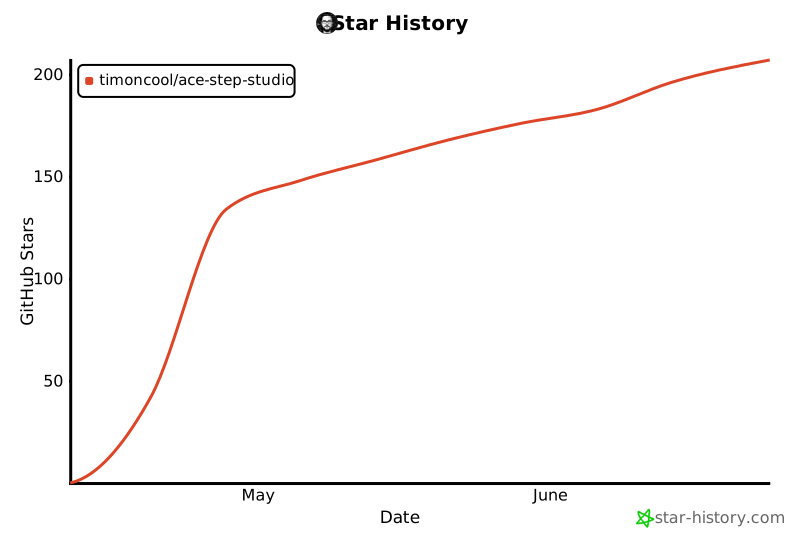
- Stars: 145
- Watchers: 5
- Forks: 11
- Open Issues: 10
-
Metadata Files:
- Readme: README.md
- Changelog: CHANGELOG.md
- Funding: .github/FUNDING.yml
- License: LICENSE
- Agents: AGENTS.md
Awesome Lists containing this project
README
# ACE-Step Studio
**Suno at home. Local AI music generation studio — songs, vocals, lyrics, covers, music videos.**
[](https://github.com/timoncool/ACE-Step-Studio/stargazers)
[](LICENSE)
[](https://github.com/timoncool/ACE-Step-Studio/commits/master)
[](https://github.com/timoncool/ACE-Step-Studio/releases)
**[Русская версия](README_RU.md)**

Create full songs with vocals, lyrics, covers, remixes and music videos — **100% local**, no cloud, no subscriptions, no internet required. One-click install on Windows, runs on any NVIDIA GPU with 12+ GB VRAM.
Built on [ACE-Step 1.5 XL](https://github.com/ace-step/ACE-Step-1.5) — the open-source 4B parameter DiT music generation model.
## Why ACE-Step Studio?
- **Free forever** — no API keys, no credits, no usage limits
- **Private** — your music never leaves your machine
- **Portable** — everything in one folder, copy to USB, delete = uninstall
- **One-click** — `install.bat` → `run.bat` → make music
## Features
### Music Generation
- **Full songs with vocals** — up to 8 minutes, any language, any genre
- **Simple & Custom modes** — describe what you want or fine-tune every parameter
- **3 XL Models** — XL Turbo (8 steps, fast), XL SFT (50 steps, max quality), XL Turbo BF16 (compact, 7.5 GB)
- **AI Lyrics & Style** — LLM generates lyrics and enriches style descriptions
- **Hot Model Switching** — change DiT/LM models without restart
- **Batch generation** — create multiple variations at once
- **10 samplers, 7 schedulers** — euler, heun, midpoint, dopri5, deis, ipndm, and more
- **LoRA support** — load LoRA weights at inference time
- **ID3 tags** — MP3 files include title, artist, cover art, lyrics, BPM
### Cloud LLM & Image (optional, off by default)
- **OpenRouter for lyrics & style** — bring-your-own-key alternative to the local LM. Pick any model (Claude, GPT-4o, DeepSeek, Llama 3.x, etc.), get instant lyrics + caption + key/BPM/duration metadata without using GPU VRAM. Local LM keeps working in parallel — toggle anytime.
- **Pollinations.ai cover generation** — auto-generate album covers in parallel with audio (server-side, fire-and-forget, never blocks audio gen). The visual prompt comes straight from the OpenRouter LLM (which writes a 1–2 sentence visual description tailored to the song's lyrics and mood) or from a keyword fallback. Anonymous tier works; bring your own token for higher rate limits and no watermark.
- **Manual cover regen modal** — picture-with-pencil button on every track. Pick any Pollinations model, write your own prompt, "Try again" until you like it, **or upload your own image from disk** (JPEG/PNG/WEBP, ≤10MB). Saved cover replaces both `songs.cover_url` and the embedded ID3 frame inside the MP3, so external players see your picked image too.
- **Independent toggles** — every cloud feature is opt-in. Use only Pollinations covers + local LM, or only OpenRouter lyrics + auto-picsum covers, or both, or neither. Local-only mode is the default.
### Cover & Remix
- **Cover mode** — transform existing audio into a new style while keeping the melody
- **Repaint mode** — regenerate specific sections of a song (region selection on waveform)
- **Reference audio** — use a reference track to guide the generation style
- **Audio strength control** — blend between source and generated audio
### Video Studio

- **Music video generator** — NCS-style visualizers with 10 presets
- **Karaoke lyrics** — synchronized LRC subtitles with 3 styles (lines, scroll, karaoke fill)
- **WYSIWYG editor** — drag elements, scroll to resize, selection frames
- **Aspect ratios** — 16:9, 9:16 (Reels/TikTok), 1:1 (Instagram)
- **12 effects** — shake, glitch, VHS, CCTV, scanlines, bloom, film grain, strobe, vignette, hue shift, letterbox, pixelate
- **Background** — random, custom image, Pexels search, video backgrounds
- **Server-side rendering** — native ffmpeg with NVENC GPU acceleration
### Audio Tools
- **Audio editor** — trim, fade, effects (AudioMass)
- **Stem extraction** — separate vocals, drums, bass, other (Demucs)
- **LRC download** — export synchronized lyrics
### Model Tools
- **BF16 Converter** — convert safetensors from FP32/FP16 to BFloat16 (~50% size reduction)
- **Model Merger** — merge two ACE-Step models with adjustable alpha (3 methods)
- **Bake LoRA** — bake LoRA weights into base model
### Interface
- **Single terminal** — one `run.bat`, Express manages Python/Gradio automatically
- **Portable** — everything in one folder, no system-wide installs
- **5 languages** — English, Russian, Chinese, Japanese, Korean
- **LAN access** — use from any device on your network (phone, tablet)
- **GPU monitoring** — live VRAM, RAM, CPU, temperature stats
- **Dark/Light theme**
## System Requirements
| Component | Minimum | Recommended |
|-----------|---------|-------------|
| GPU VRAM | 12 GB | 20+ GB |
| RAM | 16 GB | 32 GB |
| Disk | 30 GB | 60 GB (all models) |
| OS | Windows 10/11 | Windows 11 |
| GPU | RTX 3060+ | RTX 4090 |
## Quick Start
> 🚀 **One-click cross-platform install via Pinokio:** [](https://pinokio.co/item?uri=https://github.com/timoncool/ACE-Step-Studio-pinokio) [](https://beta.pinokio.co/apps/github-com-timoncool-ace-step-studio-pinokio)
>
> Works on Windows / Linux (x64 & aarch64) / macOS (Apple Silicon & Intel). No `install.bat` required — Pinokio bundles Python, Node, ffmpeg, venv and picks the right PyTorch build for your GPU automatically.
>
> Pinokio launcher repo: **[timoncool/ACE-Step-Studio-pinokio](https://github.com/timoncool/ACE-Step-Studio-pinokio)**
---
Or install manually on Windows:
### 1. Clone
```bash
git clone https://github.com/timoncool/ACE-Step-Studio.git
cd ACE-Step-Studio
```
### 2. Install
```
install.bat
```
Select your GPU type (CUDA 12.8 / 12.6 / 12.4). Installs portable Python 3.12, PyTorch, Node.js 22, and all dependencies — nothing system-wide.
### 3. Run
```
run.bat
```
Browser opens automatically at http://localhost:3001. Models download on first run (~7.5 GB for default BF16 model).
## Launchers
| Script | Description |
|--------|-------------|
| `run.bat` | Standard launch — DiT + LM (0.6B PT), full features |
| `run-no-lm.bat` | Launch without LM — more VRAM for DiT, cover/repaint work, no AI lyrics/thinking |
| `run-dev.bat` | Dev mode — 3 terminals with Vite HMR |
| `install.bat` | One-click installer |
| `update.bat` | Update code + deps + rebuild frontend |
| `reinstall.bat` | Clean reinstall (preserves models and data) |
| `download_model.bat` | Pre-download models |
## Models
| Model | Size | Steps | Speed | Quality |
|-------|------|-------|-------|---------|
| XL Turbo BF16 | 7.5 GB | 8 | Fast | High |
| XL Turbo | 18.8 GB | 8 | Fast | Very High |
| XL SFT | 18.8 GB | 50 | Slow | Highest |
| XL Merge SFT+Turbo | 18.8 GB | 12 | Medium | Very High |
### LM Models (text/lyrics AI)
| Model | VRAM | Quality |
|-------|------|---------|
| 0.6B | ~0.5 GB | Basic |
| 1.7B | ~1.5 GB | Good |
| 4B | ~4 GB | Best |
LM backend: **PT** (PyTorch, lighter) or **vLLM** (faster inference, more VRAM).
## API Keys (optional)
ACE-Step Studio is fully usable **without any API keys** — local DiT + local LM cover everything music-generation related. The keys below unlock optional cloud services that some users prefer for convenience or quality. They are stored in browser `localStorage` only, never sent to any server but the provider's own.
> **TL;DR — both providers can be used 100 % free.**
> OpenRouter has dozens of completely free models you can pick (DeepSeek R1 free, Llama 3.3 70B free, Gemini 2.0 Flash free, Qwen 2.5 free, Mistral Small free…) — just create a key and choose any model with a `:free` tag.
> Pollinations.ai works **without any account at all** on the anonymous tier (slower, occasional watermark on some models) — leave the key field blank and it just works.
| Provider | What it does in the app | Where to get it | Free tier |
|---|---|---|---|
| **OpenRouter** | Generates lyrics + caption + BPM/key/duration metadata + a visual cover prompt from your one-line description (replaces the local LM). Lets you pick Claude / GPT-4o / DeepSeek / Llama / Mistral / Gemini / any of 200+ models. | [openrouter.ai/keys](https://openrouter.ai/keys) — sign in with Google/GitHub, click *Create Key*. | **Yes — many fully free models** (filter the model picker by `:free`): DeepSeek R1 free, Llama 3.3 70B Instruct free, Gemini 2.0 Flash free, Qwen 2.5 free, Mistral Small 3 free, and more. Paid models are pay-per-token from your wallet — no monthly subscription required. |
| **Pollinations.ai** | Generates the album cover image in parallel with audio gen, plus powers the manual cover-regen modal. Token also unlocks the full image-model catalogue (FLUX, Qwen-Image, Klein, GPT-Image, Z-Image, …) and removes the watermark. | [auth.pollinations.ai](https://auth.pollinations.ai) — sign in, copy `pk_…` (public) or `sk_…` (private) key. | **Yes — fully free**, anonymous tier works without any account or key. Slower (1 req/15 s) and may have a small watermark on certain models. With a free token: 1 req/5 s + no watermark + full model list. |
### Where to enter them
- **OpenRouter** → Create panel → Advanced → toggle *"Use OpenRouter"* → paste key, pick model, *Test*.
- **Pollinations** → Create panel → Advanced → *Cover image (Pollinations.ai)* → toggle *"Generate covers via Pollinations.ai"* → paste key (optional), pick model, *Test*.
Both toggles persist across sessions and are independent — turn either one off to fall back to the local pipeline (LM for lyrics, picsum for covers).
### How private is this?
- Keys live only in your browser's `localStorage` for this site.
- They are sent **only** to `openrouter.ai` / `gen.pollinations.ai` over HTTPS, attached to that single API call. ACE-Step Studio does not have a backend account, telemetry, or proxy server.
- Cover images you generate are written to `app/server/public/audio//covers/.jpg` on your machine. Nothing is uploaded anywhere.
- If you don't want any cloud calls, simply leave both toggles off — the entire app works offline.
## Architecture
```
ACE-Step-Studio/
├── app/ # React + Express frontend & backend
├── ACE-Step-1.5/ # Python ML pipeline
├── python/ # Portable Python 3.12 (created by install.bat)
├── node/ # Portable Node.js 22 (created by install.bat)
├── models/ # HuggingFace cache (created at runtime)
├── run.bat # Standard launcher
├── run-no-lm.bat # Launch without LM
├── install.bat # One-click installer
├── update.bat # Updater
└── CHANGELOG.md # Version history
```
## Updating
```
update.bat
```
Pulls latest code, updates Python/Node deps, rebuilds frontend.
## Contributing
Contributions welcome! Here's how to help:
- **Report bugs** — [open an issue](https://github.com/timoncool/ACE-Step-Studio/issues)
- **Suggest features** — [start a discussion](https://github.com/timoncool/ACE-Step-Studio/issues)
- **Submit PRs** — see [AGENTS.md](AGENTS.md) for architecture, coding conventions, and pitfalls
Areas where help is especially needed:
- macOS / Linux support
- New visualizer presets for Video Studio
- Translations (i18n)
- LoRA training UI improvements
- Documentation & tutorials
## Other Portable Neural Networks
| Project | Description |
|---------|-------------|
| [Foundation Music Lab](https://github.com/timoncool/Foundation-Music-Lab) | Music generation + timeline editor |
| [VibeVoice ASR](https://github.com/timoncool/VibeVoice_ASR_portable_ru) | Speech recognition (ASR) |
| [LavaSR](https://github.com/timoncool/LavaSR_portable_ru) | Audio quality enhancement |
| [Qwen3-TTS](https://github.com/timoncool/Qwen3-TTS_portable_rus) | Text-to-speech by Qwen |
| [SuperCaption Qwen3-VL](https://github.com/timoncool/SuperCaption_Qwen3-VL) | Image captioning |
| [VideoSOS](https://github.com/timoncool/videosos) | AI video production |
| [RC Stable Audio Tools](https://github.com/timoncool/RC-stable-audio-tools-portable) | Music and audio generation |
## Authors
- **Nerual Dreming** — [Telegram](https://t.me/nerual_dreming) | [neuro-cartel.com](https://neuro-cartel.com) | [ArtGeneration.me](https://artgeneration.me)
- **Neiro-Soft** — [Telegram](https://t.me/neuroport) | portable neural network builds
## Acknowledgments
- **[ACE-Step Team](https://github.com/ace-step)** — open source ACE-Step 1.5 music generation model
- **[fspecii](https://github.com/fspecii/ace-step-ui)** — original ACE-Step UI
- [AudioMass](https://audiomass.co/) — browser audio editor
- [Demucs](https://github.com/facebookresearch/demucs) — stem extraction by Meta
- [Pexels](https://www.pexels.com/) — free stock photos/videos
- [Gradio](https://gradio.app/) — ML model serving
- [FFmpeg](https://ffmpeg.org/) — video encoding
## Support This Project
I build software and do research in AI and music generation. Most of what I create is free and open source. Your donations allow me to keep creating and exploring without worrying about where the next meal comes from =)
**[All donation methods](DONATE.md)** | **[dalink.to/nerual_dreming](https://dalink.to/nerual_dreming)** | **[boosty.to/neuro_art](https://boosty.to/neuro_art)**
- **BTC:** `1E7dHL22RpyhJGVpcvKdbyZgksSYkYeEBC`
- **ETH (ERC20):** `0xb5db65adf478983186d4897ba92fe2c25c594a0c`
- **USDT (TRC20):** `TQST9Lp2TjK6FiVkn4fwfGUee7NmkxEE7C`
---
## Star History