https://github.com/tinify/magento2-plugin
Speed up your Magento 2 webshop. Optimize your JPEG and PNG images automatically with TinyPNG.
https://github.com/tinify/magento2-plugin
magento2 magento2-extension pagespeed seo-optimization
Last synced: over 1 year ago
JSON representation
Speed up your Magento 2 webshop. Optimize your JPEG and PNG images automatically with TinyPNG.
- Host: GitHub
- URL: https://github.com/tinify/magento2-plugin
- Owner: tinify
- License: mit
- Created: 2016-01-11T19:30:33.000Z (over 10 years ago)
- Default Branch: master
- Last Pushed: 2022-12-20T12:09:16.000Z (over 3 years ago)
- Last Synced: 2024-09-25T12:29:24.695Z (almost 2 years ago)
- Topics: magento2, magento2-extension, pagespeed, seo-optimization
- Language: PHP
- Size: 313 KB
- Stars: 43
- Watchers: 13
- Forks: 9
- Open Issues: 6
-
Metadata Files:
- Readme: README.md
- License: LICENSE
Awesome Lists containing this project
README
[ ](https://travis-ci.org/tinify/magento2-plugin)
# Compress JPEG & PNG images for Magento 2
Make your Magento 2 store faster by compressing your JPEG and PNG images.
This plugin automatically optimizes your images by integrating with the
popular image compression services TinyJPG and TinyPNG. Learn more about
these services on https://tinypng.com/.
***Important notice: Magento 2.1.6 includes a different way of generating
product images in the cache folder. Magento reports many users with issues in
that images are not showing and have posted a notice in their
[2.1.6 release notes](http://devdocs.magento.com/guides/v2.1/release-notes/ReleaseNotes2.1.6CE.html#catalog)
along with 2 solutions. Be warned when flushing the image cache in Magento
2.1.6: you will most likely need to regenerate a lot of missing images in the
cache again afterwards with the catalog:images:resize script and this will
take a lot of time. For fresh installs of this extension we recommend you
temporarily suspend optimization when regenerating the cache. This can be done
by setting the 4 image sizes to “No” on the configuration screen. Afterwards
you can set the image sizes back to "Yes" to reenable image optimization for
normal operation.***
Do you use Magento 1? Download the extension for
[Magento 1 Community Edition](https://www.magentocommerce.com/magento-connect/compress-jpeg-png-images.html)
or [Magento 1 Enterprise Edition](https://tig.nl/image-optimization-magento-extension-enterprise-edition/) instead.
## How does it work?
When you view a product in your webshop, Magento creates different image sizes
in its cache folders. This extension will compress these images for you
automatically. Any image sizes that are exact duplicates of each other will
only be compressed once.
Your product images are uploaded to the TinyJPG or TinyPNG service and analyzed
to apply the best possible compression. Based on the content of the image an
optimal strategy is chosen. The result is sent back to your Magento webshop and
saved in your public media folder.
On average JPEG images are compressed by 40-60% and PNG images by 50-80%
without visible loss in quality. Your webshop will load faster for your
visitors, and you’ll save storage space and bandwidth!
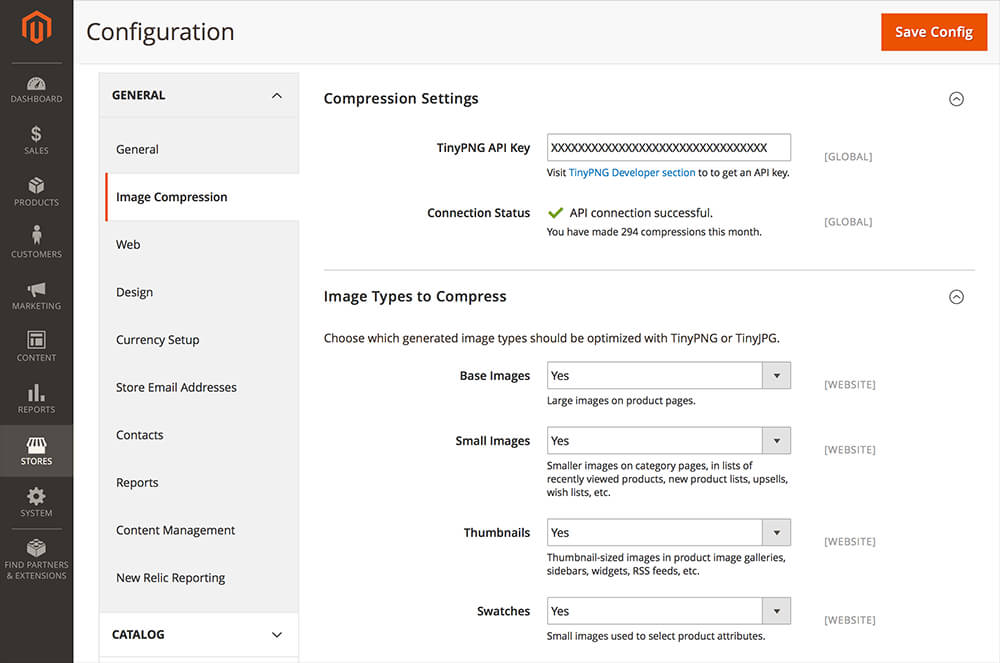
## Screenshot
Example of plugin configuration in Magento 2:
## Getting started
Obtain your free API key from https://tinypng.com/developers. The first 500
compressions per month are completely free, no strings attached! As each
product will be shown in different sizes, between 50 and 100 products can be
uploaded to your Magento webshop and compressed for free. You can also change
which of types of image sizes should be compressed.
If you’re a heavy user, you can compress additional images for a small
additional fee per image by upgrading your account. You can keep track of the
amount of compressions in the Magento 2 configuration section.
## Installation
The Magento 2 module can be installed with Composer
(https://getcomposer.org/download/). Once the new Magento 2 Marketplace is
lauched, it will also be featured there.
From the command line, do the following in your Magento 2 installation
directory:
```
composer require tinify/magento2
php bin/magento setup:upgrade
```
## Contact us
Got questions or feedback? Let us know! Contact us at support@tinypng.com.
## Information for plugin contributors
### Prerequisites
* PHP 5.5 or newer.
* MySQL 5.6 or newer (integration tests).
* Composer (https://getcomposer.org/download/).
### Running the unit tests
```
composer install
vendor/bin/phpunit
```
### Installing development version of plugin
Make sure to set `"minimum-stability": "dev"` in `composer.json` before you start.
```
composer config repositories.tinify vcs https://github.com/tinify/magento2-plugin
composer require tinify/magento2:dev-master
bin/magento setup:upgrade
```
## License
This software is licensed under the MIT License. [View the license](LICENSE).